I’ve also tried to check if Firefox send some data somewhere
I was checking my network traffic with iftop, with firefox open, with no tabs and telemetry completely disabled (in the preferences).
but anyway there were some connections going on, no idea why
maybe some traffic could be from Ublock addon that is updating the filter lists
When you say telemetry, are you referring to preferences then under “Privacy & Security” then “Firefox Data Collection and Use”, Or is there something else I’m missing? Thanks.
It doesn’t take more than 5 1/2! You could look into chaotic-aur, I’m pretty sure they have a bin version there (does a quick yay chromium in the background) - yup - it’s there (along with chromium-widevine). Definitely quicker to access!
Still testing here to see if it’s worth switching up from Brave and Firefox for my use-case.
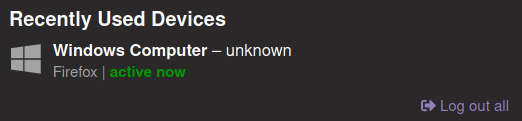
And so, I installed Librewolf. I like it, it’s pretty much Firefox without tracking. Good stuff. One thing that bothers me immensely, however, is that browser pretends to run on a Windoze system. For example when I go to preferences/account on this forum, I see:
Now, I’m all for being sneaky, but this is absolutely disgusting.
Also, a slightly lesser annoyance, but I can’t paste images when writing a post.
Also, the favicon is sometimes displayed incorrectly:
Windows is the majority of all users. If you blend in with the others you escape fingerprinting. Even with the most secure browser, because it’s such an unique one, you will by yourself create a disctinct fingerprint. I think that’s pretty clever on their side.
If I didn’t need a vanilla browser for my work I’d be probably joining the firewolf bandwagon about now.
I solved the unpleasant issue by installing a recommended add-on called “User Agent Platform Spoofer”. Now it changes it all the time, but it’s mostly GNU/Linux.
Yeah i agree it’s utterly disgusting, however it’s a good idea to use something like Windows 10 x64 spoof still…
That’s weird though…x32
There’s ongoing issue on that front btw, we have some leaker of true os still
I think i have an idea on what blocks images, need to test tomorrow
Favicon - i can’t reproduce it here, is there something unusual you’re doing perhaps, maybe some addons?
@dalto
Most of the problems so far are caused by too extreme content-breaking privacy settings by default (at least from what i personally was able to test & also thx to @AmandaONeill for number of findings)
I think i’ve encountered / reported just couple of real bugs compared to usual Firefox.
Still it’s already way more usable than GNU IceCat, hopefully with time we’ll find ways to make it better
However if you guys do find something more like that - i’d really appreciate reports on GitLab or quick question on Gitter, devs are pretty fast to fix stuff / help (unless it’s something very major, like Windows build or something )
I see the same issue with favicons. The only thing I see in common from that very small screenshot is both @Kresimir & I seem to be using containers.
Most of the bugs I have noticed were pretty minor. I am sure they will get sorted in time. The only example I remember beyond the two pointed out above is that addons search doesn’t work. It just opens an empty tab.
That’s deliberately (not very user-friendly though), they cut all mothership connections completely and encourage users to use https://addons.mozilla.org/en-US/firefox/ directly instead, you can actually change some settings to enable that search, but it’s not recommended by them
The favicon seems to be broken only for this website. I have not noticed it on any other site (but I’ve been using LibreWolf for only a couple of hours).
One thing that has REALLY started to annoy me is the new tab page, which can only be blank. I would prefer to load a local HTML file, but there is no such option. So, I use a dark theme, I’m in complete darkness, and I open a new tab, only to be blinded by the nuclear-explosion-like brightness of about:blank. It’s painful.








 compared to usual Firefox.