some drive read speeds?
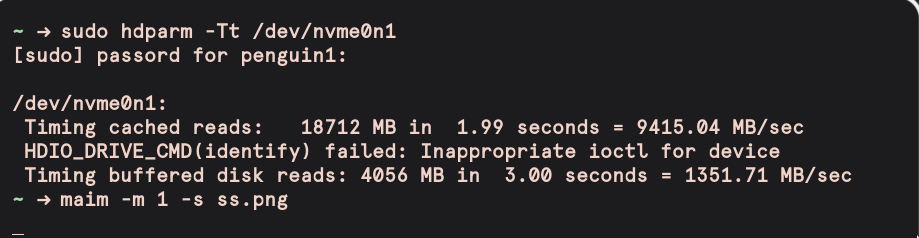
some drive read speeds?
[alienprober@TheMotrhership ~]$ sudo hdparm -Tt /dev/nvme0n1
[sudo] password for alienprober:

/dev/nvme0n1:
 Timing cached reads:   22004 MB in  2.00 seconds = 11019.05 MB/sec
 HDIO_DRIVE_CMD(identify) failed: Inappropriate ioctl for device
 Timing buffered disk reads: 3650 MB in  3.00 seconds = 1216.11 MB/sec
Just a standard Western Digital Blue SSD 500GB
[ricklinux@eos-plasma ~]$ sudo hdparm -Tt /dev/sda
[sudo] password for ricklinux:

/dev/sda:
 Timing cached reads:   29710 MB in  2.00 seconds = 14879.06 MB/sec
 Timing buffered disk reads: 1170 MB in  3.00 seconds = 389.97 MB/sec
[ricklinux@eos-plasma ~]$
Edit2:
[ricklinux@eos-xfce ~]$ sudo hdparm -Tt /dev/nvme0n1
[sudo] password for ricklinux:

/dev/nvme0n1:
 Timing cached reads:   30320 MB in  2.00 seconds = 15185.44 MB/sec
 HDIO_DRIVE_CMD(identify) failed: Inappropriate ioctl for device
 Timing buffered disk reads: 4386 MB in  3.00 seconds = 1461.60 MB/sec
[ricklinux@eos-xfce ~]$
Edit1: You also have to realize it depends on what it’s hooked up to!
Here’s system A: (Corsair MP600)
┌13:49:26 WD= [/usr/share/conkywx]
└───freebird@nest ─▶$ sudo hdparm -Tt /dev/nvme0n1
[sudo] password for freebird:

/dev/nvme0n1:
 Timing cached reads:   28388 MB in  2.00 seconds = 14217.61 MB/sec
 HDIO_DRIVE_CMD(identify) failed: Inappropriate ioctl for device
 Timing buffered disk reads: 4612 MB in  3.00 seconds = 1537.20 MB/sec
Edit: And system B (Samsung 970 EVO Plus)
┌14:12:13 WD= [~]
└───freebird@aerie ─▶$ sudo hdparm -Tt /dev/nvme0n1
[sudo] password for freebird:

/dev/nvme0n1:
 Timing cached reads:   22564 MB in  2.00 seconds = 11302.00 MB/sec
 HDIO_DRIVE_CMD(identify) failed: Inappropriate ioctl for device
 Timing buffered disk reads: 6304 MB in  3.00 seconds = 2101.12 MB/sec
Yes the Samsung 970 EVO Plus is definitely faster!
Depends on a lot of things - and what you’re testing! here’s the ‘Disks’ result on the Samsung:
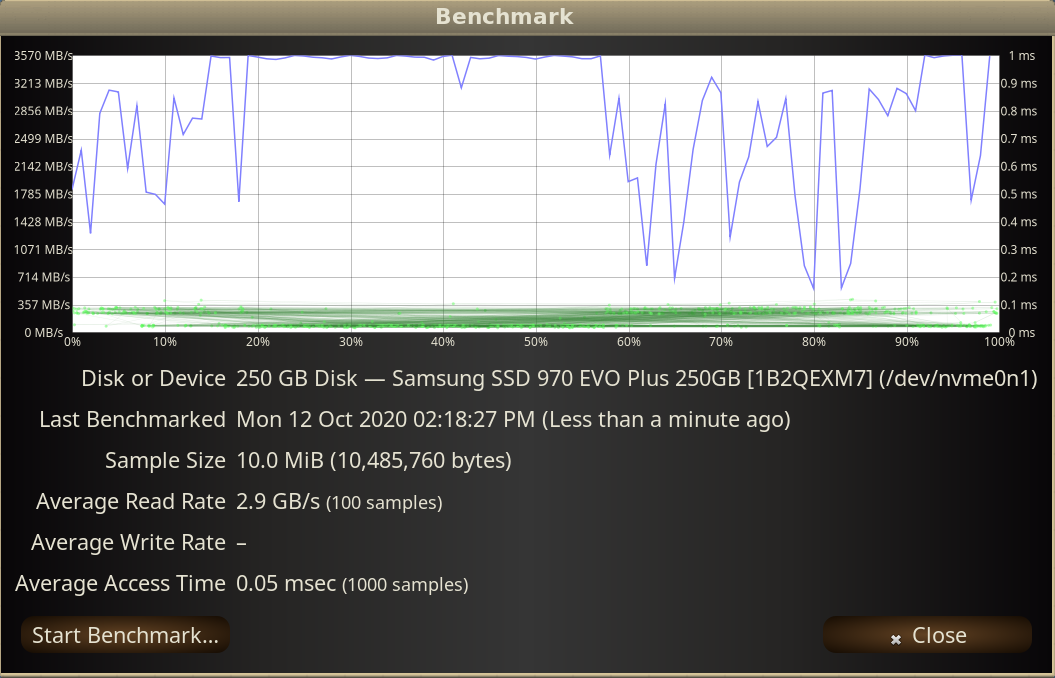
Kinda crushed by the Corsair here…
Not sure how reliable these speed tests are compared to “real” world usage…
/dev/nvme0n1:
 Timing cached reads:   29248 MB in  2.00 seconds = 14642.23 MB/sec
 HDIO_DRIVE_CMD(identify) failed: Inappropriate ioctl for device
 Timing buffered disk reads: 7186 MB in  3.00 seconds = 2395.04 MB/sec
(Samsung 970 Pro)
This isn’t fair you have Samsung 970 Pro. I only have a little old Western Digital. 
Not much, even according to it’s man:
-t Perform timings of device reads for benchmark and comparison purposes. For meaningful results, this operation should be repeated 2-3 times on an otherwise inactive system (no other active processes) with at least a couple of megabytes of free memory. This displays the speed of reading
through the buffer cache to the disk without any prior caching of data. This measurement is an indication of how fast the drive can sustain sequential data reads under Linux, without any filesystem overhead. To ensure accurate measurements, the buffer cache is flushed during the processing
of -t using the BLKFLSBUF ioctl.-T Perform timings of cache reads for benchmark and comparison purposes. For meaningful results, this operation should be repeated 2-3 times on an otherwise inactive system (no other active processes) with at least a couple of megabytes of free memory. This displays the speed of reading directly from the Linux buffer cache without disk access. This measurement is essentially an indication of the throughput of the processor, cache, and memory of the system under test.
Hm yeah that’s what I thought.
One could run a timed dd instead, with more bytes to be written than there is RAM.
I find it fascinating how fast and cheap SSD’s have become. My first SSD was a Corssair Force Series F60. In 2010, I was in Japan, and paid the equivalent of 200 USD for a 60gb drive. At the time, it had the fastest controller, Sand Force, available on the market. It had blistering 285 MB/s read and 275 MB/s write speed. Now, 10 years later, we can purchase 1tb and larger drives for that price that just blows it away.
Generally speaking the benchmark with Gnome DIsk Utility will be affected by whatever else you may have running on the machine. If I don’t have any other applications open, my Samsung 970 Evo Plus comes in at 3.4 GB/s.
The Samsung 970 Pro is great for extended writes, the speed drop off is much less pronounced and drive durability is enhanced.
Finally the number of PCIE lanes available is of utmost importance. Sticking a Nvme drive that requires a x4 capable slot in a slot with say x2 (common in laptops) will result in lower speeds. Regardless they are at the least twice as fast as a regular SSD and 10 times faster than a HDD.
With a SAMSUNG 970 SSD :

My collection of hard drives and SSDs… though there’s an extra 1tb Samsung 970 Pro NVME drive that doesn’t appear due to being passed through for VMs.
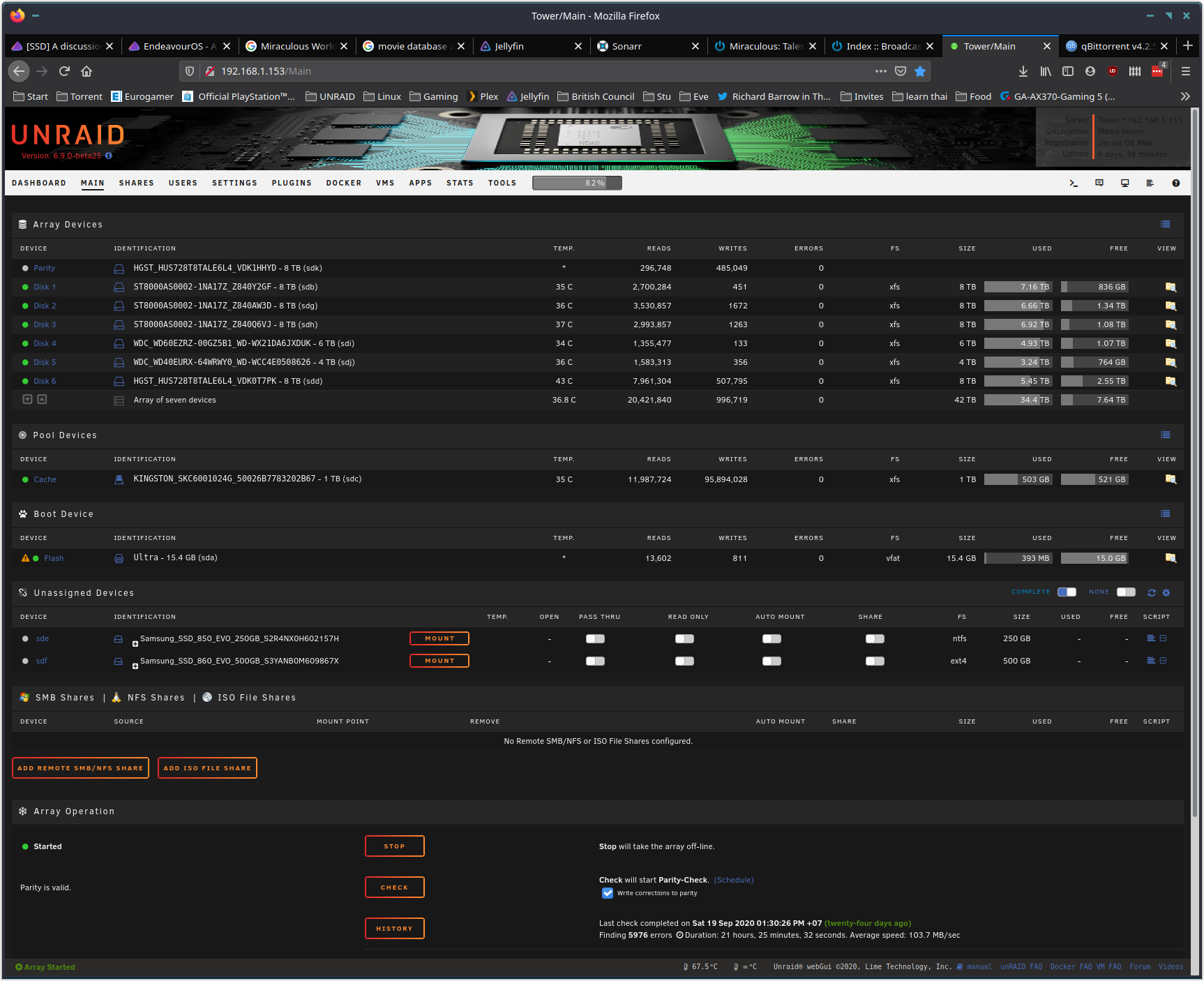
The 500Gb EVO 860 really did not like being a cache drive for my server and starting giving me problems after a year. With a total of 219.86 TB written.
It’s now chilling as a Steam drive for Endeavour OS.