NVIDIA GPU users, attention please! (Dec-2025)

The Arch devs have informed about the new Nvidia driver 590 series.
See the announcement.

This means Nvidia GPUs from Turing and newer are OK, the driver package will be automatically changed from nvidia to nvidia-open which is OK for those families.
This means series 1650 and newer GPUs.

But older (e.g. series 10xx) Nvidia GPU users need to do manual intervention.

If you have been using nvidia or nvidia-dkms (because nvidia-open wasn’t supported) you must either

  • replace nvidia packages with nvidia-580xx-dkms and all otherrelated packages from the AUR (e.g. lib32-nvidia-580xx-utils needed for steam // Games)
    or
  • uninstall all nvidia driver packages and start using the nouveau kernel driver for Nvidia GPUs.

nvidia-inst -n will reset to use nouveau driver and remove nvidia packages for you.

Other potential workarounds are

  • if you have an integrated GPU, you can use that instead, or
  • Get a newer GPU

edit to add some info on easily remove Nvidia

14 Likes

added for Xfce - X11 and 580 series only :

if possible do not update in this case , wait on fix

2 Likes

Thanks for info but to late for me I did an update and did not pay attention to question and now my system don’t boot Linux Kernel and LTS so now I have to fix it from chroot I guess…:downcast_face_with_sweat:

F it tomorrow’s problem.

be careful for tomorrow

1 Like

I was asked to add the following Phoronix link on this thread:

1 Like

Simple boot without graphical interface:
https://discovery.endeavouros.com/system-rescue/how-to-boot-without-a-graphical-environment/2021/03/

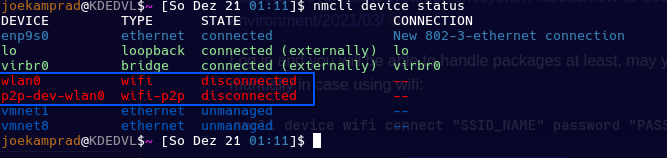
Log in and you will be able to handle packages at least, may you need to connect internet manually in case using wifi:

nmcli device wifi connect "SSID_NAME" password "PASSWORD" ifname wlp3s0

ifname you can get with nmcli device status

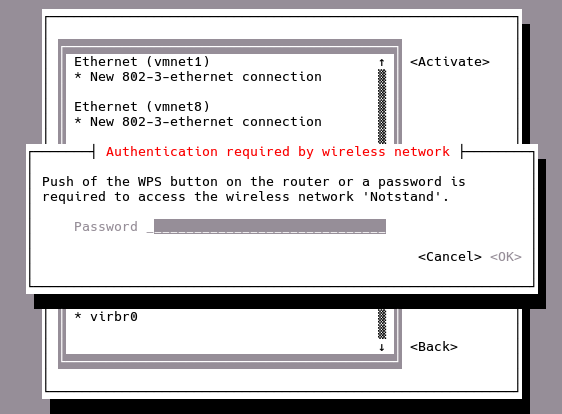
or use nmtui what gives you a minimal gui to connect:

2 Likes

With this, NVIDIA package will get off the repo, and it will only hold the nvidia-open variants.

I want to suggest trying Nouveau NVK also in case:

I switched to Nouveau quite a while ago for my MSI GeForce GTX 1050 i’m still running on my Ryzen 7 5700X system, no problem!

is Nouveau NVK the same thing as just Nouveau, or are they one and the same?

If not, what are the differences?

nvidia-settings does not come with the nvidia-580xx-dkms from aur. You can install the 590.xx for that if you need it.

I would also suggest to remove the nvidia-inst program since you don’t need it anymore after the aur package. This because when you run the nvidia-inst program it shows a command to run to install everything.

2 Likes

for the moment nvidia-inst offers nvidia current drivers , not nvidia-580xx-dkms for theses series card 9xx / 1xxx

Well i did everything correctly, now all my games dont fire up. Any help would be great

Maybe this can be added in the first post too.

The message on arch only suggests
Install nvidia-580xx-dkms from the AUR but lib32-nvidia-580xx-utils is needed too!.

1 Like

After updating to the latest drivers my second integrated GPU (RTX 5070Ti) is not recognized by the system. My first GPU (RTX 5080) is recognized though.

Re-Size BAR is enabled in my BIOS. I had manually set the 5070Ti to GEN 3 and it was working fine before. I changed it to AUTO and it is still not detecting it.

logs: https://pastebin.com/ydX1rUGX

AUR has nvidia-580xx-settings available.

And yes, nvidia-inst is currently not so useful anymore because of the reorganization of packages. Well, one less thing to worry. :wink:

1 Like

The 5070Ti needs nvidia open driver → 590.xx

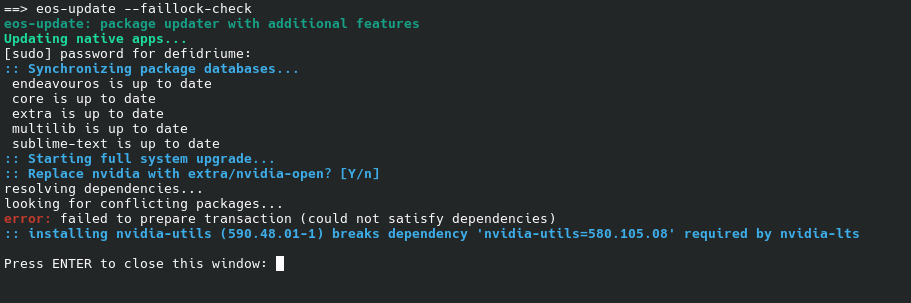
I seem to be unable to update at all, due to dependency.

I’m running a GTX 1660 Super.

nvidia-lts no longer exists, but nvidia-open-lts does.

So to handle this case you could

sudo pacman -R nvidia-lts
sudo pacman -Syu nvidia-open-lts

Hope this helps. Unfortunately I cannot test this here now.

4 Likes

This absolutely did it, thank you very much. :purple_heart:

2 Likes

On the AUR, a good search term for people affected by this change is 580xx.
Link: https://aur.archlinux.org/packages?O=0&K=580xx

You may also do yay -Ss 580xx or paru -Ss 580xx in your terminal.

Couple the above search query with pacman -Q | grep -A 0 -E "nvidia" to find out which packages you should be seeking to replace.

Example:

pacman -Q | grep -A 0 -E "nvidia"
lib32-nvidia-utils 580.119.02-1 <-- Replace me
--
linux-firmware-nvidia 20251125-2
--
nvidia-dkms 580.119.02-1 <-- Replace me
nvidia-settings 580.119.02-1 <-- Replace me
nvidia-utils 580.119.02-1 <-- Replace me
--
opencl-nvidia 580.119.02-1 <-- Replace me

and

yay -Ss 580xx
aur/nvidia-580xx-settings 580.119.02-2 (+3 2.99) 
    Tool for configuring the NVIDIA graphics driver (580xx)
aur/lib32-opencl-nvidia-580xx 580.119.02-1 (+5 4.97) 
    OpenCL implemention for NVIDIA (32-bit) (580xx)
aur/lib32-nvidia-580xx-utils 580.119.02-1 (+5 4.97) 
    NVIDIA drivers utilities (32-bit) (580xx)
aur/libxnvctrl-580xx 580.119.02-2 (+3 2.99) 
    NVIDIA NV-CONTROL X extension (580xx)
aur/opencl-nvidia-580xx 580.119.02-2 (+14 13.86) 
    OpenCL implemention for NVIDIA (580xx)
aur/nvidia-580xx-utils 580.119.02-2 (+14 13.86) 
    NVIDIA drivers utilities (580xx)
aur/nvidia-580xx-dkms 580.119.02-2 (+14 13.86) 
    NVIDIA kernel modules - module sources (580xx)
2 Likes