This is very weird, like really. It started 4-5 days ago. I started my PC like almost every day and suddenly there is no sound.
I rebooted, re-plugged and all that, nothing. I also updated, still, nothing. Thought my headphones broke, plugged them into my ROG Ally (running SteamOS), my Switch (running SwitchOS i guess), my Laptop (running EOS). They work.
So I tried different headphones, also don’t work. Tried another set of 15+ year old cheap headphones that have a “very good sound-quality” where you definitely don’t get ear cancer… THEY WORK?!
So to clarify, the 2 Headphones, that out of nowhere don’t work on my PC anymore are:
- Razer Kraken X Lite
- Razer Opus
But these super old in-ear i don’t even know what brand headphones work. I’m sad.
They also use the same port (idk how its called in english 3.5mm Audio port? Not USB just the standard thing) so the port isn’t faulty, and the headphones are also good as they work anywhere else.
What I noticed from troubleshooting so far:
I have this couple days old screenshot that i put here on the forum to explain something and how it looks on my side (where it still worked)
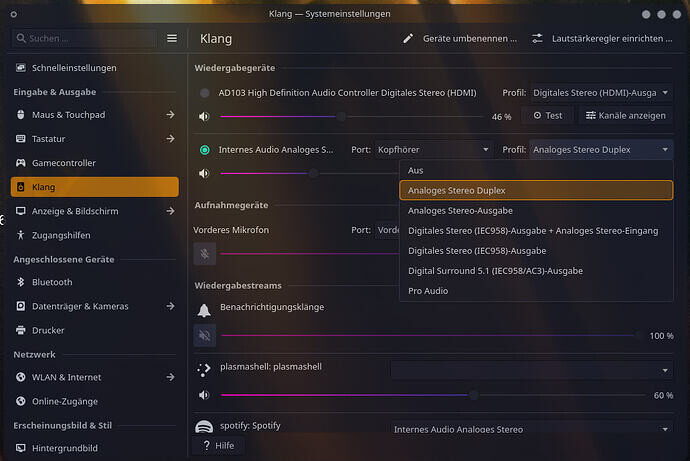
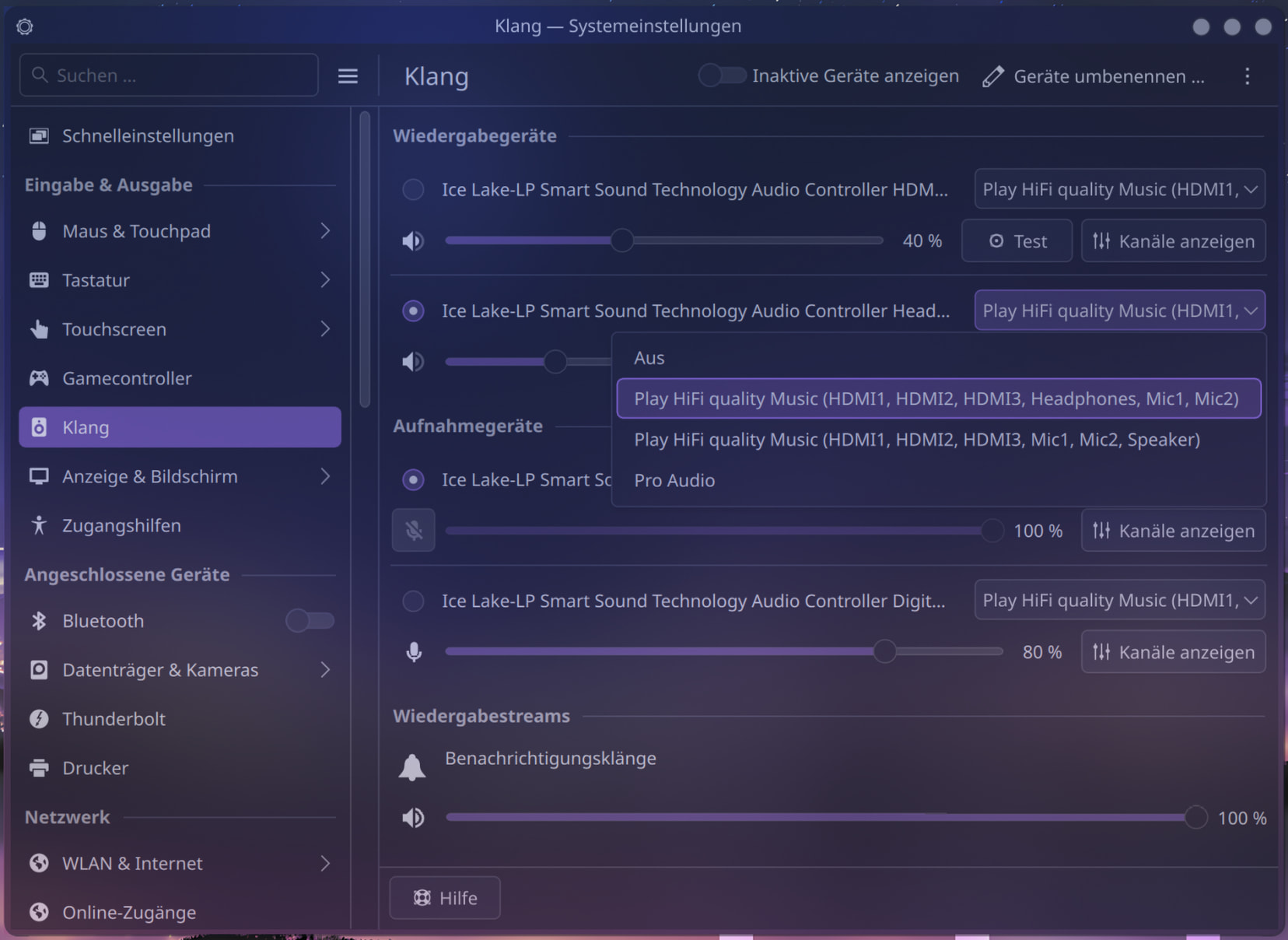
This is how it looks now:
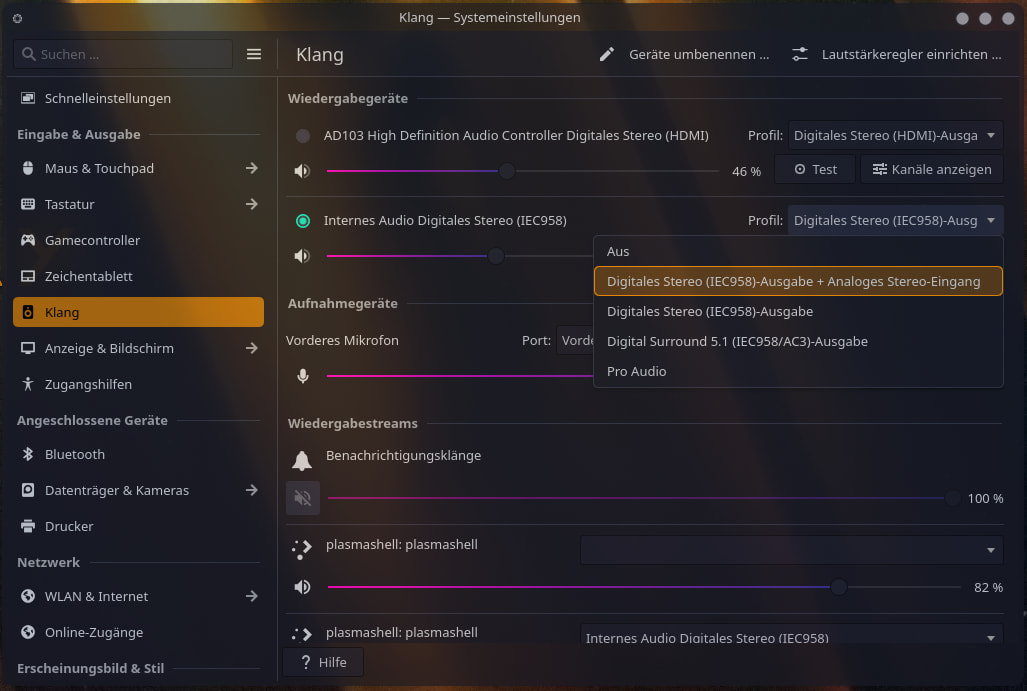
I am missing stuff. And none of the given options work. Guess I really NEED my Analog Stereo Duplex back.
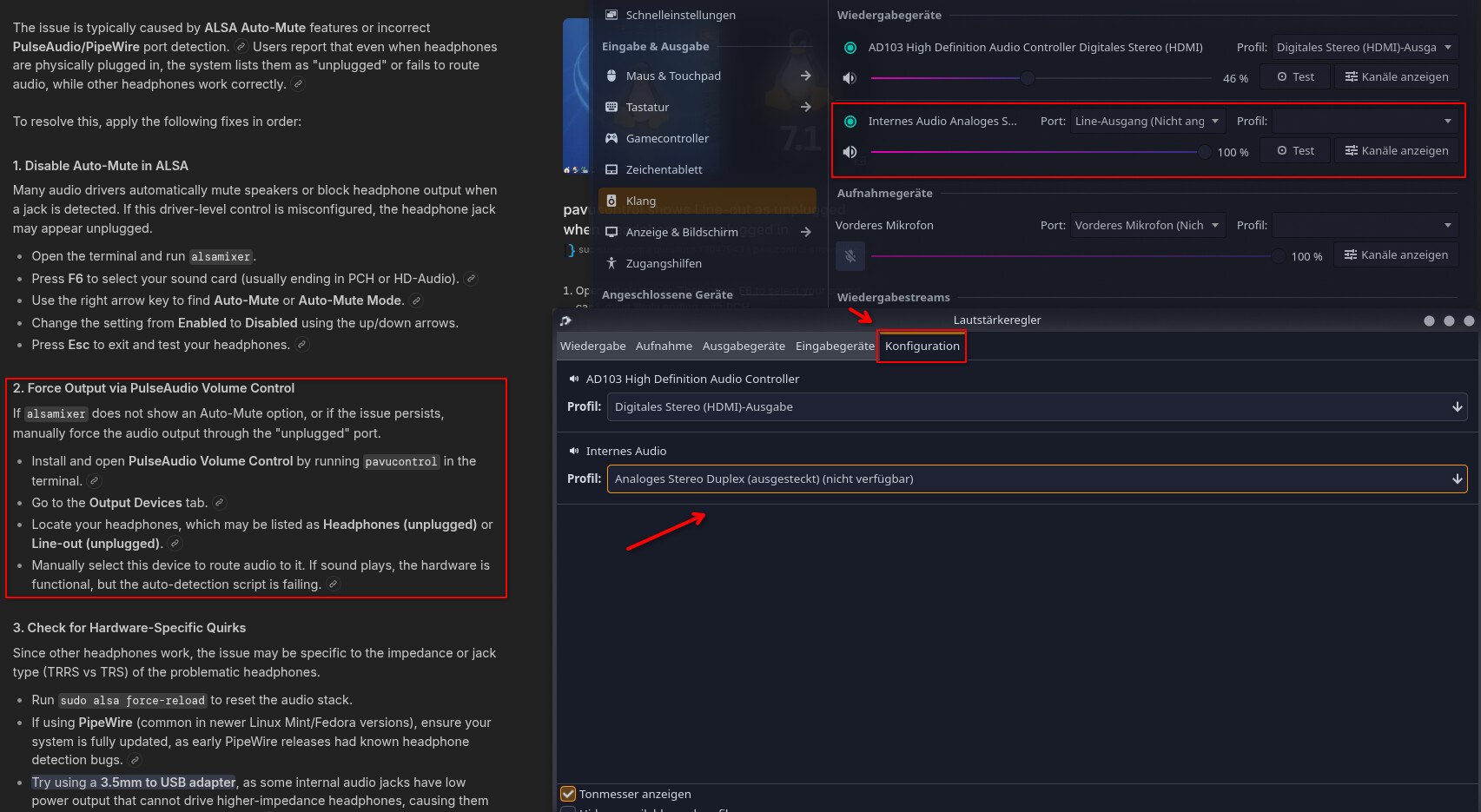
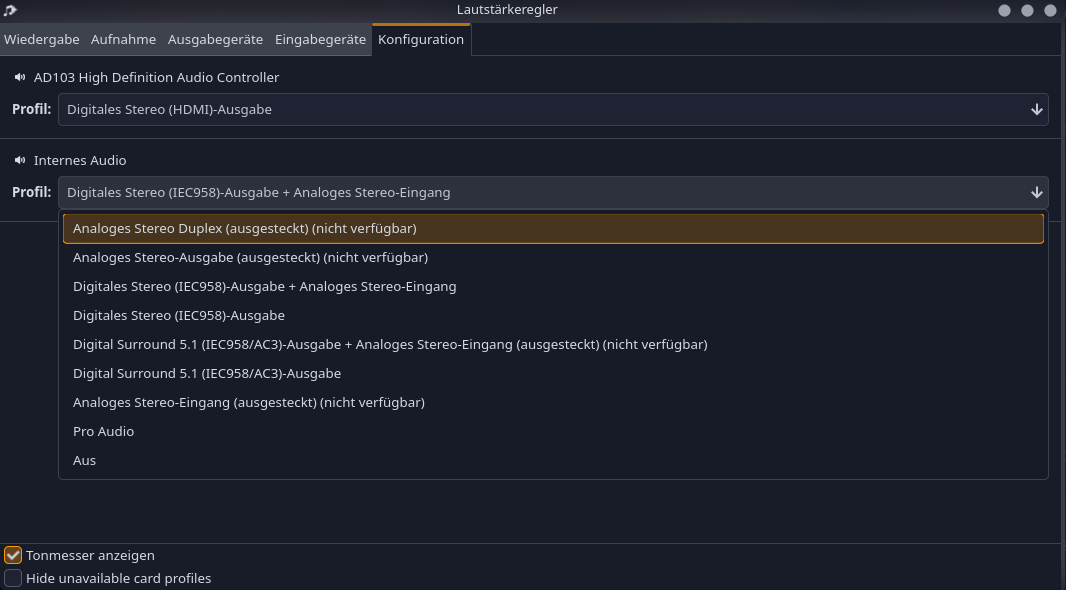
If I go into this weird program here (on the internet everyone talks about “pavucontrol” and when i type it, “Lautstärkeregler” pops up so i guess this is it) i see my Analog Stereo Duplex but i cant select it as it isn’t connected for whatever reason, it is connected but my PC thinks it isn’t.
I have also tried running
systemctl --user restart pipewire pipewire-pulse wireplumber as it was suggested somewhere on the internet.. Nothing happened.And because of this weird trend that both headphones that don’t work are from Razer, I tried deinstalling the
openrazer-daemon and polychromatic which I had installed but of course due to my luck it also didn’t change my situation.(think its just for controlling lights anyway, but it appears the openrazer devs have some issues currently with the Kernel (cant build module etc) so I thought it may be related).
I also installed the LTS-Kernel due to my history with Kernels, but also no change.
No idea why it works on my Laptop but not on my PC as I set everything up similarly (I just didnt install openrazer on the Laptop) but i never mess with sound, or anything that just works out of the box to be fair. (I also said something similar when my Laptop made problems while my PC was fine,.. right? Maybe I get lucky and it fixes itself again, hopefully sooner though and not after 10 months)
Some info about that PC:
inxi -FAZ --no-host
System:
  Kernel: 6.18.33-1-lts arch: x86_64 bits: 64
  Desktop: KDE Plasma v: 6.6.5 Distro: EndeavourOS
Machine:
  Type: Desktop System: ASUS product: N/A v: N/A serial: <superuser required>
  Mobo: ASUSTeK model: PRIME B760M-K v: Rev 1.xx
    serial: <superuser required> Firmware: UEFI vendor: American Megatrends
    v: 1805 date: 10/30/2024
CPU:
  Info: 20-core (8-mt/12-st) model: Intel Core i7-14700KF bits: 64
    type: MST AMCP cache: L2: 28 MiB
  Speed (MHz): avg: 1030 min/max: 800/5500:5600:4300 cores: 1: 1030 2: 1030
    3: 1030 4: 1030 5: 1030 6: 1030 7: 1030 8: 1030 9: 1030 10: 1030 11: 1030
    12: 1030 13: 1030 14: 1030 15: 1030 16: 1030 17: 1030 18: 1030 19: 1030
    20: 1030 21: 1030 22: 1030 23: 1030 24: 1030 25: 1030 26: 1030 27: 1030
    28: 1030
Graphics:
  Device-1: NVIDIA AD103 [GeForce RTX 4070 Ti SUPER] driver: nvidia
    v: 595.71.05
  Display: wayland server: X.org v: 1.21.1.22 with: Xwayland v: 24.1.11
    compositor: kwin_wayland driver: X: loaded: nvidia unloaded: modesetting
    gpu: nv_platform,nvidia,nvidia-nvswitch resolution: 1920x1080~144Hz
  API: EGL v: 1.5 drivers: nvidia,nvidia-drm,swrast
    platforms: gbm,wayland,x11,surfaceless,device
  API: OpenGL v: 4.6.0 compat-v: 4.6 vendor: nvidia mesa v: 595.71.05
    renderer: NVIDIA GeForce RTX 4070 Ti SUPER/PCIe/SSE2
  API: Vulkan v: 1.4.350 drivers: nvidia surfaces: N/A
  Info: Tools: api: clinfo, eglinfo, glxinfo, vulkaninfo
    de: kscreen-console,kscreen-doctor gpu: nvidia-settings,nvidia-smi
    wl: wayland-info x11: xdpyinfo, xprop, xrandr
Audio:
  Device-1: Intel Raptor Lake High Definition Audio driver: snd_hda_intel
  Device-2: NVIDIA AD103 High Definition Audio driver: snd_hda_intel
  API: ALSA v: k6.18.33-1-lts status: kernel-api
  Server-1: PipeWire v: 1.6.5 status: active
Network:
  Device-1: Realtek RTL8125 2.5GbE driver: r8169
  IF: enp5s0 state: down mac: 08:bf:b8:d5:2d:ad
  Device-2: Realtek 802.11ac NIC driver: rtw88_8821cu type: USB
  IF: wlan0 state: up mac: 1c:bf:ce:eb:fc:e3
RAID:
  Hardware-1: Intel RST Volume Management Device Controller driver: vmd
Drives:
  Local Storage: total: 3.64 TiB used: 701.84 GiB (18.8%)
  ID-1: /dev/nvme0n1 vendor: Samsung model: SSD 980 PRO 2TB size: 1.82 TiB
  ID-2: /dev/nvme1n1 vendor: Kingston model: SNV2S2000G size: 1.82 TiB
Partition:
  ID-1: / size: 1.78 TiB used: 701.84 GiB (38.4%) fs: btrfs
    dev: /dev/nvme0n1p2
  ID-2: /boot/efi size: 1022 MiB used: 636 KiB (0.1%) fs: vfat
    dev: /dev/nvme0n1p1
  ID-3: /home size: 1.78 TiB used: 701.84 GiB (38.4%) fs: btrfs
    dev: /dev/nvme0n1p2
  ID-4: /var/log size: 1.78 TiB used: 701.84 GiB (38.4%) fs: btrfs
    dev: /dev/nvme0n1p2
Swap:
  ID-1: swap-1 type: partition size: 34.24 GiB used: 0 KiB (0.0%)
    dev: /dev/nvme0n1p3
Sensors:
  System Temperatures: cpu: 37.0 C mobo: N/A
  Fan Speeds (rpm): N/A
Info:
  Memory: total: 32 GiB available: 31.12 GiB used: 5.41 GiB (17.4%)
  Processes: 519 Uptime: 55m Shell: fish inxi: 3.3.40
inxi -Aaz
Audio:
  Device-1: Intel Raptor Lake High Definition Audio vendor: ASUSTeK
    driver: snd_hda_intel v: kernel alternate: snd_soc_avs,snd_sof_pci_intel_tgl
    bus-ID: 00:1f.3 chip-ID: 8086:7a50 class-ID: 0403
  Device-2: NVIDIA AD103 High Definition Audio vendor: ASUSTeK
    driver: snd_hda_intel v: kernel pcie: gen: 4 speed: 16 GT/s lanes: 16
    bus-ID: 01:00.1 chip-ID: 10de:22bb class-ID: 0403
  API: ALSA v: k6.18.33-1-lts status: kernel-api
    tools: alsactl,alsamixer,amixer
  Server-1: sndiod v: N/A status: off tools: aucat,midicat,sndioctl
  Server-2: PipeWire v: 1.6.5 status: active with: 1: pipewire-pulse
    status: active 2: wireplumber status: active 3: pipewire-alsa type: plugin
    4: pw-jack type: plugin tools: pactl,pw-cat,pw-cli,wpctl
So, if anyone has an idea on what is wrong please send help (I hate getting ear cancer, and love listening to good music with decent sound-quality)
Edit:
Stuff from comments for those who dont want to dig through them:
- I tried to disable Auto-Mute in
alsamixer(it already was disabled) - when I force pavucontrol to use the “Analog Stereo Duplex (unplugged)(unavailable)” my headphones work… but only in KDE Settings where i can test my headphones “front left” “front right”. anywhere else they dont work, like spotify, Youtube, games on steam…
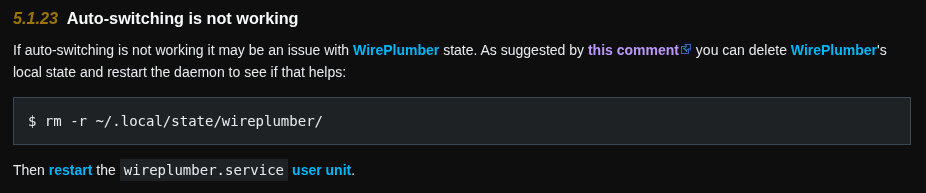
- I also deleted wireplumbers local state with
rm -r ~/.local/state/wireplumber/that didnt change anything either - I also tried
hdajackretasknothing changed - Also tested a 4th set of headphones (Sony) they also dont work, so its not just Razer now. Why this 1 set of heaphones work and all the others dont, will remain a mystery it seems.