Kernel Panic! (Linux BSOD)

Welcome to the newest episode to “Why does the mainline Linux Kernel hate on my Laptop specifically?”
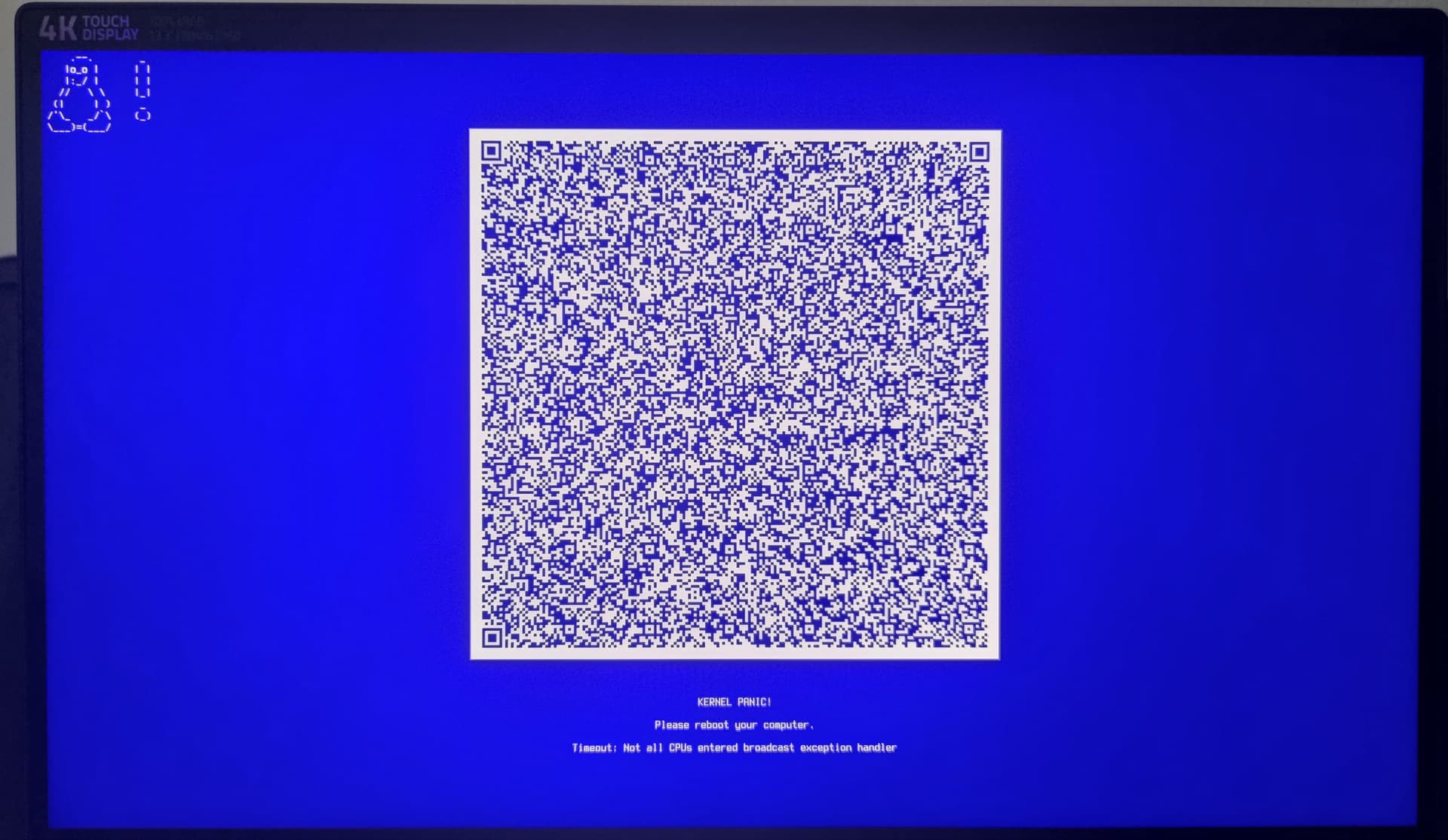
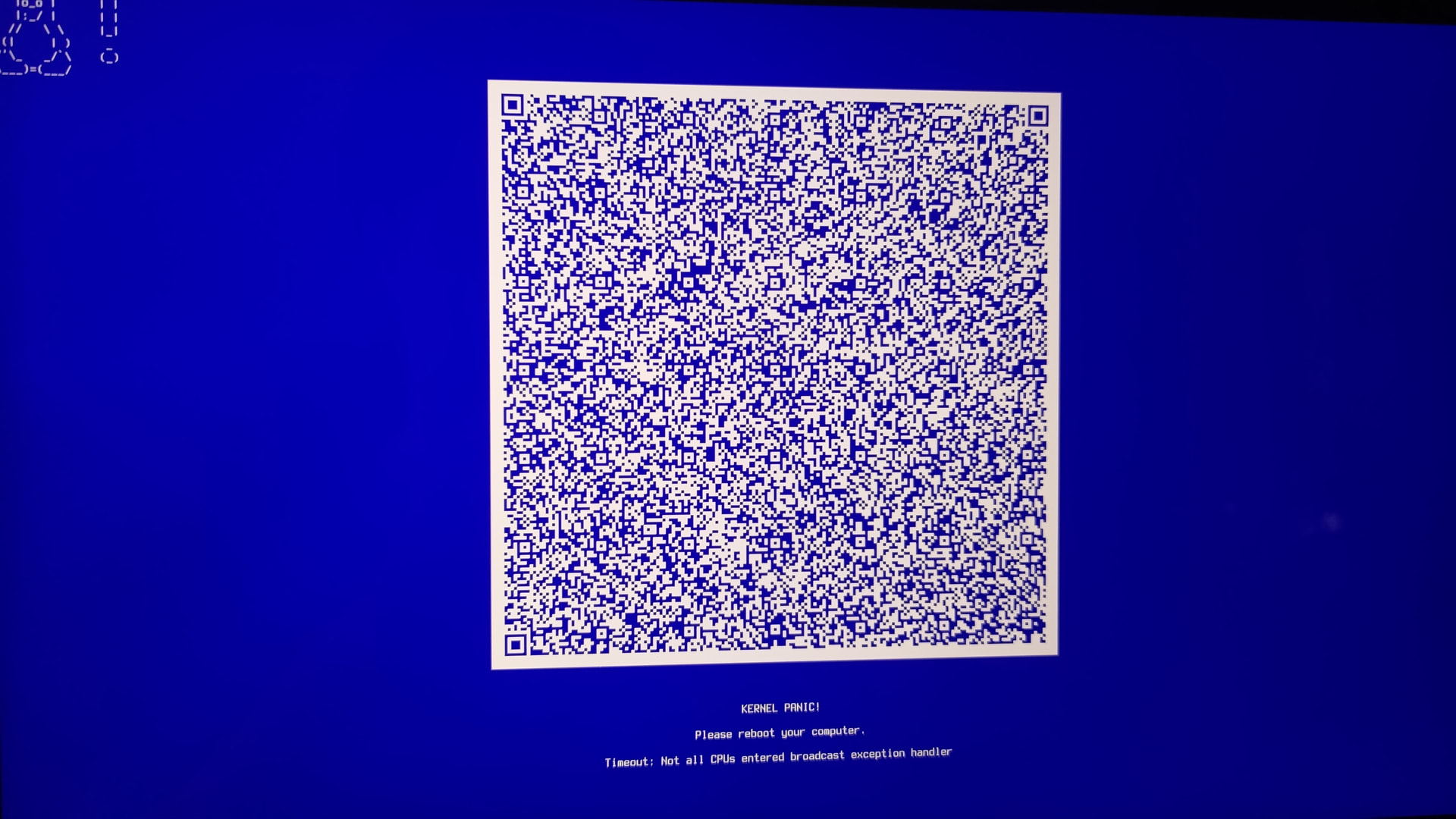
Basically if I select the Linux Kernel from Grub this now happens, saying:

KERNEL PANIC!
Please reboot your computer.
Timeout: Not all CPUs entered broadcast exeption handler

Also, either my phone just doesnt like this QR-Code, or it just doesn’t work idk.
All I do know is, this doesn’t happen on the LTS-Kernel (yet).

I tried to look for what this means, this timeout thing, all I found was some answeres on Ubuntu and Debian where they suggest installing some package (no idea if this intel microcode thing would work here or even exists, or if its needed as it doesnt happen on lts) or adding some kernel parameters (no idea how)… or on Red Hat, where I have to Log In to see the answer… thanks for that but no thanks… I really don’t know what I should do anymore…


And if I take into account that this is somewhat of a progress that the mainline Kernel just kept getting worse for my Laptop over the past few months, I fear that this will happen to the LTS-Kernel aswell.

To clarify, this is VERY likely tied to my previous (only partially) “solved” issue here:

Hidden text, klick here for shorter version of what happend in that previous issue

For one, it all started with my secondary monitor not working anymore (even though KDE detects it) in Wayland only working on the loginscreen, only the Laptop screen was working on Wayland (that still is the case on LTS).
Then, after certain update, which is when I made previous issue, Wayland wasn’t working at all anymore. Only complete Blackscreen.
In the whole process I then installed the x11-session in old snapshots, (as I wasn’t shure if that Laptop was even alive) and yes x11 was working with that new Kernel, but with horrible performance (runs hot, high fan speed + somewhat laggy). But works somewhat at least…
Then I installed the LTS-Kernel and with that, perfomance wise its fine again, just the secondary monitor issue still..
And yes, I also tested a different Distro at some point (a like 5-6 Month old install of Garuda Linux (not updated since so the issue started at around there) on an external Drive, EVERYTHING, performance AND secondary monitor works there flawlessly. It is not a Hardware issue! As still the monitor works on the Loginscreen, just not when logged in, neither in wayland nor x11.

So yeah,… As I already said, I don’t know what to do anymore. As for one, even if I would get past the Kernel Panic screen, likely I would still not be able to do anything as I then would be stuck again on Blacksccreen Wayland or bad performing x11.
Then there is my fear that all that could transfer down to the halfway working LTS-Kernel at some point.


So what should I do?

I already played around thinking maybe a clean install could fix all this, but then again the Endeavour ISO is quite old now, and I have seen some comments here on the Forum that they are currently makeing a new one but have some issues (think it was related to windows?) holding them back from releasing it, so I might wait for that?
(out of pure interest, I know that there is no issue using the old ISO, but still… many downloads)
Though, I also like the idea of keeping an install alive and let it age :sweat_smile: (for proving a point to people who think you have to reinstall every couple weeks because Arch or Linux in general breaks every single update.) Could do that with may main PC though maybe, that one doesn’t have any issues whatsoever.


Anyway, here is the current inxi from the almost perfectly working LTS-Kernel if it helps, as the issue is more reltated to the mainline Linux Kernel:

inxi
System:
  Kernel: 6.12.55-1-lts arch: x86_64 bits: 64
  Desktop: KDE Plasma v: 6.5.0 Distro: EndeavourOS
Machine:
  Type: Laptop System: Razer product: Blade Stealth 13 (Early 2020) -
    RZ09-0310 v: 2.04 serial: <superuser required>
  Mobo: Razer model: LY325 serial: <superuser required> UEFI: Razer v: 1.04
    date: 11/19/2020
Battery:
  ID-1: BAT0 charge: 48.6 Wh (100%) condition: 48.6/53.2 Wh (91.5%)
CPU:
  Info: quad core model: Intel Core i7-1065G7 bits: 64 type: MT MCP cache:
    L2: 2 MiB
  Speed (MHz): avg: 681 min/max: 400/3900 cores: 1: 681 2: 681 3: 681 4: 681
    5: 681 6: 681 7: 681 8: 681
Graphics:
  Device-1: Intel Iris Plus Graphics G7 driver: i915 v: kernel
  Device-2: NVIDIA TU117M [GeForce GTX 1650 Ti Mobile] driver: nvidia
    v: 580.95.05
  Device-3: IMC Networks Integrated Camera driver: uvcvideo type: USB
  Display: wayland server: X.org v: 1.21.1.18 with: Xwayland v: 24.1.8
    compositor: kwin_wayland driver: X: loaded: modesetting,nvidia dri: iris
    gpu: i915 resolution: 3840x2160~60Hz
  API: EGL v: 1.5 drivers: iris,nvidia,swrast
    platforms: gbm,wayland,x11,surfaceless,device
  API: OpenGL v: 4.6.0 compat-v: 4.5 vendor: intel mesa v: 25.2.5-arch1.2
    renderer: Mesa Intel Iris Plus Graphics (ICL GT2)
  API: Vulkan v: 1.4.328 drivers: intel,nvidia surfaces: N/A
  Info: Tools: api: clinfo, eglinfo, glxinfo, vulkaninfo
    de: kscreen-console,kscreen-doctor gpu: nvidia-settings,nvidia-smi
    wl: wayland-info x11: xdpyinfo, xprop, xrandr
Audio:
  Device-1: Intel Ice Lake-LP Smart Sound Audio
    driver: sof-audio-pci-intel-icl
  API: ALSA v: k6.12.55-1-lts status: kernel-api
  Server-1: PipeWire v: 1.4.9 status: active
Network:
  Device-1: Intel Ice Lake-LP PCH CNVi WiFi driver: iwlwifi
  IF: wlan0 state: up mac: 54:8d:5a:cf:59:4a
Bluetooth:
  Device-1: Intel AX201 Bluetooth driver: btusb type: USB
  Report: btmgmt ID: hci0 rfk-id: 0 state: down bt-service: disabled
    rfk-block: hardware: no software: no address: N/A
Drives:
  Local Storage: total: 931.51 GiB used: 214.75 GiB (23.1%)
  ID-1: /dev/nvme0n1 vendor: Kingston model: SNV2S1000G size: 931.51 GiB
Partition:
  ID-1: / size: 913.62 GiB used: 214.75 GiB (23.5%) fs: btrfs
    dev: /dev/nvme0n1p2
  ID-2: /boot/efi size: 1022 MiB used: 636 KiB (0.1%) fs: vfat
    dev: /dev/nvme0n1p1
  ID-3: /home size: 913.62 GiB used: 214.75 GiB (23.5%) fs: btrfs
    dev: /dev/nvme0n1p2
  ID-4: /var/log size: 913.62 GiB used: 214.75 GiB (23.5%) fs: btrfs
    dev: /dev/nvme0n1p2
Swap:
  ID-1: swap-1 type: partition size: 16.89 GiB used: 0 KiB (0.0%)
    dev: /dev/nvme0n1p3
Sensors:
  System Temperatures: cpu: 45.0 C mobo: N/A
  Fan Speeds (rpm): N/A
Info:
  Memory: total: 16 GiB available: 15.36 GiB used: 3.27 GiB (21.3%)
  Processes: 304 Uptime: 16m Shell: fish inxi: 3.3.39

please note I have stuff going on privatly and might take a while to answer sometimes as I am not always on my Laptop

Just a few questions
When was the last time you did a disk check/memory check?

Have you tried other kernels like linux-zen to see if the issue is there as well?

My phone liked this QR-Code and it works:

https://panic.archlinux.org/panic_report/#?a=x86_64&v=6.17.4-arch2-1&z=640167080254856406186769795180549460427658397942510649716575674698910756491794473072210503796383369524401991745592512415433333844066178907210707259914514205900083058442862840600182596533050233393807498797334993217841905653012822638213410600363780864131430073756846468488833314390408647926059383699565737507544529913957813144069997474395319903716049725728835329598155591364270157741885126544425664160744935088578676427615138001739921654114948325734653263896177544226404786422853159744543829507134347593302724228555162654675528684600421539318089706131285945898885300242811215575480617988684632945927405032846011474574586919620150103363566890143286749899975114113329497092360140780914784794504458256548424514747588352708855819546699423469890987926021102845071733986510207989662501979855320501050425914836031613036896587343858137998504171961919404073883600510110801300488411677780374060154885409572336966567746921382736256598619177346088126948864205031629413879815109160176073044480897288631153564562256098307564662027945498346442194583249222395192673555618435506335741991338084591615624213595384086918160785865858783659670796620823848729480322106046043999807016883806938023094528210328839735446300124195040254257034384317734638489798762156273376097581661525282024781066373114166328665808935404976649220405132761637571190531770282125947077460238735175499995117351629372407775052514647293264102158041990134942393727824113548514151739535342919461912851563657210738651047731737580065614296502504821072255359765082080558319733457930948244560279389371155554592410382762059118760271233349595393855340346604551630968421658064970232948431817212430465224828436810365354211595318406065366167352767377570700095730801606956526503538066910140586549665043169877717727315405007716284992728970419085643301253647331133966674414857885604948506403721273735513675585984891732330674252418319225707254925807088417159006831611017153059937819762886647169365726527852046299763027989214117799566842414316193163694083314355445685219701194589098030835888254799831635292092436167442792153664229599846909123360241245051787393348578969615231467024071674352254859965015333657532654810118192222862773567176058362908029500459055825243055945770903036341786284041769343451028884322620373366390474920366697721343992520417120558820257851470771797512989266026398533795189218823829201466198061767963373630637002930412436608805556498058017554673156073830010676627835610277222844214467833060037270694238209550625003408599290629666422084735068377173492661817300630382425230750428652756073588696255341578059885536090786135118516743410854776150863066048610512732462270095154304477336261673216187137219622070132129799164709831466139386246334048306216768615509605682648592107460067224309846533060733462981654137639588409407122691838830214414240905270491497641938434844156916222931196141825701844158934212142207914105146410481769402042050511759487187688830799224619699092596444908754843589579021647258552186181016171481061512772627396332354884347908953676739488587836550933901856644822505349393425376132124503047028369526705604133688299040920714468898138999908758056408221423546355129431638589682031927811254901224405339128846307650906940988837710671006096695671796550797438320821492772159216460946523632010034149715201574277008768064391035308613931622964515434673613232203612657664286476158253193559262114126040373221142291578842492875900855978978835463188967644092517163962383159488791865887284686052357386947799395729485125397218086145031656394545182028129415639610568239896689602233446767240789767307560985481089426877176783416698726841413451063198841524406944427666957059896340150135005774294051970764441487745649510822532926216471117326679744609901041270951756825127882154089436721170773813600806632709930002012248385131658369519660234646528904889544627465428227273321698501626288579761265822399450327675368439413802848081255856421470871204682679682161184739934613142337371251644099794406871985905117621103813674927059833571505426123490000494558813238679625054400101648888151184297509406441213688552063030433655236020424052836584754906919419293978954359280989864199548634546059170359439368265331391903818514593358953178933386437629823950565405236563401341581132245872672572935057695890744770163575190308103105789224646208810957421160400958998993603460683505745469038035151079527352116550145738348230629248726570414418371134984905929227424916109785125608762370604888410822500820857448660380802193618133419713801811388271348532508476392463194077578351935394546553537345159381170832564517381238323843857733492936373837711922245236470917174665498011815971114454810849074539157312045655370061280186085817269896574184803621474466828155988176574136882273184226015548401480676455123361613073900845030269894860153500780105959706804566479101210603292659713129983065116033621954995515209440432025298852262319222518143607075179704588395934402619661911924483791411726435805523342586477891013588836430734171037706234628168000966272189665401644897351761414428216574441687716370847539712959868527494566737317410477626497646127126068193132262639334171281418927824534369944934639292889369434167232947966731268582704301577274623363401429117886846392952153467922550774318981780323049934279378330213237204299866827219529147675382963518632204598553134948469541290334290692114672396818003675456406574897699421429612945519151581832370106261202784337252976445752440582673157807494864410997855224154843038190384335218119319329771134488641995287345252075289875296352505037643364324687875730564636796839162859074139572041826537490200331122950253833572961505817358900666234569460929331679113881490452212742331087921112718238216329272397644356115388194880550030515130808818358465984388868457189977625907926301180770274379636010976080313445357186118767883270234876363971806925414076355644086302875539948367723883083335023411117462973198905910304453700457011840094354295207182458665198112601689232720946833677713806124620816008021728263212489696252313394731274091717867656175078813690625629817728703362044298496421735500938789790371341426217000346374640817250654901213916915928389514191636201714581569260149880705463275434351211294062590261766080926636995108736163053640444630578633336544042885778200573657931841991336366279087417254264772474778372081121560298903611970223299730615817704039102406196240318964312603247645508422133000819430872725092135869423484620794126181379315072804069500077706927699554434925961785555636309514778372519038419388623278943600333948442362273264598971987577061209618997407011420325060551210421215471175366343506958297667227543222145564938485846809699051042539370316153416202479490992405844409856997596437321489531980851993218964476928104514418921341717805418487036050646302077313539348966739394366223189393796699704878371

Click, it’s safe :wink:

PS. Looks you need to update your kernel. The current is 6.17.5.arch1-1

Here is a disk check (no idea what you would use but this is the first i came across) that nvme is relativly new, not even a year old. Dont know what the best way is to check RAM though right now. Do you have any suggestions? I came found memtest but dont know which version to install, nor how to use it…

 ╭─mellow@BladeStealth13 in ~ took 0s
 ╰─λ sudo smartctl -i /dev/nvme0n1
smartctl 7.5 2025-04-30 r5714 [x86_64-linux-6.12.55-1-lts] (local build)
Copyright (C) 2002-25, Bruce Allen, Christian Franke, www.smartmontools.org

=== START OF INFORMATION SECTION ===
Model Number:                       KINGSTON SNV2S1000G
Serial Number:                      50026B7785AEF61A
Firmware Version:                   SCP00102
PCI Vendor/Subsystem ID:            0x2646
IEEE OUI Identifier:                0x0026b7
Controller ID:                      1
NVMe Version:                       1.4
Number of Namespaces:               1
Namespace 1 Size/Capacity:          1.000.204.886.016 [1,00 TB]
Namespace 1 Formatted LBA Size:     512
Namespace 1 IEEE EUI-64:            0026b7 785aef61a5
Local Time is:                      Tue Oct 28 14:25:54 2025 CET


 ╭─mellow@BladeStealth13 in ~ took 0s
 ╰─λ sudo smartctl -H /dev/nvme0n1
smartctl 7.5 2025-04-30 r5714 [x86_64-linux-6.12.55-1-lts] (local build)
Copyright (C) 2002-25, Bruce Allen, Christian Franke, www.smartmontools.org

=== START OF SMART DATA SECTION ===
SMART overall-health self-assessment test result: PASSED

Will test the Linux-zen tomorrow likely. (i hope the install is similar to to lts? should be hopefully)
Along with whatever memory tester you suggest me,.. if it is needed, I didnt notice any memory leaks or crashes on this system yet what would hint towards problems…

I don’t mean the smart I was talking file system check. Physical check (Check for bad blocks) the smart doesn’t give you this information.

yes just remember both linux-zen and linux-zen-headers

I assume the one on the live ISO is good enough (I think its memtest)

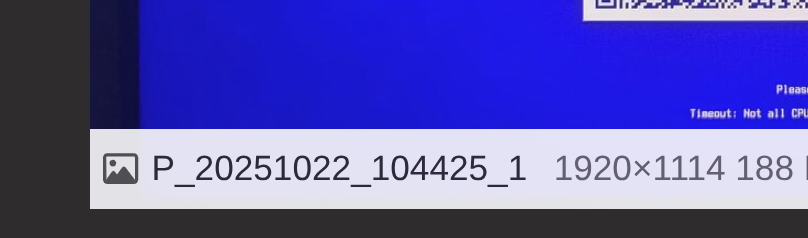
Congrats you caught me using a screenshot from 22. October 2025 which you can see from the standard android naming of a photo → YYYYMMDD :sweat_smile:


Dont worry I updated the system fully today before making this topic and verified that this BSOD still happens, I just waited a week and a update before complaining.
And since I didnt know what that QR code does I just kept the photo and used it as it looked similar.
But thanks to you and your camara I now know… also I barely understand it but that was expected, but thanks anyway :sweat_smile:

1 Like

Yeah, like, I did some looking really quick now, but I have no idea which one you want me do use..
Like badblocks
(which is kind of risky if you dont know what you are doing as it kind of can overwrite your nvme, and I do not know what I am doing kind of, esp. as see multiple ways of how people use this command and am now confused which one is the non destructive way, just know -n seems to be fine as it seems but why do some put more letters as well?)
or do you want me to use something else I that havent found yet?
As I said, this nvme isnt old, I doubt it has issues…

Will answer with the other stuff tommorrow when Im back..

1 Like

Just a basic test of the file structure and since its nvme (sorry I missed that) not sure I would worry about the bad blocks. I dont that is for that kind of drive.

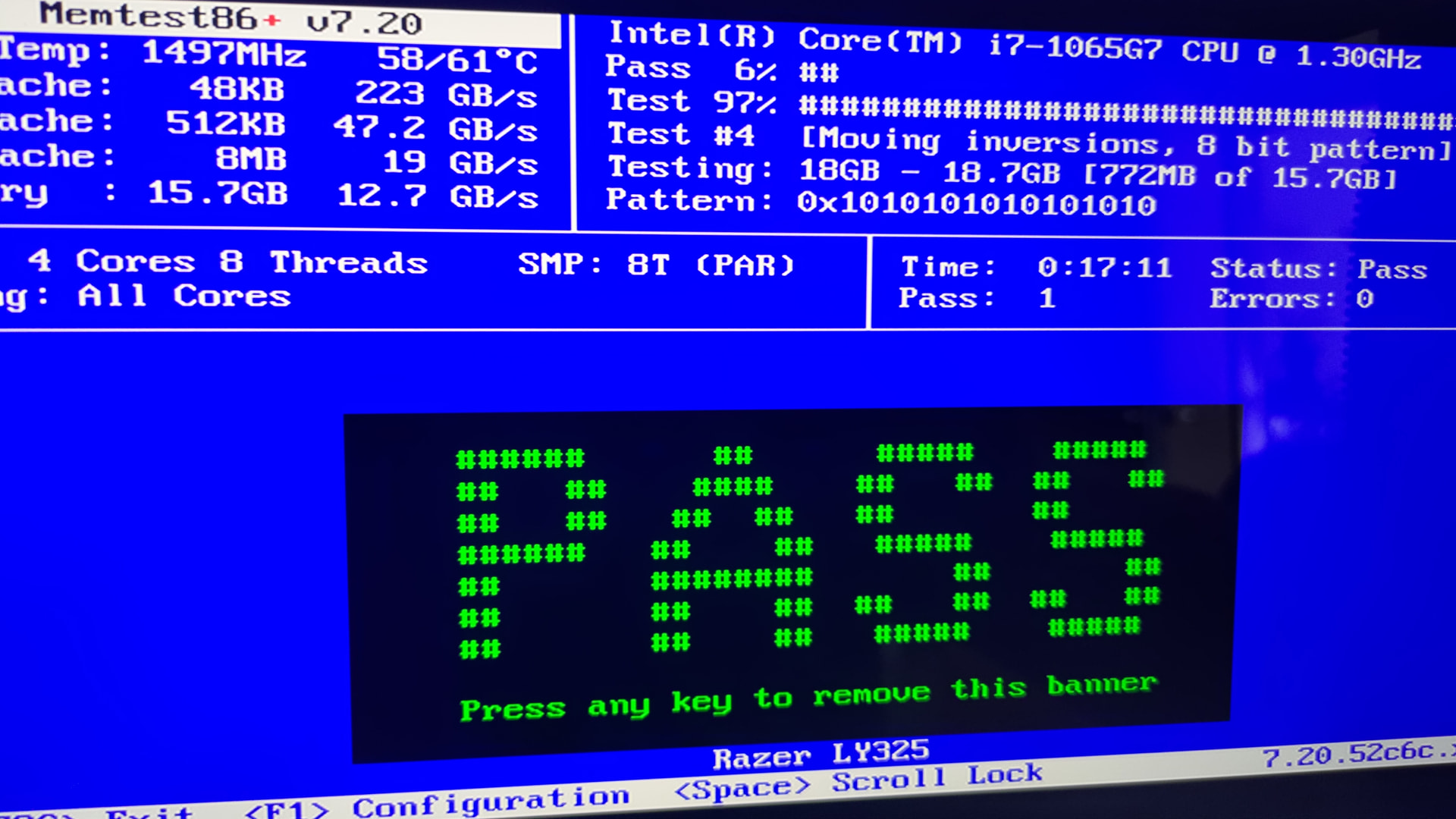
Alright, Memtest worked out and gave me a big green pass. Took a photo on the first pass with 0 errors, let it run till it hit 3 passes (still 0 errors) think memory is healthy.

Then I tried fsck which I thought you meant according to your discription of what you want, with 0 success because I only later found out that this does not work with BTRFS filesystems, only ext2/ext3/ext4 and FAT. So I searched an alternative and the only thing I found was btrfs check so I used that, which gave me that:

 ╭─mellow@BladeStealth13 in ~ took 0s
 ╰─λ sudo btrfs check --readonly --force /dev/nvme0n1p2
Opening filesystem to check...
WARNING: filesystem mounted, continuing because of --force
Checking filesystem on /dev/nvme0n1p2
UUID: 40581c40-b8f2-49c0-8281-dea74a90fe16
[1/8] checking log
[2/8] checking root items
[3/8] checking extents
[4/8] checking free space tree
We have a space info key for a block group that doesn't exist
[5/8] checking fs roots
[6/8] checking only csums items (without verifying data)
[7/8] checking root refs
[8/8] checking quota groups skipped (not enabled on this FS)
found 228028993536 bytes used, error(s) found
total csum bytes: 219834016
total tree bytes: 2222096384
total fs tree bytes: 1861648384
total extent tree bytes: 123748352
btree space waste bytes: 336633343
file data blocks allocated: 257735000064
 referenced 294743764992

I have no idea what any of this means, if that is good or bad or even helpful.
But I also found this:

 ╭─mellow@BladeStealth13 in ~ 
 ╰─λ btrfs device stats /
[/dev/nvme0n1p2].write_io_errs    0
[/dev/nvme0n1p2].read_io_errs     0
[/dev/nvme0n1p2].flush_io_errs    0
[/dev/nvme0n1p2].corruption_errs  0
[/dev/nvme0n1p2].generation_errs  0

There I’m pretty shure the 0s are good, as in no errors.

Also I tried the zen-Kernel, same issue as with the Linux non LTS Kernel. Only the LTS-Kernel works the other 2 dont..

1 Like

great that should help rule those out as issues. I am not sure about btrfs I don’t use it. I just am old school and stick with ext4. I’m not a entity that has sesitive data that I must keep on line at all times and have not need for snap shots since I have a regular backup routine started years before snapshots became a thing. I also learned from back in the days of Windows about stuff like GoBack which was utterly garbage.

1 Like

yeah I just use it out of habit and because this excact system was used on Garuda Linux and saved me a few times when I was even more of a newbie than now :sweat_smile:
It’s easy and works without me thinking about it, and definitly miles better than the windows version. Windows destroyed my boot partion AND recovery partition once with an update when I wasnt using linux yet and no, the recovery tools were not able to recover the system so i was screwed. If I didnt had a backup where I store my important stuff I would have lost everything thanks to windows.
So far this hasn’t happened to linux yet, and everytime I had to reload a snapshot was me doing errors, being clumsy or clueless that its fixable… Or yeah the stuff that I now have going on were I used these snapshots to install the lts kernel and x11.. Its helpful and saves time

1 Like