2 Issues: No Signal on external Monitor after login + Linux blackscreen after update (on wayland)

I rarely to never have any issues but right now I have 2 at the same time.

1 being that while on the login screen my external monitor works, but after login it goes black and tells me no signal.
I suspect that this might be wayland but i cant test it because kde kind of ditched x11 and i can’t select it on the login screen anymore. also it seems to be detected in the kde settings and windows tend to pop up on the second screen even if i can’t see them.
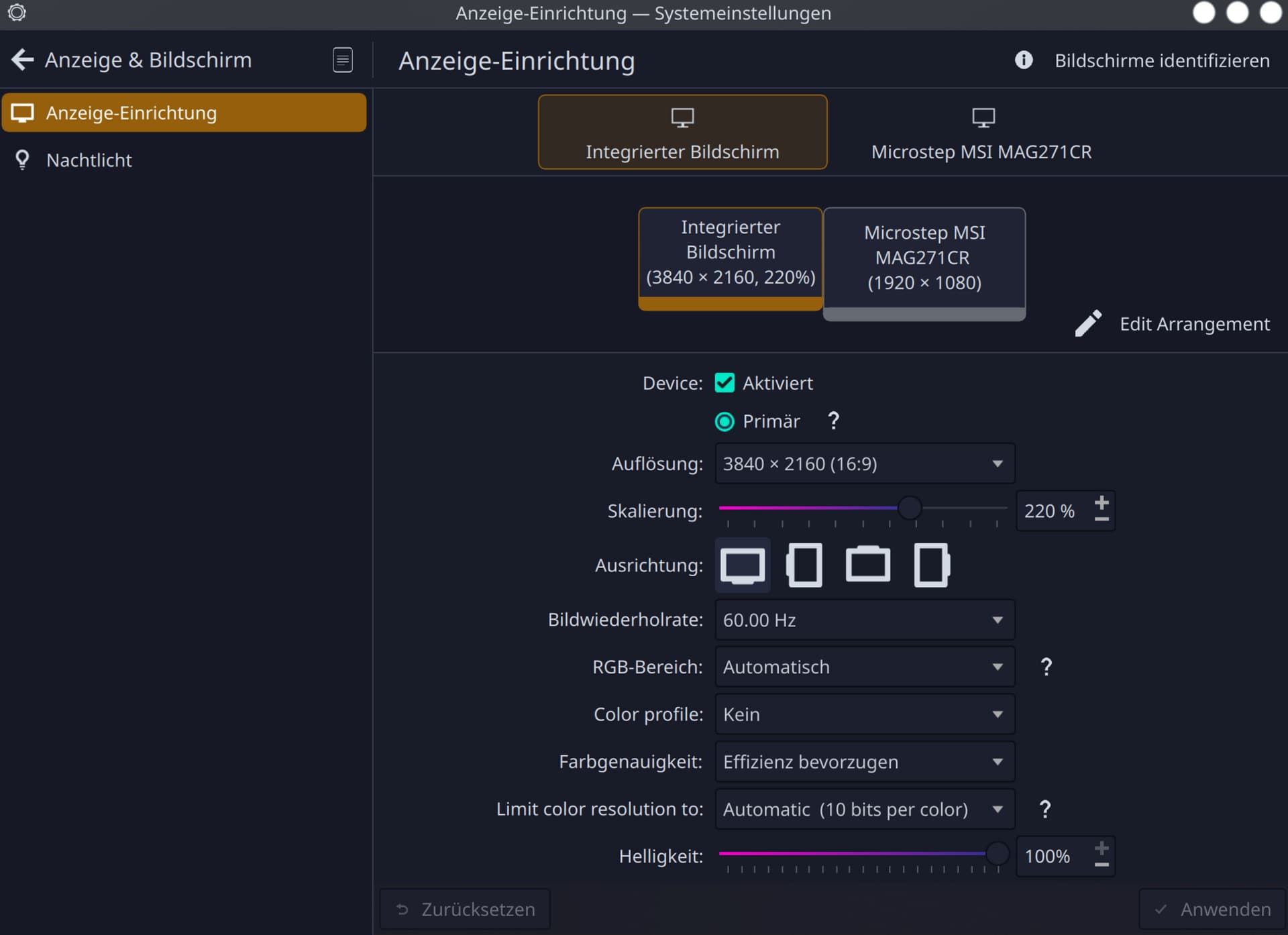

2nd issue as of right now is that when I try to update ( via eos-update or eos-update --aur tried both) after reboot and grub select screen then the “splashscreen” i think its called, it goes blackscreen (before any error or “failed” that i could see).
Thankfully to btrfs-assistant and snapper tools that makes snapshots pre- and after updates i was always able to recover when booting into the snapshots from grub (i have no idea how chroot works so this is easier for me).
I have no idea what the issue is because the update throws no errors whatsoever, i paid very close attention the 2nd time i tried it. or what fails to load on the splashscreen, i suspect maybe nvidia or the kernel update might be it. but i guess i wont do updates for the next few days. (the last time i had this, that method worked out)
but that also means i wont get my 2nd monitor to work, which i would need right now as it would make it easier as im working on something right now where 2 screens would be helpful.


Update as from the comments and the process:

Currently I am on the new update, but only x11 works (with poor performance, heat and instable and without external monitor) while loggin in on wayland still goes complete blackscreen also on the internal laptop monitor. when trying a external ssd with very old garuda gives me no issues whatsoever (both screens work and performance is great) so no hardware issues.
I also tried to install the Nvidia Nouvou drivers, robooted but still same issues on wayland = screen completly dark no response whatsoever.
Reinstalled the Nvidia open-dkms drivers, still same issue…

I now installed the LTS kernel and wayland works again, the only thing that doesnt is still the second monitor, which works on the KDE Login screen but under wayland doesnt only gets detected but no picture


(old) inxi
System:
  Kernel: 6.15.9-arch1-1 arch: x86_64 bits: 64
  Desktop: KDE Plasma v: 6.4.4 Distro: EndeavourOS
Machine:
  Type: Laptop System: Razer product: Blade Stealth 13 (Early 2020) -
    RZ09-0310 v: 2.04 serial: <superuser required>
  Mobo: Razer model: LY325 serial: <superuser required> UEFI: Razer v: 1.04
    date: 11/19/2020
Battery:
  ID-1: BAT0 charge: 45.9 Wh (99.1%) condition: 46.3/53.4 Wh (86.8%)
CPU:
  Info: quad core model: Intel Core i7-1065G7 bits: 64 type: MT MCP cache:
    L2: 2 MiB
  Speed (MHz): avg: 400 min/max: 400/3900 cores: 1: 400 2: 400 3: 400 4: 400
    5: 400 6: 400 7: 400 8: 400
Graphics:
  Device-1: Intel Iris Plus Graphics G7 driver: i915 v: kernel
  Device-2: NVIDIA TU117M [GeForce GTX 1650 Ti Mobile] driver: nvidia
    v: 575.64.05
  Device-3: IMC Networks Integrated Camera driver: uvcvideo type: USB
  Display: wayland server: X.org v: 1.21.1.18 with: Xwayland v: 24.1.8
    compositor: kwin_wayland driver: X: loaded: modesetting,nvidia dri: iris
    gpu: i915 resolution: 1: 1920x1080~144Hz 2: 3840x2160~60Hz
  API: EGL v: 1.5 drivers: iris,nvidia,swrast
    platforms: gbm,wayland,x11,surfaceless,device
  API: OpenGL v: 4.6.0 compat-v: 4.5 vendor: intel mesa v: 25.1.7-arch1.1
    renderer: Mesa Intel Iris Plus Graphics (ICL GT2)
  API: Vulkan v: 1.4.321 drivers: intel,nvidia surfaces: N/A
  Info: Tools: api: clinfo, eglinfo, glxinfo, vulkaninfo
    de: kscreen-console,kscreen-doctor gpu: nvidia-settings,nvidia-smi
    wl: wayland-info x11: xdpyinfo, xprop, xrandr
Audio:
  Device-1: Intel Ice Lake-LP Smart Sound Audio
    driver: sof-audio-pci-intel-icl
  API: ALSA v: k6.15.9-arch1-1 status: kernel-api
  Server-1: PipeWire v: 1.4.7 status: active
Network:
  Device-1: Intel Ice Lake-LP PCH CNVi WiFi driver: iwlwifi
  IF: wlan0 state: up mac: 54:8d:5a:cf:59:4a
Bluetooth:
  Device-1: Intel AX201 Bluetooth driver: btusb type: USB
  Report: btmgmt ID: hci0 rfk-id: 0 state: down bt-service: disabled
    rfk-block: hardware: no software: no address: N/A
Drives:
  Local Storage: total: 931.51 GiB used: 189.9 GiB (20.4%)
  ID-1: /dev/nvme0n1 vendor: Kingston model: SNV2S1000G size: 931.51 GiB
Partition:
  ID-1: / size: 913.62 GiB used: 189.9 GiB (20.8%) fs: btrfs
    dev: /dev/nvme0n1p2
  ID-2: /boot/efi size: 1022 MiB used: 612 KiB (0.1%) fs: vfat
    dev: /dev/nvme0n1p1
  ID-3: /home size: 913.62 GiB used: 189.9 GiB (20.8%) fs: btrfs
    dev: /dev/nvme0n1p2
  ID-4: /var/log size: 913.62 GiB used: 189.9 GiB (20.8%) fs: btrfs
    dev: /dev/nvme0n1p2
Swap:
  ID-1: swap-1 type: partition size: 16.89 GiB used: 0 KiB (0.0%)
    dev: /dev/nvme0n1p3
Sensors:
  System Temperatures: cpu: 46.0 C mobo: N/A
  Fan Speeds (rpm): N/A
Info:
  Memory: total: 16 GiB available: 15.36 GiB used: 5.12 GiB (33.3%)
  Processes: 316 Uptime: 28m Shell: fish inxi: 3.3.38
2 Likes

please post your pacman log for the time in question.

is it still logged after i loaded the snapshot?

1 Like

shit forgot you said that. yeah the snapshot should revert to an older log. nvrmind i’m still waking up.

1 Like

get some coffee to fast boot :hot_beverage:

2 Likes

I have a soda. I don’t drink Coffee.

To start your learning
https://discovery.endeavouros.com/system-rescue/arch-chroot/2022/12/

can you run checkupdates and show us what is avaiable for update? maybe that will lend a clue.

I thought I was the only one who doesnt like coffee :sweat_smile:

thanks, will try that the next time

here you go

╭─mellow@BladeStealth13 in ~ took 13s
 ╰─λ checkupdates 
abseil-cpp 20250512.1-1 -> 20250814.0-1
appstream 1.0.5-2 -> 1.0.6-1
appstream-qt 1.0.5-2 -> 1.0.6-1
archlinux-appstream-data 20250730-1 -> 20250825-1
ark 25.04.3-1 -> 25.08.0-1
baloo-widgets 25.04.3-1 -> 25.08.0-1
bind 9.20.11-1 -> 9.20.12-1
binutils 2.45+r8+g09be88bfb653-1 -> 2.45+r29+g2b2e51a31ec7-1
btrfs-progs 6.15-1 -> 6.16-1
ca-certificates-mozilla 3.114-1 -> 3.115.1-1
cryptsetup 2.8.0-1 -> 2.8.1-1
dolphin 25.04.3-1 -> 25.08.0-1
dolphin-plugins 25.04.3-1 -> 25.08.0-1
dracut 106-1 -> 108_eos-1
egl-x11 1.0.2-1 -> 1.0.3-1
ell 0.78-1 -> 0.79-1
eos-bash-shared 25.7.1-1 -> 25.8-1
eos-rankmirrors 25.7.1-1 -> 25.8-1
eos-translations 25.6-1 -> 25.8-1
fastfetch 2.49.0-1 -> 2.50.2-1
fd 10.2.0-1 -> 10.3.0-1
ffmpeg4.4 4.4.6-1 -> 4.4.6-2
ffmpegthumbs 25.04.3-1 -> 25.08.0-1
firefox 141.0.3-1 -> 142.0.1-1
firefox-i18n-de 141.0.3-1 -> 142.0.1-1
gcc 15.1.1+r500+gb1b8d8ce3eea-1 -> 15.2.1+r22+gc4e96a094636-1
gcc-libs 15.1.1+r500+gb1b8d8ce3eea-1 -> 15.2.1+r22+gc4e96a094636-1
gdbm 1.25-1 -> 1.26-1
ghostscript 10.05.1-2 -> 10.05.1-3
git 2.50.1-3 -> 2.51.0-1
glib2 2.84.3-1 -> 2.84.4-2
glibc 2.42+r3+gbc13db739377-1 -> 2.42+r17+gd7274d718e6f-1
gst-libav 1.26.5-1 -> 1.26.5-2
gst-plugins-bad 1.26.5-1 -> 1.26.5-2
gst-plugins-bad-libs 1.26.5-1 -> 1.26.5-2
gst-plugins-base 1.26.5-1 -> 1.26.5-2
gst-plugins-base-libs 1.26.5-1 -> 1.26.5-2
gst-plugins-ugly 1.26.5-1 -> 1.26.5-2
gstreamer 1.26.5-1 -> 1.26.5-2
gwenview 25.04.3-1 -> 25.08.0-1
harfbuzz 11.3.3-1 -> 11.4.4-1
harfbuzz-icu 11.3.3-1 -> 11.4.4-1
hdparm 9.65-2 -> 9.65-3
highway 1.2.0-1 -> 1.3.0-1
hwdata 0.397-1 -> 0.398-1
hwdetect 2025.03.06.1935-1 -> 2025.08.16.1333-1
imagemagick 7.1.2.0-2 -> 7.1.2.2-1
imath 3.1.12-4 -> 3.2.1-1
intel-ucode 20250512-1 -> 20250812-1
isoimagewriter 25.04.3-1 -> 25.08.0-1
kaccounts-integration 25.04.3-1 -> 25.08.0-1
kate 25.04.3-1 -> 25.08.0-1
kcalc 25.04.3-1 -> 25.08.0-1
kdeconnect 25.04.3-1 -> 25.08.0-2
kdegraphics-mobipocket 25.04.3-1 -> 25.08.0-1
kdegraphics-thumbnailers 25.04.3-1 -> 25.08.0-1
kdenetwork-filesharing 25.04.3-1 -> 25.08.0-1
kfilemetadata 6.17.0-1 -> 6.17.0-2
kimageformats 6.17.0-1 -> 6.17.0-2
kio-admin 25.04.3-1 -> 25.08.0-1
kio-extras 25.04.3-1 -> 25.08.0-1
konsole 25.04.3-1 -> 25.08.0-1
kpmcore 25.04.3-1 -> 25.08.0-1
ktorrent 25.04.3-1 -> 25.08.0-1
kwin 6.4.4-1 -> 6.4.4-4
ldb 2:4.22.3-1 -> 2:4.22.4-1
lib32-gcc-libs 15.1.1+r500+gb1b8d8ce3eea-1 -> 15.2.1+r22+gc4e96a094636-1
lib32-glibc 2.42+r3+gbc13db739377-1 -> 2.42+r17+gd7274d718e6f-1
lib32-libelf 0.193-1 -> 0.193-4
lib32-libgcrypt 1.11.1-1 -> 1.11.2-1
lib32-libtirpc 1.3.6-1 -> 1.3.6-2
lib32-mesa 1:25.1.7-1 -> 1:25.2.1-1
lib32-nvidia-utils 575.64.05-1 -> 580.76.05-1
lib32-vulkan-intel 1:25.1.7-1 -> 1:25.2.1-1
lib32-vulkan-mesa-layers 1:25.1.7-1 -> 1:25.2.1-1
libatasmart 0.19-6 -> 0.19-7
libavc1394 0.5.4-6 -> 0.5.4-7
libelf 0.193-3 -> 0.193-5
libgcrypt 1.11.1-1 -> 1.11.2-1
libinih 58-1 -> 61-1
libinput 1.28.1-1 -> 1.29.0-1
libkdcraw 25.04.3-1 -> 25.08.0-1
libkexiv2 25.04.3-1 -> 25.08.0-1
libktorrent 25.04.3-1 -> 25.08.0-1
libqalculate 5.6.0-1 -> 5.7.0-1
libraqm 0.10.2-1 -> 0.10.3-1
librsvg 2:2.60.0-2 -> 2:2.61.0-1
libsysprof-capture 48.0-6 -> 48.1-2
libtool 2.5.4+r23+g5b582aed-2 -> 2.5.4+r62+g6389dce8-1
libvlc 3.0.21-27 -> 3.0.21-28
libwbclient 2:4.22.3-1 -> 2:4.22.4-1
libxmlb 0.3.22-1 -> 0.3.23-1
libxnvctrl 575.64.05-1 -> 580.76.05-1
linux 6.15.9.arch1-1 -> 6.16.3.arch1-1
linux-firmware 20250708-1 -> 20250808-1
linux-firmware-amdgpu 20250708-1 -> 20250808-1
linux-firmware-atheros 20250708-1 -> 20250808-1
linux-firmware-broadcom 20250708-1 -> 20250808-1
linux-firmware-cirrus 20250708-1 -> 20250808-1
linux-firmware-intel 20250708-1 -> 20250808-1
linux-firmware-mediatek 20250708-1 -> 20250808-1
linux-firmware-nvidia 20250708-1 -> 20250808-1
linux-firmware-other 20250708-1 -> 20250808-1
linux-firmware-radeon 20250708-1 -> 20250808-1
linux-firmware-realtek 20250708-1 -> 20250808-1
linux-firmware-whence 20250708-1 -> 20250808-1
linux-headers 6.15.9.arch1-1 -> 6.16.3.arch1-1
mesa 1:25.1.7-1 -> 1:25.2.1-4
nano 8.5-1 -> 8.6-1
networkmanager-openconnect 1.2.10-3 -> 1.2.10-4
networkmanager-openvpn 1.12.2-1 -> 1.12.3-1
nfs-utils 2.8.3-2 -> 2.8.3-3
nfsidmap 2.8.3-2 -> 2.8.3-3
nftables 1:1.1.4-1 -> 1:1.1.4-2
nss 3.114-1 -> 3.115.1-1
nvidia-open-dkms 575.64.05-2 -> 580.76.05-4
nvidia-settings 575.64.05-1 -> 580.76.05-1
nvidia-utils 575.64.05-2 -> 580.76.05-4
okular 25.04.3-1 -> 25.08.0-1
opencv 4.12.0-2 -> 4.12.0-4
openexr 3.3.5-1 -> 3.3.5-2
ostree 2025.4-1 -> 2025.5-1
otf-latin-modern 2.004-5 -> 2.006-1
pacman-contrib 1.12.0-1 -> 1.13.0-1
parallel 20250722-2 -> 20250822-1
partitionmanager 25.04.3-1 -> 25.08.0-1
protobuf 31.1-2 -> 32.0-1
protobuf-c 1.5.2-4 -> 1.5.2-5
python 3.13.5-1 -> 3.13.7-1
python-orjson 3.11.1-1 -> 3.11.3-1
python-termcolor 2.5.0-1 -> 3.1.0-1
python-typing_extensions 4.14.1-1 -> 4.15.0-1
qca-qt6 2.3.10-2 -> 2.3.10-3
qt6-declarative 6.9.1-2 -> 6.9.1-3
qt6-webengine 6.9.1-2 -> 6.9.1-3
raptor 2.0.16-7 -> 2.0.16-8
re2 1:20240702-5 -> 1:20240702-7
rpcbind 1.2.7-2 -> 1.2.8-1
samba 2:4.22.3-1 -> 2:4.22.4-1
signon-kwallet-extension 25.04.3-1 -> 25.08.0-1
smbclient 2:4.22.3-1 -> 2:4.22.4-1
sof-firmware 2025.05-1 -> 2025.05.1-1
spandsp 0.0.6-5 -> 0.0.6-6
startup-notification 0.12-8 -> 0.12-9
thin-provisioning-tools 1.2.0-1 -> 1.2.1-1
ttc-iosevka 33.2.7-1 -> 33.2.8-1
ttc-iosevka-aile 33.2.7-1 -> 33.2.8-1
ttc-iosevka-curly 33.2.7-1 -> 33.2.8-1
ttc-iosevka-curly-slab 33.2.7-1 -> 33.2.8-1
ttc-iosevka-etoile 33.2.7-1 -> 33.2.8-1
ttc-iosevka-slab 33.2.7-1 -> 33.2.8-1
ttc-iosevka-ss01 33.2.7-1 -> 33.2.8-1
ttc-iosevka-ss02 33.2.7-1 -> 33.2.8-1
ttc-iosevka-ss03 33.2.7-1 -> 33.2.8-1
ttc-iosevka-ss04 33.2.7-1 -> 33.2.8-1
ttc-iosevka-ss05 33.2.7-1 -> 33.2.8-1
ttc-iosevka-ss06 33.2.7-1 -> 33.2.8-1
ttc-iosevka-ss07 33.2.7-1 -> 33.2.8-1
ttc-iosevka-ss08 33.2.7-1 -> 33.2.8-1
ttc-iosevka-ss09 33.2.7-1 -> 33.2.8-1
ttc-iosevka-ss10 33.2.7-1 -> 33.2.8-1
ttc-iosevka-ss11 33.2.7-1 -> 33.2.8-1
ttc-iosevka-ss12 33.2.7-1 -> 33.2.8-1
ttc-iosevka-ss13 33.2.7-1 -> 33.2.8-1
ttc-iosevka-ss14 33.2.7-1 -> 33.2.8-1
ttc-iosevka-ss15 33.2.7-1 -> 33.2.8-1
ttc-iosevka-ss16 33.2.7-1 -> 33.2.8-1
ttc-iosevka-ss17 33.2.7-1 -> 33.2.8-1
ttc-iosevka-ss18 33.2.7-1 -> 33.2.8-1
ttf-junicode 2.216-1 -> 2.218-1
ttf-junicode-variable 2.216-1 -> 2.218-1
ttf-monaspace-variable 1.200-1 -> 1.300-1
upower 1.90.9-1 -> 1.90.10-1
vapoursynth R70-2 -> 72-1
verdict 1.4.2-1 -> 1.4.4-1
vlc 3.0.21-27 -> 3.0.21-28
vlc-cli 3.0.21-27 -> 3.0.21-28
vlc-gui-qt 3.0.21-27 -> 3.0.21-28
vlc-plugin-a52dec 3.0.21-27 -> 3.0.21-28
vlc-plugin-aalib 3.0.21-27 -> 3.0.21-28
vlc-plugin-alsa 3.0.21-27 -> 3.0.21-28
vlc-plugin-aom 3.0.21-27 -> 3.0.21-28
vlc-plugin-archive 3.0.21-27 -> 3.0.21-28
vlc-plugin-aribb24 3.0.21-27 -> 3.0.21-28
vlc-plugin-aribb25 3.0.21-27 -> 3.0.21-28
vlc-plugin-ass 3.0.21-27 -> 3.0.21-28
vlc-plugin-avahi 3.0.21-27 -> 3.0.21-28
vlc-plugin-bluray 3.0.21-27 -> 3.0.21-28
vlc-plugin-caca 3.0.21-27 -> 3.0.21-28
vlc-plugin-cddb 3.0.21-27 -> 3.0.21-28
vlc-plugin-chromecast 3.0.21-27 -> 3.0.21-28
vlc-plugin-dav1d 3.0.21-27 -> 3.0.21-28
vlc-plugin-dbus 3.0.21-27 -> 3.0.21-28
vlc-plugin-dbus-screensaver 3.0.21-27 -> 3.0.21-28
vlc-plugin-dca 3.0.21-27 -> 3.0.21-28
vlc-plugin-dvb 3.0.21-27 -> 3.0.21-28
vlc-plugin-dvd 3.0.21-27 -> 3.0.21-28
vlc-plugin-faad2 3.0.21-27 -> 3.0.21-28
vlc-plugin-ffmpeg 3.0.21-27 -> 3.0.21-28
vlc-plugin-firewire 3.0.21-27 -> 3.0.21-28
vlc-plugin-flac 3.0.21-27 -> 3.0.21-28
vlc-plugin-fluidsynth 3.0.21-27 -> 3.0.21-28
vlc-plugin-freetype 3.0.21-27 -> 3.0.21-28
vlc-plugin-gme 3.0.21-27 -> 3.0.21-28
vlc-plugin-gnutls 3.0.21-27 -> 3.0.21-28
vlc-plugin-gstreamer 3.0.21-27 -> 3.0.21-28
vlc-plugin-inflate 3.0.21-27 -> 3.0.21-28
vlc-plugin-jack 3.0.21-27 -> 3.0.21-28
vlc-plugin-journal 3.0.21-27 -> 3.0.21-28
vlc-plugin-jpeg 3.0.21-27 -> 3.0.21-28
vlc-plugin-kate 3.0.21-27 -> 3.0.21-28
vlc-plugin-kwallet 3.0.21-27 -> 3.0.21-28
vlc-plugin-libsecret 3.0.21-27 -> 3.0.21-28
vlc-plugin-lirc 3.0.21-27 -> 3.0.21-28
vlc-plugin-live555 3.0.21-27 -> 3.0.21-28
vlc-plugin-lua 3.0.21-27 -> 3.0.21-28
vlc-plugin-mad 3.0.21-27 -> 3.0.21-28
vlc-plugin-matroska 3.0.21-27 -> 3.0.21-28
vlc-plugin-mdns 3.0.21-27 -> 3.0.21-28
vlc-plugin-modplug 3.0.21-27 -> 3.0.21-28
vlc-plugin-mpeg2 3.0.21-27 -> 3.0.21-28
vlc-plugin-mpg123 3.0.21-27 -> 3.0.21-28
vlc-plugin-mtp 3.0.21-27 -> 3.0.21-28
vlc-plugin-musepack 3.0.21-27 -> 3.0.21-28
vlc-plugin-nfs 3.0.21-27 -> 3.0.21-28
vlc-plugin-notify 3.0.21-27 -> 3.0.21-28
vlc-plugin-ogg 3.0.21-27 -> 3.0.21-28
vlc-plugin-opus 3.0.21-27 -> 3.0.21-28
vlc-plugin-png 3.0.21-27 -> 3.0.21-28
vlc-plugin-pulse 3.0.21-27 -> 3.0.21-28
vlc-plugin-quicksync 3.0.21-27 -> 3.0.21-28
vlc-plugin-samplerate 3.0.21-27 -> 3.0.21-28
vlc-plugin-sdl 3.0.21-27 -> 3.0.21-28
vlc-plugin-sftp 3.0.21-27 -> 3.0.21-28
vlc-plugin-shout 3.0.21-27 -> 3.0.21-28
vlc-plugin-smb 3.0.21-27 -> 3.0.21-28
vlc-plugin-soxr 3.0.21-27 -> 3.0.21-28
vlc-plugin-speex 3.0.21-27 -> 3.0.21-28
vlc-plugin-srt 3.0.21-27 -> 3.0.21-28
vlc-plugin-svg 3.0.21-27 -> 3.0.21-28
vlc-plugin-tag 3.0.21-27 -> 3.0.21-28
vlc-plugin-theora 3.0.21-27 -> 3.0.21-28
vlc-plugin-twolame 3.0.21-27 -> 3.0.21-28
vlc-plugin-udev 3.0.21-27 -> 3.0.21-28
vlc-plugin-upnp 3.0.21-27 -> 3.0.21-28
vlc-plugin-vorbis 3.0.21-27 -> 3.0.21-28
vlc-plugin-vpx 3.0.21-27 -> 3.0.21-28
vlc-plugin-x264 3.0.21-27 -> 3.0.21-28
vlc-plugin-x265 3.0.21-27 -> 3.0.21-28
vlc-plugin-xml 3.0.21-27 -> 3.0.21-28
vlc-plugin-zvbi 3.0.21-27 -> 3.0.21-28
vlc-plugins-all 3.0.21-27 -> 3.0.21-28
vlc-plugins-base 3.0.21-27 -> 3.0.21-28
vlc-plugins-extra 3.0.21-27 -> 3.0.21-28
vlc-plugins-video-output 3.0.21-27 -> 3.0.21-28
vlc-plugins-visualization 3.0.21-27 -> 3.0.21-28
vulkan-intel 1:25.1.7-1 -> 1:25.2.1-4
vulkan-mesa-layers 1:25.1.7-1 -> 1:25.2.1-4
xorg-xdpyinfo 1.3.4-2 -> 1.4.0-1
yad 14.1-2.1 -> 14.1_eos-2
yyjson 0.11.1-1 -> 0.12.0-1

You have a few updates lol. I think I would try to go ahead and update again. You may want to add the plasma X11 app/extention or whatever it is that will let kde work with x11 and see if the monitor issue persist on x11 to determine if its a wayland issue or not.

be prepared to have to reset a snapshot in case it goes wrong. however wait as long as possible before doing so as to give others time to wake up and maybe they can see something I am not at the moment.

yeah i know there are a few. dont use my laptop everyday. usually i try to update it every 1-2 weeks at least but this time i had stuff going on and just forgot.
(also i think it looks a bit much bc i collect fonts and have vlc installed lol)

but yeah i will wait a bit before trying again

To enable x11 for plasma, run yay -Syu plasma-x11-session or use pacman if you prefer.

2 Likes

thanks I knew someone would show up knowing the name of the app that the OP should install.

1 Like

thanks, but right now i fear installing stuff without updating first could break linux (and updating also breaks my linux)

just updated on my pc for testing but there it works, so i guess there really is something that bugs my laptop (guess too many packages to update on my laptop maybe?)

1 Like

if you run the command as @MyNameIsRichard posted it will do both.

3 Likes

Yeah, it may be broken, but you can switch to x11 to see if that fixes it.

1 Like

maybe there is a way to safely update one part after the other without all these other packages like first update linux kernel, firmware, dracut, intel, nvidia and then if this succeds the rest

Edit idk what happened but i guess my internet was weird wantedd to edit the comment to say i missed that it would update everthing all good but it for some reason copied above commend and responded to you first idk

1 Like

NO. Never attempt to do partial updates on Arch based systems. This could leave you in even worse shape.

2 Likes

Not me the OP. I use Openbox BTW :joy:

1 Like

I suppose you could add the others to the ignorepkg in your pacman.conf and update and then remove a few and update and so on. As long as it’s temporary it could be OK. There’s a risk with it though.

yeah the risk is what bothers me, which is why i asked if there is a potential save way to do it.

but i guess ill throw that idea out of the window

1 Like

As far as I know, there is no completely safe way to do a partial update on Arch.

2 Likes