Kernel Panic! (Linux BSOD)

Update:
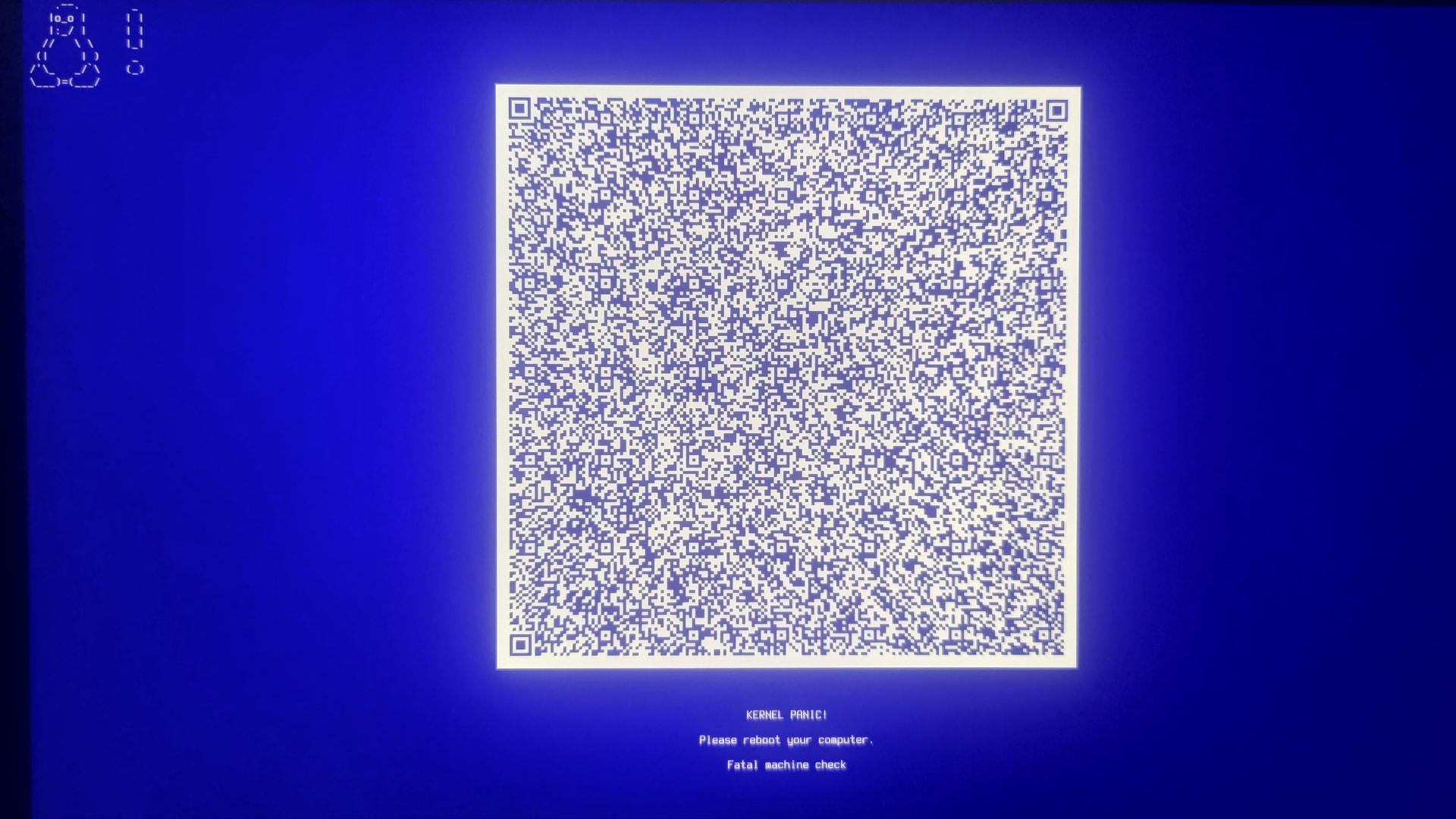
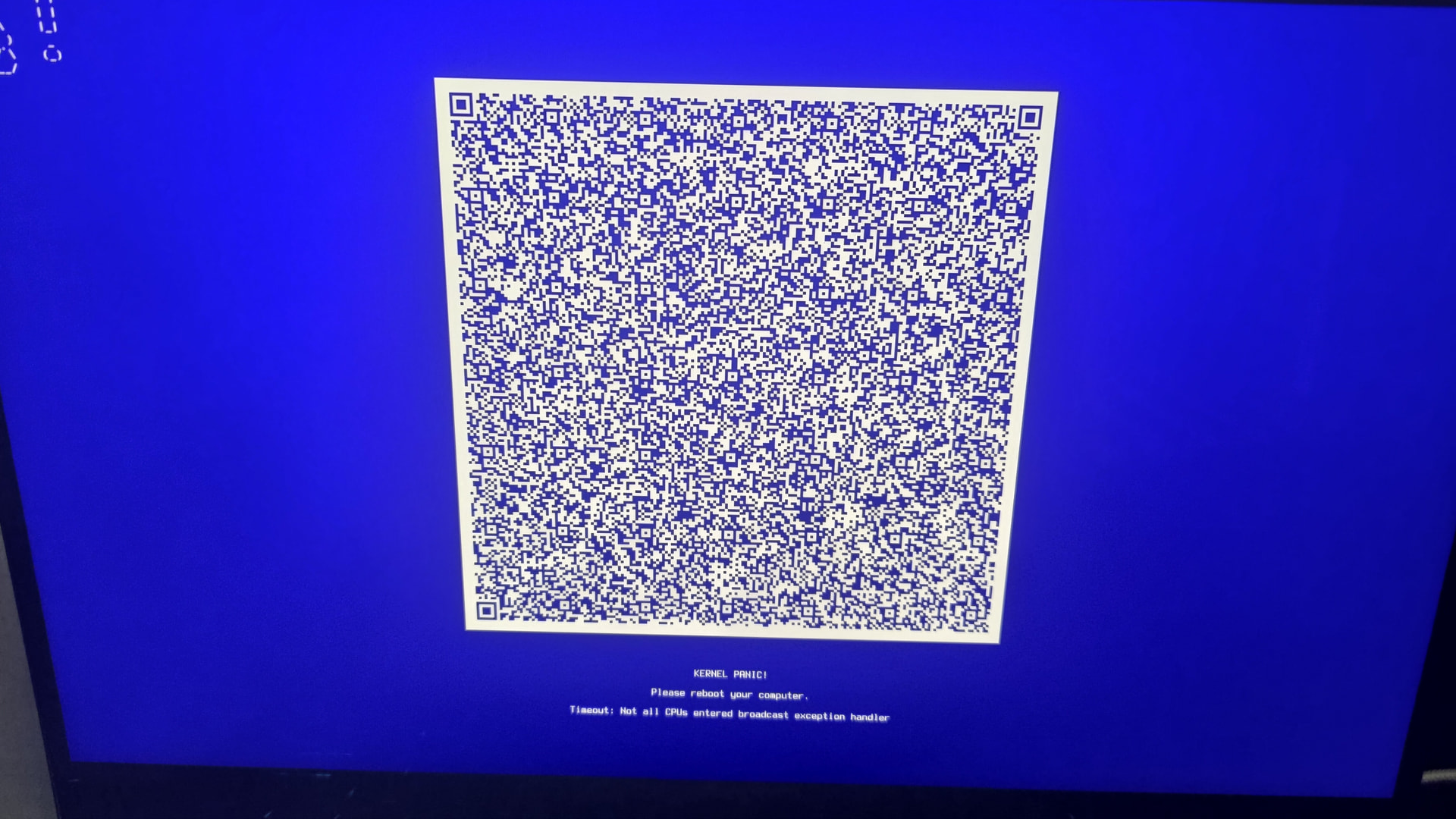
I was super happy to hear that the new ISO is out. So as I said previously that I would try to fix it with a new install, I tried it now… But as I booted into the stick with the iso, waiting a few seconds… This came up again…

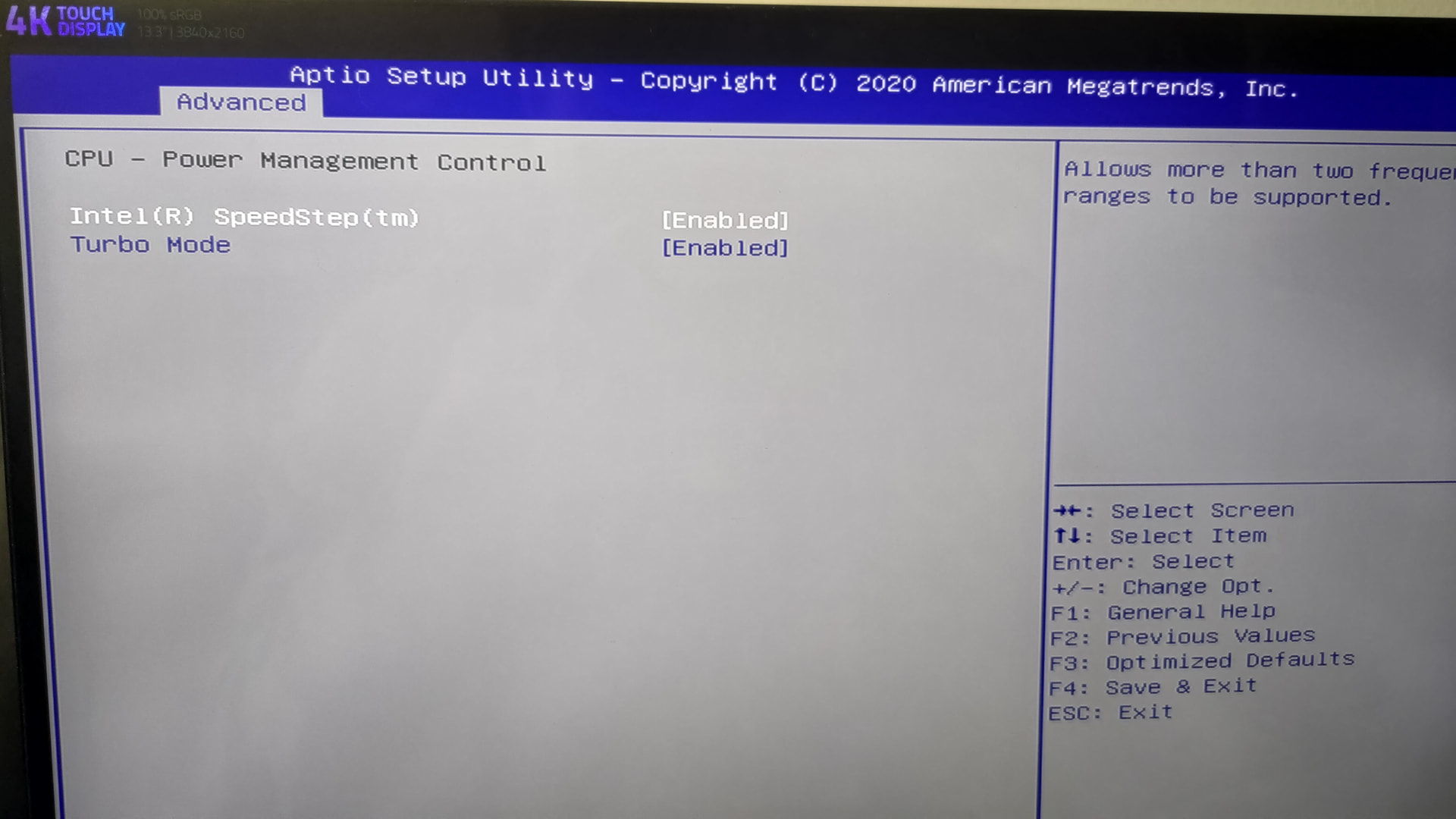
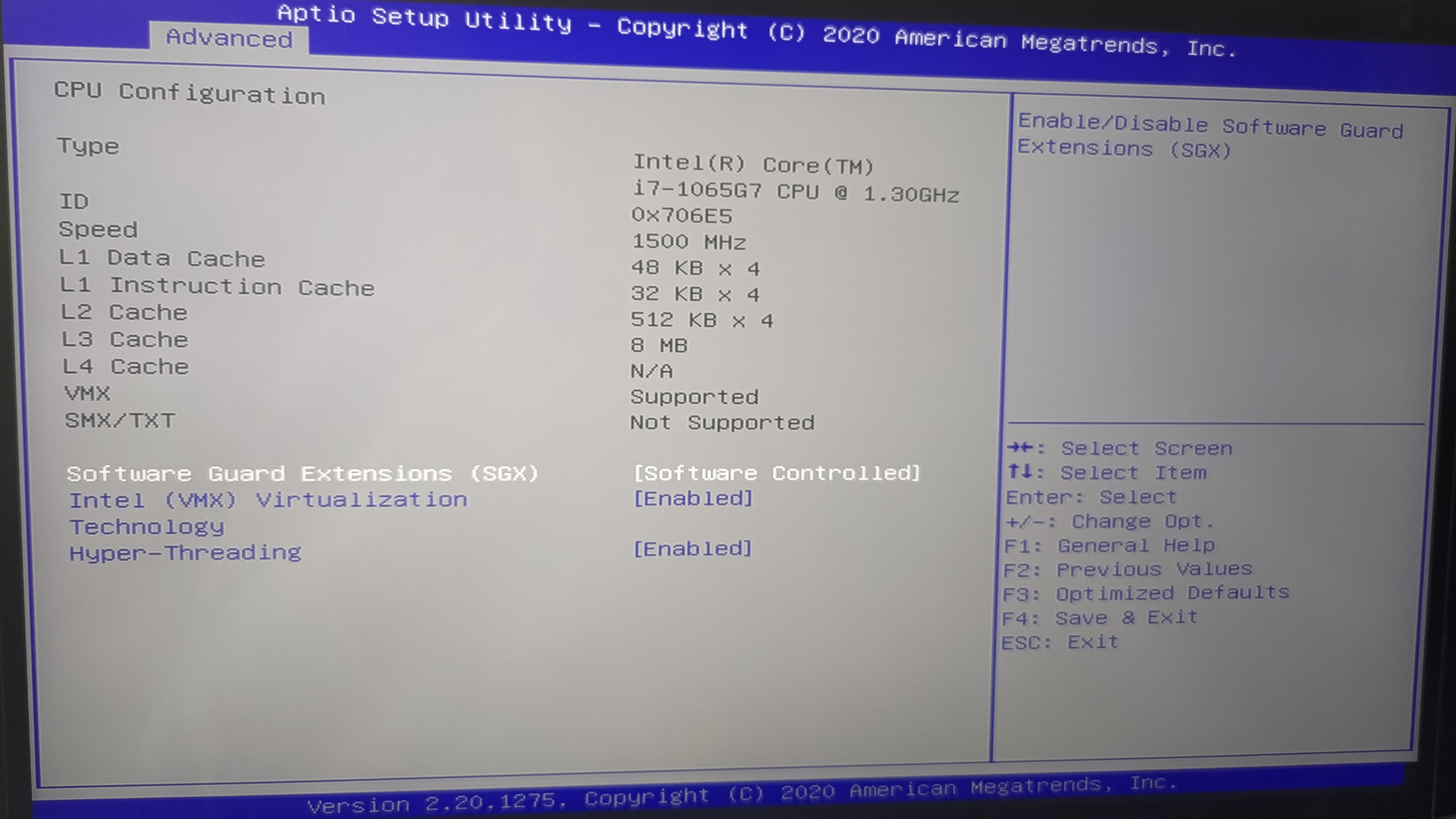
I then looked into the bios if I see anything related to the cpu state thing, all I found was this which looked fine I think, so I quit without changing anything


Then it rebooted, and funny enough I got into the iso without problems this time. I installed it on an external drive and already thought I finally won the battle… Well I booted from it after the install finished got to the login screen without kernel panic (yay) but after I typed my password the screen went black, keyboard rgb back light is on and the power led says sleepmode, fans spinning no response at all.

I am basically back to my old issue again that I linked in the op…

Link to panic report for the interested.

1 Like

Small Update after 21 days:

Now after the kernel 6.18 released I thought I give it another shot, this time not installing on an external SSD but on the Laptop itself (making it new and shiny). Weirdly enough the Live ISO gave me the same experience again, first boot into it = Kernel Panic, reboot second boot = very fine.
The thing I didnt do on the external install was also selecting the LTS-Kernel, only difference here. Else same thing. So yeah booting into the normal Kernel first, got into the login screen (SDDM Kde thing) after password hit enter, yeah got the Blackscreen again. So sadly 6.18.2 didnt do it.
Then I booted into the LTS Kernel, everything fine (also on SDDM my second monitor worked with picture and in wayland recognized by kde but still no picture in wayland while logged in), so I started to experiment. As my Gaming pc is working flawlessly, I thought what are the differences, apart from the hardware right now. So I looked at the nvidia drivers.

Gaming PC uses Nvidia-open-dkms but my Laptop just Nvidia-open. So I then used nvidia-inst to install the nvidia-open-dkms (including the lib32 dependencies stuff). rebooted and then booted into the mainline linux kernel.
Now comes the crazy part: Kernel panic. exactly the one above with the cpu timeout.
(on lts the kernel panic doesnt happen thankfully)

So it seems this driver is responsible for the kernel panic, a driver that flawlessly works on my gaming pc, and if i run nvidia-inst -t is also recommended by this program or script, whatever it is. so what is going wrong? as my laptop has a GTX 1650ti it is still supported with the current drivers, or supposed to…

So what should i do? should I try the nouveau drivers, and hope this fixes this? (and maybe this gets my monitor to fully work too?) or does someone have a different idea?
If there is a way I can provide more info plz tell.
Updated inxi from the current lts-kernel if it matters:

inxi
System:
  Kernel: 6.12.63-1-lts arch: x86_64 bits: 64
  Desktop: KDE Plasma v: 6.5.4 Distro: EndeavourOS
Machine:
  Type: Laptop System: Razer product: Blade Stealth 13 (Early 2020) -
    RZ09-0310 v: 2.04 serial: <superuser required>
  Mobo: Razer model: LY325 serial: <superuser required> Firmware: UEFI
    vendor: Razer v: 1.04 date: 11/19/2020
Battery:
  ID-1: BAT0 charge: 47.2 Wh (100%) condition: 47.2/53.2 Wh (88.8%)
CPU:
  Info: quad core model: Intel Core i7-1065G7 bits: 64 type: MT MCP cache:
    L2: 2 MiB
  Speed (MHz): avg: 400 min/max: 400/3900 cores: 1: 400 2: 400 3: 400 4: 400
    5: 400 6: 400 7: 400 8: 400
Graphics:
  Device-1: Intel Iris Plus Graphics G7 driver: i915 v: kernel
  Device-2: NVIDIA TU117M [GeForce GTX 1650 Ti Mobile] driver: nvidia
    v: 590.48.01
  Device-3: IMC Networks Integrated Camera driver: uvcvideo type: USB
  Display: wayland server: X.org v: 1.21.1.21 with: Xwayland v: 24.1.9
    compositor: kwin_wayland driver: X: loaded: modesetting,nvidia dri: iris
    gpu: i915 resolution: 3840x2160~60Hz
  API: EGL v: 1.5 drivers: iris,nvidia,swrast
    platforms: gbm,wayland,x11,surfaceless,device
  API: OpenGL v: 4.6.0 compat-v: 4.5 vendor: intel mesa v: 25.3.2-arch1.1
    renderer: Mesa Intel Iris Plus Graphics (ICL GT2)
  API: Vulkan v: 1.4.335 drivers: nvidia surfaces: N/A
  Info: Tools: api: clinfo, eglinfo, glxinfo, vulkaninfo
    de: kscreen-console,kscreen-doctor gpu: nvidia-settings,nvidia-smi
    wl: wayland-info x11: xdpyinfo, xprop, xrandr
Audio:
  Device-1: Intel Ice Lake-LP Smart Sound Audio
    driver: sof-audio-pci-intel-icl
  API: ALSA v: k6.12.63-1-lts status: kernel-api
  Server-1: PipeWire v: 1.4.9 status: active
Network:
  Device-1: Intel Ice Lake-LP PCH CNVi WiFi driver: iwlwifi
  IF: wlan0 state: up mac: 54:8d:5a:cf:59:4a
Bluetooth:
  Device-1: Intel AX201 Bluetooth driver: btusb type: USB
  Report: btmgmt ID: hci0 rfk-id: 0 state: down bt-service: disabled
    rfk-block: hardware: no software: no address: N/A
Drives:
  Local Storage: total: 931.51 GiB used: 7.88 GiB (0.8%)
  ID-1: /dev/nvme0n1 vendor: Kingston model: SNV2S1000G size: 931.51 GiB
Partition:
  ID-1: / size: 912.62 GiB used: 7.88 GiB (0.9%) fs: btrfs dev: /dev/nvme0n1p2
  ID-2: /boot/efi size: 2 GiB used: 664 KiB (0.0%) fs: vfat
    dev: /dev/nvme0n1p1
  ID-3: /home size: 912.62 GiB used: 7.88 GiB (0.9%) fs: btrfs
    dev: /dev/nvme0n1p2
  ID-4: /var/log size: 912.62 GiB used: 7.88 GiB (0.9%) fs: btrfs
    dev: /dev/nvme0n1p2
Swap:
  ID-1: swap-1 type: partition size: 16.89 GiB used: 0 KiB (0.0%)
    dev: /dev/nvme0n1p3
Sensors:
  System Temperatures: cpu: 46.0 C mobo: N/A
  Fan Speeds (rpm): N/A
Info:
  Memory: total: 16 GiB available: 15.36 GiB used: 3.71 GiB (24.2%)
  Processes: 275 Uptime: 30m Shell: Bash inxi: 3.3.40

What happens if you downgrade the driver to 570 or 575 ?

not shure how to do that without risking it to break everything even more..

also im not shure which driver version even worked fully in the past, since i only noticed that at some point my monitor didnt work anymore, but i didnt care much or look bc i never really needed it, so back then i just thought yea a replug would fix it probably (which always worked in garuda days)
The only thing i know for shure is that it worked around kernel 6.10 for shure (if it is indeed the driver, whatever driver was current there), and i noticed that something definitly was wrong around 6.15. so whatever changed in that timeframe is a issue for my laptop it seems.

I dont know if the driver is also at fault for the monitor thing, or the blackscreen after login, but i think it could be likely as if a change from nvidia-open to nvidia-open-dkms is causing a kernel panic.

even if i downgrade, it is a big downgrade i think… not shure if such a big downgrade is safe?
(this question right here is a noob question, how big of a downgrade is too big?)

So another update:

as @MichelN suggested, I tried to use older nvidia drivers..
I installed the nvidia-575xx-open-dkms and nvidia-575xx-utils (before that, i removed the old or “new” stuff ofc, got into a bit of dependency hell though).
Result was… no change, same issues after reboot.

Then i tried to find 570, but couldnt find it so i went even further back and choose 550 instead.
So I installed nvidia-550xx-dkms and nvidia-550xx-utils.
I thought that this would work because around that time things were working (i think), but to my surprise it just didnt. No 2nd monitor (apart from login screen and showing up on the kde settings) and kernel panic on the mainline linux kernel.

So I decided to rip out the nvidia drivers and go nouveau (hope i spelled it right), but no. same issue. another kernel panic on the mainline linux kernel. So i thought maybe its “tainted”? does this exist and happen? (read something about how nvidia does “taint” a kernel on the arch forum)

So after that i now did another reinstall of EOS. but this time i didnt choose the nvidia thing on the select screen. and this time i didnt get a kernel panic on the iso either the first time trying. progress i thought. but at the end,… now that its installed. im back again with the mainline linux kernel going to sleepmode (blackscreen + unresponsive + keyboard rgb backlight + power led doing sleepmode indicator) after login. and lts still 2nd monitor detected but no screen.

After 6 months of this persisting issue,… i dont know anymore. i am going in circles mentally. i tried everything basically. from different kernels to drivers to hardware tests. the hardware is fine, even works on old installs as i tested it back in the day (think it was in the previous thread i linked above)… but something is wrong, and it seems since i am the only one with this laptop in the linux world… there doesnt seem to be another one with a razer blade stealth 13 (early 2020 version)… im stuck. even if everything worked flawlessly when i started out… heck it doesnt even seem that there is someone with a gtx 1650ti. havent found any of these. the issue could be anywhere… but im not smart nor experienced enough to find it.

Hate to annoy you guys @thefrog @MyNameIsRichard but since you 2 are a bit longer here than me maybe you 2 know someone on this forum who could know what is wrong and has time and patience to maybe guide me through this? I really dont know what to do anymore. Im tired and my motivation is also now at the rock bottom, but deep down i still wish to fix it somehow… even if the chances are low.

I am at the point now where i dont care if i get a working nvidia driver where the performance is good and everything works, or if it is the nouveau driver where i have like this ~40% performance loss. but if it works im fine with it. All I want is to login into any kernel without fear, and both monitors to work…

anyway, another new inxi, with nouveau this time

inxi
System:
  Kernel: 6.12.63-1-lts arch: x86_64 bits: 64
  Desktop: KDE Plasma v: 6.5.4 Distro: EndeavourOS
Machine:
  Type: Laptop System: Razer product: Blade Stealth 13 (Early 2020) -
    RZ09-0310 v: 2.04 serial: <superuser required>
  Mobo: Razer model: LY325 serial: <superuser required> Firmware: UEFI
    vendor: Razer v: 1.04 date: 11/19/2020
Battery:
  ID-1: BAT0 charge: 47.2 Wh (100%) condition: 47.2/53.2 Wh (88.8%)
    volts: 11.94 min: 11.55
CPU:
  Info: quad core model: Intel Core i7-1065G7 bits: 64 type: MT MCP cache:
    L2: 2 MiB
  Speed (MHz): avg: 400 min/max: 400/3900 cores: 1: 400 2: 400 3: 400 4: 400
    5: 400 6: 400 7: 400 8: 400
Graphics:
  Device-1: Intel Iris Plus Graphics G7 driver: i915 v: kernel
  Device-2: NVIDIA TU117M [GeForce GTX 1650 Ti Mobile] driver: nouveau
    v: kernel
  Device-3: IMC Networks Integrated Camera driver: uvcvideo type: USB
  Display: wayland server: X.org v: 1.21.1.21 with: Xwayland v: 24.1.9
    compositor: kwin_wayland driver: X: loaded: modesetting dri: iris gpu: i915
    resolution: 1: 1920x1080~144Hz 2: 3840x2160~60Hz
  API: EGL v: 1.5 drivers: iris,swrast
    platforms: gbm,wayland,x11,surfaceless,device
  API: OpenGL v: 4.6 compat-v: 4.5 vendor: intel mesa v: 25.3.2-arch1.1
    renderer: Mesa Intel Iris Plus Graphics (ICL GT2)
  API: Vulkan Message: No Vulkan data available.
  Info: Tools: api: clinfo, eglinfo, glxinfo, vulkaninfo
    de: kscreen-console,kscreen-doctor wl: wayland-info
    x11: xdpyinfo, xprop, xrandr
Audio:
  Device-1: Intel Ice Lake-LP Smart Sound Audio
    driver: sof-audio-pci-intel-icl
  API: ALSA v: k6.12.63-1-lts status: kernel-api
  Server-1: PipeWire v: 1.4.9 status: active
Network:
  Device-1: Intel Ice Lake-LP PCH CNVi WiFi driver: iwlwifi
  IF: wlan0 state: up mac: 54:8d:5a:cf:59:4a
Bluetooth:
  Device-1: Intel AX201 Bluetooth driver: btusb type: USB
  Report: btmgmt ID: hci0 rfk-id: 0 state: down bt-service: disabled
    rfk-block: hardware: no software: no address: N/A
Drives:
  Local Storage: total: 931.51 GiB used: 6.15 GiB (0.7%)
  ID-1: /dev/nvme0n1 vendor: Kingston model: SNV2S1000G size: 931.51 GiB
Partition:
  ID-1: / size: 912.62 GiB used: 6.15 GiB (0.7%) fs: btrfs dev: /dev/nvme0n1p2
  ID-2: /boot/efi size: 2 GiB used: 664 KiB (0.0%) fs: vfat
    dev: /dev/nvme0n1p1
  ID-3: /home size: 912.62 GiB used: 6.15 GiB (0.7%) fs: btrfs
    dev: /dev/nvme0n1p2
  ID-4: /var/log size: 912.62 GiB used: 6.15 GiB (0.7%) fs: btrfs
    dev: /dev/nvme0n1p2
Swap:
  ID-1: swap-1 type: partition size: 16.89 GiB used: 0 KiB (0.0%)
    dev: /dev/nvme0n1p3
Sensors:
  System Temperatures: cpu: 46.0 C mobo: N/A
  Fan Speeds (rpm): N/A
Info:
  Memory: total: 16 GiB available: 15.36 GiB used: 3.54 GiB (23.0%)
  Processes: 259 Uptime: 1h 5m Shell: Bash inxi: 3.3.40

also just noticed, since i installed it today, it has a cool os age 1.1.2026
…at least something good about this whole situation.
I’ll tag @manuel I’m sure he can give some solid assistance.

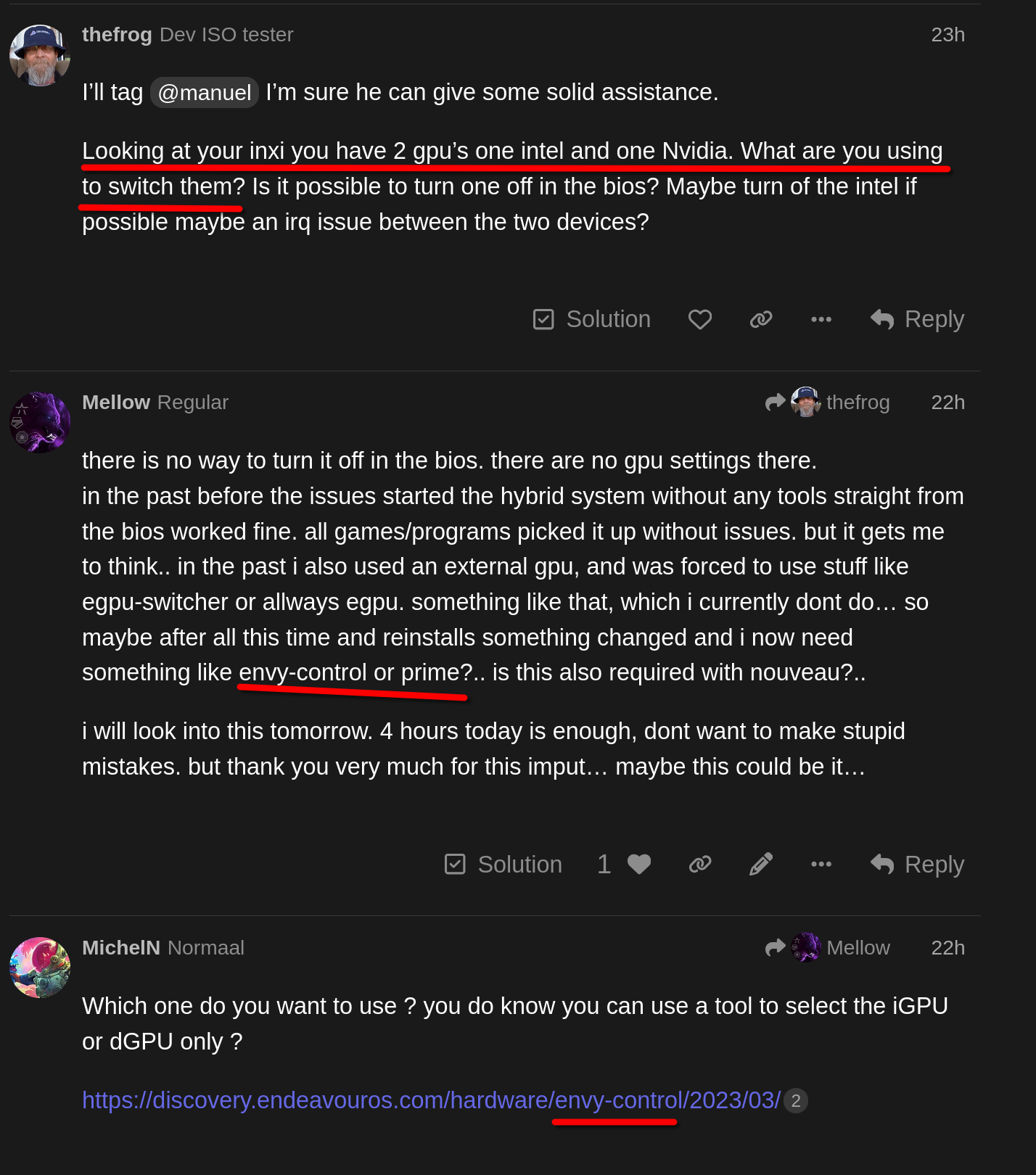
Looking at your inxi you have 2 gpu’s one intel and one Nvidia. What are you using to switch them? Is it possible to turn one off in the bios? Maybe turn of the intel if possible maybe an irq issue between the two devices?

there is no way to turn it off in the bios. there are no gpu settings there.
in the past before the issues started the hybrid system without any tools straight from the bios worked fine. all games/programs picked it up without issues. but it gets me to think.. in the past i also used an external gpu, and was forced to use stuff like egpu-switcher or allways egpu. something like that, which i currently dont do… so maybe after all this time and reinstalls something changed and i now need something like envy-control or prime?.. is this also required with nouveau?..

i will look into this tomorrow. 4 hours today is enough, dont want to make stupid mistakes. but thank you very much for this imput… maybe this could be it…

1 Like

Which one do you want to use ? you do know you can use a tool to select the iGPU or dGPU only ?

https://discovery.endeavouros.com/hardware/envy-control/2023/03/

i used envy-control in the past yes, but back then it had no use bc of egpu-switcher (and also maybe bc the bios was able to handle it idk) so at some point i removed it and never thought about it anymore

Some ideas if not presented above:

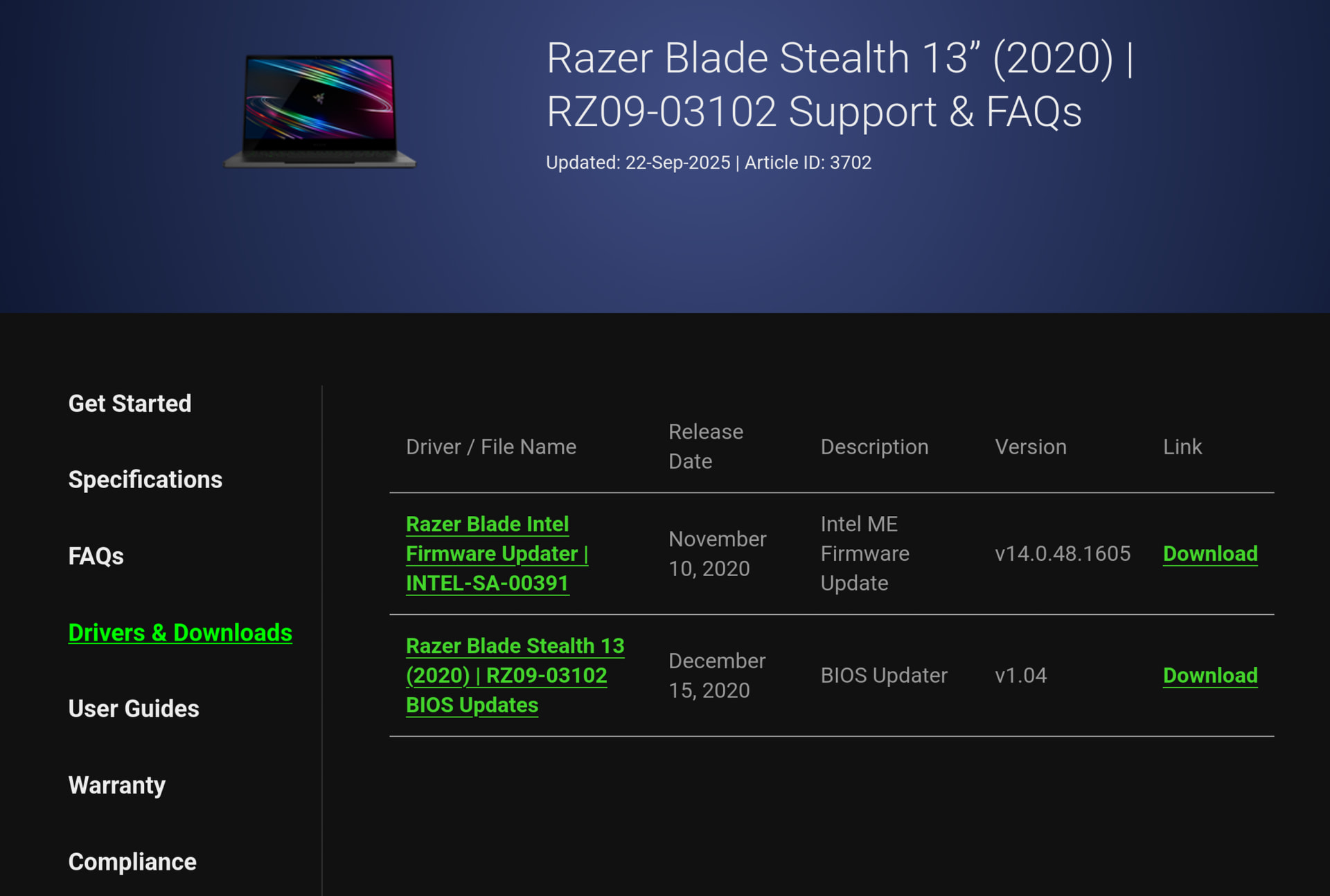
  • I noticed your motherboard firmware is from 2020, is there an update available?
  • Could you show the output of commands
nvidia-inst --test
lsmod | grep -P 'nvidia|nouveau|i915'
  • If you are using nvidia-open, try switching to nvidia-open-dkms. This requires kernel headers too (e.g. linux-lts-headers).

Here’s some Arch wiki tips unless you haven’t seen them yet:

2 Likes

Hi manuel, thanks for coming here.

There are no newer updates than v1.04 for the bios, and that 1 firmware update from around that same time in 2020. pretty shure i installed both as i had to install the bios update to install linux like 3 years ago.

shure, right now still on nouveau.

nvidia-inst --test
[mellow@Blade-Stealth13 ~]$ nvidia-inst --test
2026-01-02 14:43:52: Info: 58:00.0 3D controller [0302]: NVIDIA Corporation TU117M [GeForce GTX 1650 Ti Mobile] [10de:1f95] (rev a1)
2026-01-02 14:43:52: Info: Currently installed packages related to Nvidia:
2026-01-02 14:43:52:       libvdpau 1.5-3
2026-01-02 14:43:52:       linux-firmware-nvidia 20251125-2
2026-01-02 14:43:52:       nvidia-inst 25.12-1
2026-01-02 14:43:52: Info: inxi -Gza
Graphics:
  Device-1: Intel Iris Plus Graphics G7 vendor: Razer USA driver: i915
    v: kernel arch: Gen-11 process: Intel 10nm built: 2019-21 ports:
    active: DP-3,eDP-1 empty: DP-1, DP-2, DP-4, DP-5 bus-ID: 00:02.0
    chip-ID: 8086:8a52 class-ID: 0300
  Device-2: NVIDIA TU117M [GeForce GTX 1650 Ti Mobile] vendor: Razer USA
    driver: nouveau v: kernel non-free: 550-580.xx+ status: current (as of
    2025-11; EOL~2026-12-xx) arch: Turing code: TUxxx process: TSMC 12nm FF
    built: 2018-2022 pcie: gen: 3 speed: 8 GT/s lanes: 4 link-max: lanes: 16
    bus-ID: 58:00.0 chip-ID: 10de:1f95 class-ID: 0302
  Device-3: IMC Networks Integrated Camera driver: uvcvideo type: USB
    rev: 2.0 speed: 480 Mb/s lanes: 1 mode: 2.0 bus-ID: 3-6:4 chip-ID: 13d3:56d5
    class-ID: 0e02 serial: <filter>
  Display: wayland server: X.org v: 1.21.1.21 with: Xwayland v: 24.1.9
    compositor: kwin_wayland driver: X: loaded: modesetting
    alternate: fbdev,intel,nouveau,nv,vesa dri: iris gpu: i915
    d-rect: 5760x2160 display-ID: 0
  Monitor-1: DP-3 pos: right model: MSI MAG271CR serial: <filter>
    built: 2020 res: mode: 1920x1080 hz: 144 scale: 100% (1) dpi: 82 gamma: 1.2
    size: 598x336mm (23.54x13.23") diag: 686mm (27") ratio: 16:9 modes:
    max: 1920x1080 min: 720x400
  Monitor-2: eDP-1 pos: primary,left model: AU Optronics 0x272b built: 2018
    res: mode: 3840x2160 hz: 60 scale: 220% (2.2) to: 1745x982 dpi: 333
    gamma: 1.2 size: 293x165mm (11.54x6.5") diag: 336mm (13.2") ratio: 16:9
    modes: 3840x2160
  API: EGL v: 1.5 hw: drv: intel iris platforms: device: 1 drv: iris
    device: 2 drv: swrast gbm: drv: kms_swrast surfaceless: drv: iris wayland:
    drv: iris x11: drv: iris inactive: device-0
  API: OpenGL v: 4.6 compat-v: 4.5 vendor: intel mesa v: 25.3.2-arch1.1
    glx-v: 1.4 direct-render: yes renderer: Mesa Intel Iris Plus Graphics (ICL
    GT2) device-ID: 8086:8a52 memory: 15 GiB unified: yes display-ID: :1.0
  API: Vulkan Message: No Vulkan data available.
  Info: Tools: api: clinfo, eglinfo, glxinfo, vulkaninfo
    de: kscreen-console,kscreen-doctor wl: wayland-info
    x11: xdpyinfo, xprop, xrandr
2026-01-02 14:43:54: Info: nvidia-inst version 25.12-1
2026-01-02 14:43:54: Info: Command line: nvidia-inst --test
2026-01-02 14:43:54: Info: Selected mode: nvidia (Nvidia's open source)
2026-01-02 14:43:54: Info: Installing packages: dkms nvidia-open-dkms nvidia-settings nvidia-hook
~~~~~~~~~~~~~~~~~~~~~~~~~~~~~~~~~~~~~~~~~~~~~~~~~~
COMMANDS TO RUN:
    pacman -Syuq --noconfirm --noprogressbar --needed dkms nvidia-open-dkms nvidia-settings nvidia-hook
~~~~~~~~~~~~~~~~~~~~~~~~~~~~~~~~~~~~~~~~~~~~~~~~~~
[mellow@Blade-Stealth13 ~]$ 
"lsmod | grep -P 'nvidia|nouveau|i915'"
[mellow@Blade-Stealth13 ~]$ lsmod | grep -P 'nvidia|nouveau|i915'
nouveau              3665920  1
i915                 4583424  61
drm_gpuvm              45056  1 nouveau
drm_exec               12288  2 drm_gpuvm,nouveau
drm_buddy              24576  1 i915
gpu_sched              65536  1 nouveau
i2c_algo_bit           24576  2 i915,nouveau
drm_ttm_helper         16384  1 nouveau
mxm_wmi                12288  1 nouveau
ttm                   102400  3 drm_ttm_helper,i915,nouveau
drm_display_helper    266240  2 i915,nouveau
cec                    90112  2 drm_display_helper,i915
intel_gtt              28672  1 i915
video                  81920  2 i915,nouveau
wmi                    28672  4 video,wmi_bmof,mxm_wmi,nouveau
[mellow@Blade-Stealth13 ~]$ 

I talked about it on an above comment, which is how I came to the conclusion that it may be nvidia related even. here is the link to it

The thing is i really like the arch wiki, its great. but most of it is so complicated written that nearly every second word i dont understand. i dont know if its because im stupid or because im not a native english speaker.. i dont know, might be both tbh. (also excuse any typing mistake i made since im here, while im at it :sweat_smile:)

also, i will now try the envy control or something, similar since thefrog reminded me on this… still not shure if i need the official nvidia drivers for it, but i guess i will find out.

That was me actually :sweat_smile:

1 Like

was it?


or did i remind myself after @thefrog mentioned a tool to switch my gpus? :sweat_smile:

Anyway… doesnt matter as it doesnt work anyway…
For the steps i did:

I installed envycontrol with yay -S envycontrol
Then I set it to hybrid for the first try (which was standard setting anyway) with sudo envycontrol -s hybrid that was on nouveau drivers.
result was no change on lts, kernel panic on mainline kernel.

then i installed the nvidia drivers to see if it changes something with nvidia-inst -o --32 hybrid mode came with the same result as on nouveau with the kernel panic.

then i tried the integrated mode: sudo envycontrol -s integrated
interesting thing happened, nothing changed on the lts side, but on mainline i came to the login screen,… only for it to shut down again after trying to login on plasma wayland.

then final test, nvidia only: sudo envycontrol -s nvidia
no change on lts, kernel panic on mainline… but with a twist. it doesnt say “timeout: not all cpus entered broadcast exeption handler” anymore. but now it says “fatal machine check”. that is different… still i wonder why this happens on the mainline kernel, not on lts…

i made a picture of it, will edit it in from my phone..

In your first inxi output you had the nvidia driver installed but the renderer was mesa. The renderer is supposed to show the NVIDIA GPU and not mesa when you are using the Nvidia GPU.

About envycontrol: if that fails, there are other tools (like optimus-manager and supergfxctl and more) that do the same (switch active GPU) so if not already done so, I’d suggest trying them too.
One interesting package is nvidia-prime if you haven’t tried that already.

All of them are explained in the Arch wiki or the EndeavourOS wiki (which might be easier to understand :wink:).

1 Like

Have you tried to boot a different Linux from a live usb stick, e.g. fedora 43

If that works fine you can check which boot parameters they use and which modules they load.

One more idea is to try series 580xx nvidia related packages from the AUR.
This might sound strange, but there can be reasons why it may work better.

And as a side note, switching between packages as suggested in this thread will make you fluent with the package managing in Arch. :wink:

Is there a UEFI Bios update for this system?

You must have missed this

1 Like

Yes… i did!

1 Like