Somewhat OT:
Isn’t the length of a password more important rather than what characters it consists of?
Somewhat OT:
Isn’t the length of a password more important rather than what characters it consists of?
Both equally important
Weird characters is pretty much just attempt against direct and barbaric brute-force of common words / numbers etc
Length makes it harder / longer to attempt brute force
Pretty nice example of mnemonics 
16 numbers is apparently not easier to crack than 8 random characters… so length is indeed a bigger deal. I thought that 16 from ten characters would be much weaker than 8 from 96… However, when creating my own passwords, I make a lengthy phrase and then find creative ways to mis-spell it.
That’s sounds like a good practice.
I just use a password generator to make a password consisting of characters, numbers, symbols… Make it anything between 30-50 signs long and relying since some time on Bitwarden to remember it for me.
I prefer KeepassXC / Keepass2Android and store on webDAV.
Just use a good tool to generate your passwords, it’s simple and reliable. This pretty much forces the attacker to use brute force to crack it, and if the information entropy of the password is anything over 100 bits, it’s very unlikely that a brute force attack will succeed in any reasonable time period.
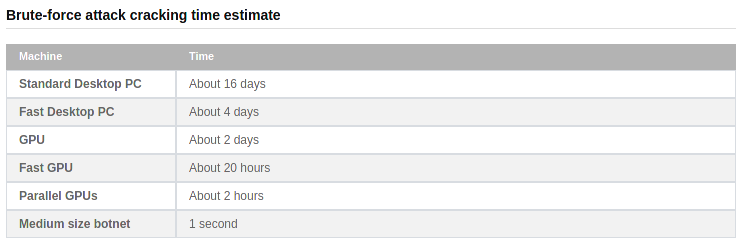
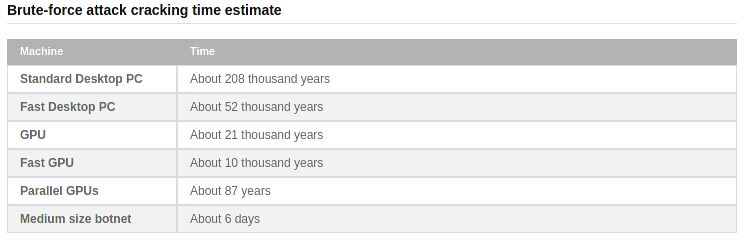
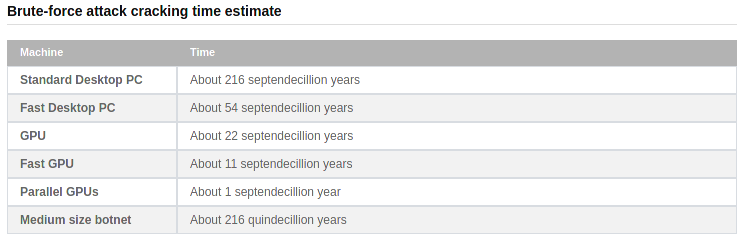
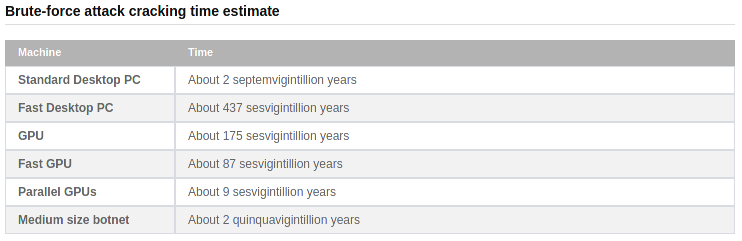
According to some tests at http://password-checker.online-domain-tools.com/ it looks like the mix-and-match of the signs becomes less relevant for “practical” purposes the longer the password is.
miuzhlefhm (length=10)
/<.]9pU({r (length=10)
dpfwayfsbgwokrrlmtuwljtxdcaznejvgfkslydzynfksmdnal (length=50)
R"vV@#Jg^\sJ8j&TBP2L^!Ym6[o_Mdde[6/A=m<8AksF0b"^Q (length=50)

/me changes his password.
/me changes his password again.
When you are using a password manager, there is no reason not to use long generated passwords. It does suck on the rare occasion when one needs to be typed in manually though. When something has a high probability of needing to be manually input, I usually limit it to 20-25 chars.
Of course, as others have pointed out, the most important part of password management is never re-using a password or creating variants of similar passwords. Given the state of the world, you should assume that some percent of your passwords will be found. Since people are getting better at correlating your various activities you can also assume there is a likelihood that people have multiple of your passwords. So if you are using some type of pattern that it identifiable you could be in trouble.
And for the love of all things, never ever reuse your email account password!
Just thought to put this here in case …
Funny you should say that…
From maybe 1990’s until maybe 2007 I used my mother’s maiden name ***** with ‘nnn’ at the end to satisfy the minimum 8 character length… for many websites.
Lastpass cleared that up for me by complaining and pushing me to change them.
Right now, my most uncomfortable password moments come when using passcodes to unlock stuff.
So you start with a phrase
{ 7 queen skype 5 # drip FRUIT coffee } QUEEN TOKYO PARK @ 9 $'
to generate your password {7qs5#dFc}QTP@9$
Then you unlock it with ‘2768’ and your toddler watches over your shoulder 
Simple enough!
Since moving to password managers (especially online password managers where it sync automatically), I’ve just went to using randomly generated complex 20+ character length passwords. I literally only know the password for my password manager, I can’t get into ANY of my stuff (even my home routers admin interface) without my password manager.
Good reminder, I hadn’t used lastpass for 3 years, not sure why I hadn’t deleted it before today.