Graphics Issue I Can't Figure Out

With TIA for any assistance, I’ve been pulling my hair out trying to solve this for the last couple of weeks (+/-).

I have a mature and well-known program called “oscar” that has been operating flawlessly under KDE wayland for more than a year. Since an update a couple of weeks ago (I think, timeline-wise) It now fails under wayland. It works fine under an X11 session.

I think this is a problem local to my machine, since not a single user has reported any related issue upstream to the oscar team.

Here’s the output from running oscar in the terminal:

$ oscar
libEGL warning: failed to get driver name for fd 15

failed to get driver name for fd 16
MESA: error: Unknown kernel mode driver
libEGL warning: egl: failed to create dri2 screen
failed to get driver name for fd 16
MESA: error: Unknown kernel mode driver
libEGL warning: egl: failed to create dri2 screen
QWaylandGLContext: Failed to create the decorations EGLContext. Decorations will not be drawn.
Warning: fallback to QtQuick software backend.
00000: Debug:    Started logging thread
00000: Debug:    OSCAR starting Tue Nov 18 09:09:49 2025
00000: Debug:    APP-NAME: "OSCAR"
00000: Debug:    APP-PATH: "/usr/bin"
00000: Debug:    Trying "/usr/bin/Html/about.html"
00000: Debug:    Trying "/usr/share/oscar/Html/about.html"
00000: Debug:    APP-RESOURCES: "/usr/share/oscar"
00000: Debug:    High Resolution Mode is Disabled
00000: Debug:    OSCAR 1.6.1+master-45dfc14 (linux x86_64)
00000: Debug:    Built with Qt 5.15.18 on Nov  9 2025 00:13:25
00000: Debug:    system locale date format "dddd, MMMM d, yyyy"
00000: Debug:    shortened date format "ddd MMM d yyyy" dayFirst false
00000: Debug:    number of built-in *.qm files 0
00000: Debug:    Inbuilt Translations: en_US
00000: Debug:    number of external *.qm files 30
00000: Debug:    Number of external translations is 30
00000: Debug:    Extra Translations: af, ar, bg, cz, da, de, el, en_UK, es, es_MX, fi, fil, fr, he, hu, it, ja, ko, nl, no, pl, pt, pt_BR, ro, ru, sv, th, tr, zh_CN, zh_TW
00000: Debug:    Using default language en_US
00075: Debug:    Logging UI initialized
00076: Debug:    Using System Tray for Menu
00077: Warning:  QWaylandGLContext: Failed to create the decorations EGLContext. Decorations will not be drawn.
Segmentation fault         (core dumped) oscar


Here’s the output of my inxi -Ga: https://0x0.st/KfW1.txt

I’ve run this output through the GPTs; I’ve researched in our forum, and generally online, the mesa, libEGL, and QWaylandGLContext error outputs to the best of my ability, and I can’t resolve the issue.

To the best of my knowledge, no other package across my system is failing.

Happy to post other logs, etc.

Again, thanks for any thoughts!
How was it installed?

From the AUR using yay. It’s the standard oscar package (not the -bin, but I’ve tried that package too with the same results).

Does VLC work? Oscar starts here on wayland btw. What is the output of
yay xf86-video | grep Installed

I was going to suggest a clean build… Have you tried that?

Yes, but no change.

No output.

yay -Qs xf86-video also displays no output (I think essentially the same command as you offered, just confirming).

IDK the solution. The command I asked is a wildcard version (not harmful)
yay xf86-video | grep Installed

8 extra/xf86-video-amdgpu 25.0.0-1 (69.6 KiB 166.2 KiB) [xorg-drivers] (Installed)
1 extra/xf86-video-ati 1:22.0.0-2 (155.3 KiB 476.7 KiB) [xorg-drivers] (Installed)

^C
yay mesa | grep Installed

7 extra/glu 9.0.3-2 (152.2 KiB 363.0 KiB) (Installed)
5 extra/mesa-utils 9.0.0-7 (151.6 KiB 781.3 KiB) (Installed)
1 extra/mesa 1:25.2.7-1 (11.2 MiB 44.4 MiB) (Installed)

^C

My mesa output reports the same as yours. My video is onboard Intel, so I’m not sure about installing the amdgpu and ati packages.

You use swrast which is a software renderer. (on my Intel base laptop iris is used)
Have you run and no question was asked? (no vulkan is used)
[Which vulkan-driver should I choose?]
sudo pacman -Syu

I have run sudo pacman -Syu. Here is my sdl output:

$  yay -Qs sdl
local/sdl2-compat 2.32.58-1
    An SDL2 compatibility layer that uses SDL3 behind the scenes
local/sdl3 3.2.26-1
    A library for portable low-level access to a video framebuffer, audio output, mouse, and keyboard (Version 3)

I’m sorry I don’t have a better idea:
yay -Rns oscar
yay -S flatpak
relogin if needed.

flatpak install flathub com.sleepfiles.OSCAR
flatpak run com.sleepfiles.OSCAR

I think flatpak packages have less dependencies.
Edit:
I tested on both Intel and AMD based Lenovo laptops with success.
Fresh EnOS wayland. (With garuda there were problems with the flatpak version)

No worries—I appreciate every response! I’ll try the flatpak route and see if I get a different result.

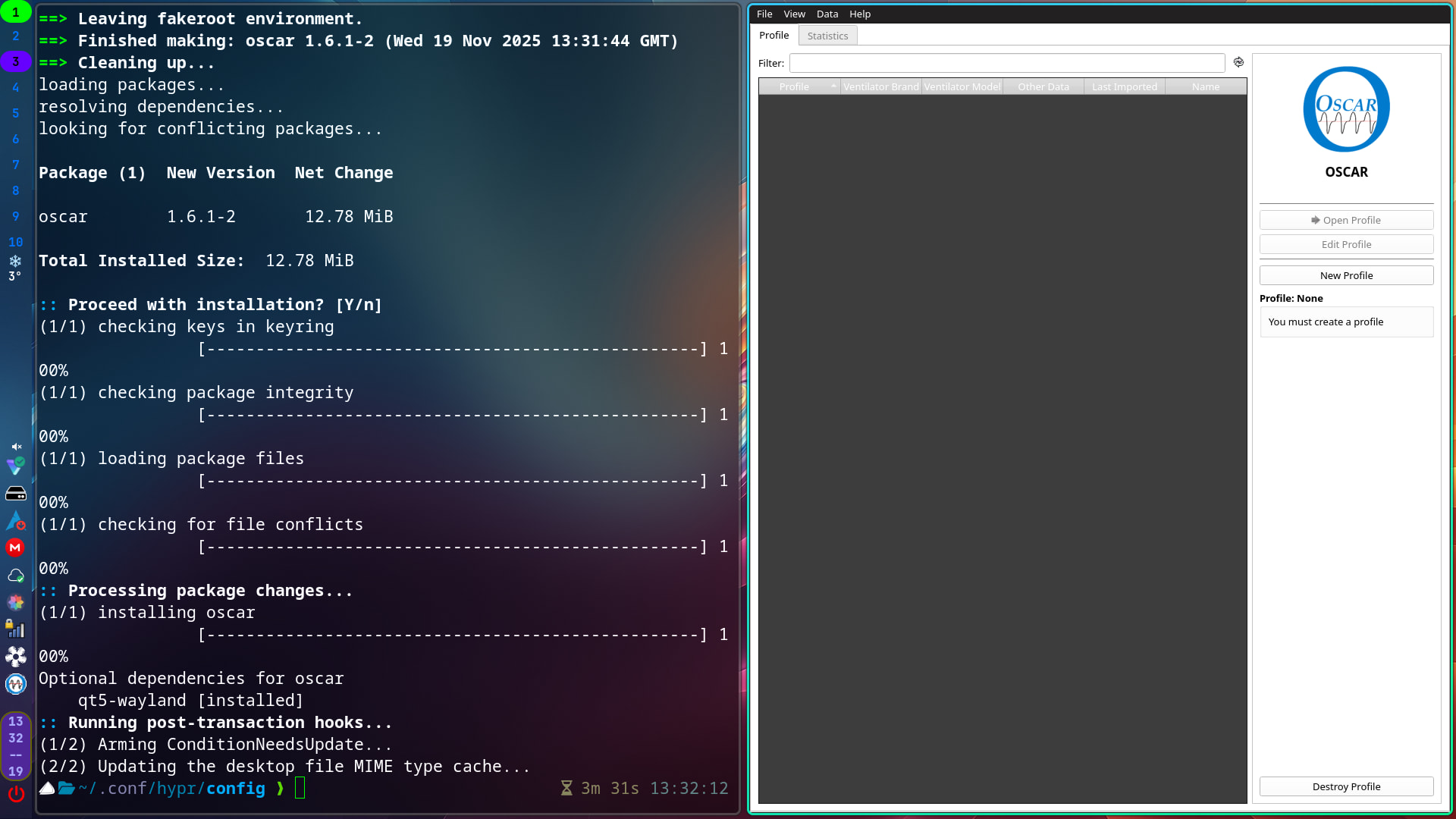
I installed it, appears to work fine here:


This is Hyprland and the themeing is a bit off due to it being qt5.

Thanks for confirming. I know whatever is the issue, it’s local to my system. I know it’s something conflicting between mesa, openGL, and/or wayland. Just can’t figure it out. I don’t think I changed anything before it stopped working; I update daily, so I know I’m good there. And it works in x11 environment and under wayland via

QT_QPA_PLATFORM=xcb QT_QUICK_BACKEND=software oscar

Frustrating, but not the end of the world, so long as the issue doesn’t impact other aspects of my system.

Again, thanks!

Solution was to uninstall nomachine, as I learned here:

https://forum.endeavouros.com/t/opengl-using-llvmpipe-as-renderer-ignoring-rx-6750-xt/76348/18?u=bkaplan

Marking this solved.

Seems like no machine doesn’t belong on any machine. :rofl:

1 Like

This topic was automatically closed 2 days after the last reply. New replies are no longer allowed.