Firefox is Getting a New AI Browsing Mode

I’ve been using Mullvad browser as a daily driver using keepassxc’s urls for bookmarks. Anything is better than using Firefox atm.

Edit: Nevermind I see you switched back. I can’t be doing that rat race thing constantly changing settings to override.

In firefox you can disable all AI features system wide with the policy: GenerativeAI

{
  "policies": {
    "GenerativeAI": {
      "Enabled": true | false,
      "Chatbot": true | false,
      "LinkPreviews": true | false,
      "TabGroups": true | false,
      "Locked": true | false
    }
  }
}

See also my post here:

3 Likes

LOL Firefox is becoming like Windows, you need to de-bloat it before you can use. :rofl:

2 Likes

It’s not only FF, almost all browsers are racing in the same direction.

1 Like

I haven’t seen any AI features in Chromium yet, thankfully.

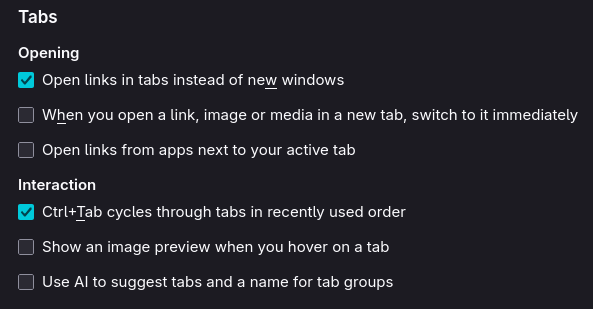
Just noticed in Firefox 1.47 there is an AI feature to name tabs and groups

What if this information is going back to Mozilla?

It doesn’t. Everything runs locally on your machine and just looks at your open tabs to group them.
Nothing is sent anywhere, and it’s not used for training any external LLMs.

I’m using Floorp 12.10, where this is enabled by default, and Waterfox 6.6.8, where it isn’t.

Its on in Zen Browser 1.17 config settings. But not show in the Zen interface.

1 Like

The same with Waterfox

Am I going blind? I can’t see anything AI related in FF147…

I believe you can find it by typing about:addons on the address bar and search for On-Device AI tab in the left-hand menu.

There are also some “under-the-hood” settings available on the about:config page, which were mentioned earlier in other posts.

“Today, as artificial intelligence, privacy, and competition shape the digital landscape, Chromium’s role has never been more critical. This article explores the evolution of Chromium, how it differs from Chrome, the rise of Edge, the state of competing browsers, how AI is being integrated, and what the future may hold for the internet’s most important open-source foundation.“

As long as I’m not seeing AI agents in my web-browser and other stuff like that, I’ll be happy. As it seems with Firefox now you have to disable the AI agent.

You may not be “seeing AI“ in Chromium but it’s definitely there…

“In short, Chromium is becoming not just a web engine but a platform for AI-powered browsing, setting the stage for a new era of personalized and intelligent internet experiences.“

1 Like

As long as I’m not being bothered by annoying AI agents and other stuff like that in my web-browser than I’m okay with it. As what you are seeing now in Firefox annoys me, I don’t really care for Firefox as a web-browser anymore or any other fork of it. Maybe I would switch back to Vivaldi at some point.

It’s what you can’t see and what we don’t know about AI integrations in browsers that should concern people…

# Security Experts Warn Companies to ‘Block All AI Browsers Now’

AI browsers are ‘too risky for general adoption by most organizations,’ according to research firm Gartner, a sentiment echoed by the UK’s National Cyber Security Centre.

3 Likes

Good thing Ladybird will be another option soon since there’s almost no option left since AI is visible or invisible almost all of them now.

It doesn’t appear to be in Vivaldi, at least there’s no settings for it. I suspect it’s only a matter of time though.

1 Like

They promote their browser as non-AI. It’s still Chrome but a better option than the AI slop options…

2 Likes
2 Likes