Well that’s good news at least and another reason to like Vivaldi.
I had switched to Chromium because I didn’t like the how many settings there are in Vivaldi that I never touched and didn’t realize up till now that Chromium also has AI working in the background.
Thanks for the info about Chromium @jackkileen! 
This is OT but I really hate the new profile system. It runs concurrently with the old system and the two are not compatible. They seem to just chuck new code at the wall every week without thinking about what is already there.
With the AI stuff are they just going to keep throwing more AI in and probably loads of duplicated code like they do everything else. I’ve lost all faith in Mozilla. I’ve even been using ungoogled-chromium for youtube and I never thought I’d be doing that.
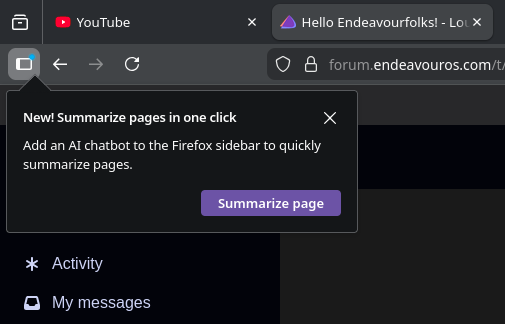
It’s a shitty UI pattern, but yeah, that is by all means an opt-in.
You’re are correct in all regards as it’s the setting “recommend features as you browse”.
I’ve not been regularly using Firefox for a few weeks now but just installed it to see what’s going on and forgot to do my due diligence.
I’ve turned off the AI chatbot / AI junk stuff in Firefox a couple of times now. Surely it shouldn’t reappear after every version update. That close to junking the whole damn browser..
As they say, you have to add an AI chatbot.
It shouldn’t, but you can keep your anti-AI parameters in ~/.mozilla/firefox/######/user.js.
/** AI ***/
user_pref("browser.ml.enable", false);
user_pref("browser.ml.chat.enabled", false);
user_pref("browser.ml.chat.menu", false);
user_pref("browser.tabs.groups.smart.enabled", false);
user_pref("browser.ml.linkPreview.enabled", false);
The following is from one of the FF developers’ blog. It is in German ,but translates fine in FF.
They are adding an option to Block all AI , starting with version 148. I tried it as it is available in Nightly, which is my main browser and Beta.
 browser.preferences.aiControls true

Adds the option in FF-Settings
Also: