I can’t install or update a package because I get (something like) this:
error: could not prepare transaction
error: failed to commit transaction (conflicting files)
libname: /insert/file/name/here exists in filesystem
Errors occurred, no packages were upgraded.
Why is this happening?
The package manager, pacman , has detected an unexpected file already exists on disk. By design it will not overwrite files that already exist. This is a design feature, not a flaw - package managers are designed to keep track of installed files.
This issue normally happens because you’ve manually added, copied, or created a file. It can also happen when you install software using a downloaded executable, run a make install , or use a third-party package system such as conda . It also occurs when you install an AUR package which installs files that conflict with a repo package.
When using a third-party installer you should always specify an alternative installation location, such as under your home directory, or under /opt or /usr/local/ . Never install directly under / or /usr .
How can I fix this?
The better way
The first step is to identify which, if any, package owns the file. This can be easily done with:
pacman -Qo /path/to/file
If this identifies a conflicting package you can decide to remove it with pacman -R . If no package is identified you can delete the file, e.g. rm /path/to/file (or move it to a backup location, e.g. mv /path/to/file /path/to/file.backup ).
The faster way
pacman has an --overwrite option which will allow it to overwrite files. If you are sure you want to, you can tell it to
sudo pacman -S $PACKAGE --overwrite path/to/*
This will (re)install the $PACKAGE and overwrite any files under the directory path/to/
This can be very useful if your local database has “lost” a package you’ve already installed (and so every file in the package “conflicts”).
The “I don’t care” way
sudo pacman -S $PACKAGE --overwrite '*'
Example
Here’s an example of how to decide what to write:
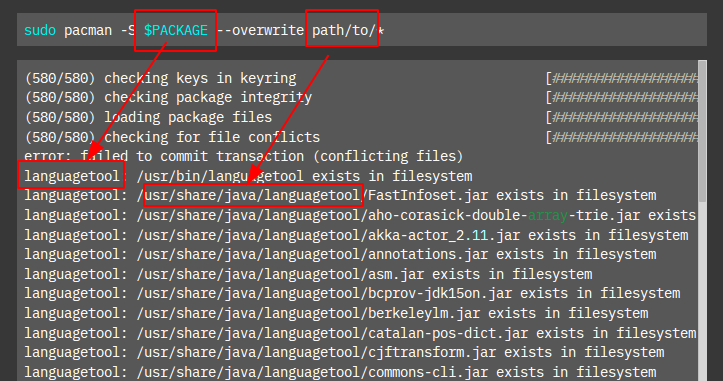
So the command could be:
sudo pacman -S languagetool --overwrite usr/bin/languagetool,usr/share/java/languagetool/*
Where can I read more?
This post was inspired by (and adapted from):
https://bbs.archlinux.org/viewtopic.php?id=56373
The above post also has links to further reading.