@ricklinux @keybreak
Is there any tools in the repo using which I can test my CPU ?
@arch_lover its incredibly unlikely to have a faulty CPU. Memtest86 is generally poor at finding minor faults, ive only ever had it find major system issues.
What CPU/Motherboard do you have? GPU? System Age? PSU Wattage/Age? etc. more details the better
3 good tools for stressing the system to find Faults are
stressapptest
stress-ng
mprime with large fft for stressing ram/CPU , small fft for CPU
Watch your temps and note down exactly when/how/what causes system freezes.
Keep in mind, the first thing you think might not be the issue. I was having system freezes for a long while and error logs pointed to GPU but really it was the Ram/Infinity fabric on my Ryzen build not liking running memory at XMP with 4 DIMMs.
Motherboard : Asus H110M-CS
CPU : Intel Core i3-6100
GPU :Onboard Intel
I had assembled this desktop myself on 2017.
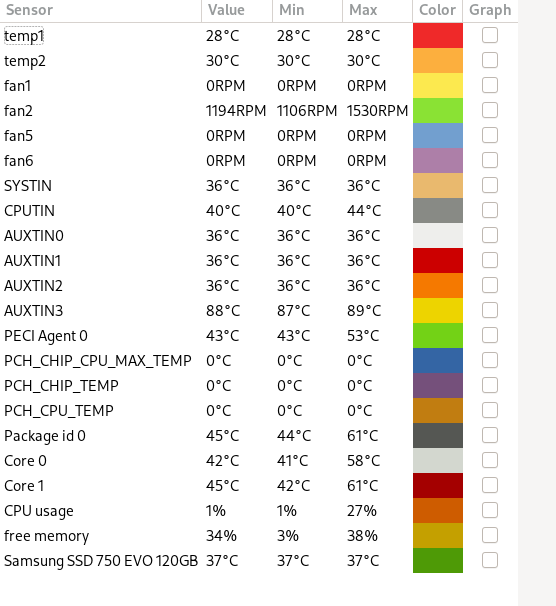
Core0 & Core1 indicate the CPU temperature, right ?
yes
what is the wattage on the PSU and what brand? Youll need to look specifically at what happening when things freeze to see if there is anything in common. Your HDD activity light doesnt really give any clue but youll need to check systemd and dmesg logs for anything suspicious. Your smart data doesnt look abnormal but when was the last time you ran Trim on that SSD?
The PSU is a no name, cheap one but the fact is its running fine since 2017. I just checked but the wattage is not mentioned on the PSU.
At first I thought my EOS install is faulty so I reinstalled just 2 days back.
Should I still run fstrim ?
As I said when the freeze happens the only way out is REISUB which reboots the PC.
How do I check the logs after the PC reboots ?
Well thats not good, that very well could be an issue there. It being a no name PSU with no labeling and being 5yrs old. Could be faulty PSU
Yes still run fstrim. as for the rest a little google fu will get you going. Im of the opinion hardware troubleshooting is a skill best learned without too much hand holding. Look into how to get your systemd logs and dmesg, there will be tons of info out there. Errors or weird stuff should be red/yellow highlighted and you can post what you find. 
It doesn’t really matter how much it run, for now it seems like a candidate number 1.
Theory of PSU is this:
-
Regardless of brand it will degrade over time (how much and how fast depends on the brand)
-
If let’s say your system eats 500 W and you have quality 1000 W PSU - it’s nearly impossible that you’ll ever notice anything at all, however if you have 450 W and crap no name 500 W - it is highly likely you’ll notice problems even after year or two.
If you have spare PSU or a friend to ask - just test with another PSU for few days.
P.S. Oh and yeah - do some heavy stress tests.
@ricklinux @keybreak
I think I found the reason why my desktop is freezing. Following @Echoa 's idea of monitoring CPU temperature I ran sensors-detect then launched psensors.I have set an alert for CPU temperature so that when the temperature reaches 65 I get a desktop notification. What I found is the cpu temperature stays way below 65 when I am playing full hd videos but when I start browsing the web moving from one website to the next the psensors is showing an alert that my cpu temperature is ~68.
Now, if my cpu fan is under performing or not ? That’s what I want to find out next. Any ideas ?
For some reason mprime is not downloading
$ yay -S mprime-bin
:: Checking for conflicts...
:: Checking for inner conflicts...
[Aur:1]  mprime-bin-307b9-1

  1 mprime-bin                       (Build Files Exist)
==> Packages to cleanBuild?
==> [N]one [A]ll [Ab]ort [I]nstalled [No]tInstalled or (1 2 3, 1-3, ^4)
==>
:: PKGBUILD up to date, Skipping (1/0): mprime-bin
  1 mprime-bin                       (Build Files Exist)
==> Diffs to show?
==> [N]one [A]ll [Ab]ort [I]nstalled [No]tInstalled or (1 2 3, 1-3, ^4)
==>
:: (1/1) Parsing SRCINFO: mprime-bin
==> Making package: mprime-bin 307b9-1 (Friday 01 April 2022 10:24:28 PM)
==> Retrieving sources...
  -> Downloading p95v307b9.linux64.tar.gz...
  % Total    % Received % Xferd  Average Speed   Time    Time     Time  Current
                                 Dload  Upload   Total   Spent    Left  Speed
  0     0    0     0    0     0      0      0 --:--:--  0:00:35 --:--:--     0^C
One thing I just noticed. When I installed google-earth-pro from AUR CPU temp spiked again.
sub 70C is basically cold as far as a CPU is concerned. If it was hitting 90C+ maybe but with those Temps i dont think thats it.
https://dichotomytests.com/test.html?id=4
the internet has it all…
Did you check the cables? Do you have Power Outages? Did you try a different Kernel/Distro? Do you have latest microcodes installed? BIOS updated? Do you have any kernel parameters set? What is the room temperature/humidity?
Yes, I checked the cables. I disassembled the whole thing including the CPU and assembled it again. No we longer face any power outages. I tried Fedora 35 LXQT and the same thing (system freeze) happened under Fedora. No I don’t have any kernel parameters set. Google is reporting the weather as 29 C Haze.
The quick ddg search got me this. Beware, this may or may not work or even make things worse.
Yes, I read that thread before posting here. The user in that is using a PCIE SATA card. I never used one. My motherboard has 6 SATA ports. So I can’t do what the user in that thread did to solve this.
Did you clean up the top of the cpu and heatsink and reapply new thermal compound after taking it apart? Check the power supply that is probably the culprit. If you don’t have the tools to check it then take it to someone who does. Power supplies need to be tested under load. If they are not putting out the proper voltage etc then you will have random lock ups etc. You can buy a tool to test it but in my opinion the toll is as much as just replacing the power supply. Me i would just replace it and see if it solves the issue.
Did you clean up the top of the cpu and heatsink and reapply new thermal compound after taking it apart?
Yes.
My desktop was running all night yesterday coz the memtest was taking forever so I switched off my display and went to sleep. I know it sounds weird but fact is I haven’t faced any freeze till now. If the problem starts again I will just purchase a new PSU and test it out.
This is only a suggestion and it may not solve the issue. Won’t know unless you are able to try another known good power supply. I don’t know your hardware, how old it is, and if it is low range as you said it’s just a cheap one. 
I have a cheap power supply load tester. I think I’ve used in twice in my lifetime and both times the power supply was the culprit. Most power supplies today have warranties ranging from 1 yr to 10 years. It depends on your hardware needs and quality of the parts and your budget. Some people go overboard others not enough and they have higher end power requirements from video cards etc and run into problems that way.
Hope you figure it out!
arch_lover,
If you have a multimeter (and a high-tech paperclip!), you can test your PSU by following this video from Britec:
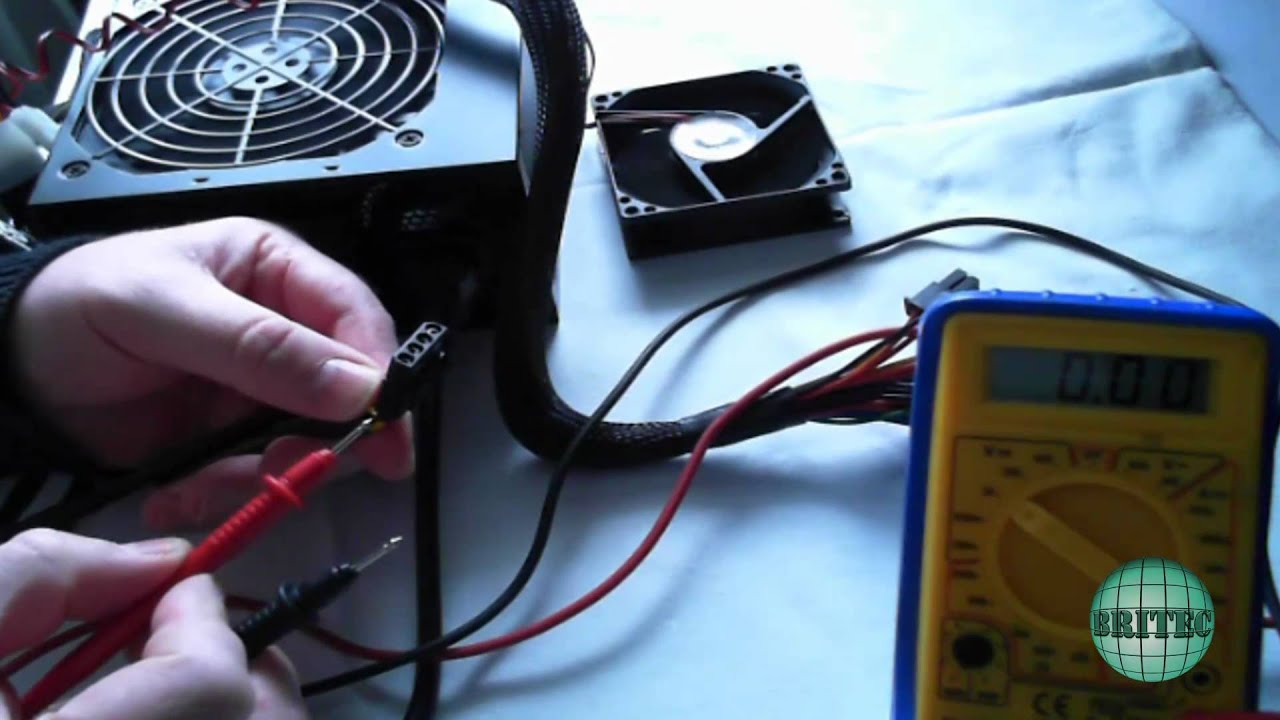
NB Do make sure that the PSU is switched OFF initially!!
Even if the PSU voltages appear okay, the PSU may still be faulty when put under normal load.
I had a PSU fail and it was easy to check with a cheap tester like this: