[ARM] Has anyone got Pine Pro 64 installed yet?

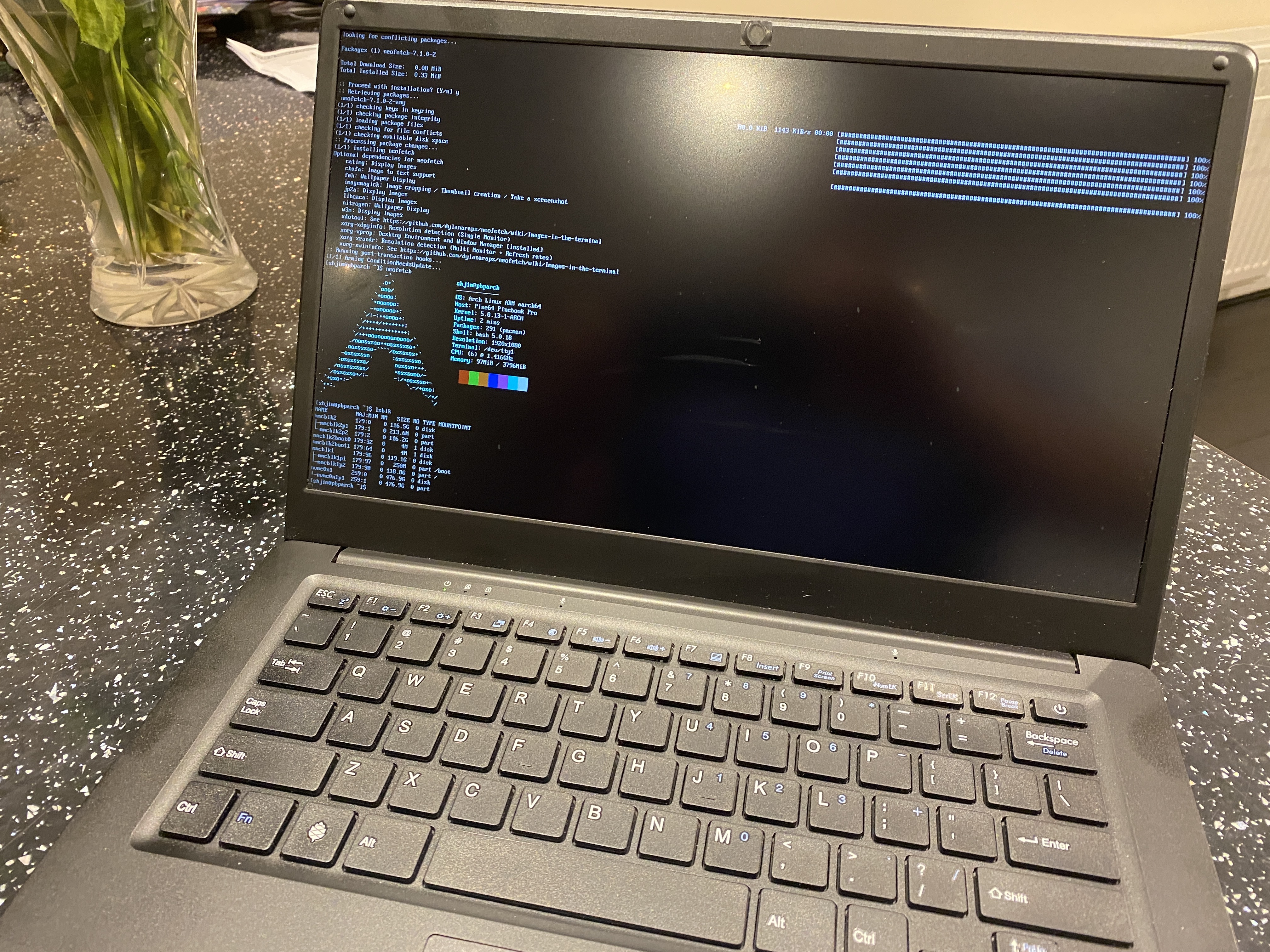
that how i did it … it all in that link to pine wiki :+1: it work for me but it might not be the right way :rofl:
but my system is run but X11 is not perfect ( is it ever !!) 55555…

ps 55555 = HAHAHA

don’t forget…

The pacman.conf installed when running pacstrap is the default one from Arch Linux ARM, so it won’t include the custom repo. Add the following to it after the entry for the aur repo:

[pinebookpro]
Server = https://nhp.sh/pinebookpro/
SigLevel = Optional

Edit…
@Pudge @lxnauta

Proof it work . New install

image

Sorry only way I could post … 3 limit :face_with_symbols_over_mouth:

Thanks, @anon75994754. I had done that already, add the repository after installing, for installing pinebook pro related stuff after wards. (Inciddentally, I found that uboot-pinebookpro-bsp solves my u-boot issue without having to backup mbr partition table, dd-ing from mrfixit’s debian and restoring mbr).

I really think I’ve gone through everything I am capable of at the moment, skill-wise and as far as documentation is available.

So I was thinking that I might convert a Manjaro install to an Arch install. And then try installing EndeavourOS Arm from there. Has anybody who’s reading this ever done it?

@Bryanpwo @Pudge @joekamprad

something for you … 2020-10-13-212155_1920x1080_scrot

pls post link for EOS i3 config +status :pray:

Wow! you actually did it :smiley:
Congrats!

Sadly no i3 config and status bar :scream: script partly work or my mess up ? I not know yet​:rofl:

It ok I fix it later

a quick google search turned this up:

https://github.com/endeavouros-team/i3-EndeavourOS

I remember some stuff in the i3blocks bar not working on my ARM install on the OdroidN2+ though…
I instead copied over my older dotfiles from another distro, and added some EOS coloring.

If you want, I can make a pastebin of my config file, so you can take bits and pieces out of it?
I am running I3-gaps though, so you would have to delete the gaps stuff

mmm scrot and flameshot :slight_smile:

@ringo was not sure scrot was installed so installed backup :rofl: flameshot will go

was looking on the internet what scrot means in dictionary… is a dirty word :laughing: :laughing: :rofl:

needs some packages beeing installed https://github.com/endeavouros-team/i3-EndeavourOS/blob/master/packages-repository.txt

@joekamprad where can i clone eos i3 scripts from pls… got most work but errors as eos use custom scripts. not sure why the install script not grab all files but that life … 555555 :rofl:

edit… it ok found them

2020-10-13-23:11:26-screenshot

all fixed :blush:

I guess you’re the first person now to run EOS on a Pinebook Pro :smiley:

one for eos twitter of what platform you use … 2020-10-13-23:26:40-screenshot

What a sight to behold.

Pudge

Just spotted this beauty on our Telegram group
ManjeavourOS :joy:

would this even work in the long run?
If so, that would mean I could turn my Manjaro install on my RockPro64 into this frankenstein OS as well :crazy_face:

ManjeavourOS

@anon75994754, finally did it: I was able to install Arch (or Alarm): what did the trick was replacing the dtb file in /boot/dtbs/rockship with a dtb from another Distro (used Manjaro’s).

@Krimkerre, I didnt finish that experiment with “Manjeavour” because when I did a reboot my machine couldn’t recognize Ethernet or Wifi: not with the SD, which I was installling to, not even in the Manjaro installation which I was running. But I’ll try that again just because I want to see how it would have worked.

So I was able to replace that installation, on the very eMMc, with Arch/Alarm, and then scripting EndeavourOS Arm into it:
endOS Arm

This wallpaper is damn beautiful!

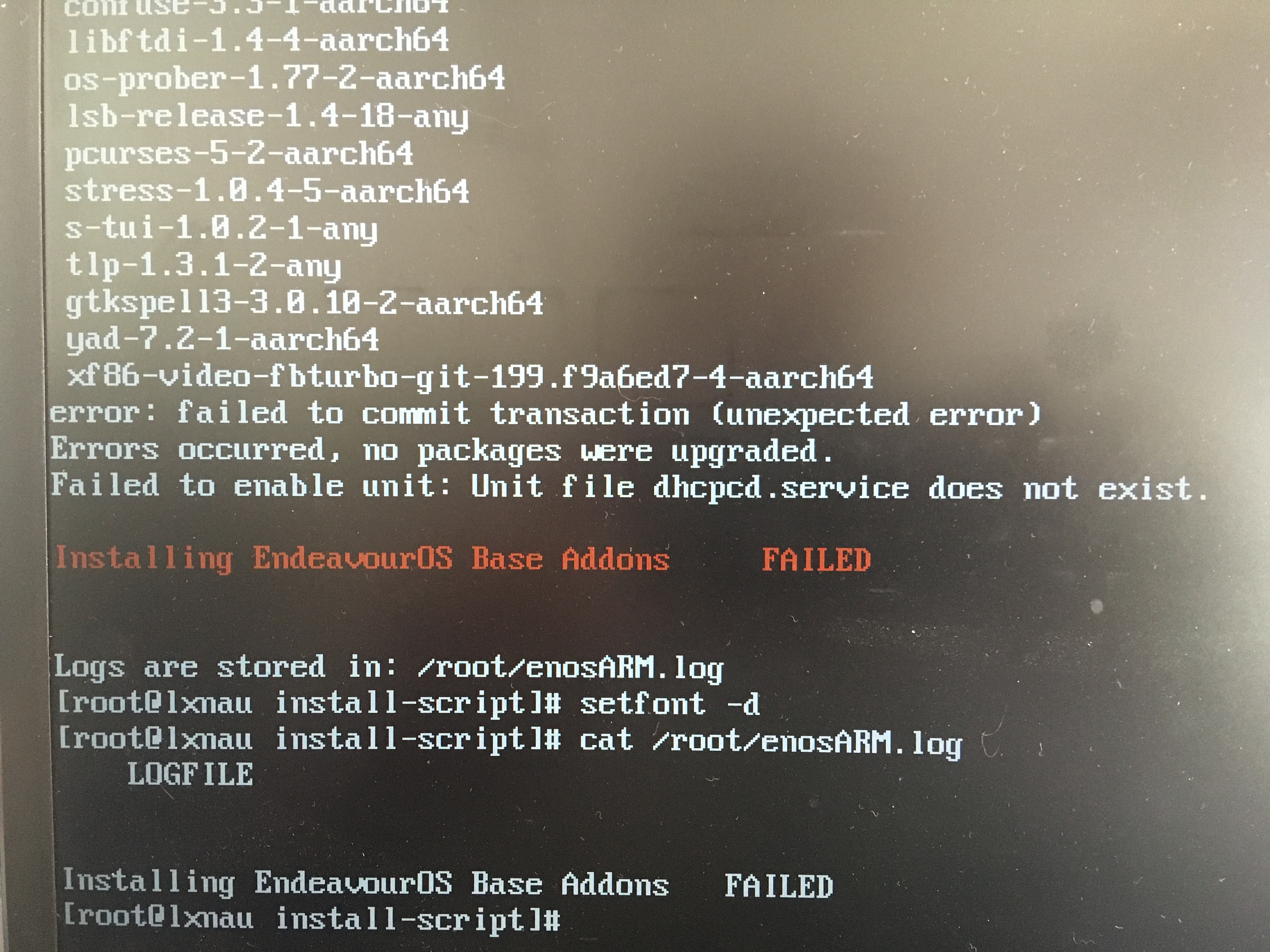
@Pudge: this time I captured the script error that I’ve mentioned before:

IMG_0421

I’ve just written the minimal Manjaro image to an EMMC…

Manjaro I3 was working perfectly fine on my rockpro64, including ethernet, so we’ll see how it goes :slight_smile:

ManjeavourOS is running on the RockPro64, network is working fine too

(I know there’s probably a special place in hell reserved, for people like us :rofl: )

2020-10-14-190912_1920x1080_scrot

WOW. Congratulations, your persistence paid off. :muscle:

The xf86-video-fbturbo-git is a ‘X.org MALI video driver’. The Pinebook Pro 64 has a Mali T860 MP4 GPU so I’m not sure why it is causing a problem. The T860 probably is the latest Mali GPU, so maybe xf86-video-fbturbo-git is old enough that it doesn’t support Mali T860?

Here is the list of packages that the EndeavourOS script uses.
You will see that line 8 is the xf86-video-fbtrubo-git driver. If you install again, after the git clone that downloads the script and support files, if vi or nano is available one could try deleting that line. Don’t comment it out with a #, actually delete the line and don’t leave a blank line in it’s place.

Normally dhcpcd is installed as part of the Archlinux Arm base image. How is the EndeavourOS script and it’s support files downloaded, on wifi or ethernet? Does the Pinebook Pro even have a ethernet port. It looks awful thin to accommodate an Ethernet jack. I know very little about WiFI, does WiFi utilize dhcp?

Right now, when the script gets to line 626 it assumes dhcpcd is installed and tries to use systemctl enable dhcpcd.service, as most SBCs have ethernet.

If they are downloaded via wifi, that means that the process for getting Archlinux base is not installing dhcpcd. So if dhcpcd is necessary, one can use vi or nano to change line 8 of the base-addons file from ‘fx86-video-fbturbo-git’ to ‘dhcpcd’

If dhcp isn’t necessary, we can put in the script a condition if the device is a Pinebook Pro 64, skip enabling dhcpcd.

Hope that helps, if I can help in any way, let me know.

EDIT:

Is the home of the EndeavourOS arm install script and it’s support files. It’s all written in bash, so easily edited to adapt to special needs. If any of you Pinebook Pro 64 laptops or RockPro64 SBC pioneers have any questions on the script or support files, let me know.

EDIT #2

Arm wallpaper by @FLVAL . His wallpaper is :fire:
In current US slang, saying something is fire is a very good thing.

Pudge