Yep, tried that too:
Live has nouveau.modeset=1 i915.modeset=1 radeon.modeset=1, tried adding those but nothing changed.
I’m on grub, right now it’s just this:
GRUB_CMDLINE_LINUX_DEFAULT=‘nowatchdog nvme_load=YES loglevel=3’
Yep, tried that too:
Live has nouveau.modeset=1 i915.modeset=1 radeon.modeset=1, tried adding those but nothing changed.
I’m on grub, right now it’s just this:
GRUB_CMDLINE_LINUX_DEFAULT=‘nowatchdog nvme_load=YES loglevel=3’
No, just what’s on this reddit thread:
Graphics:
Device-1: Advanced Micro Devices [AMD/ATI] Navi 31 [Radeon RX 7900 XT/7900
XTX/7900 GRE/7900M] driver: amdgpu v: kernel arch: RDNA-3 pcie:
speed: 16 GT/s lanes: 16 ports: active: HDMI-A-1 empty: DP-1, DP-2,
HDMI-A-2, Writeback-1 bus-ID: 03:00.0 chip-ID: 1002:744c
Display: wayland server: ``X.org`` v: 1.21.1.21 with: Xwayland v: 24.1.9
compositor: kwin_wayland driver: X: loaded: amdgpu
unloaded: modesetting,radeon alternate: fbdev,vesa dri: radeonsi
gpu: amdgpu display-ID: 0
Monitor-1: HDMI-A-1 model: AOC 24B2W1G5 res: 1920x1080 hz: 75 dpi: 93
diag: 604mm (23.8")
API: EGL v: 1.5 platforms: device: 0 drv: radeonsi device: 1 drv: swrast
gbm: drv: kms_swrast surfaceless: drv: radeonsi wayland: drv: radeonsi x11:
drv: radeonsi
API: OpenGL v: 4.6 compat-v: 4.5 vendor: amd mesa v: 25.3.3-arch1.1
glx-v: 1.4 direct-render: yes renderer: AMD Radeon RX 7900 XTX (radeonsi
navi31 LLVM 21.1.6 DRM 3.64 6.18.4-arch1-1) device-ID: 1002:744c
display-ID: :1.0
API: Vulkan v: 1.4.335 surfaces: N/A device: 0 type: discrete-gpu
driver: mesa radv device-ID: 1002:744c
Info: Tools: api: clinfo, eglinfo, glxinfo, vulkaninfo
de: kscreen-console,kscreen-doctor gpu: lact,radeontop wl: wayland-info
x11: xdpyinfo, xprop, xrandr
EDIT: is there a way to make it look better? New to the forum.
Looks fine, don’t worry.
Yeah no idea. Maybe do a complete BIOS reset would be my last “have tried everything else, so why not” suggestion.
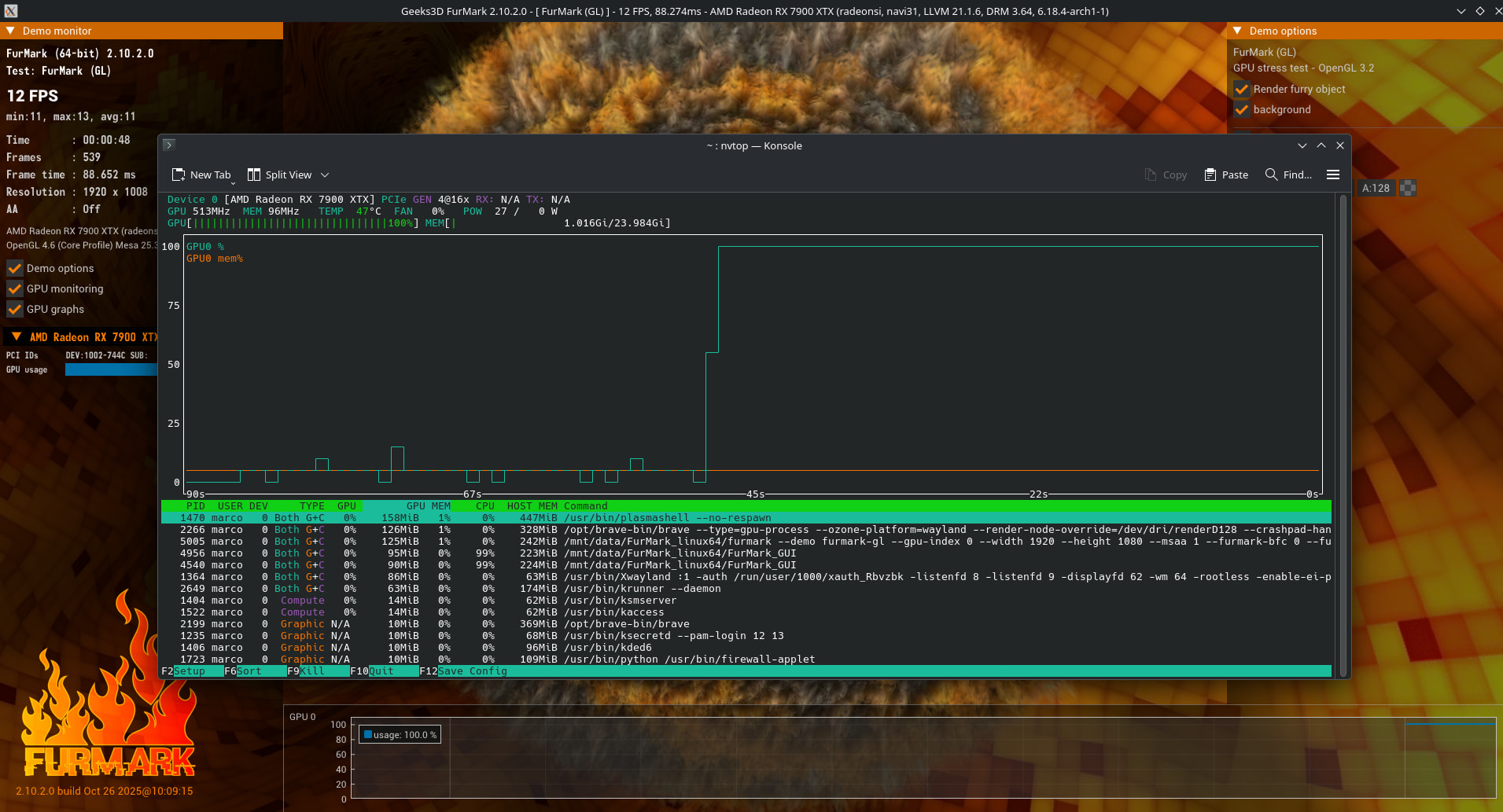
Only thing that looks odd is that 7900 xtx stuck in low power mode - #39 by Stripe76 seems to indicate activity by temperature and power draw … but where are the frames? Would be interesting to see a nvtop graph for such a run.
Sorry, what do you mean with frames in this case?
That was just colloquial for “you don’t see the fps you would expect in the benchmark”.
Oh, ok, I thought the image was missing something.
Yeah, that’s what puzzles me too, it looks like the GPU is sweating like crazy just to put out 67 frames per second lol.
And the actual state / profile being in use in terms of lact and automatic profile switching, which I mentioned earlier than that benchmark run.
Because there would be a difference if automatic profile switching based on gamemode is being in use.
furmark-gui
[ Demo Quick Stats ]
- demo                 : FurMark (GL) (built-in: YES)
- renderer             : AMD Radeon RX 6600 (radeonsi, navi23, LLVM 21.1.6, DRM 3.64, 6.18.3-zen1-1.1-zen)
- 3D API               : OpenGL 4.6 (Core Profile) Mesa 25.3.3-arch1.1.1
- resolution           : 1920x1080
- frames               : 717
- duration             : 33556 ms
- FPS (min/avg/max)    : 21 / 21 / 23
- GPU 0: AMD Radeon RX 6600 [1002-73FF]
  .max temperature: 57�C
  .max usage: 99%
  .max core clock: 477 MHz
  .min core clock: 36 MHz
gamemoderun furmark-gui
[ Demo Quick Stats ]
- demo                 : FurMark (GL) (built-in: YES)
- renderer             : AMD Radeon RX 6600 (radeonsi, navi23, LLVM 21.1.6, DRM 3.64, 6.18.3-zen1-1.1-zen)
- 3D API               : OpenGL 4.6 (Core Profile) Mesa 25.3.3-arch1.1.1
- resolution           : 1920x1080
- frames               : 3613
- duration             : 35570 ms
- FPS (min/avg/max)    : 99 / 102 / 106
- GPU 0: AMD Radeon RX 6600 [1002-73FF]
  .max temperature: 80�C
  .max usage: 99%
  .max core clock: 175 MHz
Which I’m just mentioning in case it hasn’t been obvious.
Therefore I did already mentioned lacts “reset all configurations”.
In my opinion it is Insufficient Power:
The RX 7900 XTX has a recommended minimum power supply unit (PSU) of 800W or more (some manufacturers suggest 850W). Many Intel NUC Extreme kits, such as those with a 13th gen i7, come with a 750W PSU, which may be insufficient for the card’s peak power draw, leading to performance throttling or system instability.
Edit: I am not a gamer. My opinion is based on the hardware.
Ok, but I think this test is proving that, at least for 15 minutes, the power is enough.
Agreed. Or in the same vain just remove any additional tool like LACT, gamemode etc. to eliminate variables for now. The card should behave correctly out of the box.
I disabled LACT this afternoon, with it disabled I get 12 FPS in furmark  .
.
I mean that’s not necessarily bad, if it makes the wrong behavior more pronounced. What frequencies, power draw, utilization does nvtop show on furmark with LACT disabled?
With the Windows drivers. Which is a different implementation than the amdgpu kernel modules for linux.
As you currently only have an 1080p monitor hooked up, 15mins of furmark might be sufficient to achieve thermal saturation. But I’ld prefer to run furmark in a higher resolution for at least an hour.
I’ll try when I’m at home, 3440x1440, luckily I live in the mountain so it’ll be freezing cold.
EDIT: Better still, I’ll try on my 4k TV! I can’t see plasma taskbar but I should be able to launch furmark.
I see tests done on this card on Furmark running at 420 FPS on 1080P.
The other user on this thread was around 350 but I think he set a power cap and the ones reporting 420 might be overclocking. Anyway that test drew 400 W for, at least, 15 minutes, on Linux it’s not running just after boot.
I totally think you are wasting your time. I believe either it’s a power issue or the cards faulty.
Edit: Testing it on hardware that is under-powered is not going to provide the solution.
Is there a way to test if the card is faulty?
As much as I hate Windows, if I have to choose between trying a RMA or purchasing a unicorn PSU, I think I’ll just come to terms with playing on Windows.
That’s crazy. Compared to 7900 xtx stuck in low power mode - #37 by shadow359 it’s notable you got a 0 for max possible power draw, which smells fishy.