This is a followup to my recent post as well as other post in the Forum.
I am a noob at this, both zram and zswap. I have very vague ideas on both of them. All I know is that zram has to be installed as package on EOS, whil zswap is practically baked into almost all the Linux Kernels out there. Even those kernels that are not used on EOS. Also both of them work in conjunction with SWAP and RAM.
So here are my queries
What is the difference between these?
What are the pros and cons with each of them vs the other? i.e. How is zram better than zswap? How is zswap better than zram?
When should zram be preferred? When should zswap be preferred?
Can those who have used zram or zswap or both or one of them in the past, share their thoughts and experience?
I am trying to gather info and experience over here. Any comments, hints, pointers, counterpoints, sharing of experiences would be deeply welcome.
Can you please share some details on your setup? Like what is the zram-size that has been configured? What is your Physical RAM size? What compression algo are you using, ZSTD or LZO or something else?
What has been your experience in using ZRAM? Have you noticed a degradation in performance?
About system config and use case, can you please elaborate a bit on it? For example if we have a CPU which is say about 5 years old then using zram would be fine? Or something older than that would negate zram benefits?
I have seen a discussion about a year ago between @mbod and @dalto where they specifically discussed about a use case where a user was CPU constrained and not memory (RAM+SWAP) constrained. Are you referring to a similar use case?
Please note that zswap works in conjunction with a swap devicie, a file or partition.
For zram there is no need for a “regular” swap device unless one needs it for hibernation for example.
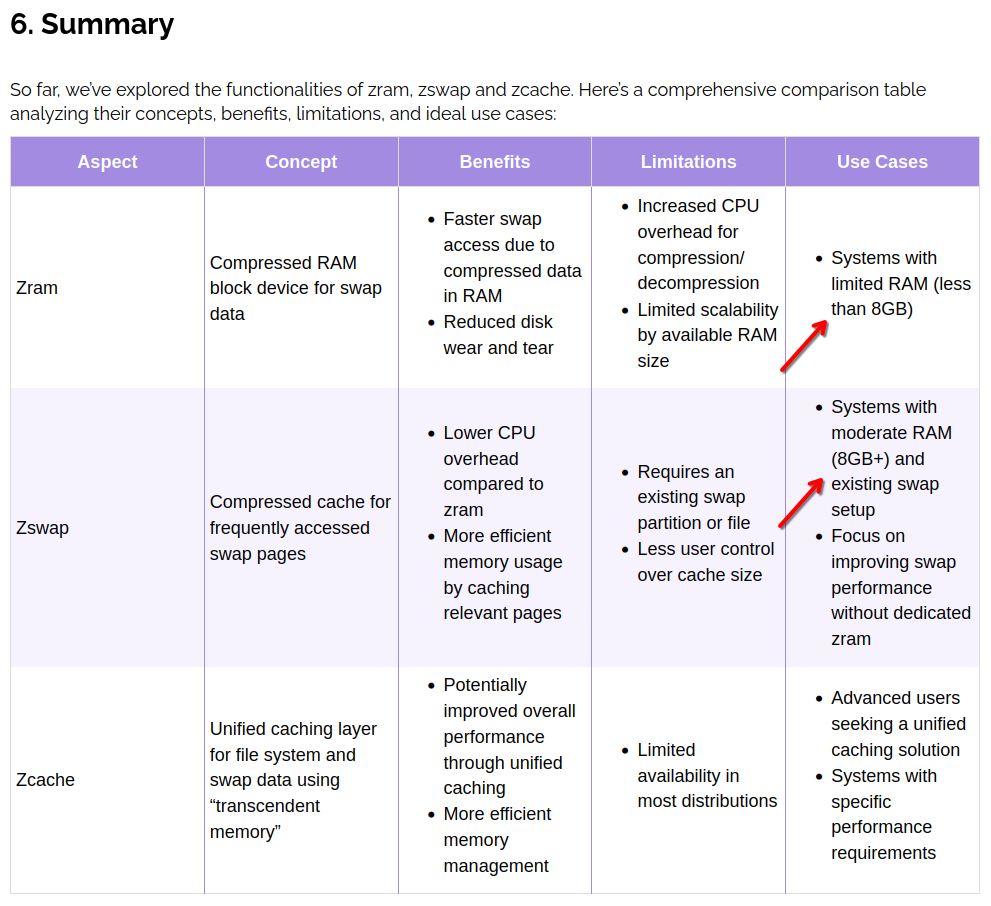
Thanks @cactux this article is a gem and very useful. I did not realize that there is a 3rd option zcache that is available too.
@cactux apart from the questions that I had raised earlier. I have a few additional questions. If you can please indulge me. I have 8GB RAM. I have not gone beyond 65% RAM usage, but I can forsee, due to code compiling in python that RAM usage will be breached. Also many applications like LibreOffice, Firefox are not exactly memory lean. From the article it does appear that zswap would be preferred over zram. Though zswap does not seem to have the same level of configuration as zram. Would love to know your thoughts.
The swapfile was intended primarily for hibernation which I haven’t been using now for some time.
If I were you, I would try both alternatives and put my system through its paces in your actual use case scenario. Monitor the swap usage. See if you observe any performance difference.
I may be wrong about this but I think, even using zram, you may get some benefits from having some swap file/partition for those occasions when your reaching the size limit of zram. I’ll happily stand corrected if I have got this wrong.
PS. I think I’ll be disabling my zram now to see how zswap + swapfile will handle swapping on my system.
Would love to know your experience and comparison on how zswap fared against zram. Please do update this thread after say 3-4 weeks with your observations.
Most normal x86 desktop/laptop CPUs from the last 15 years should be fine. Many even much older than that will be fine. Unless you are using a CPU that is ultra low power or some type of low-end embedded CPU, I don’t expect you would have any issues here.
Keep in mind, that was a single person reporting something for a highly specialized use case.
It is always good to have some swap. I also have 64GB of ram and if I don’t have any swap enabled, the kernel will kill processes occasionally.
Assuming a typical zram config where you set it to 100% of RAM, if you are exceeding that and going to swap your system performance would be absolutely terrible at that point. I think I would either change my computing habits or get more RAM if that was happening.
would also add to this that whatever/whenever I install I let the installer create a good old fashioned swap partition.
My use case: boring, calm.
@cactux I absolutely trust the Baeldung people and would adjust my consideration about my use case. They rec zswap based on having 12GB of memory alone. Good find. I’m re-reading it.