Erst einmal ein großes Dankeschön für eure Geduld und Hilfe.
Ich habe die Ordner auf dem Desktop angelegt.
Ok, hier mal die Ausgabe :
[ralf@BlackMonster 001]$ mkdir iscan-plugin
mkdir: Verzeichnis »»iscan-plugin«« konnte nicht angelegt werden: Die Datei existiert bereits
[ralf@BlackMonster 001]$ dir
iscan-gt-x750-bundle-2.30.4.x86.deb.tar.gz  iscan-plugin
[ralf@BlackMonster 001]$ cd iscan-plugin
[ralf@BlackMonster iscan-plugin]$ dir
iscan-gt-x750-bundle-2.30.4.x64.deb.tar.gz  iscan-gt-x750-bundle-2.30.4.x86.rpm.tar.gz  PKGBUILD  src
[ralf@BlackMonster iscan-plugin]$ nano PKGBUILD
[ralf@BlackMonster iscan-plugin]$ makepkg
==> Erstelle Paket: iscan-plugin-gt-x750 2.1.3-1 (Sa 20 Jun 2026 16:41:50 CEST)
==> Prüfe Laufzeit-Abhängigkeiten...
==> Prüfe Buildtime-Abhängigkeiten...
==> Empfange Quellen...
  -> iscan-gt-x750-bundle-2.30.4.x64.deb.tar.gz gefunden
==> Überprüfe source Dateien mit sha256sums...
    iscan-gt-x750-bundle-2.30.4.x64.deb.tar.gz ... Übersprungen
==> Entpacke Quellen...
  -> Entpacke iscan-gt-x750-bundle-2.30.4.x64.deb.tar.gz mit bsdtar
==> Beginne prepare()...
tar: Verweigere, Archivinhalt vom Terminal zu lesen (fehlt Option -f?)
tar: Error is not recoverable: exiting now
==> FEHLER: Ein Fehler geschah in prepare().
    Breche ab...
und hier der Inhalt der PKGBUILD :
# Maintainer: me <myself@home.de>
pkgname=iscan-plugin-gt-x750
_plugname=iscan-plugin-gt-x750
pkgver=2.1.3
pkgrel=1
pkgdesc="Epson Image Scan! plugin for GT-X750 (Perfection 4490) - Native 64-bit version"
arch=('x86_64')
url="https://download-center.epson.com/"
license=('custom:EPKOWA')
depends=('sane' 'iscan' 'libusb-compat')
makedepends=('binutils')
source=("https://download2.ebz.epson.net/iscan/plugin/gt-x750/deb/x64/iscan-gt-x750-bundle-2.30.4.x64.deb.tar.gz")
sha256sums=('SKIP')

prepare() {
  cd "$srcdir/iscan-gt-x750-bundle-2.30.4.x64.deb"

  # Extrahieren der control- und daten-archive aus dem .deb
 tar x "plugins/${_plugname}_${pkgver}-1_amd64.deb"

  # Dynamisches Entpacken des Datenarchivs (unterstützt xz und zst)
  mkdir -p extracted
  tar -xf data.tar.* -C extracted/
}

package() {
  cd "$srcdir/iscan-gt-x750-bundle-2.30.4.x64.deb/extracted"

  # Kopieren der Strukturen in das Zielverzeichnis
  if [ -d usr ]; then
    mkdir -p "$pkgdir/usr"
    cp -a usr/* "$pkgdir/usr/"
  fi

  # Bereinigen von potenziellen lib64-Pfaden zu lib
  if [ -d "$pkgdir/usr/lib64" ]; then
    mkdir -p "$pkgdir/usr/lib"
    cp -a "$pkgdir/usr/lib64"/* "$pkgdir/usr/lib/"
    rm -rf "$pkgdir/usr/lib64"
  fi

  # SANE-Backend-Registrierung
  mkdir -p "$pkgdir/etc/sane.d/dll.d"
  echo "epkowa" > "$pkgdir/etc/sane.d/dll.d/epkowa"

  # Lizenzdatei
  mkdir -p "$pkgdir/usr/share/licenses/$pkgname"
  local lic_file=$(find . -type f -iname "*license*" -o -iname "*eula*" | head -n 1)
  if [ -n "$lic_file" ]; then
    cp "$lic_file" "$pkgdir/usr/share/licenses/$pkgname/LICENSE"
  else
    echo "Proprietary EPKOWA License - see upstream URL $url" > "$pkgdir/usr/share/licenses/$pkgname/LICENSE"
  fi
}
Kann das leider nicht reproduzieren, da iscan bei mir nicht so einfach zu installieren ist.
Aber man ar verrät mir das es gar kein typo war seitens @joekamprad, da lagen LaGGGer und ich mit der Vermutung daneben.
Sorry dafür, PKGBUILDs sind nun auch nicht wirklich in meiner Komfortzone. Da muss ich auch noch hinzulernen wie es scheint.
Dementsprechend, ändere die PKGBUILD zur ursprünglichen Variante und schau ob das klappt und Dir in dem gleichen Verzeichnis das plugin erzeugt bzw. die Fehlermeldung verschwindet und es durchläuft.
(Kurz gesagt ar x extrahiert tatsächlich Dateien aus dem '.deb Paket. Was mittels tar nicht möglich ist scheinbar.)
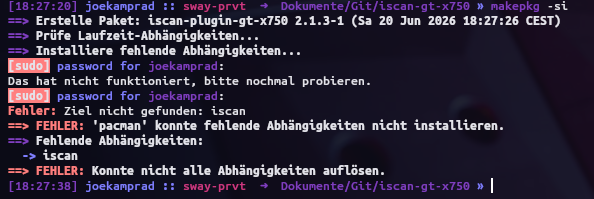
also weil beides aus dem AUR ist kann pacman das nicht auflösen, muss also zuerst die Abnhängigkeiten aus dem AUR bauen und installieren bevor das Plugin Paket gebaut werden kann. makepkg benutzt nur pacman.
journalctl -f
Jun 20 18:50:30 BlackMonster boinc[1640]: Authorization required, but no authorization protocol specified
Jun 20 18:50:31 BlackMonster boinc[1640]: Authorization required, but no authorization protocol specified
Jun 20 18:50:32 BlackMonster boinc[1640]: Authorization required, but no authorization protocol specified
Jun 20 18:50:33 BlackMonster boinc[1640]: Authorization required, but no authorization protocol specified
Jun 20 18:50:34 BlackMonster boinc[1640]: Authorization required, but no authorization protocol specified
Jun 20 18:50:35 BlackMonster boinc[1640]: Authorization required, but no authorization protocol specified
Jun 20 18:50:36 BlackMonster boinc[1640]: Authorization required, but no authorization protocol specified
Jun 20 18:50:37 BlackMonster boinc[1640]: Authorization required, but no authorization protocol specified
Jun 20 18:50:38 BlackMonster boinc[1640]: Authorization required, but no authorization protocol specified
Jun 20 18:50:39 BlackMonster boinc[1640]: Authorization required, but no authorization protocol specified
Jun 20 18:50:40 BlackMonster boinc[1640]: Authorization required, but no authorization protocol specified
Jun 20 18:50:41 BlackMonster boinc[1640]: Authorization required, but no authorization protocol specified
Jun 20 18:50:42 BlackMonster boinc[1640]: Authorization required, but no authorization protocol specified
Jun 20 18:50:43 BlackMonster boinc[1640]: Authorization required, but no authorization protocol specified
Jun 20 18:50:44 BlackMonster boinc[1640]: Authorization required, but no authorization protocol specified
Jun 20 18:50:45 BlackMonster boinc[1640]: Authorization required, but no authorization protocol specified
^Z
[1]+  Angehalten                 journalctl -f
 grep -i "0116" /usr/lib/udev/rules.d/49-iscan.rules
grep: /usr/lib/udev/rules.d/49-iscan.rules: Datei oder Verzeichnis nicht gefunden
Die Datei 49-iscan.rules existiert bei mir nicht.
Ich weiß nicht wofür die “0116” steht, aber lsusb gibt für den Scanner aus:
Bus 009 Device 007: ID 04b8:0119 Seiko Epson Corp. GT-X750 [Perfection 4490 Photo]
Bei hamrick.com handelt es sich um die Entwickler hinter VueScan. Die von denen gehosteten iscan plugins für den Perfection 4490 sollten auch mit VueScan funktionieren. Und Vuescan ist “schon” GTK3. Und nicht GTK2 wie iscan es noch ist.
Also der erste Link ist ja ein debian Paket. Da sollte debtap ja mit klappen.
Also, @lehmeier hat sich bzgl. seines Perfection 4490 dort bereits schlau gemacht, sie Kommentarspalte.
Ich bin jedoch überfragt ob Negastive gescannt werden sollen. Sollten es lediglich Bildabzüge sein, würde ich die Scaneinheit des Multifunktionsgerätes nutzen, welches ja mit epsonscan2 funktioniert, anstatt noch mehr Zeit für das Gerät aufzuwenden das rumzickt.
Auf maximal interpolierte 9600 dpi kommen beide Geräte. Auch wenn es beim Multi Gerät nur ein zusätzliches feature ist das ggf. durch den Perfection 4490 übertroffen wird. Das Multifunktionsgerät sollte auch komplett ohne direkte Softwareanbindung an den Rechner als Stand Alone Gerät scans tätigen können.
49-iscan-gt-x750.rules habe ich als dateiname genommen das wird ja jetzt explizit mit dem Paket angelegt..
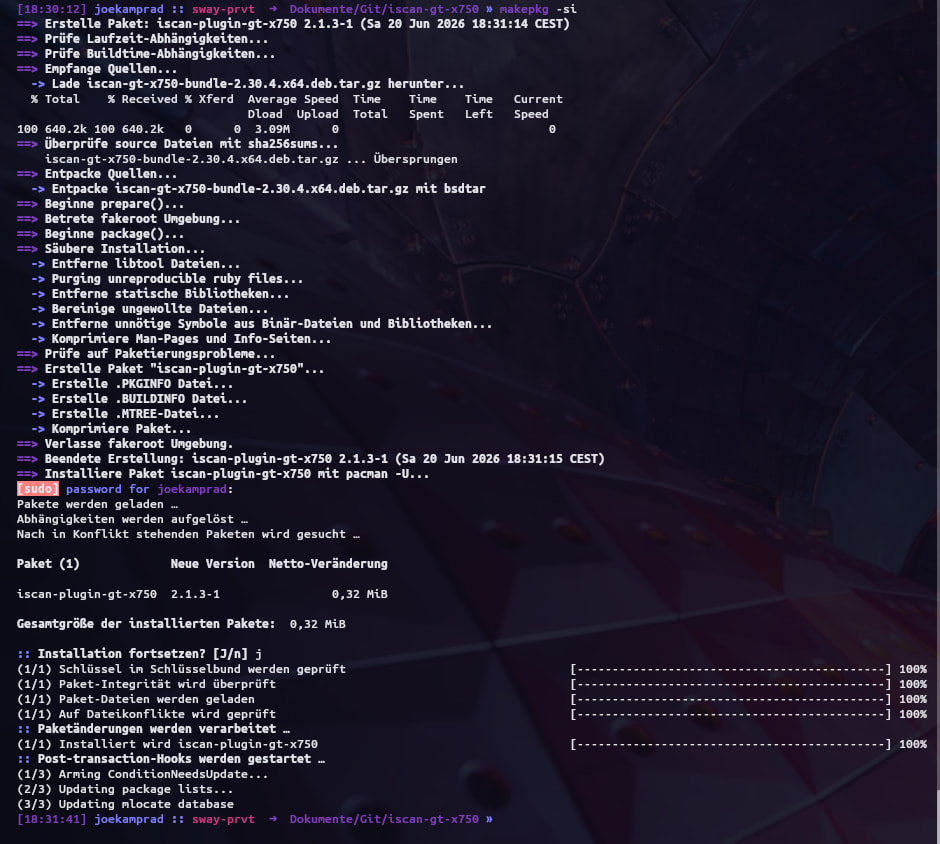
und ich verwende ja nun ein debian Paket und eines für 64 bit das Paket ist dann ein solches Plugin
vuescan ist ja nicht ohne kauf verwendbar:
You can test the trial version of VueScan for as long as you’d like with flatbed scanning, Film/Slide scanning and ADF (Automatic Document Feeder) scanning. You can test most Professional Edition features with the trial version.
Scans from the trial version will have a watermark that can’t be removed later.
Ich habe es vor etlichen Jahren gekauft, so um die ~50€. Einmalig.
Ich habe grade nachgeschaut, mittlerweile kostet das pro Jahr. Im Moment sind das 26€. Das ist natürlich heftig, zu diesen Bedingungen würde ich es auch nicht mehr kaufen.
Trotzdem ist das ein tolles Programm, keine Frage.
Ich würde ja kaufen, aber mittlerweile kostet ein Jahr 52,46€ ( ermäßigt ), normalerweise 69,95€ und Einmalzahlung kostet ermäßigt 157,45 € anstatt 174,95 €. Jeweils für die Professionell Version. Da ich auch Negative habe die ich scannen will.
Das ist mir einfach zuviel Geld, ausserdem erkennt die Trialversion im Moment meinen Scanner nicht.