TAILS or Whonix run in a VM for a majority of web surfing can be effective.
1 Like
Perhaps that’s the way to go. I have been thinking lately to try Qubes-Whonix. I have tried neither Qubes nor Whonix before so perhaps that would be a bit challenging at the beginning but I am willing to dedicate some time to it. I feel getting more and more obsessed with the idea of minimizing my digital footprint.
2 Likes
I really like how he implemented whoogle into it.
1 Like
2 Likes
Thanks for the video! I’ll be heading over right now to check it out.

Almost 2 weeks old article but might be useful if you have missed it:
A vid about the same subject: Tracking Users Browser Activity Without Javascript

I just saw this on LibreWolf’s website:
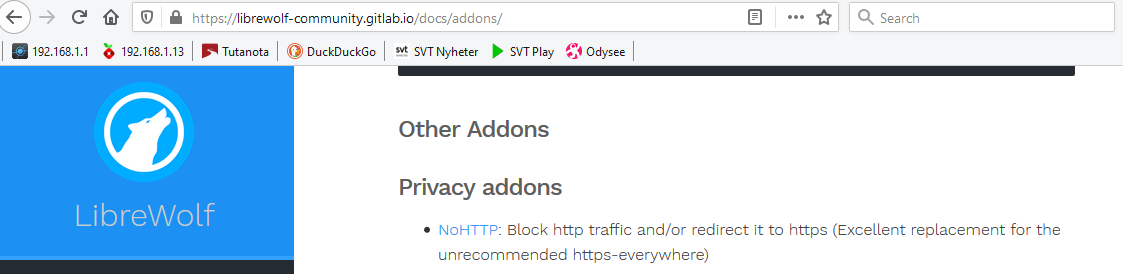
What’s wrong with HTTPS Everywhere? Because that’s the one I usually run in Firefox.
Anyone up to date on HTTPS Everywhere?
Edit:
Why is HTTPS Everywhere not recommended anymore?
1 Like
I found this on their gitlab page. The recommendations are last updated three years ago, so maybe someone here with greater insight could shed some light on this (@keybreak ?).
1 Like
Nope, not sure if it’s outdated recommendation, but yeah they’re very strict about plugins…
Besides there is simialr functionality in Firefox by default now 
2 Likes
I was mostly wondering why. It was more if there was something serious about it.
@keybreak I’ll get to a newer Firefox when 91 is out. Still at 78. An ESR.
It looks to be somewhat philosophical.
What https-everywhere does by default is tries to opportunistically add https without breaking the experience. To do this it uses a ruleset something like what an ad-blocker does. Be default, it prioritizes not breaking your web experience over forcing encryption. However, it offers configuration options and custom rules to allow you to tailor the experience to your liking.
What NoHTTP does is just block the page from loading or cause an error when it hits a site that doesn’t support https.
To me, those are very different use cases. It is up to you to decide which one fits you better.
If what you want is what NoHTTP does, I can see how you might dislike https-everywhere. It would appear bloated and having poor defaults. However, that isn’t really fair in my opinion. It just targets a different user base.
There is some basic functionality in Firefox but it isn’t nearly as flexible as what https-everywhere does. Again, it just depends what your priorities are.
10 Likes
does anyone use vivaldi?
1 Like
vivaldi is my favorite chromium-based browser but it isn’t really a privacy browser.
2 Likes
but it seems pretty safe
2 Likes
Well, that raises an interesting question I suppose. “What is a privacy browser?”
- A browser can protect privacy by respecting your privacy and not collecting personal data
- A browser can protect your privacy by stopping others from collecting data on you
Obviously, the second thing is much, much harder to do than the first. For me, a “privacy browser” should try to do both those things.
Vivaldi’s privacy policy is really only about what data they collect which is only one piece of the puzzle.
5 Likes
I really don’t think there is such as thing as a privacy browser. I just use Firefox because it works the way i like and is set up the way i like. I also like Chromium. Vivaldi is good too but a little too much for me. I do not like that data is being collected (harvested) on the internet and i think it’s wrong. Everyone’s privacy policy is only about the data they collect and the problem is all the dominant players who are making money doing this.
3 Likes
I agree. I would argue that the first point is a subset of the second one, and it is that second point that really matters. The first one should go without saying.
What I expect from a “privacy browser” is
- to make it as difficult as possible for other people’s computers (servers) to identify and track me
- to guess as accurately as possible what traffic I do not want and block it
- to err on the safe side as much as possible, even breaking functionality of websites, unless I explicitly tell it otherwise
These are, in my opinion, the minimum requirements for a browser to be justly called “privacy focused”. Of course, no browser protects its user’s privacy perfectly. This is always a matter of trade-offs and it’s a constant war between people who develop software with the aim to violate other people’s privacy and those who develop software to make that task more difficult.
Two browsers that are falsely marketed as “privacy focused,” but certainly are not are Firefox (with default settings) and Brave. I really like Firefox, though, it’s my favourite browser by far, but hardening it for privacy is a real chore (and the successful completion of that task is almost impossible to verify). LibreWolf is nice, but still a bit rough.
2 Likes
I think Vivaldi has too much bloat for my liking. It’s built on Chromium too. I’m trying not to use it. Tested ungoogled chromium not so long ago. It works, but Firefox is better in my opinion. It is possible to make Firefox private and safe with a little work.
2 Likes
I spent all day yesterday with Librewolf and at the end of the day uninstalled it, Chromium is faster loading and with a few extensions I am happy with it. Each have their own 
4 Likes