I just recently found altserver shell script. If you are a weirdo like me who likes and uses Linux on the computer side yet prefers iPhones to android phones, and you like to side load an app or 2(up to 10 at a time I believe) then up until recently you were relegated to using iOS and windows to resign your apps with altserver. Well now someone released some Linux versions and this shell script one is the one that works best for me.
Do you have to “jailbreak” your iPhone to sideload apps?
No not if you use the AltStore and alt server. The downside of that is they apps are only signed for 7 days that’s where altserver comes in as long as you are on your home Wi-Fi and your server is running it will resign the apps once a day.
I just discovered https://github.com/sharkdp/fd
A nice alternative to find.
4 Likes
Not sure if it counts but I recently discovered that we could install COSMIC into Endeavour’s GNOME…changed the game for me, made GNOME from a pain to something actually usable for my workflow. Before that I was flipping between KDE and XFCE and wasn’t 100% satisfied with either one.
1 Like
Ferdium
3 Likes
So I’ve been trying to figure out the best option for Google Drive sync. I had a little experience with rclone since my HoloISO-based AYANEO needed something that would run without a DE for obvious reasons. I also had an issue with a work thing where rsync wasn’t doing the job because it was a slow WAN link and a lot of small files (and rscync was single-threading its way through them), and I just realized rclone could do that too. It’s an incredibly powerful tool, and it just saved my butt. For people who like GUIs rclone has a broser GUI, and there’s also a web GUI if you want it, but it goes along with the whole terminal-centric approach really well. ANd it’s not even difficult to set up, though some of the more advanced stuff can be time consuming. But if you want to do a simple mount of a cloud file system (not just Google Drive, but Mega, 1Filchier, OneDrive, lots of options) the rclone-browser is plenty.
Frankly I’m not sure I’ll mess with rsync anymore unless I’m dealing with large files that can benefit from only syncing deltas.
1 Like
You can? I tried to do this months ago with no success, but that would be cool because I like cosmic a lot i just don’t care for debian/ubuntu based distros.
Oops wrong reply entry.  Clearly I need more caffiene in the morning. But yeah, the cosmic extensions, you really have to do CTRL-ALT-F2 and do their instructions from a terminal console, not just a terminal application session. Otherwise it trips over the GNOME stuff that’s already running and can’t be overwritten.
1 Like
Hmm…I am not sure I understand how you are using the cosmic enhancements to replace rsync… 
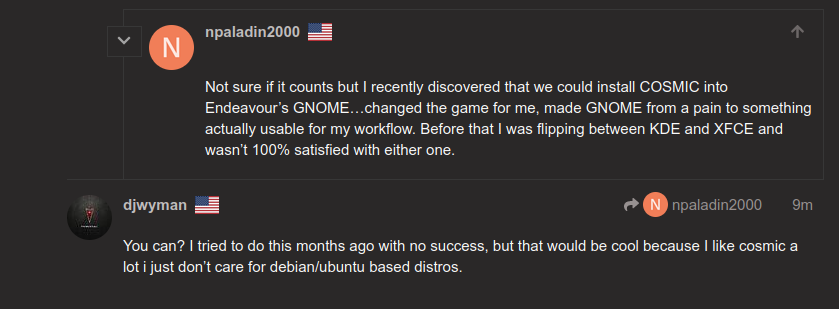
As a side note, you can see which of your posts someone is replying to by clicking on reply link:

Then it looks like this:
1 Like
Yeah, clearly I need to mainline some more caffiene this morning.
1 Like
Just discovered firejail.
--trace alone is invaluable. Now I know exactly what the program touches.
2 Likes
I used to use firejail but then I heard it has some vulnerabilities, but I can’t really form an opinion on this since I don’t have the technical know-how. I’ve been looking at various security tools, and I’ve come across LXD, bubblewrap, apparmor, selinux and systemd-nspawn.
No security enhancing tool is an ironclad shield against all problems. The same is true of everything else you mentioned. They all have pros and cons. If you are looking for the silver bullet, you aren’t likely to find it.
1 Like
I know, it just seems that every time firejail is brought up, people are always recommending something else. In fact I first got to know of this mindset on this forum.
SciteQt text editor
1 Like
https://aur.archlinux.org/packages/pdfscale-git
Invaluable in particular for printing research papers, which are usually in US letter format instead of A4, and with large margins. Lots of wasted space, and when the papers are very dense with formulae with sub/superscripts (or double subscripts: x_{i_1}…) things become basically unreadable unless your eyes are perfect.
Save your eyes! Scale your pdfs before printing!
I used to have my own unreadable pdftops → pstops → pstopdf script for that, but this works very well and is simple to install and use: e.g.
pdfscale -v -s 1.15 -r A4 [–xoffset < x >] < pdf >
will resize to A4 and scale +15%. X-offset optional.
All that’s missing is a way to automatically detect best scaling and center page by page; some papers have different margins for odd and even pages, so the zoom has to account for both. But that’s minor.
2 Likes
I was looking for system monitor via yay system monitor and there was something unusual :
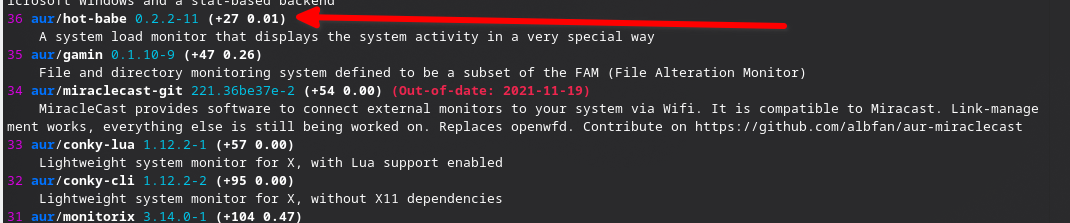
Warning : Use at your own risk. The user will be solely responsible for any harm caused by it, and @SearingSunrazeSmash do not endorse or support this product.
Maybe there should be a way to mark packaged NSFW…