@SimplyTadpole
It is my understanding you can’t adjust the clocks and voltages of amdgpu without unlocking it with a kernel parameter. I am in no way a gamer but from some reading It looks maybe like changing settings has no effect without unlocking.
Additional fans might help. Getting a new cooler is still going to require a repaste. Re-pasting is not that hard, and quite frankly anyone who owns a gaming rig should get used to it. If yo uare hitting 90c it is likely a combination of the two.
I don’t know. I get really good performance out of the box with Fedora and have not needed to tweak my GPU.
Archlinux optimizes nothing. You the user need to set everything up the way you want it. Chalk it up to learning the Arch ecosystem and how things work. A lot of other distros have their own sane defaults. Arch generally defaults to whatever the package default is. You have to tweak it to get what you want. It is time consuming, but in the end you will have a sysem you completely understand.
I have an Ryzen 3500X, stock AMD cooler , Asrock RX 580 8gb ,
32gig DDR4RAM, 27" IPS 75hz screen with ATS, Insurgency, Splitgate
Using Mangohud ( MANGOHUD=1 %command%. in the launch option)
or using steam overly + display fps inbuilt to steam
I get FPS 79-86-106-135 in town/highway/pickup areas in ATS
With using Vsync it locks to 75fps
(or should do 90hz if you got one of the asian freesync screens)
I would recommend
Check CPU, Video card and case fan fans
I would check CPU and video card temps
I would check lead from PSU to GPU is okay and possibly replace it
or test if PSU is grunty enough, must be 80+ and over 500watt
Question:
Have you or a good mate got a spare PSU ?
Have you or a good mate got a spare video card to test ?
Have you or a good mate got a spare Mobo to test ?
Have you or a good mate got a spare RAM stick to test
check if you can firmware flash it to a better revison
Also if your mobo is under 12-3 years
check your warranty status
and see what steps are needed
to RA (free replacement under warranty)
in your town/district/county
Having a spare 500w PSU and 8 gig stick stick of RAM comes in handy
to dianouse and repair your system and friends/family systems
and its good to have a reference , what works
I also record ETS2/ATS , splitgate and other games with OBS
and manage to get 1080p 30fps while still doing 75-60fps using OBS on CPU software mode
(its never managed to offer AMD VCE/hardware encoding in Linux OBS for years for me)
OBS set to 2755Kbps/Software/160 saving on OS NVME, game loading off 2.5" SSD
recording to 1080p 30fps
My latest ATS video which is UNCENSORED, with man speak and swearing, watch at your own risk
If you haven’t already, consider installing gamemode.
Some distributions include it by default, EOS doesn’t. pacman -S gamemode
Also, if you’re launching games with mangohud, capping your framerate is a good idea.
This has several benefits, like better frame-time consistency and less load on the GPU overall.
Copy the example config file to your home directory;
I was getting frustrated with my low performance and felt like giving up, because even with the suggestions here (as well as overclocking my GPU with the tool/guide KDen recommended), I continued to get very subpar performance compared to what I should be getting. And, out of frustration and curiosity, I decided to try out Fedora, just to check if the issue was indeed with a poorly-pasted or malfunctioning GPU/PSU like some people were afraid it was, and if I was misremembering getting better performance on other distros like Mint.
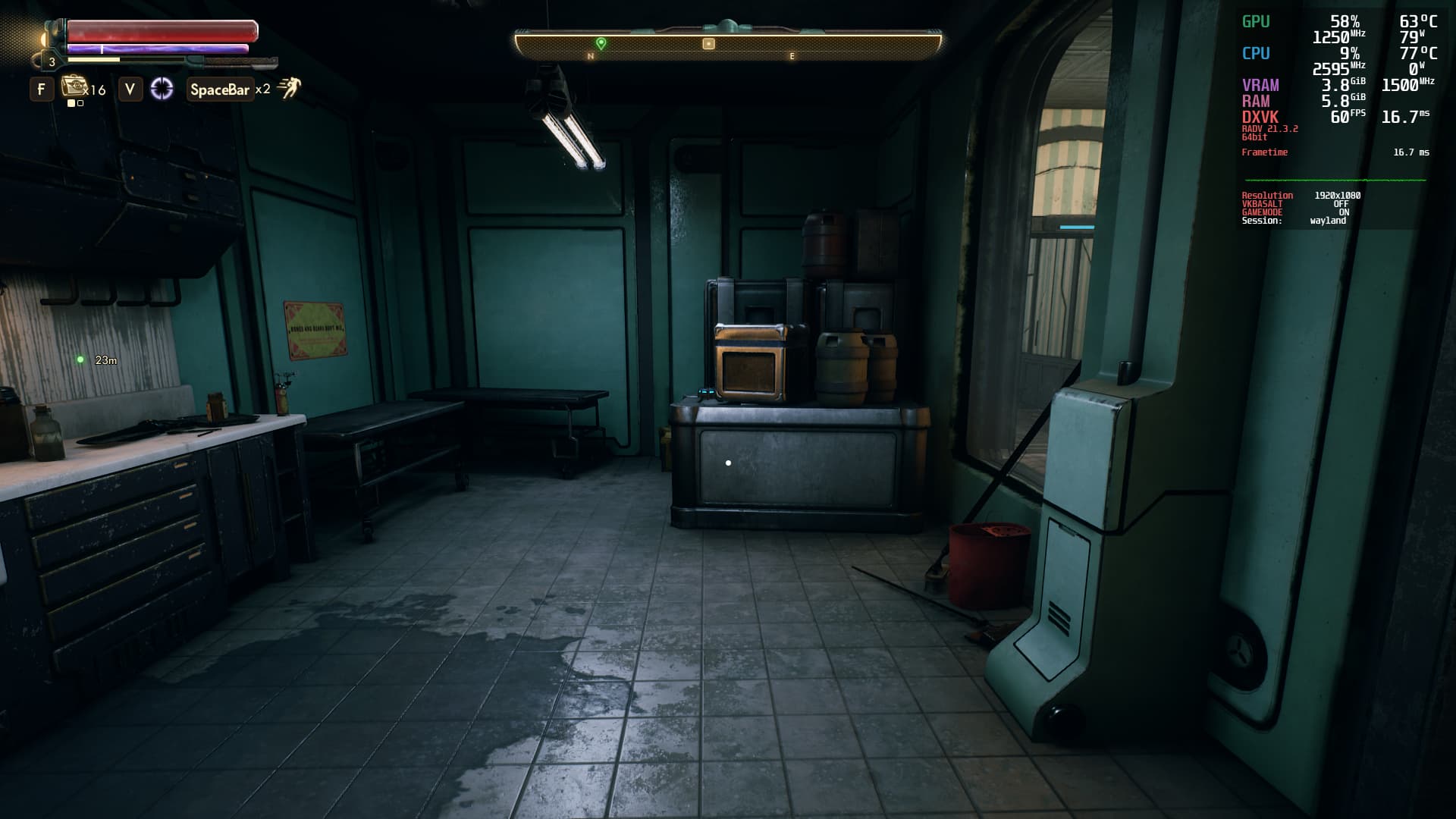
Turns out it actually isn’t and I wasn’t - I’ve gotten way better performance on Fedora than I ever did on Endeavour. Take, for example, The Outer Worlds - I’m able to regularly get over 45 FPS on the overworld and can often push past 50 FPS, and on interior scenes I’m easily able to get stable 60 FPS:
Meanwhile for reference, on Endeavour I’d be lucky if I even managed to get past 35 FPS at all, and would often chug at below 30 FPS with frame stutters as low as 25 FPS. Additionally, as you can see, I also get much better GPU/CPU temperatures on Fedora compared to Endeavour; I’m often able to get sub-65°C temperatures and in the worst-case scenario only reach up to ~72°C, versus on Endeavour where my GPU would often push up to 90°C. And note that, unlike on Endeavour, I did not overclock my GPU on Fedora!
Because of all this, it’s pretty much safe to say that, somehow, Endeavour isn’t playing nice with my hardware because it presents severe performance and heating issues that simply aren’t present on both Fedora and Linux Mint. I’m guessing it may be because, as nadb said, Arch/Endeavour doesn’t optimize anything OOTB and I would have to set it up myself? However, I find it weird that I’ve seen multiple people who use Arch/Endeavour and had no issues with performance despite using it completely OOTB.
What exactly should I do to get Endeavour to give me actually good performance? Are there any useful guides in setting up Arch/Endeavour to be optimized for gaming? And, if I configure and tweak it myself, would I be able to get even better GPU/CPU performance than I do on Fedora and Linux Mint?
Yes, I have, and amdvlk actually performed worse than vulkan-radeon.
Just how much of a performance boost does picom offer? And is it necessary even on Cinnamon?
Admittedly, I did try out another DE on Fedora - I returned to Cinnamon like I used on Linux Mint (though I also tried out KDE Plasma, which also ran quite well), so it might be possible that my better performance may owe to Cinnamon’s compositor being better than XFCE’s. However, I’m still getting better performance than I did on XFCE even when I had disabled its compositor, not to mention how I’m not dealing with my GPU overheating like crazy anymore either, which has me confused as to what is going on.
I actually already had done both of these, I learned to do it since my Mint days ^^’
I’ve tried KDE Plasma twice (once on Endeavour, another on Fedora), and I disliked it and couldn’t adapt to it both times, sadly.
Actually, I used KDE on Wayland as I don’t like GNOME, either. I switched to Cinnamon afterward and performance is slightly worse, but still better than XFCE. I’m still trying to find the ideal DE for me, honestly ^^’
I should try Cinnamon on Endeavour, but I’m worried about it once again not performing well. I’ve done so much distrohopping on December that I’m concerned about my SSD’s health ^^’
That is fair but note that Wayland has much better support in gnome. I have not tried on kde but read in the forum that it still has experimental features.
Yes, that is true. Wayland on KDE was absurdly unstable and I’ve had Steam and multiple games just crash on me five times within a single day. KDE was also forcing itself to use Wayland instead of X, too, for some reason. Cinnamon has been much more stable.
I’d use GNOME since I heard it has the best gaming performance on Wayland (and possibly out of all DEs), but I’ve had a horrible experience using GNOME on my first-ever distro (Pop!_OS) because I couldn’t adapt to its workflow at all, so I’m worried I might have a bad experience with it yet again. There are gnome extensions that patch it to have a workflow more adapted to mine (like Desktop Icons and Dash-to-Panel), but I’m not sure how well DtP actually works regarding usability and the thought of having to rely on third-party hacks to get basic functionality doesn’t really appeal to me…
Anyway, it’s indeed quite strange that you get way better performance on both, Mint & Fedora. So I think it’s neither the kernel nor the display server. I also don’t think it’s the DE. Never heard of Cinnamon beeing somehow optimized for gaming.
Since you also mentioned the high temperatures on EOS, my guess is on the drivers. Did you compare driver versions between EOS and Fedora?
I had good experience on gnome 41, but I didn’t use any extensions. but workflow is different and Linux you have the freedom of choice. So it’s important to use something you feel comfortable with. But don’t think it really has to do with Wayland vs xorg, the problem is likely driver related in the first place or need additional packages to enhance gaming I assume.
I’ve included my inxi -Ga from Endeavour in the first post of this thread. As you can see, the drivers are almost identical between the two, with only a very minor difference with the Mesa drivers. I highly doubt it’s the cause of such severe performance issues. Maybe I’m missing or forgetting another driver?
Regarding additional packages, I installed gamemode and set up mangohud to cap my framerate to 60 FPS as I mentioned before, so I don’t think it’s that - unless, of course, I’m also forgetting something again.
Oh, true, true. Issue is, I… don’t know if I’m adapting too well to Fedora. While it easily works, I did deal with issues on it as well (including the same wifi issue I had on Endeavour; seems like only Linux Mint likes my antenna), and I don’t feel like I have as much control over Fedora as I did with Arch/Endeavour, especially when it comes to kernel management. Plus, I came to really like and practically fell in love with pacman, and dnf isn’t as good in my experience. So I’d really want to come back honestly, I just don’t want to do it while I haven’t figured out and solved why Endeavour just so virulently despises my GPU…
Sorry, out of ideas here Ppl here are usually quick and eager to help, so I’m afraid nobody here knows what causes those problems. I would suggest asking on the Arch forums, maybe someone there has a solution.



 Ppl here are usually quick and eager to help, so I’m afraid nobody here knows what causes those problems. I would suggest asking on the Arch forums, maybe someone there has a solution.