Do both of these commands work or not?
reboot -f
poweroff -f
Do both of these commands work or not?
reboot -f
poweroff -f
Yes reboot -f
No poweroff -f → the graph is stopped with the text of the first post.
Then it’s probably not a kernel issue.
Yeah, that’s understandable if you need good graphics performance.
By the way, about those settings in variables GRUB_CMDLINE_LINUX_DEFAULT and MODULES, are you sure you need all of them?
Probably you are, just asking some simple questions because there have been kernel and driver updates…
It may be, although for me there is still an open file from nvidia, as it says above in the Arch forum, the fix issue is in nvidia …
I’m not having any issues with my GTX 1060 on Xfce.
No, not really, as I don’t use the pc for Netflix, for example with DRM …
For this reason I tried this script and it did not work:
cat /usr/lib/systemd/system-shutdown/*
#!/bin/sh
# We need to ensure all md arrays with external metadata
# (e.g. IMSM, DDF) are clean before completing the shutdown.
/sbin/mdadm --wait-clean --scan
#!/bin/sh
# remove nvidia modules
/usr/bin/modprobe -r nvidia_drm nvidia_modeset nvidia_uvm && /usr/bin/modprobe -r nvidia
One thing I didn’t see in your settings is adding nvidia-drm.modeset=1 in variable
GRUB_CMDLINE_LINUX_DEFAULT. Worth a try I guess.
Sorry can’t go re-read the entire post. Did you change any bios settings around the same time this is happening?
OK, bad luck so far.
If you are still willing, I’d still suggest trying the nouveau driver instead of nvidia, just to see if that helps anything.
I was going to ask about this also but i figured it wouldn’t matter.
Hi Elloquin !!!
I haven’t touched anything in the bios.
Ok, no luck, but I’ll try again later.
Thanks for your help !
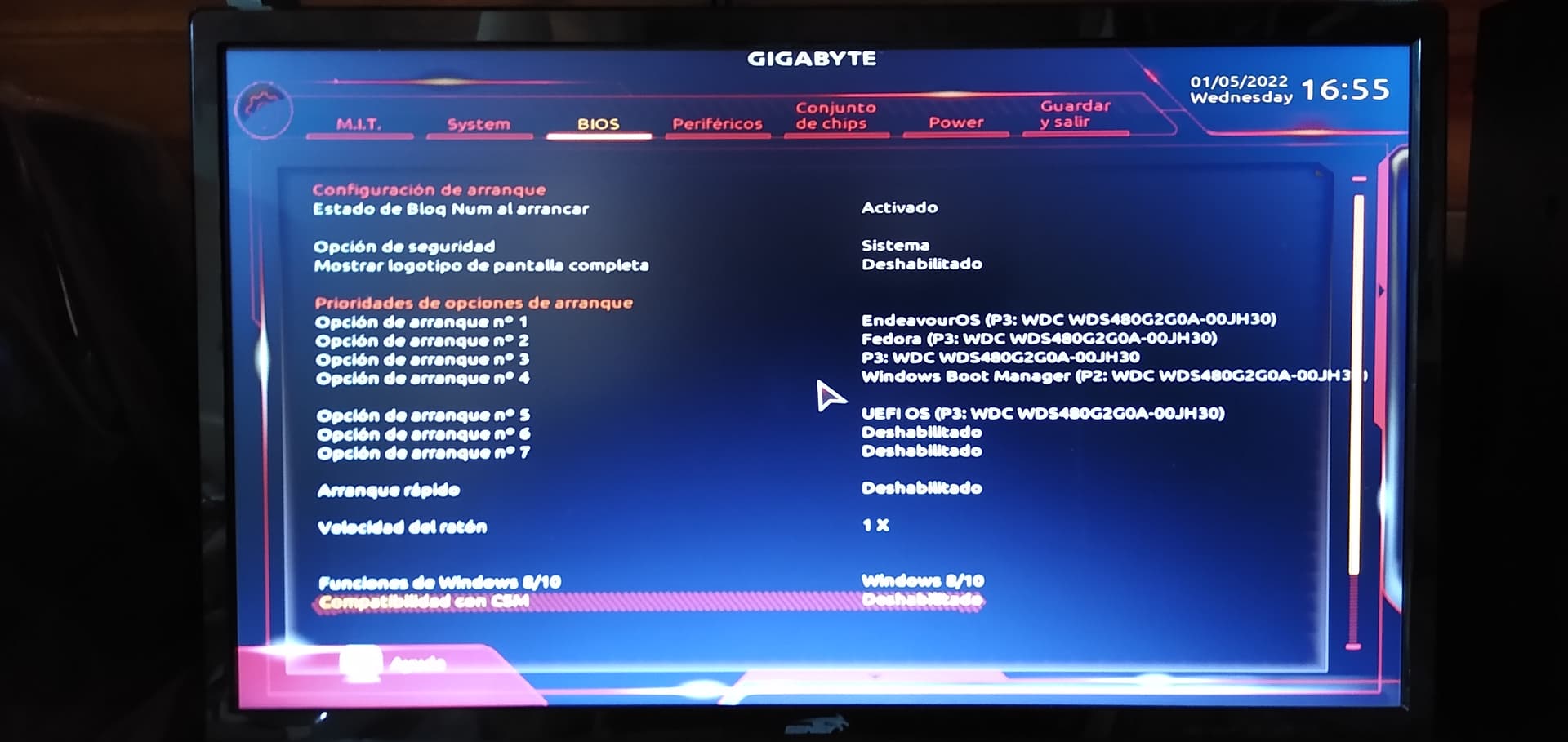
Can you check something quickly? Maybe a setting that was ok to be set a certain way used to be ok and now a kernel update has made that setting not ok. I am still digging. Sorry my friend i didn’t realize this was still a problem. I need you to check your bios and look to see if it is set to [Legacy+UEFI] and change it to [UEFI]. Also look to see if there is a CSM setting and turn that off. One at a time just for testing purposes.
This is meaningless if this is a legacy MBR installation obviously.
cat /etc/fstab
# /etc/fstab: static file system information.
#
# Use 'blkid' to print the universally unique identifier for a device; this may
# be used with UUID= as a more robust way to name devices that works even if
# disks are added and removed. See fstab(5).
#
# <file system>             <mount point>  <type>  <options>  <dump>  <pass>
UUID=0CFC-0F42                            /boot/efi      vfat    umask=0077 0 2
UUID=414f6e6c-8604-4d9c-b648-fc027c3a70d2 /              xfs     defaults,noatime 0 1
tmpfs                                     /tmp           tmpfs   defaults,noatime,mode=1777 0 0
The bios is UEFI
Ahhh xfs…I am reading something about this…
CSM is a different setting but its fine.
It says CSM and i usually turn off also. It should not lock on EOS startup.