The r8168 ethernet issues and Welcome (experimental)

@manuel
Okay so lets go through this. Normally i always used the r8168 module but i never used hibernation or suspend modes although i always installed with swap. There have been numerous issues with either the r8168 and r8169 depending on the hardware and whether they are using suspend and or hibernation or not. First off here is my hardware.

[ricklinux@eos-xfce ~]$ lspci -vnn | grep Ethernet
27:00.0 Ethernet controller [0200]: Realtek Semiconductor Co., Ltd. RTL8111/8168/8411 PCI Express Gigabit Ethernet Controller [10ec:8168] (rev 15)
[ricklinux@eos-xfce ~]$ 

So i decided to try the BTRFSonLUKS using snapshots and hibernation and swap. When i fisrt installed and tried hibernation and or suspend the network would not reconnect. So i uninstalled r8168 and rebooted because it’s my understanding that r8169 is already in the setup. It automatically worked.

So now i just reinstalled the r8168.
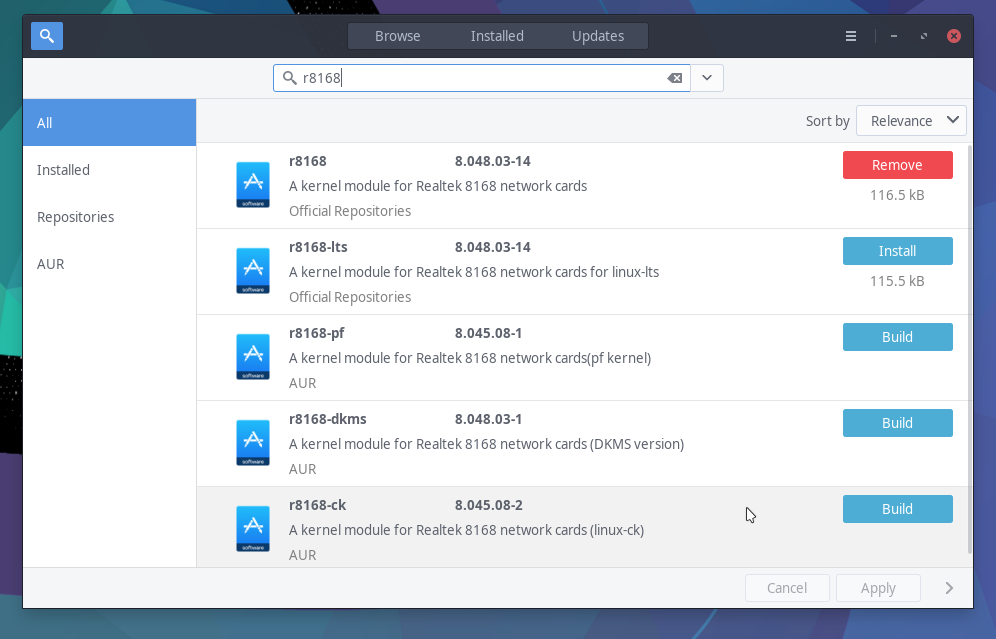
Screenshot_2020-08-01_11-39-53

I rebooted the computer and it works. When i went into suspend mode and came back out it wouldn’t connect.

I’m not going to lie to you this starts to confuse me after a while because i don’t know all the commands to look at stuff that i need in order to know what is happening. :wink:
I have to think about it and or look them up.

So currently i tried suspend and it wouldn’t connect. But this is where the confusion comes in. Even though you install the r8168 don’t you have to unload the current r8169 and load the r8168?
I tried that thinking to load the r8168 and tried suspend mode and it wouldn’t reconnect after.

What does your command do? Does it replace the r8169 with r8168?

So i reloaded the r8168 and it will not reconnect after suspend or hibernation.

27:00.0 Ethernet controller: Realtek Semiconductor Co., Ltd. RTL8111/8168/8411 PCI Express Gigabit Ethernet Controller (rev 15)
	Subsystem: Micro-Star International Co., Ltd. [MSI] X570-A PRO motherboard
	Flags: bus master, fast devsel, latency 0, IRQ 136, IOMMU group 28
	I/O ports at d000 [size=256]
	Memory at f7604000 (64-bit, non-prefetchable) [size=4K]
	Memory at f7600000 (64-bit, non-prefetchable) [size=16K]
	Capabilities: <access denied>
	Kernel driver in use: r8168
	Kernel modules: r8169, r8168

Edit: I just ran your command but had to use sudo.

27:00.0 Ethernet controller: Realtek Semiconductor Co., Ltd. RTL8111/8168/8411 PCI Express Gigabit Ethernet Controller (rev 15)
	Subsystem: Micro-Star International Co., Ltd. [MSI] X570-A PRO motherboard
	Flags: bus master, fast devsel, latency 0, IRQ 40, IOMMU group 28
	I/O ports at d000 [size=256]
	Memory at f7604000 (64-bit, non-prefetchable) [size=4K]
	Memory at f7600000 (64-bit, non-prefetchable) [size=16K]
	Capabilities: <access denied>
	Kernel driver in use: r8169
	Kernel modules: r8169, r8168

Edit2: Just tried suspend and it comes right back to ethernet connected.

Does this help? My concern i guess is when the r8168 gets updated? Does it change the module that’s loaded?

Edit3: Also tried Hibernation and it comes back up connected.

Typo. :wink:

@jonathon
Thanks…i can’t type either!

2 Likes

The sed command (right, it needs sudo, sorry about that) blacklists r8168 instead of r8169.

Explanation: installing r8168 also creates file /usr/lib/modprobe.d/r8168.conf which blacklists r8169.
Now this sed command simply changes that file to blacklist r8168 instead.

This also means r8169 is used, not r8168.

This way we can keep installing r8168 package with these Ethernet cards, but by default system uses r8169.
And the r8168 package is available if network doesn’t work with r8169.
User just needs to reinstall r8168 and reboot.

Not sure we will use this, but interesting to see the results.

1 Like

@manuel So is the welcome app command is doing this if you have the r8168 installed and then reboot? When i installed BTRFSonLUKS and the r8168 wasn’t working for suspend & hibernation i just uninstalled it and rebooted and the r8169 loaded?

The r8169 is part of the firmware that gets loaded with arch correct? That’s my understanding!

Nope.
Welcome currently offers to uninstall r8168 if it is installed and there’s no internet connection.
Then (for these cards) r8169 will be automatically used after reboot.

That’s kind of what i did since i installed the BTRFSonLUKS with Hibernation & Suspend. Before i had the r8168 loaded and had no issues since over 1 year. This is what i have been asking users to do all along that have had issues with it not working. Blacklisting it or uninstalling it.

1 Like

@manuel
I did a fresh install of Cinnamon with BTRFSonLUKS and it loaded the r8168 on my hardware so i tried suspend and the network didn’t come back up. So i used your command and reboot and works perfectly.

2 Likes

That’s great to hear, thanks for testing! :sweat_smile:

I think this is the best course of action^^^

There is currently a bug that affects a very small percentage of r8168 adapters that will prevent the r8169 module from loading properly at boot. In these edge cases the r8168 driver must be used.

My own personal opinion is to install the r8168 driver but keep it blacklisted. It can the be easily modprobed manually or changed with a script and your button to switch modules.

Generally r8169 is the preferred module, but a small sub-set of cards do currently need to have the r8168 driver available because of an outstanding bug.

I think scripting automatically switching the module in use via blacklisting is a very good solution as to which driver to use.

The driver switch button (with the r8168 driver already installed) can be acommplished as simply as this:

#use the r8168 driver
echo -e "blacklist r8169" | sudo tee /etc/modprobe.d/realtek_ethernet.conf; sudo modprobe -r r8169; sudo modprobe r8168

To use the r8169 module:

#use the r8169 driver
echo -e "blacklist r8168" | sudo tee /etc/modprobe.d/realtek_ethernet.conf; sudo modprobe -r r8168; sudo modprobe r8169
6 Likes

Hello @manuel
Just FYI. I installed the latest kernel 5.7.12 and along with the updates came an update to r8168 and as i had thought it installed. So i tried suspend and when i reboot the r8168 loads and bumps out my r8169. When i get to the desktop the network icon is spinning in circles but i still had internet this time. But i had to use your command to blacklist the r8168 again. My only option is to remove the r8168 since it is a package. I haven’t tried the dkms version of the r8168 either to see if it works with suspend and hibernation? But i have my doubts.

1 Like

If the r8168 driver package is rewriting the blacklist file when it is updated then a pacman hook could be written to correct that behaviour.

Of course now things are starting to get more complicated if stuff like this has to be created as well.

4 Likes

Agreed, it is a bit too complicated for a simple module switch.

This particular upgrade “issue” could be solved with a pacman hook. But there might be still more things that would need to be covered, and in principal this should be solved upstream somewhere.

But this is also annoying for those with this driver issue. Seems like there is no real solution, only some workarounds :frowning_face:

EDIT: removed one clause, was not really sensible…

1 Like

It appears that the upstream solution will take time.
https://lkml.org/lkml/2019/5/15/650

1 Like

True, for your case the real solution is to uninstall r8168.

https://bbs.archlinux.org/viewtopic.php?id=256858 #13 and 14

1 Like

I had the same issue i had to remove r8168 for my Ethernet to start working again, what’s the difference between r8168 and r8169?

Welcome! There are a small amount of older Ethernet chips that need it. Most are covered by r1869. R1868 has been known to cause issues on some systems.

2 Likes

Technical detail is that r8168 is an out-of-tree module (so needs to be installed separately) and r8169 is an in-tree module (so is always available).

2 Likes

some weird question, is it not possible to create a service or someplace where you can make a clicable option thats rmmod r8168 driver and modprobe, and viceversa? :slight_smile: