I believe it used to be Toshiba’s SSD division.
Apologies if this will get flagged, but I wonder what you reckon about this particular unit’s specs.
I believe it used to be Toshiba’s SSD division.
Apologies if this will get flagged, but I wonder what you reckon about this particular unit’s specs.
Can’t find the specs on it easily.
Could you try booting on the live ISO and adding the following kernel parameter. You need to press e for edit and add this to the default grub command line. You can add it to the end of the line. Then press enter to continue booting.
nvme_core.default_ps_max_latency_us=0
OR
nvme_core.default_ps_max_latency_us=5500
If it boots on the live ISO see if the drive is listed.
lsblk
Cheers, Rick. I’ll try when I’m home in an hour; out getting gas.
Okay… i think it’s a controller issue but figuring it out will be a bit trying different things.
Edit: Please also look again at your Bios settings for Sata controller as it should be set to AHCI. This is probably a setting that’s hidden just to make sure.
Edit: You could also try this kernel parameter.
iommu=soft
For real. It took me forever too finally find one to replace the WWLAN card in my t480s.
They are rare. Mine is Western digital I believe. I finally found one on eBay and I had to have it shipped from Korea and it took a couple weeks.
I’ll look at my firmware in a bit to see what I see.
So Manjaro doesn’t see it. . .
Ubuntu? That’s got by far the best chance. Or even Windows install disk?
It sounds like it could be faulty though if firmware doesn’t see it
It could be also it needs a firmware update for this drive. I’m not familair with this brand but the controller doesn’t identify it. 
Just to clear things up, and for future use, here is what I get from my liveISO at boot up
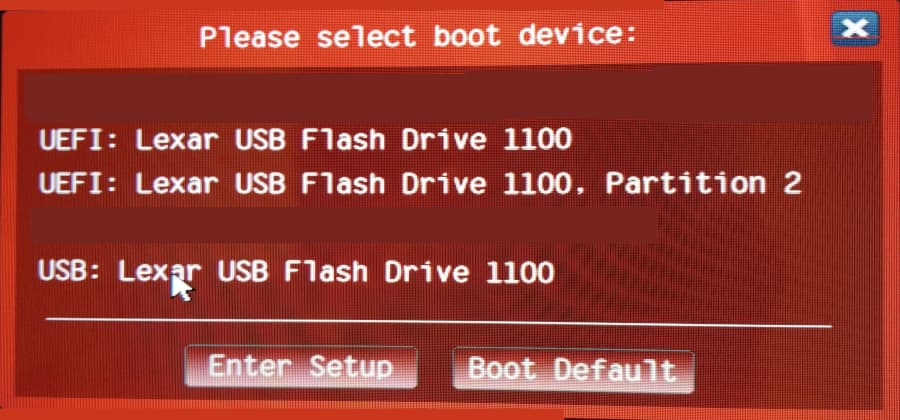
The two entries that start with UEFI are for installing on UEFI
UEFI: Lexar USB Flash Drive 1100 is what I always use
UEFI: Lxcar USB Flash Drive 100, Partition 2 I have no idea what this is for, it doesn’t work for me.
Maybe someone else here can clarify.
USB: Lexar USB Flash Drive 100 Is for legacy/MBR/msdos installs
Evidently your device doesn’t have UEFI or it is disabled?
Pudge
Not sure what you are referring to? Where are you seeing this? The logs show this.
Machine:
  Type: Laptop System: LENOVO product: 21E80011US v: ThinkPad X1 Nano Gen 2
    serial: <superuser required> Chassis: type: 10 serial: <superuser required>
  Mobo: LENOVO model: 21E80011US v: SDK0T76538 WIN
    serial: <superuser required> UEFI: LENOVO v: N3IET34W (1.14 )
    date: 07/20/2022
Edit: I think i know what you are getting at with one of the images but it definately shows it’s UEFI and it’s also a new laptop.
You can move number 4 so it is at the top. Plus or minus moves the highlighted choice up or down.
Cheers, Rick. I added the arguments to GRUB and booted. Here’s the output from lsblk
NAME   MAJ:MIN RM   SIZE RO TYPE MOUNTPOINTS
loop0    7:0    0 128.7M  1 loop /run/miso/sfs/livefs
loop1    7:1    0 809.6M  1 loop /run/miso/sfs/mhwdfs
loop2    7:2    0   1.7G  1 loop /run/miso/sfs/desktopfs
loop3    7:3    0 645.3M  1 loop /run/miso/sfs/rootfs
sda      8:0    0   7.5G  0 disk /run/miso/bootmnt
├─sda1   8:1    0   3.3G  0 part
└─sda2   8:2    0     4M  0 part
Unfortunately don’t see the SSD.
I will look again at BIOS for changing SATA controller settings.
Yes the controller is definitely not picking it up. Did you try all three kernel parameters?
I tried nvme_core.default_ps_max_latency_us=5500 but not your first suggestion. This was in combination with iommu=soft.
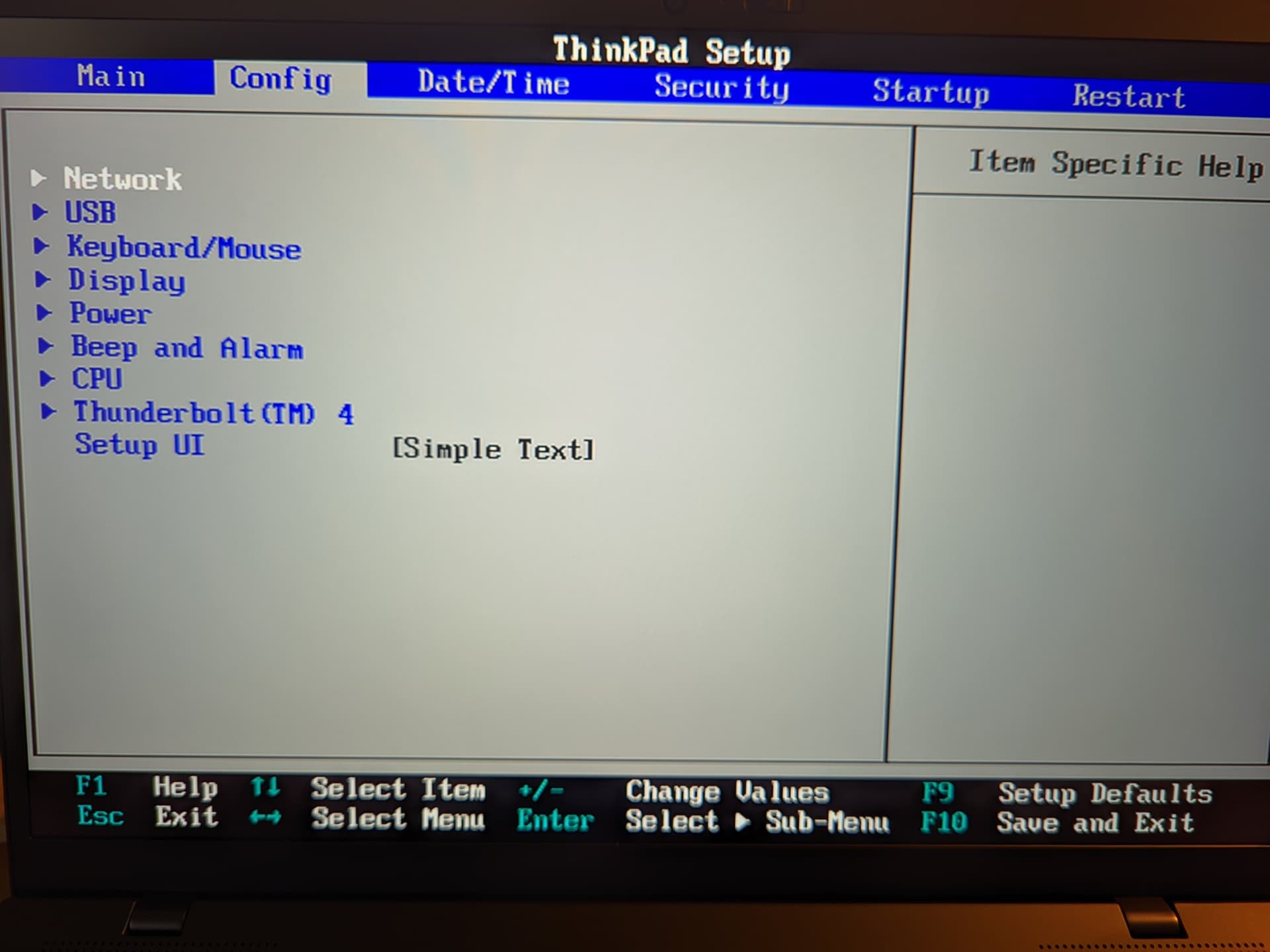
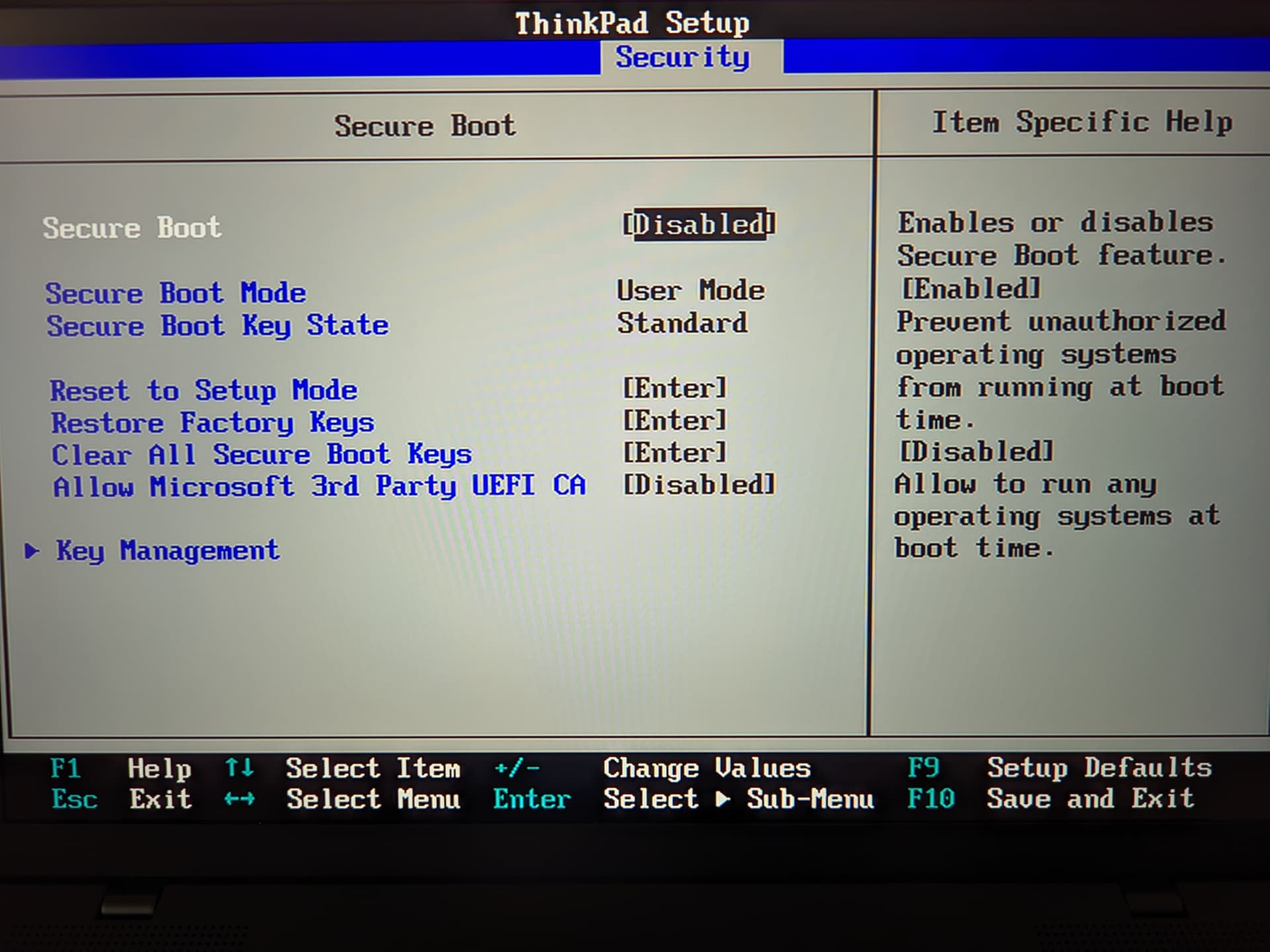
I’m in the X1’s BIOS now. Flipped through all the menus. I don’t see anything about changing storage controller options. If it is in some hidden menu, do I have to press some key like ten times to summon it? Trying to look into it. Photos:
When the computer is booting up, press F11 (or what is appropriate) and you get this screen for choosing which ISO to boot from. This is where it all starts when deciding whether to do a legacy install OR a UEFI install. Many new users are confused about this. They just pick one and hope it is right.
If legacy is not enabled or available, only the entries starting with “UEFI” are listed.
In this case only the legacy option is available, and not UEFI choices.
Pudge
Output of lsblk with nvme_core.default_ps_max_latency_us=0 and iommu=soft:
NAME   MAJ:MIN RM   SIZE RO TYPE MOUNTPOINTS
loop0    7:0    0 128.7M  1 loop /run/miso/sfs/livefs
loop1    7:1    0 809.6M  1 loop /run/miso/sfs/mhwdfs
loop2    7:2    0   1.7G  1 loop /run/miso/sfs/desktopfs
loop3    7:3    0 645.3M  1 loop /run/miso/sfs/rootfs
sda      8:0    0   7.5G  0 disk /run/miso/bootmnt
├─sda1   8:1    0   3.3G  0 part
└─sda2   8:2    0     4M  0 part
This is different to what mine shows? But i have my system set to UEFI only no legacy CSM disabled and secure boot disabled and all secure keys erased.
Before this problem, I was afforded two options: Either the USB, or the SSD. When I would try to choose the USB, the screen would flicker and return me to the same menu. I then remembered that I had to disable Secure Boot in order to get into the Live USB environment. On this menu, only the name of the USB was provided. No partitions.
I disabled Secure Boot, and on the same menu, I was provided the same options as above. No partitions were optioned. Only the full name of the USB.
This was on the latest EOS ISO.
The proper usb is listed in the menu you just need to move it to the top to boot first. Highlight the entry and use the plus and or minus keys to move it up or down in the list.
Edit: One other thing you might try is to turn secure boot back on and then clear all the secure boot keys then disable secure boot again after clearing the keys.
USB is at the top. See below.

Re: your second suggestion – I will try that now.
I would also move the nvme to the top under the usb hdd Scandisk Cruzer Glide