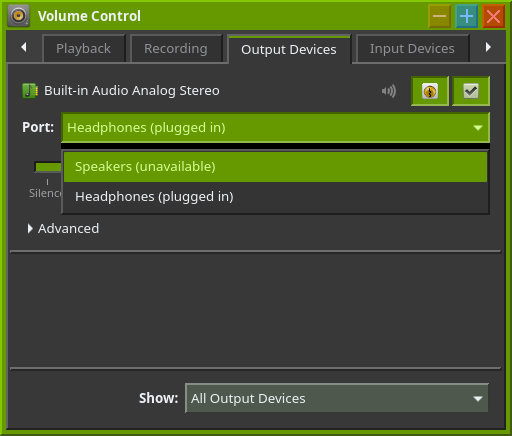
Self-explanatory. The speakers make random popping sounds and don’t produce actual audio, but headphones do work normally. The popping sounds happen regardless of whether the headphones are plugged in or if the system is muted.
(didn’t install yet, this is from the live session)
The popping is probably wrong HW suspend/wake-up order for this particular onboard soundcard in the driver. Disable power save. Create a .conf file in /etc/modprobe.d with options snd_hda_intel power_save=0 as its content.
As for the no sound issue, check if you have sof-firmware installed.
echo options snd_hda_intel power_save=0 | sudo tee /etc/modprobe.d/90-soundfix.conf gets rid of all pops except one at shutdown, but still only headphone sound works.
When on Windows (and the drivers are installed), the output device can be changed from the sound applet (this is true for many systems). This is called “multistreaming”.
On Linux however, this doesn’t seem possible, including on another system I have. TBH I hope I’m wrong. The headphones would have to be unplugged to hear sound from the speakers, and on this system, they don’t work as of now. At least the random popping noises are gone, just one on shutdown.
The linked forum post is “how to get my PC to use the headphones when they’re plugged in, and speakers otherwise” which is what the system is already doing. What I was asking about is how to temporarily force speaker output even when headphones are plugged in, but this requires that the speakers actually output real sound first, which they don’t.
EDIT: Even on another system, multistreaming doesn’t seem to work right. If I open up pavucontrol, it says “Speakers (unavailable)” when I have my headphones, like so:
Obviously, no sound can be heard when the speakers are selected as the active audio device unless the headphones get unplugged. On Windows, multistreaming works fine (that’s the driver’s name for it) and you can switch the sources around in the sound applet. Hopefully someone finds a solution soon.
I’m also getting a weird issue where I have to press the “windows 10” entry in systemd-boot twice, but that’s out of scope. Remove reboot-for-bitlocker from the systemd-boot configuration.
pw-record: unrecognized option '--list-targets'
pw-record [options] [<file>|-]
  -h, --help                            Show this help
      --version                         Show version
  -v, --verbose                         Enable verbose operations

  -R, --remote                          Remote daemon name
      --media-type                      Set media type (default Audio)
      --media-category                  Set media category (default Playback)
      --media-role                      Set media role (default Music)
      --target                          Set node target serial or name (default auto)
                                          0 means don't link
      --latency                         Set node latency (default 100ms)
                                          Xunit (unit = s, ms, us, ns)
                                          or direct samples (256)
                                          the rate is the one of the source file
  -P  --properties                      Set node properties

      --rate                            Sample rate (req. for rec) (default 48000)
      --channels                        Number of channels (req. for rec) (default 2)
      --channel-map                     Channel map
                                            one of: "stereo", "surround-51",... or
                                            comma separated list of channel names: eg. "FL,FR"
      --format                          Sample format (ulaw|alaw|u8|s8|s16|s32|f32|f64) (req. for rec) (default s16)
      --volume                          Stream volume 0-1.0 (default 1.000)
  -q  --quality                         Resampler quality (0 - 15) (default 4)
  -a, --raw                             RAW mode
Sounds like it maybe a hardware feature aka nothing you can do if the hardware says disable the built in if theres something plugged into the 3.5mm jack on the side