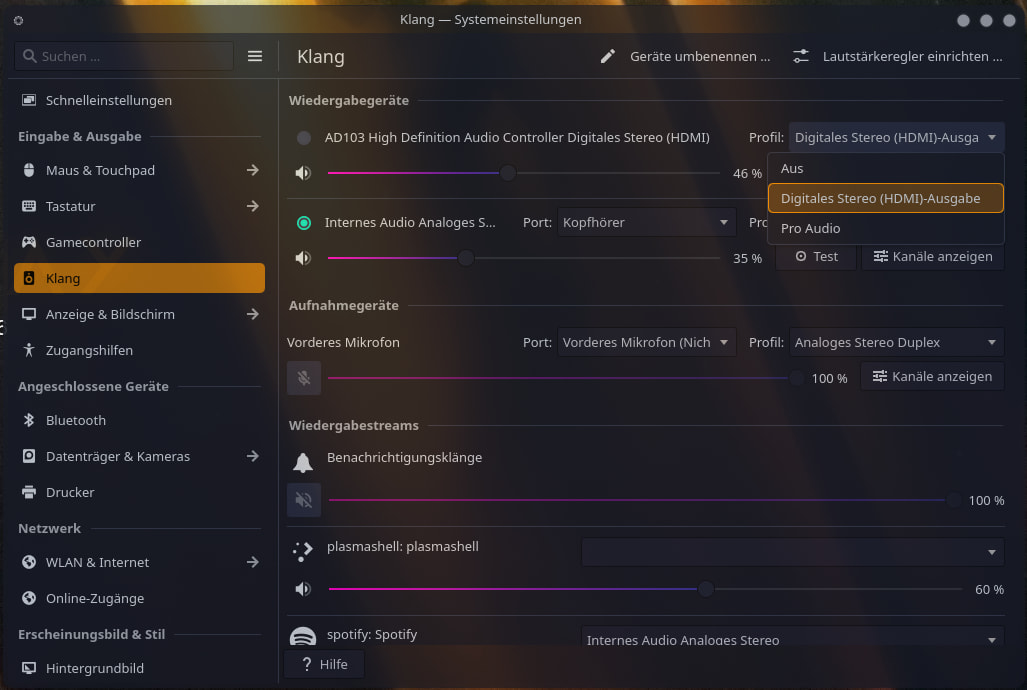
I cannot hear anything from the speakers if I remove my headphones from the 3.5mm jack (this is the main issue), and on Windows, I can freely switch between the speakers and headphone jack regardless (“multistreaming” as the driver refers to it), even on my other system, as I stated earlier.
My other system does have working speakers though, so it’s not a huge concern, even if multistreaming does work on Windows and not Linux, again, as I stated earlier. Possibly a bug in pavucontrol (the multistreaming part), but I doubt it.
double check whether the auto mute is disabled open a terminal type alsamixer then press F6 to select your sound card from here navigate using arrow key > to auto-mute if it is enabled click it to disabled make sure your speaker (line-out) isnt mute (MM) or the Master setting also. Press M to toggle mute/unmute as well as arrow key UP or DOWN volume.
@khagaroth, your kernel module parameter unfortunately did not resolve my issue. @raiin, auto-mute is not enabled, and neither is anything set as muted/zero volume, for the matter.
check your journalctl if there is something unusual logs like crashing or errors
my suspicious might be an applications that redirect your audio to oblivion
if i were you i would try it on a bootable live usb were everything is set default just to see if it has audio or what.. this might be a good idea to thinkering from here than your main drive
setting the last thing to 3 only makes the popping worse, and neither actually work.
Methodology: modify the options, run sudo pacman -Syu linux && reboot to force the modprobe options to be baked into the initramfs, and test sound.
Like, I dont know how to help because there is a lot of missing information, as this is a rather old post and no idea how much has changed over time.
In your original post you said you haven’t installed EOS and its just a live session. Have you tried installing it?
You said you use XFCE, have you tried using KDE just to rule out that your issue isn’t linked to XFCE.
I have a lot of options to choose from when setting up my sound (even more on my laptop as there are more speakers, my monitor actually doesn’t have sound built in):
Apart from that, i wonder if you have it installed, is it updated? Or if you are still sitting on an ISO, are you using a current one?
I have looked on the internet and saw a couple of reports where your HP Pavilion thing is mentioned that the sound from the monitor is not working, while headphones or via bluetooth is working. some have said its fixed with kernel 6.14 or later (your old inxi says its 6.13, so could be related?)
In some other cases they had to blacklist a module, but I am not shure if this also works on your specific model.
add those 2 lines at the end of /etc/modprobe.d/blacklist.conf:
#fix for hp-pavilion aio 27 xa0013ng
blacklist snd_hda_codec_realtek
DEs don’t matter here, though I must admit that this same issue occurred a few years ago (2021 or 2022) on KDE as well.
The kernel has long been updated. At the time of writing, I am on 7.0.11.
This did NOT work: /etc/modprobe.d/blacklist.conf
#fix for hp-pavilion aio 27 xa0013ng
blacklist snd_hda_codec_realtek
if anything, unless blacklisting a module makes modprobe think it doesn’t exist (almost certainly not), then this suggests that the fix is not applicable to my hardware.
~]$ sudo modprobe -r snd_hda_codec_realtek
modprobe: FATAL: Module snd_hda_codec_realtek not found.
~]$ sudo modprobe snd_hda_codec_realtek
modprobe: FATAL: Module snd_hda_codec_realtek not found in directory /lib/modules/7.0.11-arch1-1
~]$
Regenerate your initramfs (by say, sudo reinstall-kernels) and you should be good to go with the following caveats:
a. You cannot use the internal microphone.
b. Applications that use cubeb will complain about CUBEB_ERROR_INVALID_FORMAT if you switch the output device to the speakers, resulting in non-functional audio for that application. If you unplug the headphones (or restart cubeb), it works fine.
Anyone have any idea how to fix that?
EDIT: Let’s try bothering upstream, since this is entirely distro-unspecific from what I found online for the exact same hardware.
EDIT 2: Certain modprobe options (especially model=generic) will require a cold boot (shutoff, disconnect AC, hold power for good measure, wait a minute, reconnect AC and boot) to completely take effect, especially upon removal (you could end up with a useless “external mic” otherwise).