I’m trying to switch from Windows 10 to EndeavourOS, and i made a ventoy live usb with EndeavourOS on it. When i boot into it, though, it tries to connect to my ethernet connection but fails with ip-config-unavailable and gets stuck in a loop. The ethernet connection works fine on Windows. The same problem happens with Linux Mint live usb and presumably any distro that uses NetworkManager. I’m not sure where to start in fixing this; I’ve tried several other forum posts online and none have helped with my situation. I’m not terribly new with Linux as I’ve used Linux Lite and EndeavourOS for a few months now. It’s strange though, because I used to run Linux Lite on this PC and this problem never happened. Any help would be appreciated!
Welcome to the community @LukeMax 


Some system specs might help get the ball rolling. Understandably, without Internet on that system though, it might be a problem sharing some of the more detailed specs. Are you able to connect to WiFi, or tether with your phone, even if just temporary?
These sorts of details would be a good start (system, machine and network):
inxi -SMNxx --za
I’ve noticed a few problems with my wired connection over the last few days. If the command above shows you have a Realtek using the r8169 driver that may the issue.
no ethernet in a live environment?
the times (once) I shared a disk with WIN, WIN would shut down linux’s modem manager and network manager services after update just 'cause it could.
…but a live .iso? I don’t know if Windows has this kind of reach i.e. disabling services on an .iso.
If it’s a Ventoy do you have internet in other live environments (isos)?
I’m thinking if it’s Endeavour-only, it’s a place to start…
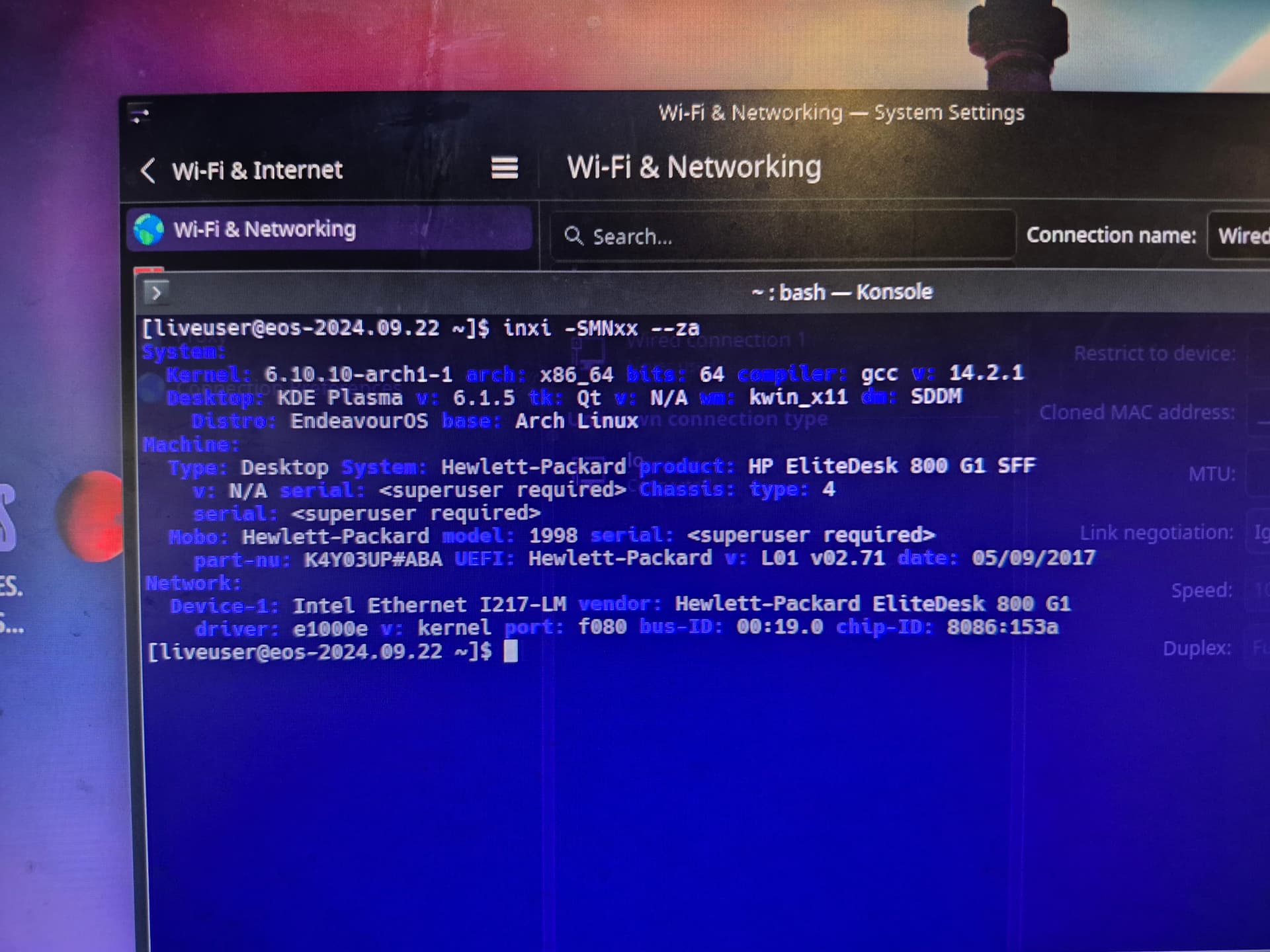
Others who have encountered this issue with the Intel I217 ethernet adaptor on the live ISO, have had success disabling the Wake On LAN (WOL) feature under Windows.
I’m not sure specifically how that is done under Windows, but hopefully that’s a point in the right direction?
Sources:
- EndeavourOS > No ethernet connection (Intel i217-V) USB live install
- Arch > Ethernet issues after booting Windows (Intel I217-V (e1000e))
Perhaps of help:
- Intel Support > Enabling Wake-on-LAN (just disable instead enabling)
I’m not sure how I didn’t think of doing that since I’ve definitely disabled that to fix it before, thanks for reminding me!