hello! basically I’m having a bit of a problem with figuring out how to go about restoring a btrfs snapshot as I’ve never done so, i have grub-btrfs set up and all automated, all that’s left is to actually use it and see if it works, but I’ve seen snippets of posts where people say you shouldn’t use grub-btrfs to boot into an old snapshot and use it from then on, but as a stepping stone to restore ‘properly’ via timeshift (timeshift is what I’m using for snapshot creation) and another where it just said never restore from grub-btrfs and only restore via timeshift otherwise you create this big nesting of directories so I’m a bit confused, any guidance on this is welcome, I’m sure i am overthinking it but i don’t want to take risks, I’ve learned the hard way with that for arch previously.
Welcome to EOS community 
For reference:
- Btrfs-Assistant + Snapper vs Timeshift : Btrfs-Assistant & Snapper vs Timeshift
- Timeshift is simple and easy to use but not as feature rich as Snapper
- Generally you don’t need both Btrfs-Assistant and Timeshift.
Personally never used timeshift so can’t say.
Never experienced any issues with Btrfs-Assistant.
i have btrfs-assistant just to have it tbh, restore button is greyed out when i select the snapshots made by timeshift but not a concern, i would have used snapper if it wasnt all CLI based i dont feel too confident with that and even though ive had a bad experience with timeshift its what im most used to
Not even once I touched terminal for snapper 
Snapper and Btrfsmaintenance will be automatically detected by btrfs-assistant if installed. They’re optional. If interested see my journey Recommended Btrfs Assistant configuration
All you need is
yay -S btrfs-assistant btrfsmaintenance
sudo pacman -S snapper snap-pac grub-btrfs inotify-tools
then everything can be managed from GUI according to your preference.
oh that’s really interesting i didn’t know they integrated like that, if I’m honest i have basically set up all the snapper stuff but with timeshift instead its not much different aside from changing a config file somewhere from saying snapper to timeshift-auto i think, and the pacman hook sounds useful but i can get by with just taking daily snapshots once i discovered that they took up literally no space but still functioned as a full backup, blew my mind.
Anyways you might be able to shed some light on this, when you use grub-btrfs to boot into a snapper snapshot if say your machine wouldn’t boot into the DE anymore, do you just use that as your daily driver from then on or would you do something more after?
Never caused any problem as such but just for testing I tried to switch to different snapshot. After that I moved back to latest snapshot.
Though if you discover what recent package caused the issue…you can just roll back to older snapshot with older version of that package then
- remove that pacakge
- update everything else besides that package
- use downgrade included with EOS IIRC
Your home directory will be unaffected with these changes as that’s a different subvolume having separate snapshots.
Mostly I use BTRFS as backup solution for my home directory. Files are important.
If you mess-up your system you can always fix it via chroot. (including all the scenarios I mentioned above). Nice to have snapshots at grub menu but chroot is the ultimate fix.
On one occasion grub messed-up, so I had to chroot and fix it. Snapshots of root won’t help when Grub itself is broken 
Hi @lolzhunter
Simply launch BTRFS Assistant → Snapper tab → “Browse/Restore” tab → select the snapshot you need to restore 2 then there is a button to restore to this snapshot.
Let us know how it goes. I hope this helps.
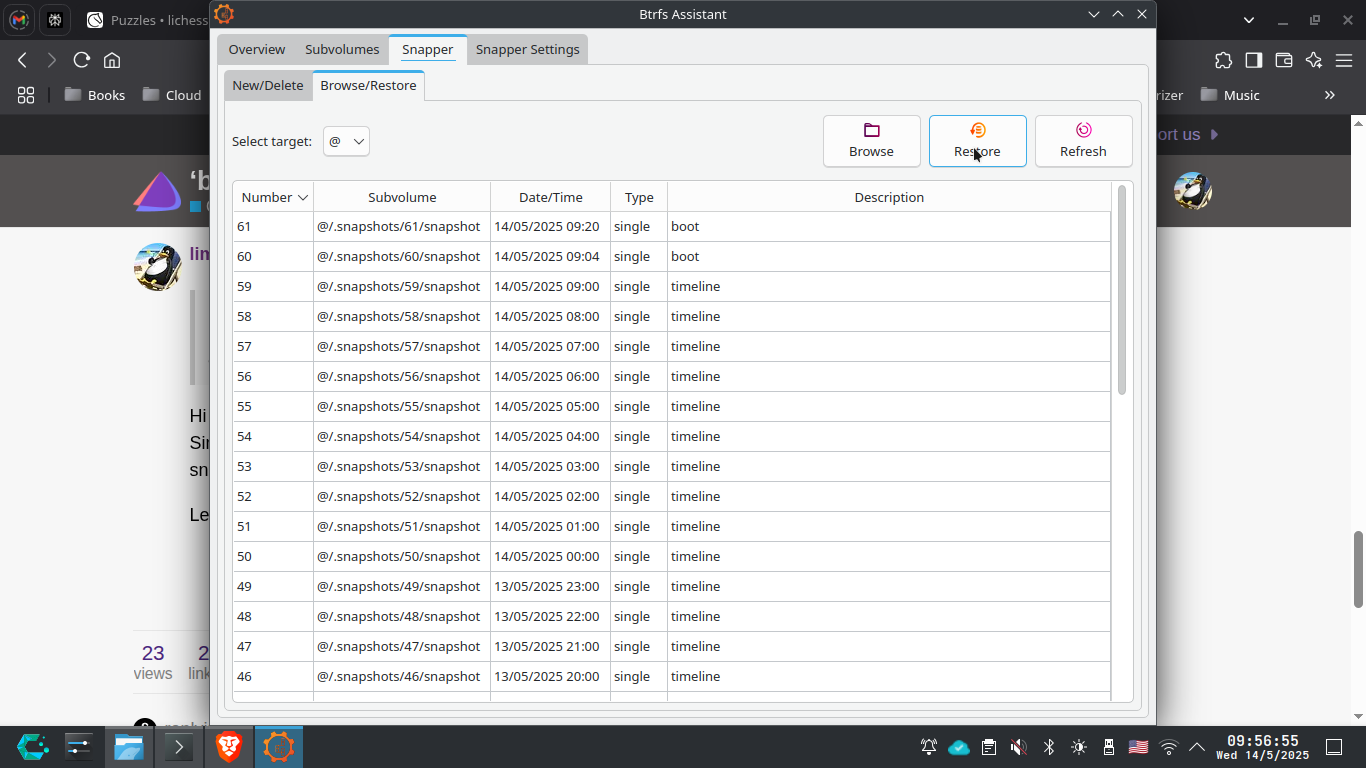
For home…Btrfs Assistant method only lets you recover single file one at a time and not folders.
If I open as administrator for the /home/.snapshots directory from filemanager, I can copy multiple files/folders from the desired snapshot, correct? ping @dalto for this question 
I hope I did not mess things up. I understand this would restore the full snapshot. We are marking a specific snapshot and then pressing the restore button!
When you boot into a snapshot, you shouldn’t use the system. You simply restore the snapshot from there and then reboot.
ok so when i boot into a snapshot from grub, i should restore a snapshot properly from there via timeshift or whatever i use to restore, and i imagine it would have to be a different snapshot to the one i just booted into otherwise it might cause problems, or will that not matter? thanks for the answer btw
It’s usually the one you’ve booted in to.
oh really? that’s handy i assumed it would have to be different since actually booting into it would mess it up somehow if you tried to restore from it
Out of my curiosity since I don’t use Grub. Does that mean with grub-btrfs you just boot into a working system from the Grub menu and then use btrfs-assistent or Timeshift to actually restore your system?
Or snapper. I’ve never had to rollback since I started to use Endeavour, but on Tumbleweed it was as easy as booting to a snapshot and running snapper rollback followed by another reboot. I don’t imagine Endeavour being much different.
Yes.
I’ve gotten used to btrfs-assistent, I know it’s front-end for snapper but I’ve never used “snapper rollback” yet. I’ve only broken my system myself when I do some experimenting and then it’s nice to be able to rollback to a previous snapshot.
snapper rollback isn’t what you want for the root. You should do the snapshot restore from within Btrfs Assistant.
I’ve only used btrf-assistent for restoring root. Just a question btrfs-assistent is a GUI. What happens if I screw my system up so much that I need to chroot in and that I can’t use access GUI or does btrfs-assistent also have a command-line tool that I wasn’t aware of that I can use then?
btrfs-assistant --help
Warning: No translations available
Usage: btrfs-assistant-bin [options]
An application for managing Btrfs and SnapperOptions:
-h, --help Displays help on commandline options.
–help-all Displays help, including generic Qt
options.
-v, --version Displays version information.
-l, --list List snapshots
-r, --restore Restore the given snapshot
Oh snap it does! Awesome! Thanks @dalto! And to follow up on that, why is it not recommended to use “snapper rollback” to restore your “root” sub-volume?