I just updated my computer and now the resolution is messed up
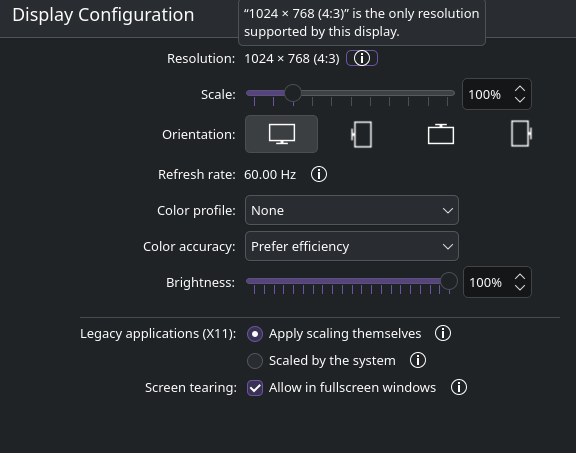
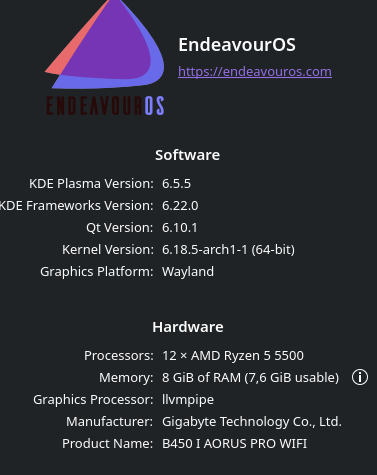
your processor shows as llvmpipe
can you show us your system info
inxi -Faz --no-host
System:
Kernel: 6.18.5-arch1-1 arch: x86_64 bits: 64 compiler: gcc
v: 15.2.1 clocksource: tsc avail: hpet,acpi_pm
parameters: initrd=\4c67c81511654b4b92476a00b22407ba\6.18.5-arch1-1\initrd
nvme_load=YES nowatchdog rw
root=UUID=df04ff60-451f-4807-8806-3834865283c0
resume=UUID=1f9e9576-e7c0-4cef-b259-8b33568f8d14 rw
root=UUID=df04ff60-451f-4807-8806-3834865283c0
resume=UUID=1f9e9576-e7c0-4cef-b259-8b33568f8d14
systemd.machine_id=4c67c81511654b4b92476a00b22407ba
Desktop: KDE Plasma v: 6.5.5 tk: Qt v: N/A info: frameworks
v: 6.22.0 wm: kwin_wayland vt: 1 dm: SDDM Distro: EndeavourOS
base: Arch Linux
Machine:
Type: Desktop System: Gigabyte product: B450 I AORUS PRO WIFI
v: N/A serial:
Mobo: Gigabyte model: B450 I AORUS PRO WIFI-CF
serial: uuid:
Firmware: UEFI vendor: American Megatrends LLC. v: F63c
date: 07/20/2022
Battery:
Device-1: apple_mfi_fastcharge_1-3 model: N/A serial: N/A
charge: N/A status: N/A
Device-2: apple_mfi_fastcharge_1-4 model: N/A serial: N/A
charge: N/A status: N/A
Device-3: hidpp_battery_0 model: Logitech G305 Lightspeed
Wireless Gaming Mouse serial: charge: 100% (should
be ignored) rechargeable: yes status: discharging
CPU:
Info: model: AMD Ryzen 5 5500 bits: 64 type: MT MCP
arch: Zen 3 gen: 3 level: v3 note: check built: 2021-22
process: TSMC n7 (7nm) family: 0x19 (25) model-id: 0x50 (80)
stepping: 0 microcode: 0xA500012
Topology: cpus: 1x dies: 1 clusters: 1 cores: 6 threads: 12
tpc: 2 smt: enabled cache: L1: 384 KiB
desc: d-6x32 KiB; i-6x32 KiB L2: 3 MiB desc: 6x512 KiB
L3: 16 MiB desc: 1x16 MiB
Speed (MHz): avg: 2391 min/max: 411/4269 boost: enabled
scaling: driver: amd-pstate-epp governor: powersave cores:
1: 2391 2: 2391 3: 2391 4: 2391 5: 2391 6: 2391 7: 2391
8: 2391 9: 2391 10: 2391 11: 2391 12: 2391 bogomips: 86237
Flags-basic: avx avx2 ht lm nx pae sse sse2 sse3 sse4_1
sse4_2 sse4a ssse3
Vulnerabilities:
Type: gather_data_sampling status: Not affected
Type: ghostwrite status: Not affected
Type: indirect_target_selection status: Not affected
Type: itlb_multihit status: Not affected
Type: l1tf status: Not affected
Type: mds status: Not affected
Type: meltdown status: Not affected
Type: mmio_stale_data status: Not affected
Type: old_microcode status: Not affected
Type: reg_file_data_sampling status: Not affected
Type: retbleed status: Not affected
Type: spec_rstack_overflow mitigation: Safe RET
Type: spec_store_bypass mitigation: Speculative Store
Bypass disabled via prctl
Type: spectre_v1 mitigation: usercopy/swapgs barriers and
__user pointer sanitization
Type: spectre_v2 mitigation: Retpolines; IBPB: conditional;
IBRS_FW; STIBP: always-on; RSB filling; PBRSB-eIBRS: Not
affected; BHI: Not affected
Type: srbds status: Not affected
Type: tsa mitigation: Clear CPU buffers
Type: tsx_async_abort status: Not affected
Type: vmscape mitigation: IBPB before exit to userspace
Graphics:
Device-1: NVIDIA GP104 [GeForce GTX 1070] vendor: ASUSTeK
driver: N/A alternate: nouveau, nvidia_drm, nvidia
non-free: 550-580.xx+ status: current (as of 2025-11;
EOL~2026-12-xx) arch: Pascal code: GP10x process: TSMC 16nm
built: 2016-2021 pcie: gen: 1 speed: 2.5 GT/s lanes: 16
link-max: gen: 3 speed: 8 GT/s bus-ID: 01:00.0
chip-ID: 10de:1b81 class-ID: 0300
Display: wayland server: X.org v: 1.21.1.21 with: Xwayland
v: 24.1.9 compositor: kwin_wayland driver: X:
loaded: modesetting alternate: fbdev,nouveau,nv,vesa
gpu: N/A display-ID: 0
Monitor-1: Unknown-1 res: mode: 1024x768 hz: 60
scale: 100% (1) dpi: 96 size: 270x203mm (10.63x7.99")
diag: 338mm (13.3") modes: 1024x768
API: EGL v: 1.5 platforms: device: 0 drv: swrast
surfaceless: drv: swrast wayland: drv: swrast x11: drv: swrast
inactive: gbm
API: OpenGL v: 4.5 vendor: mesa v: 25.3.3-arch1.2 glx-v: 1.4
direct-render: yes renderer: llvmpipe (LLVM 21.1.6 256 bits)
device-ID: ffffffff:ffffffff memory: 7.44 GiB unified: yes
display-ID: :1.0
API: Vulkan Message: No Vulkan data available.
Info: Tools: api: clinfo, eglinfo, glxinfo, vulkaninfo
de: kscreen-console,kscreen-doctor gpu: nvidia-smi
wl: wayland-info x11: xdpyinfo, xprop, xrandr
Audio:
Device-1: NVIDIA GP104 High Definition Audio vendor: ASUSTeK
driver: snd_hda_intel v: kernel pcie: gen: 1 speed: 2.5 GT/s
lanes: 16 link-max: gen: 3 speed: 8 GT/s bus-ID: 01:00.1
chip-ID: 10de:10f0 class-ID: 0403
Device-2: Advanced Micro Devices [AMD/ATI] Renoir/Cezanne
HDMI/DP Audio driver: snd_hda_intel v: kernel pcie: gen: 3
speed: 8 GT/s lanes: 16 bus-ID: 0b:00.1 chip-ID: 1002:1637
class-ID: 0403
Device-3: Advanced Micro Devices [AMD] Ryzen HD Audio
vendor: Gigabyte driver: snd_hda_intel v: kernel pcie: gen: 3
speed: 8 GT/s lanes: 16 bus-ID: 0b:00.6 chip-ID: 1022:15e3
class-ID: 0403
Device-4: C-Media Blue Snowball
driver: hid-generic,snd-usb-audio,usbhid type: USB rev: 1.1
speed: 12 Mb/s lanes: 1 mode: 1.1 bus-ID: 3-2:2
chip-ID: 0d8c:0005 class-ID: 0300 serial:
API: ALSA v: k6.18.5-arch1-1 status: kernel-api
tools: alsactl,alsamixer,amixer
Server-1: PipeWire v: 1.4.9 status: active with:
1: pipewire-pulse status: active 2: wireplumber status: active
3: pipewire-alsa type: plugin 4: pw-jack type: plugin
tools: pactl,pw-cat,pw-cli,wpctl
Network:
Device-1: Intel Wi-Fi 5 Wireless-AC 9x6x [Thunder Peak]
driver: iwlwifi v: kernel pcie: gen: 2 speed: 5 GT/s lanes: 1
bus-ID: 07:00.0 chip-ID: 8086:2526 class-ID: 0280
IF: wlan0 state: up mac:
Device-2: Intel I211 Gigabit Network vendor: Gigabyte
driver: igb v: kernel pcie: gen: 1 speed: 2.5 GT/s lanes: 1
port: e000 bus-ID: 09:00.0 chip-ID: 8086:1539 class-ID: 0200
IF: enp9s0 state: down mac:
Info: services: NetworkManager, systemd-timesyncd,
wpa_supplicant
Bluetooth:
Device-1: Intel Wireless-AC 9260 Bluetooth Adapter
driver: btusb v: 0.8 type: USB rev: 2.0 speed: 12 Mb/s
lanes: 1 mode: 1.1 bus-ID: 1-10:5 chip-ID: 8087:0025
class-ID: e001
Report: btmgmt ID: hci0 rfk-id: 0 state: up
address: bt-v: 5.1 lmp-v: 10 status: discoverable: no
pairing: no class-ID: 6c0104
Drives:
Local Storage: total: 1.78 TiB used: 1.26 TiB (70.7%)
SMART Message: Unable to run smartctl. Root privileges
required.
ID-1: /dev/nvme0n1 maj-min: 259:0 vendor: Kingston
model: SNV2S1000G size: 931.51 GiB block-size: physical: 512 B
logical: 512 B speed: 63.2 Gb/s lanes: 4 tech: SSD
serial: fw-rev: SBM02103 temp: 43.9 C scheme: GPT
ID-2: /dev/sda maj-min: 8:0 vendor: Kingston
model: SA400S37960G size: 894.25 GiB block-size:
physical: 512 B logical: 512 B speed: 6.0 Gb/s tech: SSD
serial: fw-rev: Z1.3 scheme: GPT
Partition:
ID-1: / raw-size: 921.71 GiB size: 906.17 GiB (98.31%)
used: 503.97 GiB (55.6%) fs: ext4 dev: /dev/nvme0n1p2
maj-min: 259:2
Swap:
Kernel: swappiness: 60 (default) cache-pressure: 100 (default)
zswap: yes compressor: zstd max-pool: 20%
ID-1: swap-1 type: partition size: 8.8 GiB
used: 4 KiB (0.0%) priority: -2 dev: /dev/nvme0n1p3
maj-min: 259:3
Sensors:
System Temperatures: cpu: 37.8 C mobo: N/A
Fan Speeds (rpm): N/A
Info:
Memory: total: 8 GiB available: 7.62 GiB used: 3.1 GiB (40.7%)
Processes: 275 Power: uptime: 40m states: freeze,mem,disk
suspend: deep avail: s2idle wakeups: 0 hibernate: platform
avail: shutdown, reboot, suspend, test_resume image: 3 GiB
services: org_kde_powerdevil, power-profiles-daemon,
upowerd Init: systemd v: 259 default: graphical
tool: systemctl
Packages: 1205 pm: pacman pkgs: 1192 libs: 332 tools: yay
pm: flatpak pkgs: 13 Compilers: gcc: 15.2.1 Shell: Bash
v: 5.3.9 running-in: konsole inxi: 3.3.40
can you post the output of
pacman -Qs nvidia
Looks like you may need to remove the nvidia packages and install ones from the AUR
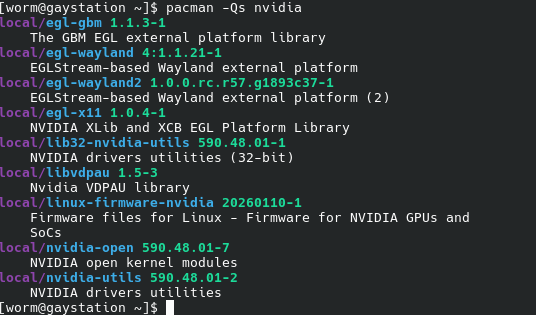
what should i do now? How do i go about replacing those packages?
follow the directions in the link i posted
1 Like
sorry, i feel so stupid, i can’t figure out what to do. I need clearer steps. I know i have to replace those packages but have no idea exactly how to do that. I’ve been trying for a while now
Hello, you must remove your current driver:
sudo pacman -Rdd nvidia-open nvidia-utils lib32-nvidia-utils
An then you can try this:
yay -S nvidia-580xx-dkms nvidia-580xx-utils nvidia-580xx-settings lib32-nvidia-580xx-utils
4 Likes
[quote=“worm, post:3, topic:77631”]
Graphics:
Device-1: NVIDIA GP104 [GeForce GTX 1070] vendor: ASUSTeK
driver: N/A alternate: nouveau, nvidia_drm, nvidia
You have no driver loaded.
Your system is not rendering on the Gpu.
Your Gpu is A Gtx 1070 which is not supported by the current 590xx drivers. You need to install the 580xx version from the AUR. The link provided explains that.
You need to use yay to install those packages. Try installing with this and then after it finishes reboot. Then post inxi -Ga
yay -S nvidia-580xx-dkms nvidia-580xx-utils lib32-nvidia-580xx-utils nvidia-580xx-settings
Edit: What @albersc2 posted will work also.
2 Likes
@worm
Post inxi -Ga to verify.
@ricklinux @albersc2 sorry for the late reply. Everything seems so be fixed. I was having some issues launching minecraft through prismlauncher (hence the late response while i was trying to fix that) due to graphics issues. I was able to fix that by updating flatpak
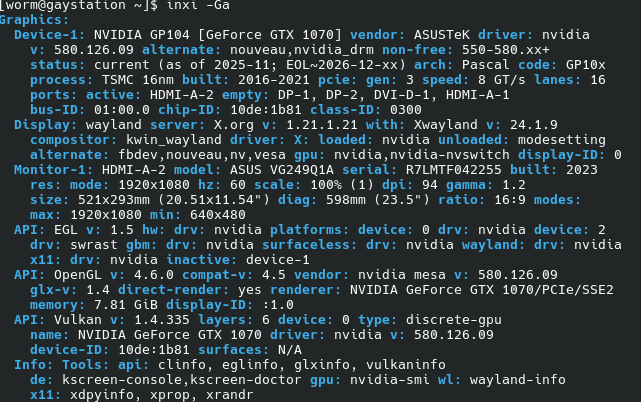
2 Likes
Looks good!
2 Likes
I’m glad to hear that 
1 Like
This topic was automatically closed 2 days after the last reply. New replies are no longer allowed.