I’m usin’ grub
lol, stuck at hostname service AND the USB doeasn’t show UEFI anymore? do i need to disable something in BIOS to be able to see UEFI and install it?
well i try to rewrite the usb, in iso and dd, one of thrm might work
well i got it, at reinstalling
damn.. i did reinstall it, but i did reuse the boot and home partition, i hope this do not affect it? (seems fine, apps like steam show up, but are not installed)
but well, nah monitor still doesn’t show 160+ hz, maybe i’ll try to dual boot and set 160 in windows may this works
EDIT: nope.. also i did boot into the non lts verion, in grub it was hidden under advanced.
yes i did select the nvidia one this time, said it only is for the latest cards?
Graphics:
Device-1: NVIDIA GM206 [GeForce GTX 960] vendor: Micro-Star MSI
driver: nvidia v: 535.54.03 alternate: nouveau,nvidia_drm non-free: 530.xx+
status: current (as of 2023-05) arch: Maxwell code: GMxxx
process: TSMC 28nm built: 2014-19 pcie: gen: 1 speed: 2.5 GT/s lanes: 16
link-max: gen: 3 speed: 8 GT/s ports: active: none off: DP-3,HDMI-A-1
empty: DP-1,DP-2,DVI-I-1 bus-ID: 07:00.0 chip-ID: 10de:1401 class-ID: 0300
Display: x11 server: X.Org v: 21.1.8 compositor: kwin_x11 driver: X:
loaded: nvidia unloaded: modesetting alternate: fbdev,nouveau,nv,vesa
gpu: nvidia,nvidia-nvswitch display-ID: :0 screens: 1
Screen-1: 0 s-res: 4480x1440 s-dpi: 108 s-size: 1054x342mm (41.50x13.46")
s-diag: 1108mm (43.63")
Monitor-1: DP-3 mapped: DP-4 note: disabled pos: primary,top-right
model: AOC AG275QG3R4B+ serial: RKGN1JA002286 built: 2022 res: 2560x1440
dpi: 109 gamma: 1.2 size: 597x336mm (23.5x13.23") diag: 685mm (27")
ratio: 16:9 modes: max: 2560x1440 min: 640x480
Monitor-2: HDMI-A-1 mapped: HDMI-0 note: disabled pos: bottom-l
model: Acer S240HL serial: LU50D0018514 built: 2012 res: 1920x1080 hz: 60
dpi: 92 gamma: 1.2 size: 531x299mm (20.91x11.77") diag: 609mm (24")
ratio: 16:9 modes: max: 1920x1080 min: 640x480
API: OpenGL v: 4.6.0 NVIDIA 535.54.03 renderer: NVIDIA GeForce GTX
960/PCIe/SSE2 direct-render: Yes
Your card is supported. The installer will and does install the nvidia drivers for this card. As for the refresh rates you’ll have to figure that out. It’s either not reading the edid properly or it’s incorrect. I can’t really help much with this . You have the hardware so you’ll have to go through steps to figure out what the issue is.
https://wiki.archlinux.org/title/Xrandr#Adding_undetected_resolutions
https://wiki.archlinux.org/title/Xrandr#Permanently_adding_undetected_resolutions
alright, i’ll read trough the links you posted and do a stop for now, no more questions here, i’m kinda annoyed myself haha 
thank you!
btw intel or amd gpus? is here a thread where ppl talk about which gpu is the best option with their own “experience”?
maybe i’ll try to save up somehow, even if this wouldn’t mean it solves all my problems… my gpu is weak anyways for the things i do and want to do~
only found this:
but doesnt really help
Get an amd as it uses amdgpu kernel module. I would suggest the 6750 XT as it is the most reasonable price here at least.
thank you very much <3 maybe i have luck at black friday, the last times were dissappointing as ik
what where? well you sent one of the links before, i tried but when doin’ ‘xrandr --addmode DP 2560x1440_165.00’ it don’t find it, if i add a number? any..:
X Error of failed request: BadMatch (invalid parameter attributes)
Major opcode of failed request: 140 (RANDR)
Minor opcode of failed request: 18 (RRAddOutputMode)
Serial number of failed request: 47
Current serial number in output stream: 48
EDIT:
it’s in xrandr the new one without doing addmode, but i can’t switch to it.
What do you mean?
Edit:
What does xrandr show with both monitors hooked up?
@Wasting6674
I’m not an expert on this but if you follow the wiki and do this what does it show?
cvt 2560 1440
Edit: Want to see what refresh rates it shows for this resolution?
Edit: Also what refresh rates are shown in KDE under settings for the display?
example:

I’m using Wayland so it may be slightly different looking.
You could try the following for each monitor. This is what the specs say your monitors support on those types of connections…
xrandr --output DP-4 --mode 2560x1440 -rate 165 (Or 170)
xrandr --output HDMI-0 --mode 2560x1440 -rate 144
Have you tried setting the refresh rate in the nvidia settings app? That worked for me once.
cvt 2560 1440 165
2560x1440 164.90 Hz (CVT) hsync: 261.86 kHz; pclk: 938.50 MHz
Modeline “2560x1440_165.00” 938.50 2560 2792 3072 3584 1440 1443 1448 1588 -hsync +vsync
xrandr --newmode “2560x1440_165.00” 941.49 2560 2792 3080 3600 1440 1441 1444 1585 -HSync +Vsync
xrandr --addmode DP-1 2560x1440_165.00 (i tried DP-1 up to 6 just to be sure)
X Error of failed request: BadMatch (invalid parameter attributes)
Major opcode of failed request: 140 (RANDR)
Minor opcode of failed request: 18 (RRAddOutputMode)
Serial number of failed request: 47
Current serial number in output stream: 48
and as i already said, i can see it in “xrandr” without doin’ --addmoe somehow.. but this it what it shows (the new one that has been added):
DP-5 disconnected (normal left inverted right x axis y axis)
2560x1440_165.00 (0x2e3) 941.490MHz -HSync +VSync
h: width 2560 start 2792 end 3080 total 3600 skew 0 clock 261.52KHz
v: height 1440 start 1441 end 1444 total 1585 clock 165.00Hz
my settings show 60hz and 120hz at refresh rate
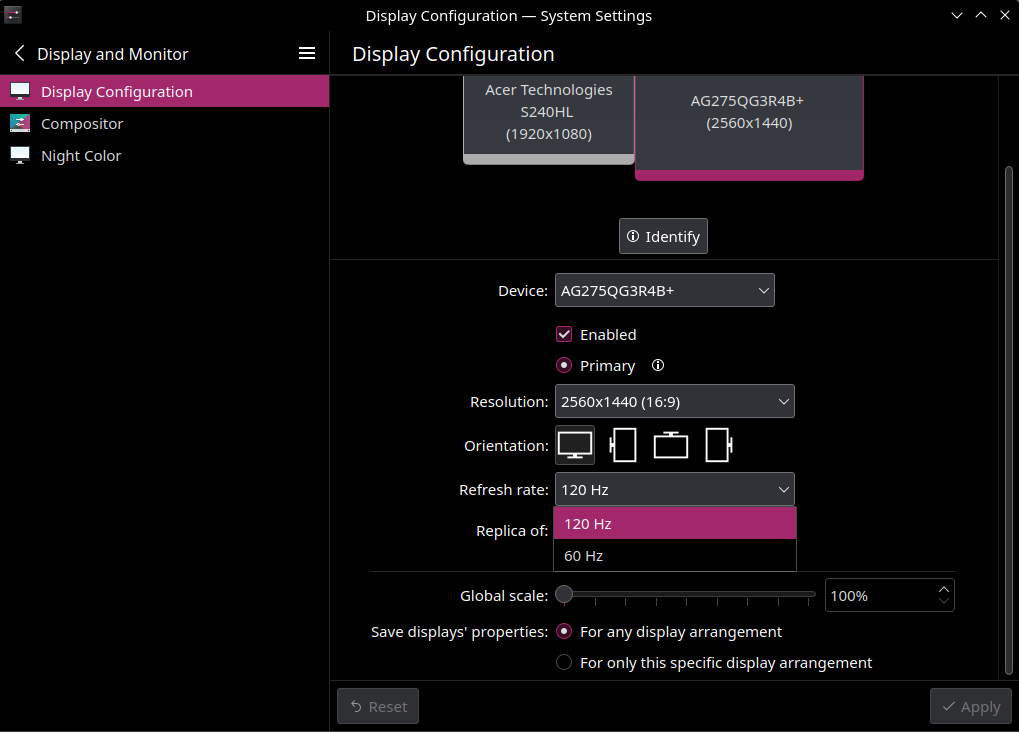
also, no need to output HDMI to 1440p and 144hz, it is HD and 60hz and never was higher, or should i still test it?
i did try it out a few hours ago, without any success
Did you try the two commands exactly as i showed.
xrandr --output DP-4 --mode 2560x1440 -rate 165
xrandr --output HDMI-0 --mode 2560x1440 -rate 144
xrandr --output DP-4 --mode 2560x1440 -rate 165
xrandr: unrecognized option ‘-rate’
Try ‘xrandr --help’ for more information.
did changed it to --rate, it flashed but nothing changed
in xrandr it still shows 120* and in settings the same.

Well it’s probably not recognizing the EDID properly. I’m not an expert on this. I don’t do gaming and i don’t have multiple monitors or high refresh rates.
i don’t really can read it and i don’t know if it’s the whole edid, on bottom it also says it cannot be trusted 
This is read-edid version 3.0.2. Prepare for some fun.
Attempting to use i2c interface
Looks like no busses have an EDID. Sorry!
Attempting to use the classical VBE interfacePerforming real mode VBE call Interrupt 0x10 ax=0x4f00 bx=0x0 cx=0x0 Function supported Call successful VBE version 300 VBE string at 0x11100 "NVIDIA"VBE/DDC service about to be called
Report DDC capabilitiesPerforming real mode VBE call Interrupt 0x10 ax=0x4f15 bx=0x0 cx=0x0 Function supported Call successful Monitor and video card combination does not support DDC1 transfers Monitor and video card combination does not support DDC2 transfers 0 seconds per 128 byte EDID block transfer Screen is not blanked during DDC transferReading next EDID block
VBE/DDC service about to be called
Read EDIDPerforming real mode VBE call Interrupt 0x10 ax=0x4f15 bx=0x1 cx=0x0 Function supported Call failedThe EDID data should not be trusted as the VBE call failed
Error: output block unchanged
I’m sorry nothing was successful. Maybe try some other arguments
if you played with them, or send an email to Matthew Kern pyrophobicman@gmail.com.
Partial Read… Try again
thanks for trying! at least i could learn a little bit.
What does it say when you run
xrandr --output DP-4 --mode 2560x1440 --rate 165