After rebooting screen last shows loading ramdisk before turning black forever. I restored to last previous working version 6.14.6 with btrfs-assistant. Same eos-update issue with both virtualbox instances today. How can I figure out the issue? Or just wait a few weeks before trying again.
Please run the update and share the entire output from the update here so we can see what is going wrong.
Of course, don’t reboot if it fails.
Try to downgrade the mesa package and/or install the vulkan-virtio package.
From your log: extra/mesa 1:25.0.5-1 1:25.1.1-1 -60.22 MiB
all virtualbox installs? you have 3d enabled?
Before rerunning eos-update I setup pacman.conf to ignore mesa package but after reboot had same problem. Did not try installing vulkan-virtio package yet.
what GPU on host?
No 3d enabled for virtualbox instances.
Host gpu: 00:02.0 VGA compatible conHotroller: Intel Corporation HD Graphics 530 (rev 06)
I had the same issue with Virtualbox on Manjaro Xfce Unstable host with both Arch Xfce and EndeavourOS Xfce. My other Linux VM’s were not affected, Manjaro Xfce(BRTFS-Stable), Manjaro Xfce-Stable) , Arch Plasma and Manjaro Plasma (Stable).
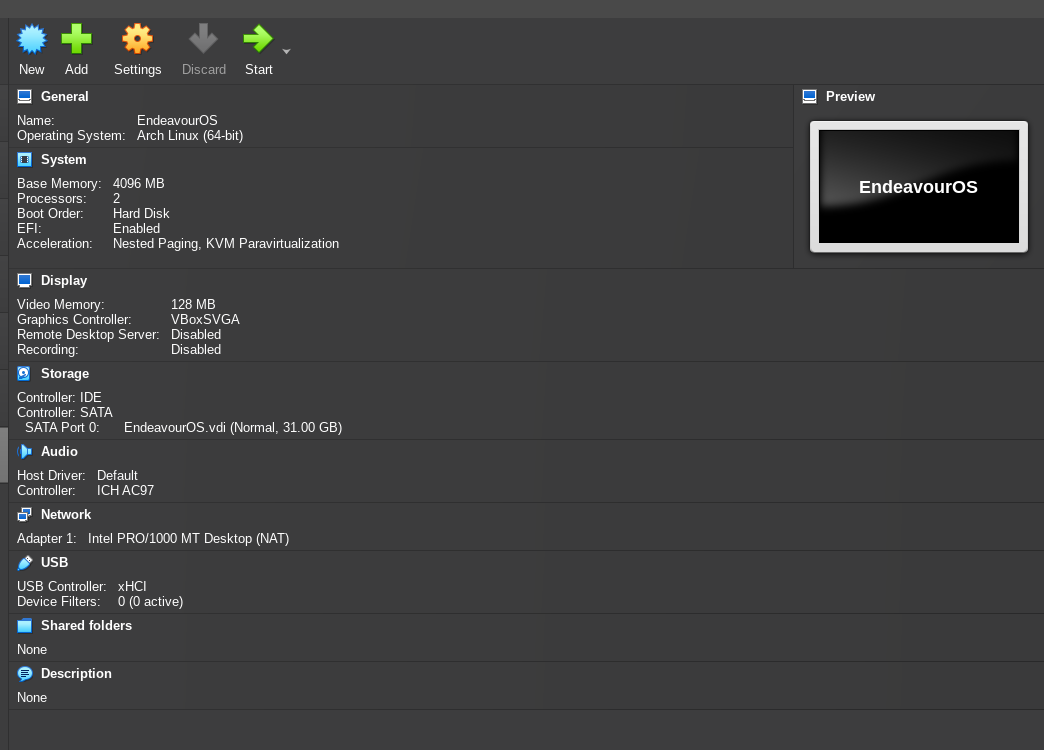
I got EndeavourOS (new VB installation) fixed by changing the Display Setting to VBoxSVGA, even though Virtualbox indicates “Invalid Settings Detected”.
A new Arch Xfce VB installation works straight away with no change to the Display Settings. I’m stumped.
This is what my EOS config looks like:
Host Inxi, in case it matters:
System:
  Kernel: 6.14.8-3-MANJARO arch: x86_64 bits: 64 compiler: gcc v: 15.1.1
    clocksource: tsc avail: hpet,acpi_pm
    parameters: BOOT_IMAGE=/boot/vmlinuz-6.14-x86_64
    root=UUID=a4356953-c72b-40da-845f-f30936703dea rw ipv6.disable=1
    mitigations=off apparmor=1 security=apparmor nowatchdog nmi_watchdog=0
    udev.log_priority=3 amd_pstate=active
  Desktop: Xfce v: 4.20.1 tk: Gtk v: 3.24.48 wm: xfwm4 v: 4.20.0
    with: xfce4-panel tools: xfce4-screensaver vt: 7 dm: LightDM v: 1.32.0
    Distro: Manjaro base: Arch Linux
Machine:
  Type: Mini-pc Mobo: AZW model: SER v: V1.0 serial: <superuser required>
    uuid: <superuser required> UEFI: American Megatrends LLC. v: 5800H502
    date: 02/15/2023
Battery:
  Message: No system battery data found. Is one present?
Memory:
  System RAM: total: 32 GiB available: 28.31 GiB used: 2.2 GiB (7.8%)
  Message: For most reliable report, use superuser + dmidecode.
  Array-1: capacity: 32 GiB slots: 2 modules: 2 EC: None
    max-module-size: 16 GiB note: est.
  Device-1: Channel-A DIMM 0 type: DDR4 detail: synchronous unbuffered
    (unregistered) size: 16 GiB speed: 3200 MT/s volts: note: check curr: 1
    min: 1 max: 1 width (bits): data: 64 total: 64 manufacturer: Crucial
    part-no: CT16G4SFS832A.C8FF serial: <filter>
  Device-2: Channel-B DIMM 0 type: DDR4 detail: synchronous unbuffered
    (unregistered) size: 16 GiB speed: 3200 MT/s volts: note: check curr: 1
    min: 1 max: 1 width (bits): data: 64 total: 64 manufacturer: Crucial
    part-no: CT16G4SFS832A.C8FF serial: <filter>
PCI Slots:
  Permissions: Unable to run dmidecode. Root privileges required.
CPU:
  Info: model: AMD Ryzen 7 5800H with Radeon Graphics bits: 64 type: MT MCP
    arch: Zen 3 gen: 3 level: v3 note: check built: 2021-22
    process: TSMC n7 (7nm) family: 0x19 (25) model-id: 0x50 (80) stepping: 0
    microcode: 0xA500011
  Topology: cpus: 1x dies: 1 clusters: 1 cores: 8 threads: 16 tpc: 2
    smt: enabled cache: L1: 512 KiB desc: d-8x32 KiB; i-8x32 KiB L2: 4 MiB
    desc: 8x512 KiB L3: 16 MiB desc: 1x16 MiB
  Speed (MHz): avg: 1102 min/max: 400/4465 boost: enabled scaling:
    driver: amd-pstate-epp governor: performance cores: 1: 1102 2: 1102 3: 1102
    4: 1102 5: 1102 6: 1102 7: 1102 8: 1102 9: 1102 10: 1102 11: 1102 12: 1102
    13: 1102 14: 1102 15: 1102 16: 1102 bogomips: 102208
  Flags: 3dnowprefetch abm adx aes aperfmperf apic arat avic avx avx2 bmi1
    bmi2 bpext cat_l3 cdp_l3 clflush clflushopt clwb clzero cmov cmp_legacy
    constant_tsc cpb cppc cpuid cqm cqm_llc cqm_mbm_local cqm_mbm_total
    cqm_occup_llc cr8_legacy cx16 cx8 de debug_swap decodeassists erms extapic
    extd_apicid f16c flushbyasid fma fpu fsgsbase fsrm fxsr fxsr_opt ht
    hw_pstate ibpb ibrs ibs invpcid irperf lahf_lm lbrv lm mba mca mce
    misalignsse mmx mmxext monitor movbe msr mtrr mwaitx nonstop_tsc nopl npt
    nrip_save nx ospke osvw overflow_recov pae pat pausefilter pclmulqdq
    pdpe1gb perfctr_core perfctr_llc perfctr_nb pfthreshold pge pku pni popcnt
    pse pse36 rapl rdpid rdpru rdrand rdseed rdt_a rdtscp rep_good sep sha_ni
    skinit smap smca smep ssbd sse sse2 sse4_1 sse4_2 sse4a ssse3 stibp succor
    svm svm_lock syscall tce topoext tsc tsc_scale umip user_shstk v_spec_ctrl
    v_vmsave_vmload vaes vgif vmcb_clean vme vmmcall vpclmulqdq wbnoinvd wdt
    xgetbv1 xsave xsavec xsaveerptr xsaveopt xsaves xtopology
  Vulnerabilities:
  Type: gather_data_sampling status: Not affected
  Type: ghostwrite status: Not affected
  Type: indirect_target_selection status: Not affected
  Type: itlb_multihit status: Not affected
  Type: l1tf status: Not affected
  Type: mds status: Not affected
  Type: meltdown status: Not affected
  Type: mmio_stale_data status: Not affected
  Type: reg_file_data_sampling status: Not affected
  Type: retbleed status: Not affected
  Type: spec_rstack_overflow status: Vulnerable
  Type: spec_store_bypass status: Vulnerable
  Type: spectre_v1 status: Vulnerable: __user pointer sanitization and
    usercopy barriers only; no swapgs barriers
  Type: spectre_v2 status: Vulnerable; IBPB: disabled; STIBP: disabled;
    PBRSB-eIBRS: Not affected; BHI: Not affected
  Type: srbds status: Not affected
  Type: tsx_async_abort status: Not affected
Graphics:
  Device-1: Advanced Micro Devices [AMD/ATI] Cezanne [Radeon Vega Series /
    Radeon Mobile Series] driver: amdgpu v: kernel arch: GCN-5 code: Vega
    process: GF 14nm built: 2017-20 pcie: gen: 3 speed: 8 GT/s lanes: 16 ports:
    active: HDMI-A-1 empty: DP-1,DP-2,HDMI-A-2 bus-ID: 04:00.0
    chip-ID: 1002:1638 class-ID: 0300 temp: 45.0 C
  Display: x11 server: X.Org v: 21.1.16 with: Xwayland v: 24.1.6
    compositor: xfwm4 v: 4.20.0 driver: X: loaded: amdgpu unloaded: modesetting
    alternate: fbdev,vesa dri: radeonsi gpu: amdgpu display-ID: :0.0 screens: 1
  Screen-1: 0 s-res: 1440x900 s-dpi: 96 s-size: 382x239mm (15.04x9.41")
    s-diag: 451mm (17.74") monitors: <missing: xrandr>
  Monitor-1: HDMI-A-1 model: HannSpree/HannStar HF199H serial: <filter>
    built: 2008 res: 1440x900 dpi: 81 gamma: 1.2 chroma: red: x: 0.647 y: 0.333
    green: x: 0.282 y: 0.608 blue: x: 0.149 y: 0.071 white: x: 0.314 y: 0.329
    size: 453x255mm (17.83x10.04") diag: 520mm (20.5") ratio: 16:9
    modes: 1440x900, 1920x1080, 1280x1024, 1280x800, 1152x864, 1280x720,
    1024x768, 832x624, 800x600, 720x576, 720x480, 640x480, 720x400
  API: EGL v: 1.5 hw: drv: amd radeonsi platforms: device: 0 drv: radeonsi
    device: 1 drv: swrast gbm: drv: zink surfaceless: drv: radeonsi x11:
    drv: radeonsi inactive: wayland
  API: OpenGL v: 4.6 compat-v: 4.5 vendor: amd mesa v: 25.1.1-arch1.1
    glx-v: 1.4 direct-render: yes renderer: AMD Radeon Graphics (radeonsi renoir
    ACO DRM 3.61 6.14.8-3-MANJARO) device-ID: 1002:1638 memory: 2.93 GiB
    unified: no
  Info: Tools: api: eglinfo,glxinfo de: xfce4-display-settings
    x11: xdpyinfo,xprop
Audio:
  Device-1: Advanced Micro Devices [AMD/ATI] Renoir Radeon High Definition
    Audio driver: snd_hda_intel v: kernel pcie: gen: 3 speed: 8 GT/s lanes: 16
    bus-ID: 04:00.1 chip-ID: 1002:1637 class-ID: 0403
  Device-2: Advanced Micro Devices [AMD] ACP/ACP3X/ACP6x Audio Coprocessor
    driver: N/A alternate: snd_pci_acp3x, snd_rn_pci_acp3x, snd_pci_acp5x,
    snd_pci_acp6x, snd_acp_pci, snd_rpl_pci_acp6x, snd_pci_ps,
    snd_sof_amd_renoir, snd_sof_amd_rembrandt, snd_sof_amd_vangogh,
    snd_sof_amd_acp63, snd_sof_amd_acp70 pcie: gen: 3 speed: 8 GT/s lanes: 16
    bus-ID: 04:00.5 chip-ID: 1022:15e2 class-ID: 0480
  Device-3: Advanced Micro Devices [AMD] Family 17h/19h/1ah HD Audio
    driver: snd_hda_intel v: kernel pcie: gen: 3 speed: 8 GT/s lanes: 16
    bus-ID: 04:00.6 chip-ID: 1022:15e3 class-ID: 0403
  API: ALSA v: k6.14.8-3-MANJARO status: kernel-api with: aoss
    type: oss-emulator tools: alsactl,alsamixer,amixer
  Server-1: JACK v: 1.9.22 status: off tools: N/A
  Server-2: PipeWire v: 1.4.2 status: active with: 1: pipewire-pulse
    status: active 2: wireplumber status: active 3: pipewire-alsa type: plugin
    tools: pactl,pw-cat,pw-cli,wpctl
Network:
  Device-1: Realtek RTL8111/8168/8211/8411 PCI Express Gigabit Ethernet
    driver: r8169 v: kernel pcie: gen: 1 speed: 2.5 GT/s lanes: 1 port: f000
    bus-ID: 01:00.0 chip-ID: 10ec:8168 class-ID: 0200
  IF: enp1s0 state: up speed: 1000 Mbps duplex: full mac: <filter>
  IP v4: <filter> type: dynamic noprefixroute scope: global
    broadcast: <filter>
  Device-2: Intel Wi-Fi 6 AX200 driver: iwlwifi v: kernel pcie: gen: 2
    speed: 5 GT/s lanes: 1 bus-ID: 02:00.0 chip-ID: 8086:2723 class-ID: 0280
  IF: wlan0 state: down mac: <filter>
  Info: services: iwd, NetworkManager, smbd, systemd-timesyncd
  WAN IP: <filter>
Bluetooth:
  Device-1: Intel AX200 Bluetooth driver: btusb v: 0.8 type: USB rev: 2.0
    speed: 12 Mb/s lanes: 1 mode: 1.1 bus-ID: 3-3:2 chip-ID: 8087:0029
    class-ID: e001
  Report: rfkill ID: hci0 rfk-id: 0 state: down bt-service: disabled
    rfk-block: hardware: no software: no address: see --recommends
Logical:
  Message: No logical block device data found.
RAID:
  Message: No RAID data found.
Drives:
  Local Storage: total: 1.38 TiB used: 400.55 GiB (28.4%)
  SMART Message: Required tool smartctl not installed. Check --recommends
  ID-1: /dev/nvme0n1 maj-min: 259:0 vendor: Kingston model: OM8SEP4512N-A0
    size: 476.94 GiB block-size: physical: 512 B logical: 512 B speed: 63.2 Gb/s
    lanes: 4 tech: SSD serial: <filter> fw-rev: SBM01100 temp: 40.9 C
    scheme: GPT
  ID-2: /dev/sda maj-min: 8:0 vendor: Western Digital
    model: WD Blue SA510 2.5 1TB size: 931.51 GiB block-size: physical: 512 B
    logical: 512 B speed: 6.0 Gb/s tech: SSD serial: <filter> fw-rev: 0100
  Message: No optical or floppy data found.
Partition:
  ID-1: / raw-size: 39.06 GiB size: 38.15 GiB (97.67%) used: 11.93 GiB (31.3%)
    fs: ext4 dev: /dev/nvme0n1p2 maj-min: 259:2 label: N/A
    uuid: a4356953-c72b-40da-845f-f30936703dea
  ID-2: /boot/efi raw-size: 513 MiB size: 512 MiB (99.80%)
    used: 320 KiB (0.1%) fs: vfat dev: /dev/nvme0n1p1 maj-min: 259:1 label: N/A
    uuid: 3C65-A0BD
  ID-3: /home raw-size: 58.59 GiB size: 57.37 GiB (97.92%)
    used: 4.68 GiB (8.2%) fs: ext4 dev: /dev/nvme0n1p3 maj-min: 259:3 label: N/A
    uuid: 4dfbf5ef-220e-4ca3-bb73-cbe8d86284e2
  ID-4: /mnt/017f508f-13dd-45a1-aec4-4ebb9e8ceb6f raw-size: 192.52 GiB
    size: 188.44 GiB (97.88%) used: 807.9 MiB (0.4%) fs: ext4 dev: /dev/nvme0n1p5
    maj-min: 259:5 label: Linux Data 2
    uuid: 017f508f-13dd-45a1-aec4-4ebb9e8ceb6f
  ID-5: /mnt/c0db2385-9960-4dc5-b781-ef647f7ecae7 raw-size: 931.51 GiB
    size: 915.83 GiB (98.32%) used: 294.01 GiB (32.1%) fs: ext4 dev: /dev/sda
    maj-min: 8:0 label: N/A uuid: c0db2385-9960-4dc5-b781-ef647f7ecae7
  ID-6: /mnt/c630bd8b-ed03-4a60-9ffd-89c476873f3d raw-size: 186.26 GiB
    size: 182.28 GiB (97.86%) used: 89.13 GiB (48.9%) fs: ext4
    dev: /dev/nvme0n1p4 maj-min: 259:4 label: Linux Data 1
    uuid: c630bd8b-ed03-4a60-9ffd-89c476873f3d
Swap:
  Kernel: swappiness: 10 (default 60) cache-pressure: 100 (default) zswap: yes
    compressor: zstd max-pool: 20%
  ID-1: swap-1 type: file size: 1.46 GiB used: 256 KiB (0.0%) priority: -2
    file: /swapfile
Unmounted:
  Message: No unmounted partitions found.
USB:
  Hub-1: 1-0:1 info: hi-speed hub with single TT ports: 4 rev: 2.0
    speed: 480 Mb/s (57.2 MiB/s) lanes: 1 mode: 2.0 chip-ID: 1d6b:0002
    class-ID: 0900
  Hub-2: 1-3:2 info: Hitachi ports: 4 rev: 2.0 speed: 480 Mb/s (57.2 MiB/s)
    lanes: 1 mode: 2.0 chip-ID: 045b:0209 class-ID: 0900
  Hub-3: 1-3.1:6 info: Hitachi ports: 4 rev: 2.0 speed: 480 Mb/s (57.2 MiB/s)
    lanes: 1 mode: 2.0 chip-ID: 045b:0209 class-ID: 0900
  Device-1: 1-3.3:4 info: Logitech Mouse type: mouse
    driver: hid-generic,usbhid interfaces: 1 rev: 2.0 speed: 1.5 Mb/s (183 KiB/s)
    lanes: 1 mode: 1.0 power: 100mA chip-ID: 046d:c077 class-ID: 0301
  Device-2: 1-3.4:5 info: Logitech Keyboard K120 type: keyboard,HID
    driver: hid-generic,usbhid interfaces: 2 rev: 1.1 speed: 1.5 Mb/s (183 KiB/s)
    lanes: 1 mode: 1.0 power: 90mA chip-ID: 046d:c31c class-ID: 0300
  Device-3: 1-4:3 info: Fresco Logic Generic Billboard Device type: billboard
    driver: N/A interfaces: 1 rev: 2.0 speed: 12 Mb/s (1.4 MiB/s) lanes: 1
    mode: 1.1 chip-ID: 1d5c:7102 class-ID: 1100
  Hub-4: 2-0:1 info: super-speed hub ports: 2 rev: 3.1
    speed: 10 Gb/s (1.16 GiB/s) lanes: 1 mode: 3.2 gen-2x1 chip-ID: 1d6b:0003
    class-ID: 0900
  Hub-5: 3-0:1 info: hi-speed hub with single TT ports: 4 rev: 2.0
    speed: 480 Mb/s (57.2 MiB/s) lanes: 1 mode: 2.0 chip-ID: 1d6b:0002
    class-ID: 0900
  Device-1: 3-3:2 info: Intel AX200 Bluetooth type: bluetooth driver: btusb
    interfaces: 2 rev: 2.0 speed: 12 Mb/s (1.4 MiB/s) lanes: 1 mode: 1.1
    power: 100mA chip-ID: 8087:0029 class-ID: e001
  Hub-6: 4-0:1 info: super-speed hub ports: 2 rev: 3.1
    speed: 10 Gb/s (1.16 GiB/s) lanes: 1 mode: 3.2 gen-2x1 chip-ID: 1d6b:0003
    class-ID: 0900
Sensors:
  System Temperatures: cpu: 51.5 C mobo: N/A gpu: amdgpu temp: 44.0 C
  Fan Speeds (rpm): N/A
Repos:
  Packages: pm: pacman pkgs: 1171 libs: 312 tools: pamac
  Active pacman repo servers in: /etc/pacman.d/mirrorlist
    1: https://mnvoip.mm.fcix.net/manjaro/unstable/$repo/$arch
    2: https://southfront.mm.fcix.net/manjaro/unstable/$repo/$arch
    3: https://forksystems.mm.fcix.net/manjaro/unstable/$repo/$arch
    4: https://ohioix.mm.fcix.net/manjaro/unstable/$repo/$arch
    5: https://nocix.mm.fcix.net/manjaro/unstable/$repo/$arch
    6: https://repo.ialab.dsu.edu/manjaro/unstable/$repo/$arch
    7: https://opencolo.mm.fcix.net/manjaro/unstable/$repo/$arch
    8: https://irltoolkit.mm.fcix.net/manjaro/unstable/$repo/$arch
Processes:
  CPU top: 5 of 350
  1: cpu: 3.6% command: firefox pid: 35232 mem: 508.6 MiB (1.7%)
  2: cpu: 2.2% command: firefox-bin pid: 37384 mem: 296.3 MiB (1.0%)
  3: cpu: 0.8% command: VirtualBox pid: 38213 mem: 200.1 MiB (0.6%)
  4: cpu: 0.7% command: Xorg pid: 1063 mem: 101.6 MiB (0.3%)
  5: cpu: 0.7% command: Thunar pid: 1338 mem: 60.6 MiB (0.2%)
  Memory top: 5 of 350
  1: mem: 508.6 MiB (1.7%) command: firefox pid: 35232 cpu: 3.6%
  2: mem: 296.3 MiB (1.0%) command: firefox-bin pid: 37384 cpu: 2.2%
  3: mem: 247.1 MiB (0.8%) command: firefox-bin pid: 36854 cpu: 0.5%
  4: mem: 238.6 MiB (0.8%) command: firefox-bin pid: 37196 cpu: 0.4%
  5: mem: 200.1 MiB (0.6%) command: VirtualBox pid: 38213 cpu: 0.8%
Info:
  Processes: 350 Power: uptime: 1h 39m states: freeze,mem,disk suspend: s2idle
    wakeups: 0 hibernate: shutdown avail: reboot,suspend,test_resume
    image: 11.31 GiB services: upowerd,xfce4-power-manager Init: systemd v: 257
    default: graphical tool: systemctl
  Compilers: gcc: 15.1.1 Shell: Zsh v: 5.9 running-in: xfce4-terminal
    inxi: 3.3.38
Why use a manjaro kernel in eos ?
I am not using a Manjaro Kernel in EOS. Manjaro is the host and the inxi is from the host. I posted it, just in case the host specs might matter.
EOS, VB inxi:
System:
  Kernel: 6.14.7-arch2-1 arch: x86_64 bits: 64 compiler: gcc v: 15.1.1
    clocksource: tsc avail: kvm-clock,acpi_pm
    parameters: BOOT_IMAGE=/boot/vmlinuz-linux
    root=UUID=9c28de6d-3917-475d-ad08-4ec2749bb895 rw ipv6.disable=1
    mitigations=off nowatchdog nmi_watchdog=0 nvme_load=YES loglevel=3
  Desktop: Xfce v: 4.20.1 tk: Gtk v: 3.24.48 wm: xfwm4 v: 4.20.0
    with: xfce4-panel tools: xfce4-screensaver vt: 7 dm: LightDM v: 1.32.0
    Distro: EndeavourOS base: Arch Linux
Machine:
  Type: Virtualbox System: innotek GmbH product: VirtualBox v: 1.2
    serial: <superuser required> Chassis: Oracle Corporation type: 1
    serial: <superuser required>
  Mobo: Oracle model: VirtualBox v: 1.2 serial: <superuser required>
    uuid: <superuser required> UEFI: innotek GmbH v: VirtualBox date: 12/01/2006
CPU:
  Info: model: AMD Ryzen 7 5800H with Radeon Graphics bits: 64 type: MCP
    arch: Zen 3 gen: 3 level: v3 note: check built: 2021-22
    process: TSMC n7 (7nm) family: 0x19 (25) model-id: 0x50 (80) stepping: 0
    microcode: 0xA500011
  Topology: cpus: 1x dies: 1 clusters: 1 cores: 2 smt: <unsupported> cache:
    L1: 128 KiB desc: d-2x32 KiB; i-2x32 KiB L2: 1024 KiB desc: 2x512 KiB
    L3: 16 MiB desc: 1x16 MiB
  Speed (MHz): avg: 3194 min/max: N/A cores: 1: 3194 2: 3194 bogomips: 12775
  Flags: avx avx2 ht lm nx pae sse sse2 sse3 sse4_1 sse4_2 sse4a ssse3
  Vulnerabilities:
  Type: gather_data_sampling status: Not affected
  Type: ghostwrite status: Not affected
  Type: indirect_target_selection status: Not affected
  Type: itlb_multihit status: Not affected
  Type: l1tf status: Not affected
  Type: mds status: Not affected
  Type: meltdown status: Not affected
  Type: mmio_stale_data status: Not affected
  Type: reg_file_data_sampling status: Not affected
  Type: retbleed status: Not affected
  Type: spec_rstack_overflow status: Vulnerable
  Type: spec_store_bypass status: Not affected
  Type: spectre_v1 status: Vulnerable: __user pointer sanitization and
    usercopy barriers only; no swapgs barriers
  Type: spectre_v2 status: Vulnerable; STIBP: disabled; PBRSB-eIBRS: Not
    affected; BHI: Not affected
  Type: srbds status: Not affected
  Type: tsx_async_abort status: Not affected
Graphics:
  Device-1: InnoTek Systemberatung GmbH VirtualBox Graphics Adapter
    vendor: VMware driver: vboxvideo v: kernel ports: active: VGA-1 empty: none
    bus-ID: 00:02.0 chip-ID: 80ee:beef class-ID: 0300
  Display: x11 server: X.Org v: 21.1.16 compositor: xfwm4 v: 4.20.0 driver:
    X: loaded: modesetting alternate: fbdev,vboxvideo,vesa gpu: vboxvideo
    display-ID: :0.0 screens: 1
  Screen-1: 0 s-res: 1440x900 s-dpi: 96 s-size: 381x238mm (15.00x9.37")
    s-diag: 449mm (17.69")
  Monitor-1: VGA-1 model: VBOX monitor serial: <filter> built: 1990 res:
    mode: 1440x900 hz: 60 scale: 100% (1) gamma: 1.2 size: N/A modes:
    max: 1440x900 min: 640x480
  API: EGL v: 1.5 platforms: device: 0 drv: swrast surfaceless: drv: swrast
    x11: drv: swrast inactive: gbm,wayland
  API: OpenGL v: 4.5 vendor: mesa v: 25.1.1-arch1.1 glx-v: 1.4
    direct-render: yes renderer: llvmpipe (LLVM 19.1.7 256 bits)
    device-ID: ffffffff:ffffffff memory: 3.71 GiB unified: yes
  Info: Tools: api: eglinfo,glxinfo de: xfce4-display-settings
    x11: xdpyinfo, xprop, xrandr
Audio:
  Device-1: Intel 82801AA AC97 Audio vendor: Dell driver: snd_intel8x0
    v: kernel bus-ID: 00:05.0 chip-ID: 8086:2415 class-ID: 0401
  API: ALSA v: k6.14.7-arch2-1 status: kernel-api
    tools: alsactl,alsamixer,amixer
  Server-1: PipeWire v: 1.4.2 status: active with: 1: pipewire-pulse
    status: active 2: wireplumber status: active 3: pipewire-alsa type: plugin
    4: pw-jack type: plugin tools: pactl,pw-cat,pw-cli,wpctl
Network:
  Device-1: Intel 82540EM Gigabit Ethernet driver: e1000 v: kernel port: c1a0
    bus-ID: 00:03.0 chip-ID: 8086:100e class-ID: 0200
  IF: enp0s3 state: up speed: 1000 Mbps duplex: full mac: <filter>
  Device-2: Intel 82371AB/EB/MB PIIX4 ACPI type: network bridge
    driver: piix4_smbus v: N/A modules: i2c_piix4 port: N/A bus-ID: 00:07.0
    chip-ID: 8086:7113 class-ID: 0680
  Info: services: NetworkManager,systemd-timesyncd
Drives:
  Local Storage: total: 31 GiB used: 8.24 GiB (26.6%)
  SMART Message: Unable to run smartctl. Root privileges required.
  ID-1: /dev/sda maj-min: 8:0 vendor: VirtualBox model: VBOX HARDDISK
    size: 31 GiB block-size: physical: 512 B logical: 512 B speed: 3.0 Gb/s
    tech: N/A serial: <filter> fw-rev: 1.0 scheme: GPT
Partition:
  ID-1: / raw-size: 14.65 GiB size: 14.32 GiB (97.74%) used: 7.09 GiB (49.5%)
    fs: ext4 dev: /dev/sda2 maj-min: 8:2
  ID-2: /boot/efi raw-size: 512 MiB size: 511 MiB (99.80%)
    used: 320 KiB (0.1%) fs: vfat dev: /dev/sda1 maj-min: 8:1
  ID-3: /home raw-size: 15.85 GiB size: 15.5 GiB (97.76%)
    used: 1.15 GiB (7.4%) fs: ext4 dev: /dev/sda3 maj-min: 8:3
Swap:
  Kernel: swappiness: 60 (default) cache-pressure: 100 (default) zswap: yes
    compressor: zstd max-pool: 20%
  ID-1: swap-1 type: file size: 512 MiB used: 0 KiB (0.0%) priority: -2
    file: /swapfile
Sensors:
  Src: lm-sensors+/sys Message: No sensor data found using /sys/class/hwmon or
    lm-sensors.
Info:
  Memory: total: 4 GiB available: 3.8 GiB used: 699.9 MiB (18.0%)
  Processes: 158 Power: uptime: 0m states: freeze,mem,disk suspend: s2idle
    wakeups: 0 hibernate: shutdown avail: reboot,suspend,test_resume
    image: 1.51 GiB services: upowerd,xfce4-power-manager Init: systemd v: 257
    default: graphical tool: systemctl
  Packages: pm: pacman pkgs: 824 libs: 228 tools: pamac,yay Compilers:
    gcc: 15.1.1 Shell: Zsh v: 5.9 running-in: xfce4-terminal inxi: 3.3.38
3d disabled in settings or enabled?
3D disabled. The VM fails to boot with 3D enabled and VMSVGA. EOS boots, however with VBoxSVGA setting which does not allow 3D.
It is strange that Arch Xfce VM boots fine with the standard VMSVGA display setting and 3D enabled.
I don’t know how to get a log for the VM with the standard VMSVGA which doesn’t boot properly. Do I attempt chroot and run a journalctl command? If so, which command would be best?
journalctl -b -0 is current boot -1 last -2 last before that e.t.c.
It appears to have to do with lightdm and/or xorg:
The journalctl output is from a fresh, current, eos install with the only modification as follows:
1- Moved panel 1 (the one with the Whisker Menu) to the bottom.
2- Removed Panel 2 ( the dock type panel on the bottom)
Display:VMSVGA , 3D Disabled, 256 MB memory
System Memory: 4096MB
Host: Manjaro Xfce (Unstable) Fully updated.
I tried eos-update again today and rain into same problems but can confirm switching the VB display setting to VBoxSVGSA fixed the problem. I noticed the mesa version is higher 1:25.1.1-2.
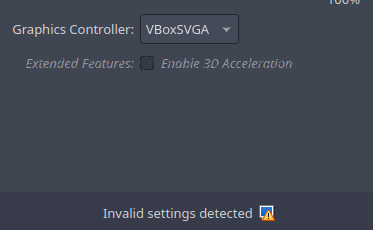
I see VBoxSVGA as a workaround. Virtualbox notes “invalid settings detected” when switching to it. I installed another EOS Xfce just to see if something might have been corrupted in my installation. I got the same result. I also did another Arch Xfce VB install and it booted just fine with the VMSVGA Graphics Controller.
Installation of vulkan-virtio wasn’t the answer, either.
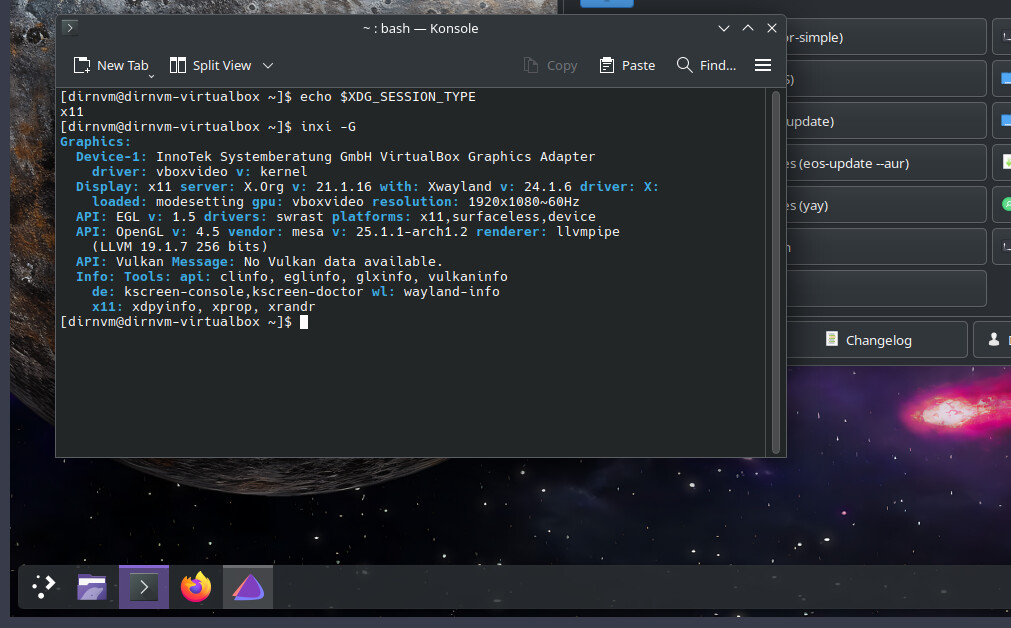
I switched to VBoxSVGA, and the login screen appeared. However, I need to use X11 instead of Wayland in my VM to successfully load the session. I’m currently using Endeavour OS with KDE Plasma in VirtualBox.
Display Graphic Controller
X11
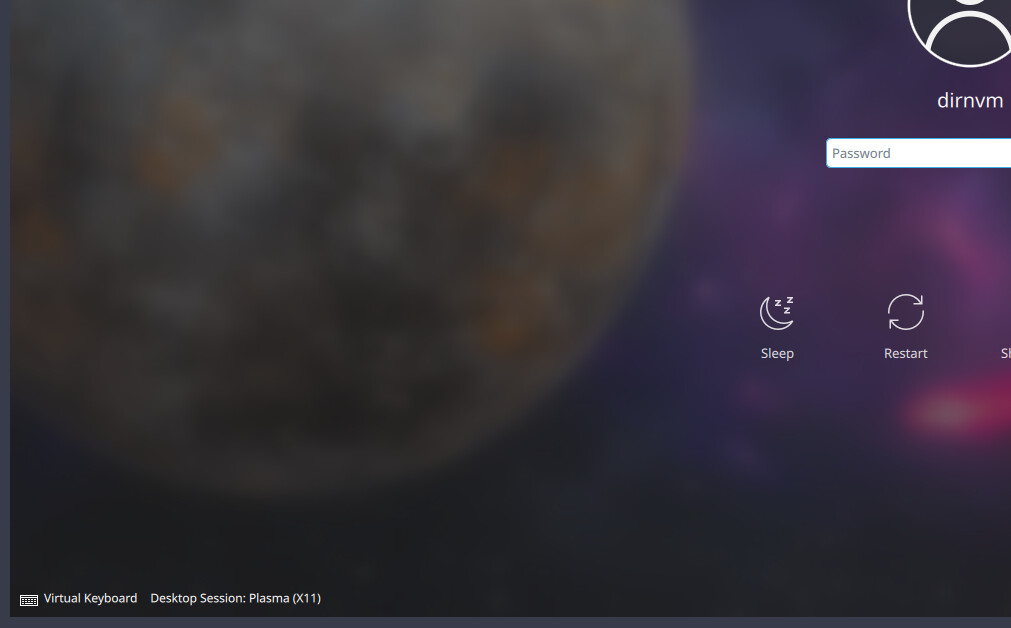
VM
I had a similar issue with VirtualBox VM, boot failed before login.
I didn’t have to downgrade mesa, but downgrading only xf86-video-vmware in the guest system worked around this issue.
Thank you so much, @manuel! In the case of my VirtualBox VM, the culprit was the xf86-video-vmware package.
I downgraded to version 13.4.0-3, and that resolved the issue without needing to switch to VBoxSVGA and X11.
1 Like