the system canot find my printer , it is in my wifi list but the problem is that i canot add the printer to my system “hp envy all-in-one 6420e series” ,installed cups - hplip - sane the hp device manager is on my system but will not start. can only use it now with my old win7 but like to use it normal on my Eos can somebody help me out here ? i try the related topic here already but nogo for me.
Is the service started?
systemctl status cups.service
Edit: I asked just because you are using an arch-based operating system. You not only have to install many things on your own, you also have to enable them if you want them to be enabled at system boot.
yes i did >>
● cups.service - CUPS Scheduler
Loaded: loaded (/usr/lib/systemd/system/cups.service; enabled; preset: dis>
Active: active (running) since Tue 2025-12-02 11:37:22 CET; 3h 3min ago
Invocation: 728526894eb649528109a7676238e74a
TriggeredBy: ● cups.socket
● cups.path
Docs: man:cupsd(8)
Main PID: 588 (cupsd)
Status: “Scheduler is running…”
Tasks: 1 (limit: 19007)
Memory: 4M (peak: 4.2M)
CPU: 60ms
CGroup: /system.slice/system-cups.slice/cups.service
└─588 /usr/bin/cupsd -l
Not sure this will solve your problem, but there was a cups update today, maybe it helps (if not already installed ofcourse).
just installed today cups 2 times ,thank you for help thinkinking….
You should be able to set this printer up with ease. If you installed eos with print support then cups should already be installed. You need to install hplip with sudo pacman -S hplip
Install system-config-printer,a GUI tool to configure printers.
Start system-config-printer and click the button to add a printer. Select your printer and choose HPLIP as the connection method.
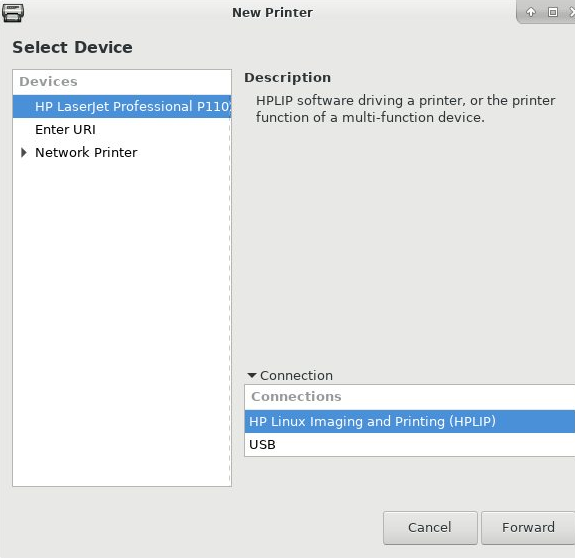
system-config-printer should now allow you to print a test page.
In order for a GTK application like Evince to show your printer in the printing dialog, you need to install gtk3-print-backends as well.
OR
Instead of system-config-printer described above, you can also use CUPS’ web interface, reachable at localhost:631
Thank you so very much ricklinux just made my first print  and scanning wil be ok 2 now the printer is added, and now i remember when i installed Eos on my laptop my pc still working and did not need printer-support that time pfff how stupid from me not thinking about this could be it omg… thank you very much
Greetz
Just keep in mind the following with hplip.
Keep lib in sync with driver
The library hplip from pacman and the driver plug-in installed via hp-setup -i have to have the same version, otherwise you’ll be unable to print and see this error message in your systemd journal (inspect it with journalctl -e):
validate_plugin_version() Plugin version[3.17.7] mismatch with HPLIP version[3.18.4]
To fix this, you can run hp-setup -i again which will download and install the current driver.
and thank you again for this information, as you can see am still very noob ;p
thank you for the help.
Greetz