And would be nice to see the output of inxi -Gaz from such install.
Graphics:
  Device-1: NVIDIA AD107 [GeForce RTX 4060] vendor: ZOTAC driver: nvidia
    v: 590.48.01 alternate: nouveau,nvidia_drm non-free: 550-580.xx+
    status: current (as of 2025-11) arch: Lovelace code: AD1xx
    process: TSMC n4 (5nm) built: 2022+ pcie: gen: 1 speed: 2.5 GT/s lanes: 8
    link-max: gen: 4 speed: 16 GT/s ports: active: DP-1,DP-3
    empty: DP-2,HDMI-A-1 bus-ID: 01:00.0 chip-ID: 10de:2882 class-ID: 0300
  Display: wayland server: X.org v: 1.21.1.21 with: Xwayland v: 24.1.9
    compositor: kwin_wayland driver: X: loaded: nvidia unloaded: modesetting
    alternate: fbdev,nouveau,nv,vesa gpu: nv_platform,nvidia,nvidia-nvswitch
    d-rect: 3840x1080 display-ID: 0
  Monitor-1: DP-1 pos: primary,left model: Acer XF270H B serial: <filter>
    built: 2019 res: mode: 1920x1080 hz: 144 scale: 100% (1) dpi: 82 gamma: 1.2
    size: 598x336mm (23.54x13.23") diag: 686mm (27") ratio: 16:9 modes:
    max: 1920x1080 min: 640x480
  Monitor-2: DP-3 pos: right model: Acer XF270H B serial: <filter>
    built: 2019 res: mode: 1920x1080 hz: 144 scale: 100% (1) dpi: 82 gamma: 1.2
    size: 598x336mm (23.54x13.23") diag: 686mm (27") ratio: 16:9 modes:
    max: 1920x1080 min: 640x480
  API: EGL v: 1.5 hw: drv: nvidia platforms: device: 0 drv: nvidia device: 2
    drv: swrast gbm: drv: nvidia surfaceless: drv: nvidia wayland: drv: nvidia
    x11: drv: nvidia inactive: device-1
  API: OpenGL v: 4.6.0 compat-v: 4.5 vendor: nvidia mesa v: 25.3.2-arch1.1
    glx-v: 1.4 direct-render: yes renderer: NVIDIA GeForce RTX 4060/PCIe/SSE2
    memory: 7.81 GiB display-ID: :0.0
  API: Vulkan v: 1.4.335 layers: 2 device: 0 type: discrete-gpu
    name: NVIDIA GeForce RTX 4060 driver: nvidia v: 590.48.01
    device-ID: 10de:2882 surfaces: N/A
  Info: Tools: api: clinfo, eglinfo, glxinfo, vulkaninfo
    de: kscreen-console,kscreen-doctor gpu: nvidia-settings,nvidia-smi
    wl: wayland-info x11: xdpyinfo, xprop, xrandr
just be careful theses new serie is only for 1650 / 20xx or more for nvidia cards
all version 900 / 1000 / 1650 have to stay on a good version 580
it appears that xfce under wayland works ( use labwc ) , but missing here for keyboard
the keyboard keymap thing is something unresolved on both xfce4 and cinnamon wayland session.
It is not able to read the system settings from locale properly.
On sway there is a workaround.
But its using swaytools and sway to apply.
This looks proper to me … so it is not failing to set hardware rendering, it seems with this.
just did an XFCE4 install and tried all the things.
- using labwc wayland: result is okay it is usable but there seems to be zero improvement on the things that are not working since the wayland session is implemented. the keymap issue is unsolved, and half of the settings are not fully working or completely not open at all.
- tried to use dkms version of the modules for Nvidia on x11 session is causing the exact same sluggish artifact thing as the nvidia modules package.
- removing Nvidia completely and using kernel nouveau drivers and modules, is working but is incomplete for even for my 3060 still and has artifacts and sluggish behavior too not that strong as with nvidia but still not usable.
- The thing that does workout nice was to switch to NVK nouveau package (vulkan) !
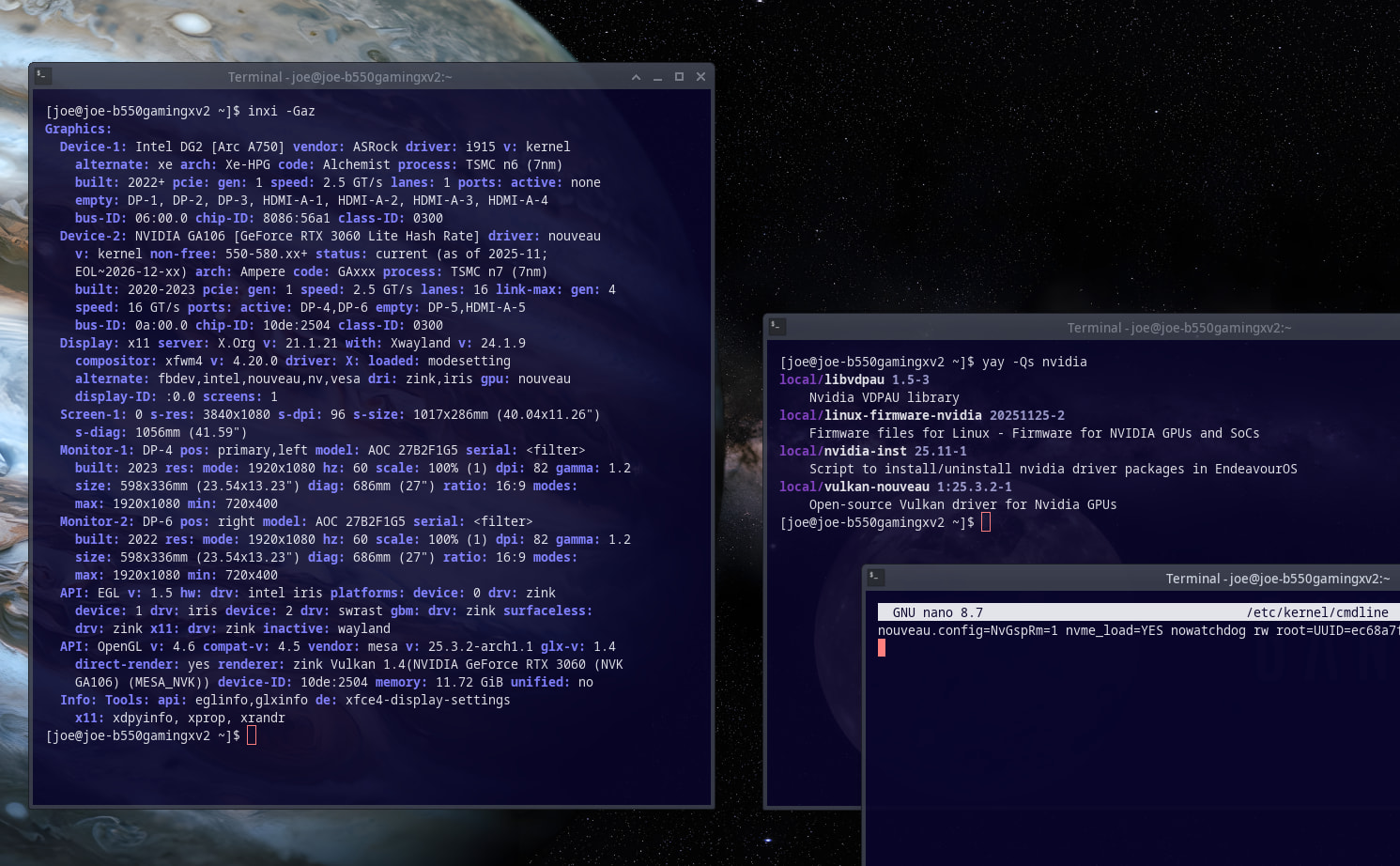
uninstall everything nvidia:
nvidia
nvidia-dkms
nvidia-open
nvidia-open-dkms
nvidia-lts
nvidia-beta
nvidia-utils
egl-wayland
and install vulkan-nouvau:
sudo pacman -Syu vulkan-nouveau
and add nouveau.config=NvGspRm=1 as a kernel parameter for dracut into /etc/kernel/cmdline and run sudo reinstall-kernels
in case using Grub into /etc/default/grub and they’re adding the option on the CMD line too, followed by sudo grub-mkconfig -o /boot/grub/grub.cfg
This is indeed not supported for older GPU too only for Kepler and newer NVIDIA cards.
With the testing repos enabled on GeForce 10xx, I had to use
IgnorePkg = nvidia-open*
and remove package nvidia-settings.
Otherwise pacman offers to change nvidia to nvidia-open which does not work on older than Turing GPUs.
Let’s see how Arch organizes Nvidia packages.
Currently Turing and newer GPUs should use nvidia-open,
while Maxwell, Pascal, and Volta GPUs use nvidia.
Edit: the AUR has nvidia-580xx-dkms and related packages available now!
So would this work for a GTX 1060? I’m waiting for the nvidia switch to the 590 branch before I do a new install with GNOME
My assumption was that I would need to install the 580 drivers from the AUR 
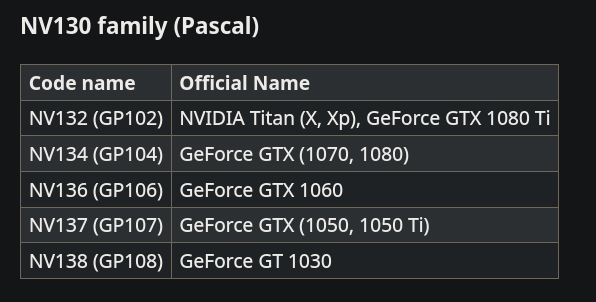
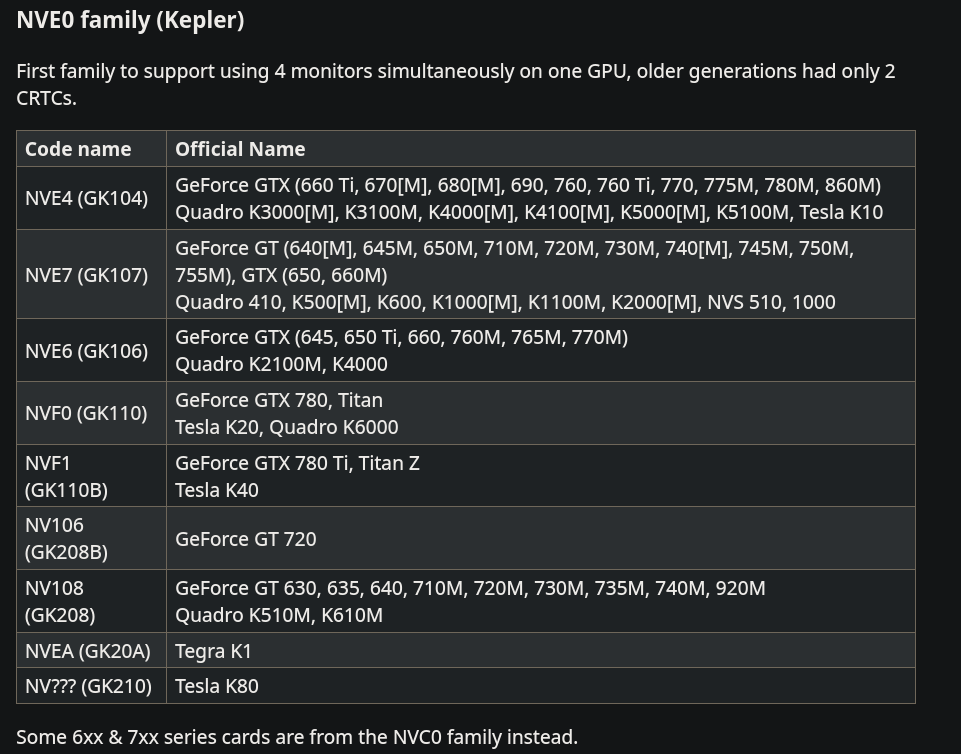
last status for NVK Zinc
Would you know if the 580 driver or NVK would be the better choice generally?
So much to figure out… which is a reason why I’m stalling my planned EOS install on the old Win 10 pc. That and I’m lazy 
Laziness is a gift 
In general, NVK is better compared to nouveau from kernel, and I saw some Linux Gaming content over the web about that NVK is also working good on Gaming.
I tried the same too, but I am not a gamer really…
you missed that

But i was testing on the one and only OS not Bazzite or any
and.. does the video even have any clear conclusion?
The 590 drivers do work on the 1650 but I do not know for how much longer.
inxi -Gaz
Graphics:
  Device-1: NVIDIA TU117 [GeForce GTX 1650] vendor: ASUSTeK driver: nvidia
    v: 590.48.01 alternate: nouveau,nova_core,nvidia_drm non-free: 550-580.xx+
    status: current (as of 2025-11; EOL~2026-12-xx) arch: Turing code: TUxxx
    process: TSMC 12nm FF built: 2018-2022 pcie: gen: 1 speed: 2.5 GT/s
    lanes: 16 link-max: gen: 3 speed: 8 GT/s ports: active: HDMI-A-1
    empty: DP-1,DVI-D-1 bus-ID: 01:00.0 chip-ID: 10de:1f82 class-ID: 0300
  Display: wayland server: X.org v: 1.21.1.21 with: Xwayland v: 24.1.9
    compositor: kwin_wayland driver: X: loaded: nvidia
    gpu: nvidia,nvidia-nvswitch display-ID: 0
  Monitor-1: HDMI-A-1 model: Samsung S24C350 serial: <filter> built: 2013
    res: mode: 1920x1080 hz: 60 scale: 100% (1) dpi: 94 gamma: 1.2
    size: 521x293mm (20.51x11.54") diag: 598mm (23.5") ratio: 16:9 modes:
    max: 1920x1080 min: 640x480
  API: EGL v: 1.5 hw: drv: nvidia platforms: device: 0 drv: nvidia device: 2
    drv: swrast gbm: drv: nvidia surfaceless: drv: nvidia wayland: drv: nvidia
    x11: drv: nvidia inactive: device-1
  API: OpenGL v: 4.6.0 compat-v: 4.5 vendor: nvidia mesa v: 25.3.2-arch1.1
    glx-v: 1.4 direct-render: yes renderer: NVIDIA GeForce GTX 1650/PCIe/SSE2
    memory: 3.91 GiB display-ID: :1.0
  API: Vulkan v: 1.4.335 layers: 2 device: 0 type: discrete-gpu
    name: NVIDIA GeForce GTX 1650 driver: nvidia v: 590.48.01
    device-ID: 10de:1f82 surfaces: N/A
  Info: Tools: api: clinfo, eglinfo, glxinfo, vulkaninfo
    de: kscreen-console,kscreen-doctor gpu: nvidia-settings,nvidia-smi
    wl: wayland-info x11: xdpyinfo, xprop, xrandr
I had to swap out an older 1050 card as it would not work with the 590 drivers.
check value comparison on same games for linux & windows
baldur gate 3 is specific , because they have optimised on linux for steamdeck
- 20% in favor in linux if optimised …
The TU117 tells that it is a Turing family GPU. That means it should work for a long-ish time still, although only Nvidia knows how long. Eventually Nvidia will deprecate it too.
BTW, 1050 should work with the nvidia-580xx-dkms (AUR).
EOL~2026-12-xx
It shows
The 1050 also showed 2026 but the 590 drivers would not work.I purchased a 3050 to replace the 1650 and it works very well so far.I removed the 1050 and put in the 1650 and it works with the new driver.The desktop is an older Acer from 2017 so i will probably find a newer motherboard and replace it then i may find an AMD card and put it in.The 3050 is not the fastest or best I could get but all I could afford and it will work for what I use it for.
I’m thinking about buying a 3050 if I have trouble with my 1060 going forward in the long run but I’ll have to try the 580 drivers from the AUR once I’m ready to install EOS on that PC first, or try the NVK ones as @joekamprad described