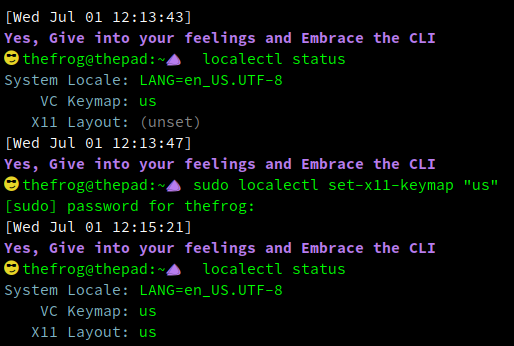
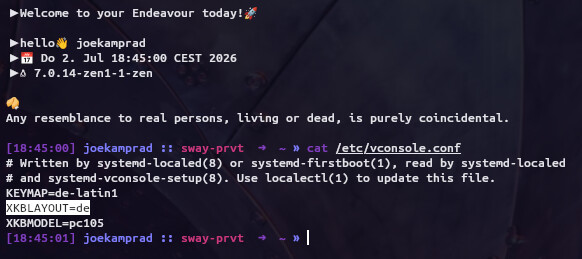
Due to a change introduced in the xkeyboard-config major upgrade (version 2.48-1), the X11 keyboard layout configuration managed by systemd-localed may be unset post-upgrade. This occurs because systemd-localed reads the XKB model, layout, variant, and options directly from /etc/vconsole.conf. If only the legacy Xorg keyboard snippet exists, localectl reports the X11 layout as unset. In many Desktops this will show by issue that keyboard output is screwed..Y=Z no Umlauts (Germans) or you get issue in case your passwort uses such letters uneven with default locale-C layout.
Check at your install with:
localectl status
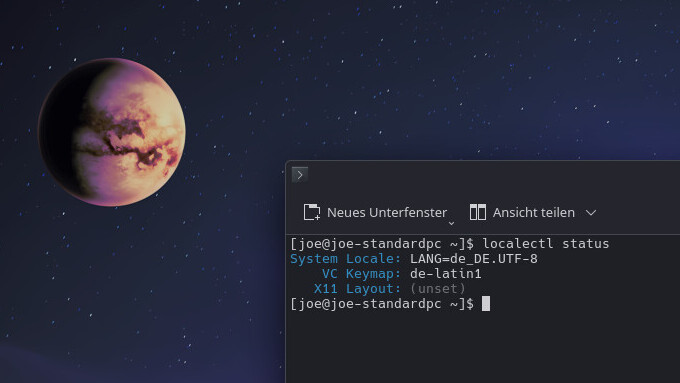
If you see X11 Layout: (unset) fix it by running:
sudo localectl --no-convert set-x11-keymap "your-language-keymap"
Note: Replace "your-language-keymap" with your specific layout (e.g., de, us).
This command writes the selected XKB state alongside KEYMAP into /etc/vconsole.conf and replaces any stale XKB entries, matching the standard systemd behavior.
Simpler said.. it adds missing values for XKBLAYOUT=XX
and XKBMODEL=XXXX to /etc/vconsole.conf 
To list possible values for sudo localectl set-x11-keymap "your-language-keymap" check this:
localectl list-x11-keymap-layouts | grep "your-language-keymap"
There are a lot other options possible too but should not be needed to fix this current issue,
You may want/need special mode / variant / layout / option set in addition:
localectl list-x11-keymap-variants

localectl list-x11-keymap-models

localectl list-x11-keymap-options
Or simple go read the Manual, and get all the details.