No issues here
localectl status
System Locale: LANG=nl_NL.UTF-8
    VC Keymap: nl
   X11 Layout: nl
  X11 Variant: us
No issues here
localectl status
System Locale: LANG=nl_NL.UTF-8
VC Keymap: nl
X11 Layout: nl
X11 Variant: us
Have read that Wayland and X11, --were X11 is still in use – still refer to localectl set-X11-keymap and that this was not changed only because of the “X11” in the name. Think it would not have made much sense to implement a “localectl set-wayland-keymap”, besides the existing “set-x11-keymap-expression”
So does this mean that those on wayland should also do this? For me the X11 Layout: (unset) while the System Locale: and VC Keymap: are set to the correct values.
Is there a way to know what were the values previously for X11 Layout, X11 Variant, XKBMODEL, XKBVARIANT, XKBOPTIONS etc?
I use two keyboards. One external with 78 physical keys with a layout of qwerty-us. The second is the inbuilt keyboard with a layout of qwerty-us and 80 physical keys, 81 physical keys if you count the power button key which is flush with the keyboard and next to delete key.
Both of the keyboards have a Windows/Meta/Super key and a “Fn” key which allows the F1-F12 keys to work as media control keys, scroll lock keys, and others. The “Fn” also works as a partial number keypad.
So what ideally should be the XKBMODEL, XKBVARIANT for both of these?
Only set system default keyboard switching needs to get setup inside your desktop session settings.
The unset x11 value is used to set correct language keymap what is used by desktop settings to set and fallback.
How did you get the X11 Model and X11 Variant values? In the code snippet it is showing the X11 Model as pc105. Does pc105 correspond to a Generic | Generic 105-key PC keyboard or something else?
I had some irritating issue that may or may not be connected with this thread. I update regularly, I probably updated 4 or 5 times (with many more boot cycles) since this thread was created, so I’m really not sure if this is connected, but the topic is so strikingly similar … I guess it won’t hurt reporting it here and maybe learning something from the experts’ comments?
I’m using KDE and I’ve these kernels installed: 6.18.38-1-lts, 7.1.3-arch1-1, the latter being my daily driver.
I remember that I updated yesterday, including a kernel package update. I just shut down afterwards. Today, I couldn’t boot because decrypting my drive failed (wrong password). I found out that I was able to decrypt and boot using the LTS kernel and after some debugging, I found the issue: For some reason, the 7.1.3 kernel used the wrong keymap, with which I couldn’t decrypt my drive because my password contains German Umlauts (ö/ä/ü).
In the dracut emergency terminal (7.1.3 kernel):
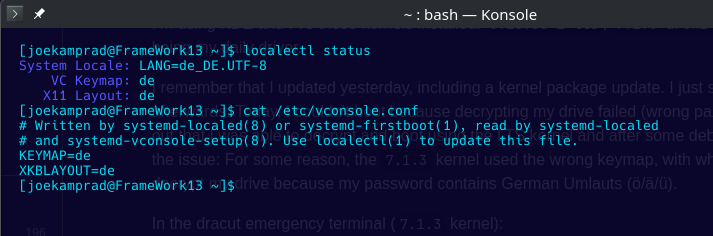
$ cat /etc/vconsole.conf
KEYMAP=de
XKBLAYOUT=de
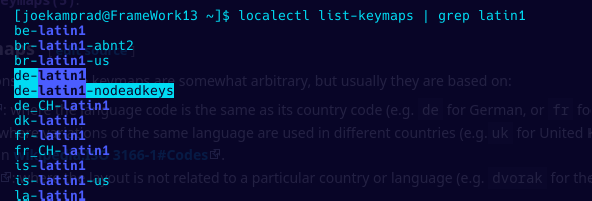
In that terminal, the öä keys were mapped to []. Researching while using the LTS kernel, I found out that I need KEYMAP=de-latin1. I noticed that because the mapping was also wrong having the de keymap and trying to log into tty3. (By the way, I get Login incorrect when trying to log into tty3 with my user, is this expected?)
I couldn’t change the keymap in the dracut emergency terminal via loadkeys de-latin1 because that keymap was not available, so I ended up doing this (booted with the LTS kernel):
$ sudo loadkeys de-latin1
$ cat /etc/vconsole.conf
# Written by systemd-localed(8) or systemd-firstboot(1), read by systemd-localed
# and systemd-vconsole-setup(8). Use localectl(1) to update this file.
KEYMAP=de-latin1
XKBLAYOUT=de
XKBMODEL=pc105
XKBOPTIONS=terminate:ctrl_alt_bksp
$ sudo dracut -f --kver 7.1.3-arch1-1
After this, I could normally decrypt and boot with the non-LTS kernel.
It might be connected to this thread because I read it when it was posted, I indeed had the X11 Layout: (unset) and fixed it by running sudo localectl set-x11-keymap "de" , and if I recall it correctly, this was the result:
$ localectl
System Locale: LANG=en_GB.UTF-8
               LC_NUMERIC=de_DE.UTF-8
               LC_TIME=de_DE.UTF-8
               LC_MONETARY=de_DE.UTF-8
               LC_PAPER=de_DE.UTF-8
               LC_NAME=de_DE.UTF-8
               LC_ADDRESS=de_DE.UTF-8
               LC_TELEPHONE=de_DE.UTF-8
               LC_MEASUREMENT=de_DE.UTF-8
               LC_IDENTIFICATION=de_DE.UTF-8
    VC Keymap: de
   X11 Layout: de
Which worked for a week! Then the last kernel update came …
Now:
$ localectl
System Locale: LANG=en_GB.UTF-8
               LC_NUMERIC=de_DE.UTF-8
               LC_TIME=de_DE.UTF-8
               LC_MONETARY=de_DE.UTF-8
               LC_PAPER=de_DE.UTF-8
               LC_NAME=de_DE.UTF-8
               LC_ADDRESS=de_DE.UTF-8
               LC_TELEPHONE=de_DE.UTF-8
               LC_MEASUREMENT=de_DE.UTF-8
               LC_IDENTIFICATION=de_DE.UTF-8
    VC Keymap: de-latin1
   X11 Layout: de
    X11 Model: pc105
  X11 Options: terminate:ctrl_alt_bksp
Which I guess I’ll just keep? This whole keymap/layout/locale topic is pretty mysterious to me …
Any comments or insights? I guess I should make my encryption password keymap-agnostic? Any tips for that? 
By the way: I switched to EndeavourOS about 14 months ago and have been using it basically daily, and this is the first real issue that I’ve encountered! So, props and thanks to the team behind this great OS! 
I used to go save path and use passkey that will work with en_US too.
Your config looks legit to me.
If the file /etc/vconsole.conf has KEYMAP=de and XKBLAYOUT=de then decrypting the drive ought to work with both Linux mainline kernel 7.1.x as well as Linux LTS kernel 6.18.x. The question is why it did not work. Were you able to find that out? Because if the öä keys were mapped to [] then that mapping was applicable for both kernels. It cant be the case that öä keys were mapped to [] for 7.1.x mainline linux kernel and not for the Linux LTS kernel 6.18.x
No, I have no idea. The only thing I know is that loadkeys de-latin1 && dracut -f did the trick.
Well, but I think that is exactly what I observed. 
I also see the following:
Having de-latin1
    VC Keymap: de-latin1
   X11 Layout: de
    X11 Model: pc105
  X11 Options: terminate:ctrl_alt_bksp
Switching to tty3: öäü mapped correctly (checking this in the username prompt)
Then after sudo localectl set-keymap de, I’m having
    VC Keymap: de
   X11 Layout: de
    X11 Model: pc105
  X11 Options: terminate:ctrl_alt_bksp
Switching to tty3: öäü mapped to []@. But it doesn’t appear to be simply the US mapping: E. g. - is correctly mapped to - and SHIFT+- to _, but on a US keyboard it would be / and ?, respectively, wouldn’t it? ° is mapped to ~, but I can still create ~ like in the DE layout, same for [] which I can create with ALTGR+8|9.
Switching back to de-latin1 makes the mapping in tty3 correct again.
I suspect that the same mapping-issue would occur if I rebooted instead of switching to tty3, but I didn’t test it because I fear locking myself out if I can’t enter my password.
No idea what’s going on …
I run KDE-Plasma on wayland and use the plasma-login-manager. The plasma-login fell back to the us keyborad layout. There is (yet) no possibility to change the keyboard layout in the login screen and the kcm-module for the login-screen in the plasma settings doesn’t set it either. The only way to get the correct keyboard layout in the login screen in the plasma-login ist the way to set the X11 layout properly, as described in the beginning of this post by joecamprad.
I added this in the arch-wiki: https://wiki.archlinux.org/title/Plasma_Login_Manager#Keyboard_layout
On the git-page of the plasma-login-manager they say that they want to set the keyboard layout via the kcm module, but it doesnt do so at the time being.
sudo localectl --no-convert set-x11-keymap de
To only set x11 value.. VC keymap should be de-latin1 for German layout.
The keyboard issue is really confusing.
Will it be enough to set your keyboard to the desired values using
sudo localectl setkeymap layout = <2-digit country code>, e.g., de,
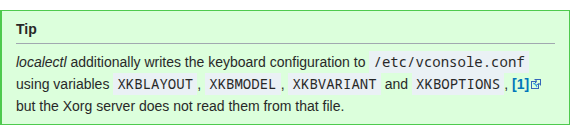
—including in the VC keymap—and how should we interpret this from the new Arch Wiki entry:
thats for vconsole TTY .. Xorg Server needs:
sudo localectl set-x11-keymap de
It only says it will “additional” write keyborad config into /etc/vconsole.conf and that Xorg Server does not read that file..
So I missunderstood it. Xorg Server gets the information directly from the usual localectl command. sudo localectl set-x11-keymap de or another countrycode as layout.
A suggestion from my side. The text in the Wiki reads
Plama Login Manager will use (at the moment) the X11 Layout, default is "us".
would it be possible to change this to
Plama Login Manager will use (at the moment) the X11 Layout, which if not set, defaults to "us" layout.
Thanks for the change in the Arch Wiki.
Even sudo localectl set-x11-keymap de sets VC-Keymap.. it needs --no-convert
But seems we do not need de-latin1 anymoreit will not harm but its legacy now.
is the minimum that will work for us Germans
may you had not rebooted after the change?
Will test on other installs but for me with this all is set properly.
Could also be something was fixed upstream in between.
//
edit .. was wrong on that..
This is my current status and /etc/vconsole.conf. I’ve also included “Model” and “Options” for reference. Please, what do you mean by “it needs-- no-convert”?
[petermb@EndeavourOSNeo-Machine ~]$ localectl status
System Locale: LANG=de_DE.UTF-8
    VC Keymap: de
   X11 Layout: de
    X11 Model: pc105
  X11 Options: terminate:ctrl_alt_bksp
[petermb@EndeavourOSNeo-Machine ~]$ cat /etc/vconsole.conf
# Written by systemd-localed(8) or systemd-firstboot(1), read by systemd-localed
# and systemd-vconsole-setup(8). Use localectl(1) to update this file.
KEYMAP=de
XKBLAYOUT=de
XKBMODEL=pc105
XKBOPTIONS=terminate:ctrl_alt_bksp
if used this flag/option it will not convert other values and only set the one x11-keymap value..
Can you validate that keymap is fine in both graphical session and TTY?
German Umlauts work. öäü and z is z and y is y. German keymap is active at the moment.
But the next update can change it back to the default us?
And so you meant to set that flag like this:
sudo localectl set-x11-keymap de --no-convert
In the manual, the description for that flag says that if the keymap is not converted from the console to X11, or X11 to console, respectively! With X11, does that mean the fields X11 Layout (also X11 Model, X11 Options set in my config)? And that it will not harmonize with the console!
How to handle that if we are using that flag/option so that the graphical session and TTY (console) both have the proper localisation=de, or what else is needed?
TYY would then have to be configured using a separate command with the same localization, right?
I’m confused.
My setting:
[thomas@roamer ~]$  localectl status
System Locale: LANG=de_DE.UTF-8
    VC Keymap: de
   X11 Layout: de
[thomas@roamer ~]$
But in a TTY the keyboard layout is still us and I’m lacking Umlaute.
GUI/Plasma is working fine.
Where to put the german layout for TTY?