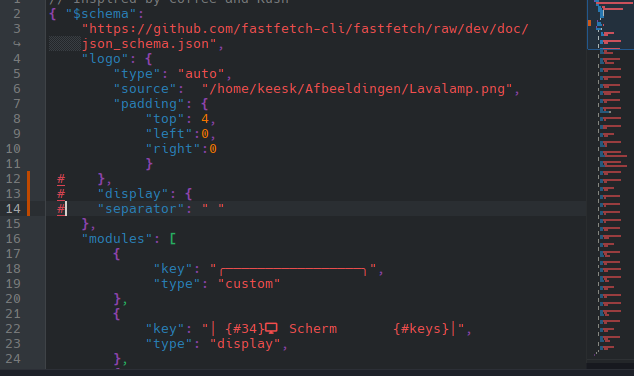
I have a genuine question how do you ACTUALLY commend modules for fastfetch I’m fairly familiar with config files but this one takes the cake. All i want to do is remove some modules but if i delete one i get and instant error and if i try commending a line with // it just commends the whole rest of the file. I was able to get rid if a few modules by putting /* in front of the word “type” at the beginning of the module but it will only let me end that commend if i put it in front of another module where it says “type” and of course the place i would like to end the commend on has a “break” so if i go past it it deletes the break but if i try to end the commend before the break it either ignores the commend or throws an error. I even tried making another module to end the commend on and nope instant error. I genuinely do not understand this and why it has to be so unnecessarily complicated and of course when i try searching online all i get is “use // for a single line or /* */”. But nothing specifies where to put them and according to everything I’m reading I’m doing it right!? If anyone could please explain this i would greatly appreciate it I have been tearing my hair out for over 5 hours all to make fastfetch look like my neofetch because for some reason neofetch it showing incorrect system info.
hey! Good to have you with us!
There’s a great guide in fastfetch’s own Github ; you’ll find it here ;
The key thing to remember is that formatting and delineation between modules is handled by parenthesis (those curly brackets) { } - make sure you’re closing them properly.
Hello @Lexi-Alder-Lake and welcome to the  -Forum!
You may take a look into that thread
Thank you for your response however I have read that and it quite literally does not explain how to remove a module or commend one out. I also have not messed with any of those parenthesis brackets so I’m not sure what to do with that information I assume things have to happen inside of them witch i have been doing. This is what I am dealing with all i want to know is how to get rid of the locale module but it seems like no matter where i place the commends it either commends the whole rest of the document or throws an error
},
{
“type”: “locale”,
“keyicon”:
},
“break”,
{
“Type”: “colors”,
“key”: “ “
“keyicon”: ““
“symbol”
etc
This is the only way I’ve made it work but it deletes the “break” and slams everything at the bottom close together.
},
{
/* “type”: “locale”,
“keyicon”:” “
},
“break”
{
*/ “type”: “colors”,
“key”: “ “
“keyicon”: “ “
“symbol”: “block”,
etc
and when i try // in front of “type: “locale”, it commends everything below it
Am i just really stupid? or is there just not a lot of straight forward information on this without having a bachelors degree
Thank you for your response but that wiki gives zero information on how to delete or commend out a module I’ve read it a thousand times and got nothing from it
Really? You’ve read it a thousand times? With a reading time of 101 minutes, that’s a mathematical mystery.
comment out = #
This might be a comprehension issue then, so I’ll try and spell it out for you ;
This is a module :
        {
            "type": "os",
            "key": " {#35}│ OS          │{$4}│{#keys} {$2}"
        },
You can either delete the entirety of the module you don’t need, starting and ending with “{“ and “},” or, you can comment them out ;
#        {
#            "type": "os",
#            "key": " {#35}│ OS          │{$4}│{#keys} {$2}"
#        },
For the record, you absolutely don’t need a bachelors degree, just a moment to understand what the wiki is telling you.
Yeah # does nothing so….
I don’t know what you’re doing, but @Canoe’s instructions are really helpful
Okay i literally just tried that and it did nothing i even tried deleting the whole module again and guess what still shows up locale…I don’t understand # does absolutely nothing deleting it does nothing.. and that wiki does not say anything about how to do this all i see is how to
generate config
config structure
logo configuration
display configuration
module configuration
format strings
As far as i can tell this wiki isn’t telling me anything about this just some weak examples of the code and “configuring” it but nothing specific it’s like whoever wrote it assumes I’m a jsonc expert or something
Are you sditing the wight file. I dpn’t know fastfetch, so it’s only a maybe.
Which file are you editing?
~/.config/fastfetch/config.jsonc
So let’s walk you through this a little more then ;
Make sure you’re editing ; ~/.config/fastfetch/config.jsonc
Save the file and reload fastfetch. I’m sorry but there’s not much more I can do because you’re complaining about the wiki not giving you what you need, but not giving any of us much information of what you’re editing or how. Start with the above and see how you get on.
So I just tried the # thing and that is not working at all but just deleting the whole section does the trick but you have to remember to save the file after editing the config.jsonc file. And the changes only show up after closing the terminal and start a new one.
@Lexi-Alder-Lake, the only real way to start tinkering with Fastfetch is to find a sample config.jsonc and edit away—trial and error. That’s how most of us got started with customizing Fastfetch. The thread @swh shared above is full of ideas and loads of useful information.
Just as a side note : if you type in something that is not correct it will show up in red color and is underlined.
Yes that is the file I am editing and i have also been saving after each try # does not work on jsonc files you have to use // for a single line or /**/ for a whole block see what i mean about the wiki and how it isn’t very straight forward i think i got it working it seems to be just incredibly picky about where you put the // //”type”:=too close // “type”:= nope try again
//———————————————————————————“type”:= just right idfk I’m so used to regular config files that use # and is very straight forward so this wasted a good 6 hours of my night.
Not in my text editor it doesn’t
lol I think you’re going to find life doesn’t smoothen out much when every learning experience is considered a waste..