so the problem is my hardware can play up to 24 bits according to proc/asound/Generic/codec#0 which i think is where i look for that, 16, 20, 24 under the bits section, and everywhere that i can find, pipewire wants to play at S32_LE and even says it is according to pw-top, but when i do pactl list sinks | grep resolution_bits it says its at 16, and also when i run aplay -D default --dump-hw-params with a .wav file thats 32 bits it says its playing it at 16 bits, im quite confused everything should be set up to play it at 32 (which would actually be 24 with some ‘padding’ ive been told to get it to 32) but its not i think, any help would be appreciated for this im fine to say im way out of my depth here considering i only just learned what a DAC is 6 hours ago
In short, 24 bits are already more than enough for high definition audio. Not the bit depth is the decisive factor, it’s the bitrate which is more important.
Check out coppwr. - https://github.com/dimtpap/coppwr
Yay coppwr-bin
I’m not sure if it has the ability to config bit rates as I’ve never had a need to mess with them (one good ear and the other is shot  ) but it’s super handy for diag and just about anything else you might want to mess with pipewire.
Cheers
I don’t know if it will help or not, but I turned to DeepSeek with this question…
The answer is this (machine translation into English):
For everyday tasks like volume control, pactl can still be used, but for any diagnosis of formats, bit depth and sound quality, only pw-top and other native PipeWire commands are used.
Your observation is correct — your system does use 32-bit audio, despite the fact that pactl shows 16 bits.
yes im totally fine with 24, but when looking into it, it seems people have alot of trouble setting it on 24 bits mode, so people just say letting it do 32 is easier and doesnt effect quality, so making it ‘easy’ on myself at least i think so to go for that
sort of, if thats the case then i wonder why its telling me 16 in those two places, if im honest ive been told that you cant even hear the difference between 16 and 24 (something about 16 bit depth fully encapsulates the range of human hearing im still shoddy on that whole thing though), but yknow im getting good headphones next week so couldnt hurt
On a good quality recording, you won’t hear the difference between 16bit and 24bit. Reserve is needed when editing.
installed and had a look, confirms the information i got from the commands, the pipewire source for my media player is 32 bit float, and even the output on my analog device it says 32 bit float, but the properties of the analog module itself still says alsa resolution bits at 16, everything online seems to point to alsa.resolution_bits being the bit depth value, and also even though the mode is S32_LE (signed 32 bit little endian) now its saying its actually float? fully aware this is probably not the easiest problem to solve like this but yknow figured id try everything just to see, ive added a screenshot of where exactly i think the problem is, everything else either lacks any mention of bit depth or is set at 32 already, only here is there resolution bits and its at 16
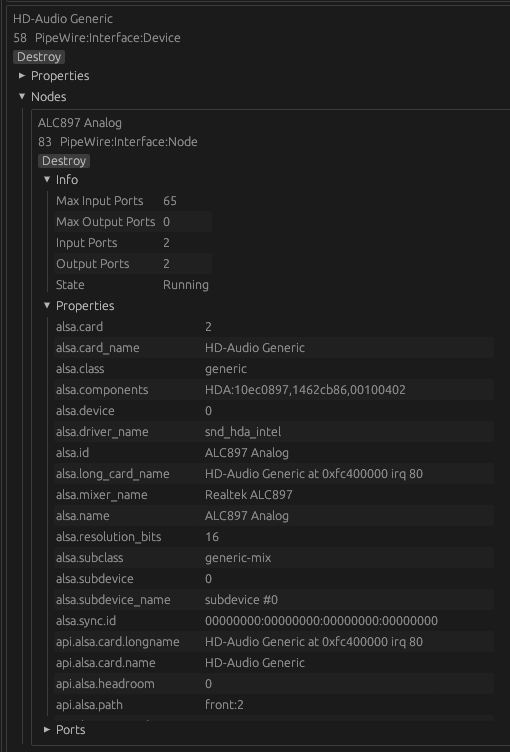
ah i see now, i suppose the only foolproof way around this would be getting an external DAC and hoping alsa plays better with it, at least as far as i know, still i feel bad for anyone who wants to do this for editing purposes it seems like a headache lol
Understand that the determining factor in recording quality is the skill of mixing and editing a track.
I have already said that if you make it a rule to view tracks in audio editors, then many things will become clear. For example, that a “good” recording in the 44/16 format will most often sound better than a “modern” recording in the 192/24 format.
A banal RedBook is more than enough for the vast majority of recordings. Even classical works do not require anything more than 48/24, provided that the track was recorded and prepared by true professionals in their field.
That looks like the run a run off the mill Realtek motherboard chip?
I wouldn’t worry about 16 bit or more, every quality difference - which is very theoretical anyway - is going to be whipped out by the cheap motherboard electronics.
one of the determining factors anyways, if you export it at like 8000khz its not gonna sound good as far as i understand, but anyways i was able to do some tinkering and set my resolution to 24 bits, but the aplay command still does it at 16 bits, might be a skill issue on my part i dont really understand that command well
Additionally, if you check the manpages of pipewire and it’s section about the runtime settings - you’ll find options about the clock rates in kHz (44100, 48000 … ) as well as the buffer sizes. But no options related to the bit depth at all.
yeah it is, you have a good point i saw alot of electro interference reasons as for why people use external DAC’s, maybe ill hear it when i get my new headphones but reluctant to buy an external DAC on a whim on top of the headphones because im not really sure whats just market hype and tangible benefit
yeah, there’s a feature request to add that i believe somewhere, i set mine at just 48000khz because as far as i understand it upsampling wont effect the quality (depending on if the algorithm is good) so didnt see the need to match the bitrate, i think for fun i will probably raise the resampling quality value to like 10 or something just to see
I’ve got an SMSL-SU1 DAC that I’ve purchased used for not too much money.
And I’ve allowed almost every bitrate via pipewire to avoid any resampling. As the source material defines the quality, not the hardware you’ve got.
i did test out adding 41000khz to the options, but in my testing when i switched from playing music to a youtube video at 48000, it didnt auto switch at least according to the pw-top so i figured it wouldnt be worth the hassle
Well, I prefer the approach to avoid resampling at all.
Within the pipewire.conf file you’ll find
default.clock.rate          = 44100
default.clock.allowed-rates = [44100, 48000, 96000, 192000]
If you exclude 44100 and set the default rate to 48000, every 44100 will be upsampled to 48000.
In my case, as I’m using ncspot as an client to my spotify premium account, even their high quality streaming media is still 44100 but at a 320kbps. Therefore I don’t upsample and keep the stream as it is.
for the solution part i will share how i raised my bit depth, first i needed the alsa ID for my actual audio thing, which you can find doing pactl list sinks and scrolling until you find the audio your using, for me its Starship/Matisse HD Audio Controller Analog Stereo so i found that, the alsa ID part will be under Name: part at the top, then you navigate to the /usr/share/wireplumber/wireplumber.conf.d folder, i made a .conf file there called 83-alsa.conf sudo touch 83-alsa.conf because 83 was the numerical ID at the time but this changed after restart it seems so i guess you can put any number there, anyways in the screenshot below is what you put in there, except where it says node.name thats where you put your alsa ID from earlier and then just save it, and reboot and it should have the value changed to 24 bits (according to what it tells me).
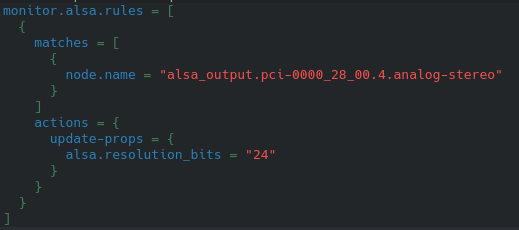
grain of salt with this i got this off another arch linux forum post and couldnt tell you anything about it outside of that
Check the forums of audiosciencereview.com to get somewhat unbiased reviews based on their actual measured sound characteristics. You’ll need to register to check out the testing results if I’m not mistaken.
But beware, you may end not only with a DAC, but a dedicated headphone amplifier as well.