I’ve already deduced that updates to packages were not the cause of the problem, the ganymede iso’s live environment almost certainly uses a linux-firmware version that predates when I started having this issue and yet it was still affected.
maybe try connecting to a smartphone, tethering its data plan to proof that your ISP is not responsible of limiting what OS can do. Also it might be a good idea to update your motherboard bios.
I have just tried this, both while the phone was connected to the same gateway and while it was solely relying on data.
Data
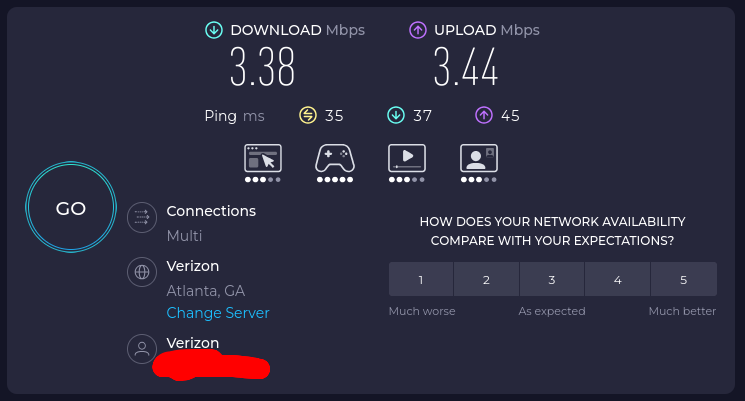
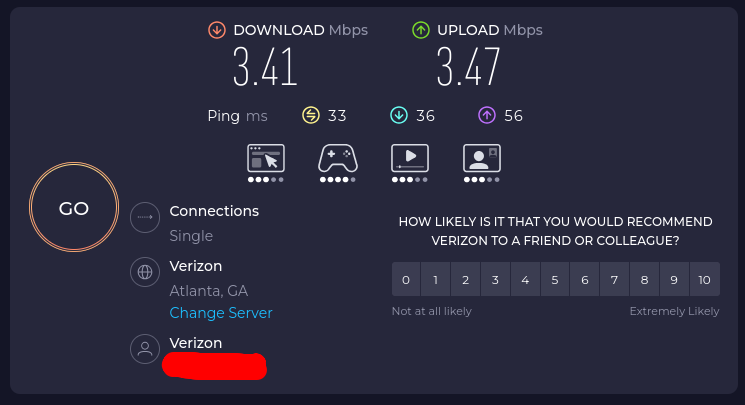
XB8 Gateway
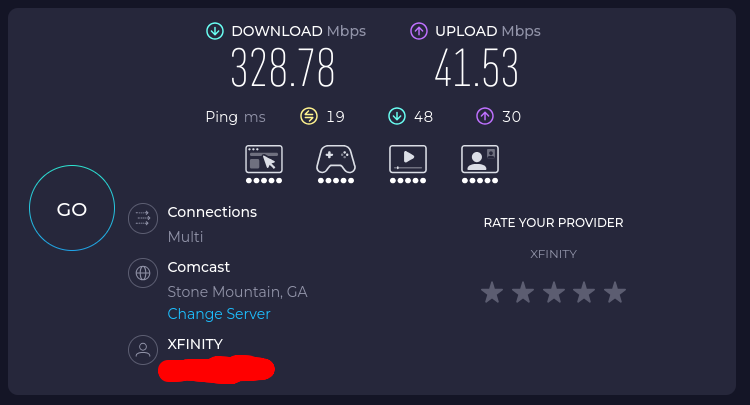
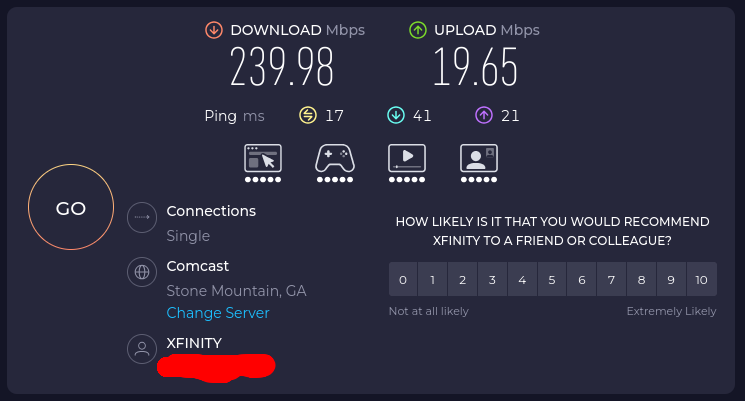
In both cases the speed is drastically different from a direct connection to the gateway, with the phone connecting to the gateway in place of my PC giving a substantial boost in speed.
This along with Windows 11 having a faster connection speed than EndeavourOS shows to me that the issue has to be one of two things:
- A driver issue, not involving rtw89_8851be. (doesn’t feel likely, everything worked perfectly fine until it randomly didn’t)
- Judging from posts on reddit and the xfinity forums, the XB8 on its latest firmware hates Linux
edit: I know for a fact my mobile service comes from Xfinity as well, not sure why it’s appearing as Verizon rather than XFINITY or Comcast.
Can you show the WiFi info?
inxi -Na
Edit: Just wondering what chip it is? rtl8851?
It’s the Realtek RTL8851BE @ricklinux.
Okay so it looks like it should be using the rtw89-dkms-git package from the AUR.
Already installed using Paru, issue is still present
[nomiddleclass@nomiddleclass-b650mcv3y1 ~]$ paru -Qi rtw89-dkms-git
Name            : rtw89-dkms-git
Version         : r1766.f93ba28-1
Description     : Drivers for Realtek Wi-Fi 6/6E and Wi-Fi 7 adapters
Architecture    : any
URL             : https://github.com/morrownr/rtw89
Licenses        : GPL2
Groups          : None
Provides        : None
Depends On      : dkms
Optional Deps   : usb_modeswitch: A tool that can switch the adapter from CD-ROM mode to Wi-Fi mode [installed]
Required By     : None
Optional For    : None
Conflicts With  : None
Replaces        : None
Installed Size  : 9.22 MiB
Packager        : Unknown Packager
Build Date      : Fri 24 Apr 2026 05:40:23 PM EDT
Install Date    : Fri 24 Apr 2026 05:40:33 PM EDT
Install Reason  : Explicitly installed
Install Script  : No
Validated By    : None
Have you tried disabling the power management? Also temporarily disable ipv6 to test. Also if dual booting on Windows disable the fast start up feature in Windows power management.
This may sound to simplistic to be the cause, but some WiFi chips just don’t play well with the specific channel that your router assigns.
In the 5 GHz band some specific WiFi chips will not even connect on the upper channels. Sometimes selecting the lowest 5 GHz channel(s) available in your router’s config utility can make a huge difference.
Seems far too simple to make a difference, but with some WiFi chips the specific channel on the 5 GHz band is super important.
Unfortunately, despite Wifi (and bluetooth) being not a new technology, screwy things like this abound :0
If you mean wifi powersaving I’ve already done that via udev rules.
If you don’t then I’d like you to describe this further, I’ve kept Plasma’s Power Management on Performance Mode since the moment I installed it and I’m unsure what else you could mean.
I already have, I also knew it wasn’t Windows’ fault since the start because I hadn’t booted into it for months until after the issue began so I could test the speed.
I’m iffy regarding this since a game I play requires ipv6 for online multiplayer, but I’ll try later through kernel parameters in grub anyways. I’ll keep you posted
The XB8 gateway uses band steering by default, so the channels are managed automatically. I’m not aware of a way to disable this.
Are you able to disable 5GHz in favour of 2.4GHz as a means of at least testing if it’s related to the 5GHz frequency?
I’m unsure how to do this manually but I’ve noticed my pc automatically being handed 2.4GHz rather than 5GHz sometimes, typically this occurs when connecting to the XB8 for the first time after a reboot but it sometimes happens at random as well.
Even during moments like this the “Connection Speed” still does not go above 54 MBit/s.
I feel your pain. The obsession and assumption that everyone will want to use a mobile instead for everything… even to the point of needing to use a mobile to order a coffee at a cafe when the staff are standing right in front of you… I better stop, my eye’s starting to twitch.
Lets 

Can you share the output of this please:
yay -Q | grep -E 'headers|dkms'
Yes but disabling under Network Manager.
/etc/NetworkManager/conf.d/default-wifi-powersave-on.conf
[connection]
wifi.powersave = 2
Then reboot and see if any different.
used paru instead
[nomiddleclass@nomiddleclass-b650mcv3y1 ~]$ paru -Q | grep -E 'headers|dkms'
dkms 3.4.0-1
linux-api-headers 6.19-1
linux-bsb-headers 6.19.13.arch1-1
linux-headers 6.19.14.arch1-1
linux-zen-headers 6.19.14.zen1-1
rtw89-dkms-git r1766.f93ba28-1
v4l2loopback-dkms 0.15.3-1
vulkan-headers 1:1.4.341.0-1
xone-dkms 0.5.8-2
[nomiddleclass@nomiddleclass-b650mcv3y1 ~]$
I uninstalled linux-lts and linux-mainline to save space, so that’s why their headers aren’t here
Just did so, no effect.