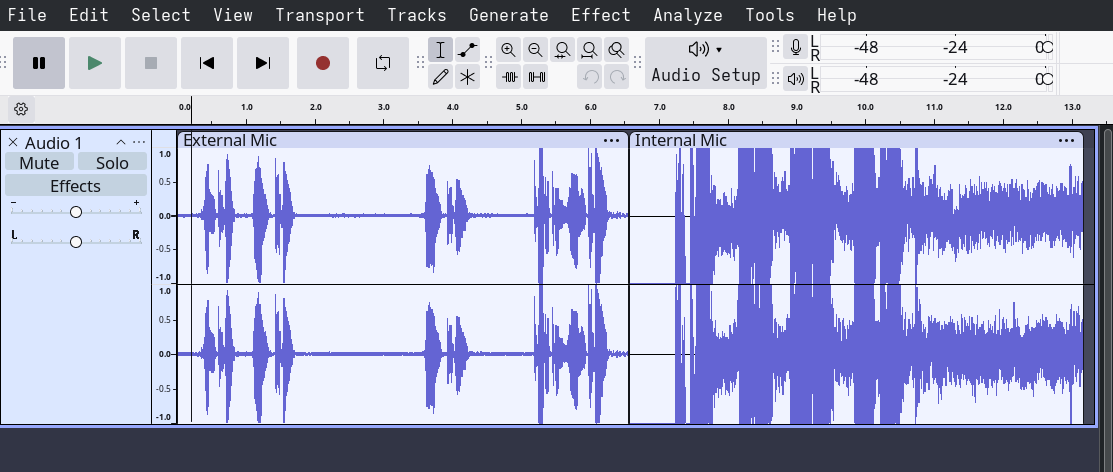
This is an issue I have trawled through the internet for the past day, trying all sorts of things with no luck. I just got a Framwork 16, I have managed to get Bluetooth working fine, but the onboard mic doesn’t work, and when I plug in my Blue Yeti, I get sound but super lagged.
Really could do with a bit of hand-holding through the process now, im a noob to linux.
**** List of CAPTURE Hardware Devices **** card 1: Generic_1 [HD-Audio Generic], device 0: ALC295 Analog [ALC295 Analog] Subdevices: 1/1 Subdevice #0: subdevice #0
I’d like to get a better understanding of the issues you are running into (note I’m running a Thinkpad T450 in Gnome). After you reviewed the Framework 13 and 16 articles on the the Arch Wiki, have you turned on Audio, adjusted the mixer levels and got access to the built in microphone?
You also mentioned you thought your recordings were laggy. Can you described how you were testing, what applications you were using?
Have you tried testing audio in Audacity for local recording?
Additionally you mentioned following a Framework Guide, can you share a link to what you are reading, I’d like to take a look.
So I first realised the issue when attending a meeting in Discord, they could hear me but not clearly, on using Discord’s mic check, where you hear back your mic, it was laggy with an echo and hard to make out what I was saying.
I’ve gone through a few forums following the steps others took, also tried out GPT’s suggestions, which did get me to record audio and listen to it back all in Konsole and got the same distortion and laggy audio. I’ve also made sure pipewire and pulseaudio are installed.
I’ve tried plugging in an external USB mic, and I get the same laggy distortion.
Currenly, after a few attempts to fix things myself, the only input devices I can select on Discord is Family 17h/19h/1ah HD Audio Controller Analogue Stereo, which records no sound (i guess since this is a controller, it’s not actually a mic?
Just testing now, my external mic sounds fine, but I can no longer get my speakers to work to output sound, and I can only hear through my bluetooth headphones.
Also been testing with OBS and all the same result
Seems like I’ve gone and broken all my onboard audio
Okay update: I found this for framework drivers update and it restored my micophone (Family 17h/19h/1ah HD Audio Controller Analog Stereo) and ity picks my voice up.
Back to where I started, and it still sounds really bass-y. Can you help with this?
I’m glad you made some progress (I was about to send you a long post). What software were you testing in where you determined your voice sounded bassy?
If you have not already installed Audacity for audio recording and playback, now is a good time:
Install Audacity:
sudo pacman -S audacity
If you use this software to do a recording, you can:
see the visual equalizer of how your voice is being picked up (this will help eliminate whether the microphone or the playback on speakers is contributing to the sound change).
send the recording to another device to see if your voice sounds bassy there (this will help us determine whether equalization is being applied on the output).
Do the results change when you use internal vs external microphone?
Additionally you can look into using Easy Effect to tune your microphone to your liking (unfortunately not something in my wheel house as I mainly use Teams + Zoom and Signal for my calls).
EasyEffects looks like it would be a great tool, but for me, it’s not picking up any audio applications for both input and output. I suspect I have an issue with Pipewire and PulseAudio conflicting since I have both?
[pyran@Endurance ~]$ pactl info Server String: /run/user/1000/pulse/native Library Protocol Version: 35 Server Protocol Version: 35 Is Local: yes Client Index: 21 Tile Size: 65472 User Name: pyran Host Name: Endurance Server Name: pulseaudio Server Version: 17.0-88-geee0 Default Sample Specification: s16le 2ch 44100Hz Default Channel Map: front-left,front-right Default Sink: alsa_output.usb-BLUE_BLUE_USB_Audio_2.0_0000-00.analog-stereo Default Source: alsa_input.pci-0000_c1_00.6.analog-stereo Cookie: bfd6:7851 [pyran@Endurance ~]$ pacman -Q pipewire pipewire 1:1.4.9-1 [pyran@Endurance ~]$ pacman -Q pulseaudio pulseaudio 17.0+r88+geee0e8f22-1
Definitely you either have Pipewire or PulseAudio for your setup. The short of it is the package ‘pipewire-pulse’ will take over anything PulseAudio did.
Make sure Pipewire, Pipewire-pulse, Wireplumber and pavucontrol are installed (where pavucontrol is a handy mixer with a GUI AND assuming you do not have ‘pipewire-session-manager’ installed).
I did have to go through each pulseaudio uninstall one by one to make sure they were gone as the command I copied and pasted only uninstalled pulseaudio and not the rest.
You’re most welcome. I had many growing pains the past 5 years transitioning to Linux (good people here helped me grow my tech skills).
Its a benefit to get your feedback as you have a top of the line Framework. I’m likely will move from Lenovo there as Apple development with Linux can be unpredictable. I just need my system to work.
This friendly forum was a selling point for me when choosing a distro.
I am loving my framework, I had a hp for 9 years which died last month when I couldn’t repair it any more. The ability to repair is a passion of mine and putting the laptop together when it arrived was like playing with Lego. Framework is rapidly improving and listens to its users and I have watch development for the past 2 years and they’re everything a tech company should be.
Edit: hp stand for hinge problems for a reason, the hinge cut the power cable