Low latency audio on Endeavour?

Sorry i already reinstalled.
I installed fedora to test if thst will have the same instabilities.

The logic i think is, if a different base (not arch), different de (gnome), and different almost everything inuding the file system will have the same issues, then i can narrow it down to hardware.

So if fedora has the same issues, its definitely a hardware issue.
I already don’t like using it though lol… but i have to test it.

But heres the last inxi from manjaro
Just disregard manjaro specific things (even the kernel, i switched back to standard after that).

System:
  Kernel: 6.1.4-x64v1-xanmod1-MANJARO arch: x86_64 bits: 64 compiler: gcc
    v: 12.2.0 parameters: BOOT_IMAGE=/@/boot/vmlinuz-manjaro-xanmod
    root=UUID=27a6f9c0-8b45-42c5-85e1-be095307048f rw rootflags=subvol=@
    amdgpu.gpu_recovery=1 audit=0
    resume=UUID=b58bc35c-1a93-4c4c-a1ec-5eefe535dea6 udev.log_priority=3
    amd_iommu=on vfio-pci.ids=1002:6658,1002:aac0
  Desktop: KDE Plasma v: 5.26.4 tk: Qt v: 5.15.7 wm: kwin_x11 vt: 1 dm: SDDM
    Distro: Manjaro Linux base: Arch Linux
Machine:
  Type: Desktop Mobo: ASRock model: B550M Pro4 serial: <superuser required>
    UEFI: American Megatrends LLC. v: P2.30 date: 02/24/2022
CPU:
  Info: model: AMD Ryzen 5 5600G with Radeon Graphics bits: 64 type: MT MCP
    arch: Zen 3 gen: 4 level: v3 note: check built: 2021-22
    process: TSMC n7 (7nm) family: 0x19 (25) model-id: 0x50 (80) stepping: 0
    microcode: 0xA50000C
  Topology: cpus: 1x cores: 6 tpc: 2 threads: 12 smt: enabled cache:
    L1: 384 KiB desc: d-6x32 KiB; i-6x32 KiB L2: 3 MiB desc: 6x512 KiB
    L3: 16 MiB desc: 1x16 MiB
  Speed (MHz): avg: 3691 high: 3900 min/max: 1400/4464 boost: enabled
    scaling: driver: acpi-cpufreq governor: performance cores: 1: 2988 2: 3900
    3: 3900 4: 3900 5: 3900 6: 3213 7: 3900 8: 3900 9: 3900 10: 3900 11: 3900
    12: 3002 bogomips: 93422
  Flags: avx avx2 ht lm nx pae sse sse2 sse3 sse4_1 sse4_2 sse4a ssse3 svm
  Vulnerabilities:
  Type: itlb_multihit status: Not affected
  Type: l1tf status: Not affected
  Type: mds status: Not affected
  Type: meltdown status: Not affected
  Type: mmio_stale_data status: Not affected
  Type: retbleed status: Not affected
  Type: spec_store_bypass mitigation: Speculative Store Bypass disabled via
    prctl
  Type: spectre_v1 mitigation: usercopy/swapgs barriers and __user pointer
    sanitization
  Type: spectre_v2 mitigation: Retpolines, IBPB: conditional, IBRS_FW,
    STIBP: always-on, RSB filling, PBRSB-eIBRS: Not affected
  Type: srbds status: Not affected
  Type: tsx_async_abort status: Not affected
Graphics:
  Device-1: AMD Bonaire XTX [Radeon R7 260X/360] vendor: PC Partner / Sapphire
    driver: vfio-pci v: N/A alternate: radeon,amdgpu arch: GCN-2
    code: Sea Islands process: GF/TSMC 16-28nm built: 2013-17 pcie: gen: 3
    speed: 8 GT/s lanes: 16 bus-ID: 01:00.0 chip-ID: 1002:6658 class-ID: 0300
  Device-2: AMD Cezanne [Radeon Vega Series / Radeon Mobile Series]
    driver: amdgpu v: kernel arch: GCN-5.1 code: Vega-2 process: TSMC n7 (7nm)
    built: 2018-21 pcie: gen: 3 speed: 8 GT/s lanes: 16 link-max: gen: 4
    speed: 16 GT/s ports: active: DP-1,HDMI-A-1 empty: DP-2 bus-ID: 06:00.0
    chip-ID: 1002:1638 class-ID: 0300 temp: 35.0 C
  Display: x11 server: X.Org v: 21.1.6 with: Xwayland v: 22.1.7
    compositor: kwin_x11 driver: X: loaded: amdgpu unloaded: modesetting,radeon
    alternate: fbdev,vesa dri: radeonsi gpu: amdgpu display-ID: :0 screens: 1
  Screen-1: 0 s-res: 5120x1440 s-dpi: 96 s-size: 1354x381mm (53.31x15.00")
    s-diag: 1407mm (55.38")
  Monitor-1: DP-1 mapped: DisplayPort-0 pos: primary,left
    model: AOC Q3279WG5B serial: <filter> built: 2020 res: 2560x1440 dpi: 90
    gamma: 1.2 size: 725x428mm (28.54x16.85") diag: 842mm (33.1") ratio: 15:9
    modes: max: 2560x1440 min: 720x400
  Monitor-2: HDMI-A-1 mapped: HDMI-A-0 pos: right model: AOC Q3279WG5B
    serial: <filter> built: 2020 res: 2560x1440 dpi: 90 gamma: 1.2
    size: 725x428mm (28.54x16.85") diag: 842mm (33.1") ratio: 15:9 modes:
    max: 2560x1440 min: 720x400
  API: OpenGL v: 4.6 Mesa 22.3.1 renderer: AMD Radeon Graphics (renoir LLVM
    14.0.6 DRM 3.49 6.1.4-x64v1-xanmod1-MANJARO) direct render: Yes
Audio:
  Device-1: AMD Tobago HDMI Audio [Radeon R7 360 / R9 OEM]
    vendor: PC Partner / Sapphire driver: vfio-pci bus-ID: 3-2.2:4
    alternate: snd_hda_intel chip-ID: 1235:8200 pcie: class-ID: 0103
    speed: Unknown lanes: 63 link-max: gen: 6 speed: 64 GT/s bus-ID: 01:00.1
    chip-ID: 1002:aac0 class-ID: 0403
  Device-2: AMD Renoir Radeon High Definition Audio driver: snd_hda_intel
    v: kernel pcie: gen: 3 speed: 8 GT/s lanes: 16 link-max: gen: 4
    speed: 16 GT/s bus-ID: 06:00.1 chip-ID: 1002:1637 class-ID: 0403
  Device-3: AMD Family 17h/19h HD Audio vendor: ASRock driver: snd_hda_intel
    v: kernel pcie: gen: 3 speed: 8 GT/s lanes: 16 link-max: gen: 4
    speed: 16 GT/s bus-ID: 06:00.6 chip-ID: 1022:15e3 class-ID: 0403
  Device-4: Focusrite-Novation Scarlett 2i4 USB type: USB
    driver: snd-usb-audio
  Sound API: ALSA v: k6.1.4-x64v1-xanmod1-MANJARO running: yes
  Sound Interface: sndio v: N/A running: no
  Sound Server-1: JACK v: 1.9.21 running: yes
  Sound Server-2: PulseAudio v: 16.1 running: yes
  Sound Server-3: PipeWire v: 0.3.63 running: yes
Network:
  Device-1: Realtek RTL8111/8168/8411 PCI Express Gigabit Ethernet
    vendor: ASRock driver: r8169 v: kernel pcie: gen: 1 speed: 2.5 GT/s lanes: 1
    port: e000 bus-ID: 04:00.0 chip-ID: 10ec:8168 class-ID: 0200
  IF: enp4s0 state: up speed: 1000 Mbps duplex: full mac: <filter>
  IF-ID-1: virbr0 state: down mac: <filter>
Bluetooth:
  Device-1: Cambridge Silicon Radio Bluetooth Dongle (HCI mode) type: USB
    driver: btusb v: 0.8 bus-ID: 3-2.1:3 chip-ID: 0a12:0001 class-ID: e001
  Report: rfkill ID: hci0 rfk-id: 0 state: up address: see --recommends
Drives:
  Local Storage: total: 698.65 GiB used: 305.19 GiB (43.7%)
  SMART Message: Unable to run smartctl. Root privileges required.
  ID-1: /dev/nvme0n1 maj-min: 259:0 vendor: Kingston model: SNV2S500G
    size: 465.76 GiB block-size: physical: 512 B logical: 512 B speed: 63.2 Gb/s
    lanes: 4 type: SSD serial: <filter> rev: SBI02102 temp: 35.9 C scheme: GPT
  ID-2: /dev/sda maj-min: 8:0 vendor: Samsung model: SSD 860 EVO 250GB
    size: 232.89 GiB block-size: physical: 512 B logical: 512 B speed: 6.0 Gb/s
    type: SSD serial: <filter> rev: 1B6Q scheme: GPT
Partition:
  ID-1: / raw-size: 448.97 GiB size: 448.97 GiB (100.00%)
    used: 305.19 GiB (68.0%) fs: btrfs dev: /dev/nvme0n1p2 maj-min: 259:2
  ID-2: /boot/efi raw-size: 300 MiB size: 299.4 MiB (99.80%)
    used: 608 KiB (0.2%) fs: vfat dev: /dev/nvme0n1p1 maj-min: 259:1
  ID-3: /home raw-size: 448.97 GiB size: 448.97 GiB (100.00%)
    used: 305.19 GiB (68.0%) fs: btrfs dev: /dev/nvme0n1p2 maj-min: 259:2
  ID-4: /var/log raw-size: 448.97 GiB size: 448.97 GiB (100.00%)
    used: 305.19 GiB (68.0%) fs: btrfs dev: /dev/nvme0n1p2 maj-min: 259:2
Swap:
  Kernel: swappiness: 30 (default 60) cache-pressure: 50 (default 100)
  ID-1: swap-1 type: partition size: 16.5 GiB used: 0 KiB (0.0%)
    priority: -2 dev: /dev/nvme0n1p3 maj-min: 259:3
Sensors:
  System Temperatures: cpu: 34.5 C mobo: 33.0 C gpu: amdgpu temp: 35.0 C
  Fan Speeds (RPM): fan-1: 0 fan-2: 1109 fan-3: 0 fan-4: 0 fan-5: 0 fan-6: 0
    fan-7: 0
Info:
  Processes: 341 Uptime: 5m wakeups: 0 Memory: 30.74 GiB
  used: 4.32 GiB (14.1%) Init: systemd v: 252 default: graphical
  tool: systemctl Compilers: gcc: 12.2.0 clang: 14.0.6 Packages: pm: pacman
  pkgs: 1835 libs: 499 tools: pamac pm: flatpak pkgs: 0 Shell: Zsh v: 5.9
  default: Bash v: 5.1.16 running-in: yakuake inxi: 3.3.24

The only additional setup I did was change a couple of settings in my pipewire.conf file.

Set default.clock.rate to your card’s sample rate, and set default.clock.quantum to your buffer size.

For example, mine are set like this:

default.clock.rate = 48000
default.clock.quantum = 128

There might be more settings you can change, but I’ve never needed more than setting the above.

As for any packages just make sure you have the following:

pipewire
pipewire-alsa
pipewire-pulse
pipewire-jack
wireplumber
1 Like

Thanks! Hopefully i can narrow down the problem and go back from Fedora.
Arch has everything i need, it’s just that i can’t figure out what’s making it unstable. :frowning:
I can’t even install Reaper in Fedora, ugh, this is a nightmare… Why can’t arch work??? lol
I AM narrowing it down, so, hopefully i’ll identify the problem and come back to arch.

You have 5600G which has graphics on it. What is the other Gpu you have?

Edit: Or is this both for the same?

Graphics:
  Device-1: AMD Bonaire XTX [Radeon R7 260X/360] vendor: PC Partner / Sapphire
    driver: vfio-pci v: N/A alternate: radeon,amdgpu arch: GCN-2
    code: Sea Islands process: GF/TSMC 16-28nm built: 2013-17 pcie: gen: 3
    speed: 8 GT/s lanes: 16 bus-ID: 01:00.0 chip-ID: 1002:6658 class-ID: 0300
  Device-2: AMD Cezanne [Radeon Vega Series / Radeon Mobile Series]
    driver: amdgpu v: kernel arch: GCN-5.1 code: Vega-2 process: TSMC n7 (7nm)
    built: 2018-21 pcie: gen: 3 speed: 8 GT/s lanes: 16 link-max: gen: 4
    speed: 16 GT/s ports: active: DP-1,HDMI-A-1 empty: DP-2 bus-ID: 06:00.0
    chip-ID: 1002:1638 class-ID: 0300 temp: 35.0 C

Edit: This is another card?

AMD Bonaire XTX [Radeon R7 260X/360

I see this driver: vfio-pci so it’s not using amdgpu?

Edit: This is used on virtual? So I’m not understanding why this card isn’t using amdgpu like the 5600G

1 Like

Yes, the other gpu is r260x.
I only use that one for the gpu passthrough (and not anymore even, i took it out as part ot the troubleshooting step).

Its very old, the integrated card runs better. So i use the igpu for primary displays, and pci gpu for gpu passthrough to the virtual machine.

If i did inxi on endeavour it wouldnt even show the second gpu as i took it out.

But fedora is also unstable.
Steam crashed, another program that i wanted to use to create a bootabke usb froze as well…
And well, i dont wat to use fedora, i dont like it. Arch runs WAY faster and has all the software i need.

Im running memtest on each individual ram stick now.
Thia will take time but will definitely tell me if ram is at fault.

This is what i was getting at. Maybe it’s what was causing the problem because it’s such an older platform.

1 Like

But i took it out when i installed endeavour, and fedora had similar instability issues also without it.
Besides, it wasnt being used by the system to display anything, the driver it used was vfio, meaning, only in use by the virtual machines.
So i dont think the gpu was the problem.

Just asking as I’m not familiar with seeing this very often.

No worries. :slight_smile:
I basically, just did all that so i can have Affinity Software suite running, because it’s impossible to have it running on linux. So i made a GPU passthrough qemu/kvm machine, and installed windows on it so that, when i need Affinity, i can work natively in it. Worked great, drivers recognized the GPU and windows was contained where it can’t hurt me lol, so worked fine.

I think i might have narrowed down the problem though - i was sold incompatible memory.
Both sticks are Crucial 16GB 3200Mhz CL22, but one is single sided, the other double sided (rev. B and rev. E or the other way around don’t know which is which).

Apparently this is a no-no, and they can’t work stable together… I didn’t know that, and they all passed memtests, both on their own, and together, but it has something to do with cpu memory controller having issues then, which memtest wouldn’t catch.

Here’s the thread about it:

I just started a thread there to ask, cause upon reading my mobo manual i found out that my particular Ryzen only supports up to Gen3 in that slot where the nvme is - but the nvme is Gen4.
But apparently (and i thought it was fine, was just checking), that’s fine, the nvme will just be slower, it wouldn’t cause instability.

So i mentioned the memory, and that person said this about the rev versions which i had no idea about, nor did the site where i bought them label which one it is or that there even is a difference. You can see on the pictures that it’s the same serial number even, and the specs, but it’s not the same.

So now i guess i have to buy another memory stick, and see which one will come (single sided is apparently better but i can’t order that specific one for some reason), and put 2 same ones in.

Right now, i took out 1 ram.

Should i try to install Endeavour again with that 1 RAM and see if it’s still unstable, browsers crashing and KDE having errors? Then it should be fine to upgrade the ram, the OS will just use more RAM, i don’t have to install it again right?

EDIT: Though, even with 1 RAM stick, and on Fedora, firefox tabs keep crashing, and so do chromium ones, and the same pattern seems to keep repeating again… So idk if reinstalling will do anything.

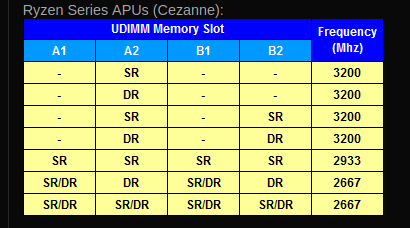
The nvme being gen 4.0 will work in gen 3.0 slot. As far as memory goes your cpu supports dual channel DDR4 up to 3200Mhz and should be installed in pairs as per the chart below.

Screenshot_20230214_084026

Edit: You can use Single Rank as per the chart or Dual Rank but you can’t mix them.

Edit2: It is always best to buy the ram sticks in pairs that way you know they are compatible.

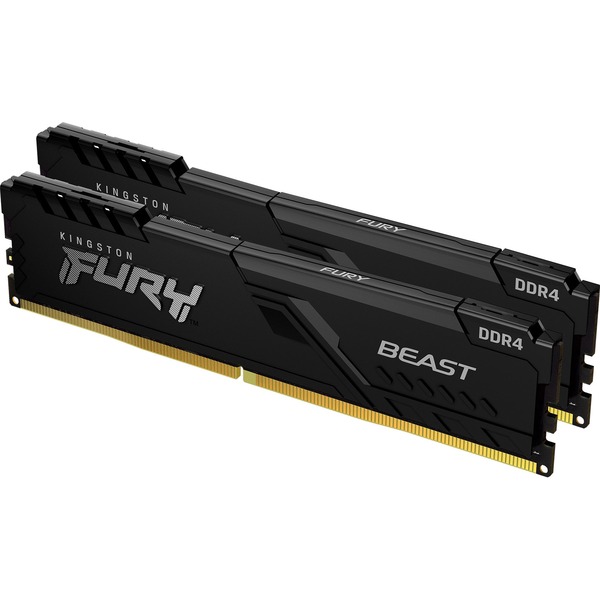
Edit3: If i were you i would get a better quality ram such as this.

Dual Channel DDR4 CL 16 1.35 volt
Made in Tawain

Edit4: The website has a list of compatible ram and vendors for this board. The HyperX is Kingston. I just give an example which would be fine.

https://www.asrock.com/mb/AMD/B550M%20Pro4/index.asp#MemoryCEZ

2 Likes

As for the OP’s topic, pipewire… there is a good tutorial on another forum, also covering latency. Although I guess pipewire has been improved in various ways, since that tutorial was written:

I don’t think the OP is having issues with crackling & popping. It was more instability issues.

Edit: But it is a good tutorial on pipewire. :wink:

Thank you. The store i bought it from didnt have kits though, but oh well…
I will take a look at other ram for sure as well.

Though, the same seems to be happening with 1 RAM now so i dont know…

Im running y-cruncher to see if that will detect any errors.

And no, i didnt have issues with pipewire cause i didnt have time to have issues, the system almost ummediately became unstable. So i didnt mess with low lateny audio at all.

Pipewire replaces both: Pulseaudio and Jack
Pipewire offers jack implementation via the pipewire-jack package.
Configuration is supposed to be much easier, than in the past.

Name                     : pipewire-jack
Beschreibung             : Low-latency audio/video router and processor - JACK support

You already suspected the nvme earlier, didn’t you?

@vepar
The ram i suggested has faster timings CL16
The images i showed are for a pair of 16 GB sticks @ $99.99 Cdn (32 GB Total)

Edit: Your motherboard has two m.2 slots. One is Pci-e 4.0 closest to the Cpu and the other is Pci-e 3.0

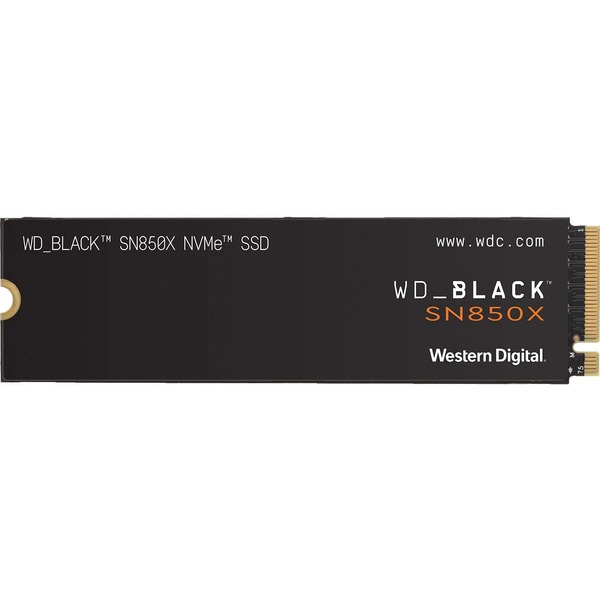
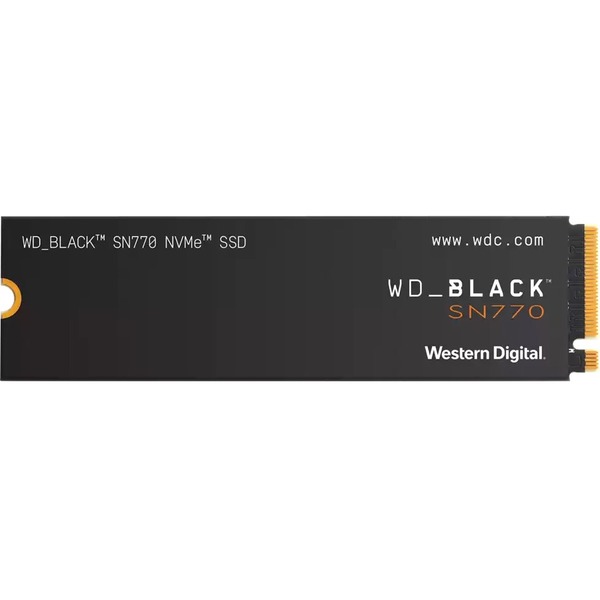
If you find you do need a new Nvme drive i suggest these ones.

Pci-e 4.0 Read Times 7300 Mb/s Write Times 6300 Mb/s 1TB

Pci-e 3.0 Read Times 5000 Mb/s Write Times 4000 Mb/s 500 MB

1 Like

If I remember correctly, EndeavourOS uses wireplumber as default for quite some time now. pipewire-media-session is obsolete now and replaced by wireplumber in most distributions, as far as I know.

Yes, but, no I/O errors so far on Fedora. Or the desktop environment issues. Steam an one other program froze, but that could have been the memory as at the time i still had the 2 sticks in.

I did get a reply from the manufacturer, i have to send them the receipt and model number (again) so they can then see if it needs to be replaced or not.

Yes, but i have to see if they can be found locally, or what i can get locally. Buying internationally almost always means shipping costs more than the thing i’m buying so i’m stuck buying here.
Though, that’s not a bad thing, returning anything if it’s broken is easier that way.

Well, the nvme is in that one slot that has the Armor thing on it. I guess that’s the right one.
But both will act as Gen3 cause Renoir doesn’t support more. So i guess it doesn’t matter which one i put it in.

I’ll see what the support says on the nvme.

Yes, i did a bit of reading, it seems all is implemented out of the box on Endeavour, so i should be good to go when i go back to it. Just need to configrue, latency, put myself in the audio group and allow it full memory and cpu priority, and that sort of stuff, the usual.

I’ll test this when i can make sure the system won’t randomly die again or have I/O errors or KDE issues like it used to.

1 Like

Well i ran y-cruncher, it passed all tests, however, the I/O test was bad:

I/O Performance Analysis:

Enter # to change option:

   1    Memory:             10.8 GiB
        Swap file Size:     86.4 GiB

   3    Multi-Threading:    Push Pool  ->  24 / ?  (randomization on)

   4    Far Memory Config:  Disk Raid 0:   ** Default Path **
   5    Far Memory Tuning:  1.00 MiB/seek, no parallelism

  20    Load from Configuration File
  21    Save to Configuration File

   0    Start I/O Performance Analysis!

option: 0


This process does not have "CAP_IPC_LOCK". Page locking will not be possible.
Please run y-cruncher with elevation to enable page locking.

Working Memory...  10.8 GiB  (spread: 100%/1)
I/O Buffers...     64.0 MiB

Sequential Write:         1.62 GiB/s                                           
Sequential Read:          1.66 GiB/s                                           
Threshold Strided Write:   366 MiB/s                                           
Threshold Strided Read:   1.51 GiB/s                                           
VST Streaming:                                                                 
    Computation:  1.55 GiB/s  
    Disk I/O   :   580 MiB/s  
    Ratio      :  0.364835

Notes:

  - The overall I/O bandwidth is very poor compared to the CPU performance.
    Computations utilizing disk will be severely limited by disk access.
    The best way to improve performance is to increase your disk bandwidth.
    For best performance on large computations, the disk bandwidth should be
    at least double the compute speed. (Ratio > 2.0)

  - The threshold non-sequential I/O bandwidth is somewhat low.
    This may result in sub-optimal performance for large computations that
    require a lot of disk space.
    The optimal ratio between sequential/non-sequential I/O is about 3 to 1.
    It is recommended to increase the "Min I/O Size" setting and re-run
    this benchmark.

So, it IS something with the nvme?

Yes that is correct the 5600G supports Pci-e 3.0 I don’t know what brand and type of drive you have but i can tell you that i have Western Digital Black nvme m.2 2280 drives and i have partitioned and formatted them more times that you would think they’d be worn out by now. My system works flawless on Kde Plasma or any other desktop.