Yes, it’s possible to fix that. I’m away right now. Will let you know once I’m back or anyone in here should be able to help you once they are available.
To get rid of the white corner, you’ll need to use kwin-effects-forceblur. Huge thanks to @perletero for sharing this tip 
Once you’ve installed it, open Desktop Effects and do the following:
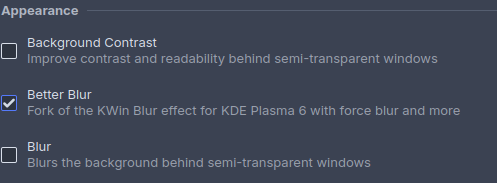
- Turn off the regular KWin Blur effect.
- Enable Better Blur instead.
- Open the Better Blur settings → go to the Rounded Corners tab.
- Adjust the Window top and bottom corner radius values. For Polar Gleam / Dusk, set the radius to 15.
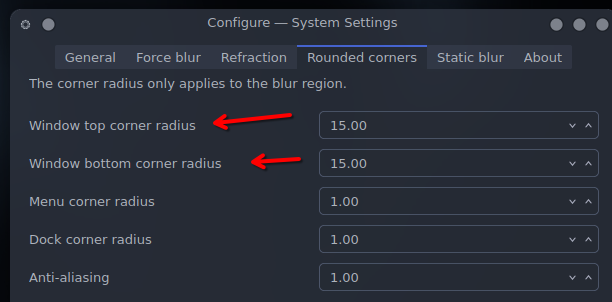
This should solve the problem in almost all cases, however for some specific apps this might not be enough, if it persist you might want to try disabling Background Contrast :
- System Settings → Window Management → Desktop Effects
- Turn off Background Contrast

^ EDIT : This option has been removed in Plasma 6.5 ^
You might also want to check that the Blur Corner Radius is properly set in Kvantum (Not needed if using Polar Dusk, @dirn has done his job properly  , but might be useful for other themes)
- Open Kvantum Manager
- Compositing & General look → Blur Corner Radius
- Set Menu and Tooltip
A value of 2 is usually enough, but you might want to adjust depending on your theme (i think it is set to 6 in Polar Gleam/Dusk if i remember correctly, but again in this case this step should not be necessary)
Restarting Plasma or rebooting is optional but might help if nothing change.
Thanks for the answer 
It works a bit better, but now I have black corners instead. 
Edit: actually doesn’t look like anything changed

What version of Plasma are you running ? A restart might be needed.
Not a fan of light themes in general, but this one looks pretty clean. Really amazing.
I’m on plasma 6.4.5 on Fedora. Rebooting didn’t help

Then you might want to check my (previously deleted) post below @dirn solutions, might help. (Or update if you can)
Plasma is currently on version 6.5.1. Perhaps an update will help.
@kraNG is on Fedora, @UncleSpellbinder
Not sure if Fedora has received the updates yet.
I guess it depends on which version of Fedora they are on. The current stable version of KDE Plasma on Fedora is 6.5.0, which is available with the Fedora 43 release.
Thanks @Svartis 

Tell me you are an Apple user without telling me
Have you configured the rounded corner radius blur in Better Blur, @kraNG?
If you’re referring to me — honestly, I’ve never used any Apple devices. They’re just way too expensive here. I’d have to sell a kidney to afford one 
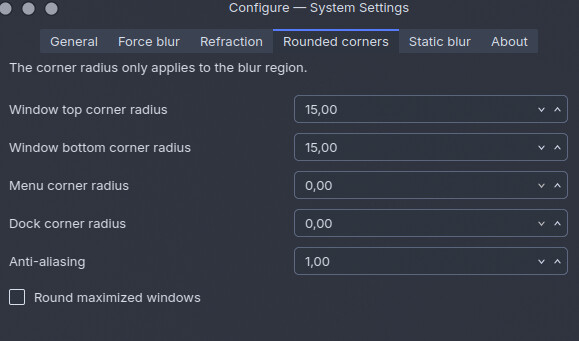
Yeah i just tried it and i have the same problem. I’ll try to figure something out.
I said that because that is a macOS desktop layout that i am looking at, but of course it is quite possible that you come from Gnome which mimics macOS. It is just the layout of course. Happy to see another plasma user. Plasma is the best.
True! Back in the day, I was a Gnome 2.x + Avant Window Navigator + Compiz Fusion user 