Hello,
I have dual boot with EOS and Win10. Two separate drives. One 500GB NVMe shared with Win10 boot and system and one 1TB HDD for stuff. So, one of the logical partitions from the HDD I was using for extra storage while in EOS.
In this particular case I was downloading using qBitorrent to the “missing” partition. The system froze. No response from keyboard, mouse… I did hard restart and when I logged in EOS the drive/partition was missing.
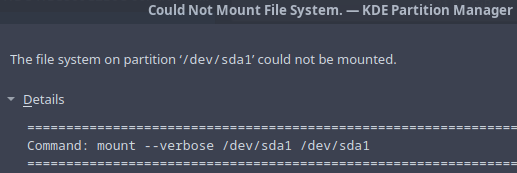
So far I used KDE Partition Manager to figure out what’s going on. Couldn’t mount
And Disk check came back with error:
KDE Partition Manager: SMART Status Report
Date: 2024-04-15 12:15 P.M.
Program version: 24.02.2
Backend: pmsfdiskbackendplugin (1)
KDE Frameworks version: 6.0.0
Machine: Linux EVL340 6.8.5-arch1-1 #1 SMP PREEMPT_DYNAMIC Thu, 11 Apr 2024 01:47:33 +0000 x86_64
Check and repair partition ‘/dev/sda1’ (931.51 GiB, ntfs)
Job: Check file system on partition ‘/dev/sda1’
Command: ntfsresize --no-progress-bar --info --force --verbose /dev/sda1
Check file system on partition ‘/dev/sda1’: Error
Check and repair partition ‘/dev/sda1’ (931.51 GiB, ntfs): Error
Also, I logged in Win10 and confirmed the partition is well and alive. No issue accessing the partition in Win10. All data intact.
So, being a noob I exhausted my knowledge what to do.
Help will be appreciated.
Thanks
Do you have “fast startup” disabled in windows? If you don’t disable that, the disks will always be marked as dirty since Windows is going into a hybrid shutdown state.
if it is not a fast startup issue of Windows
you can do an fdisk -l to see how
the HD are mounted, or you could also
post a view of a partition manager like
gparted or KDE part man.
I cannot recall right now, since I’m in EOS. Haven’t touched/changed it. But it was mounted before the hard shutdown. Actually, after the initial EOS installation many months ago the EOS automatically found and mount the partition. Access with sudo password.
Device Start End Sectors Size Type
/dev/nvme0n1p1 2048 206847 204800 100M EFI System
/dev/nvme0n1p2 206848 239615 32768 16M Microsoft reserved
/dev/nvme0n1p3 239616 766019693 765780078 365.2G Microsoft basic data
/dev/nvme0n1p4 975730688 976771071 1040384 508M Windows recovery environment
/dev/nvme0n1p5 766019694 782794751 16775058 8G Linux swap
/dev/nvme0n1p6 782794752 866680831 83886080 40G Linux filesystem
/dev/nvme0n1p7 866680832 975730687 109049856 52G Linux home
Try going to windows, then fully shutting the system down from there (not restart!) then cold boot into linux, see if that fixes it.
Also make sure any windows boot shenanigans like fast startup and hibernation are disabled.
If that doesn’t do the trick, try ntfsfix, I believe it’s a part of the ntfs-3g package or something like that, it is probably already installed for u so u just gotta run it and point it at ur partition.
Honestly in my years of experience on linux, dual booting through most of it, using ntfs on linux is a mistake to be avoided. This kind of shit is just one of many, many reasons.
Also, also, avoid KDE Partition Manager (like the plague!) everytime i tried to shrink a volume with it, it got corrupted, but it has never happened to me when i used gparted.
… assuming that the UUID matches to sda1 (?)
if not we can work around with /dev/sda1 /media/mydisk ntfs rw 0 0
since there is no other sd - device to confuse with

 , now we can carry on at: