Hello everyone  ,
,
Quite a new user to Linux here (6 months total and 3 on EndeavourOS)
Q1
I wanted to know what those messages mean, since I don’t remember seeing them before (or maybe I just didn’t pay attention).
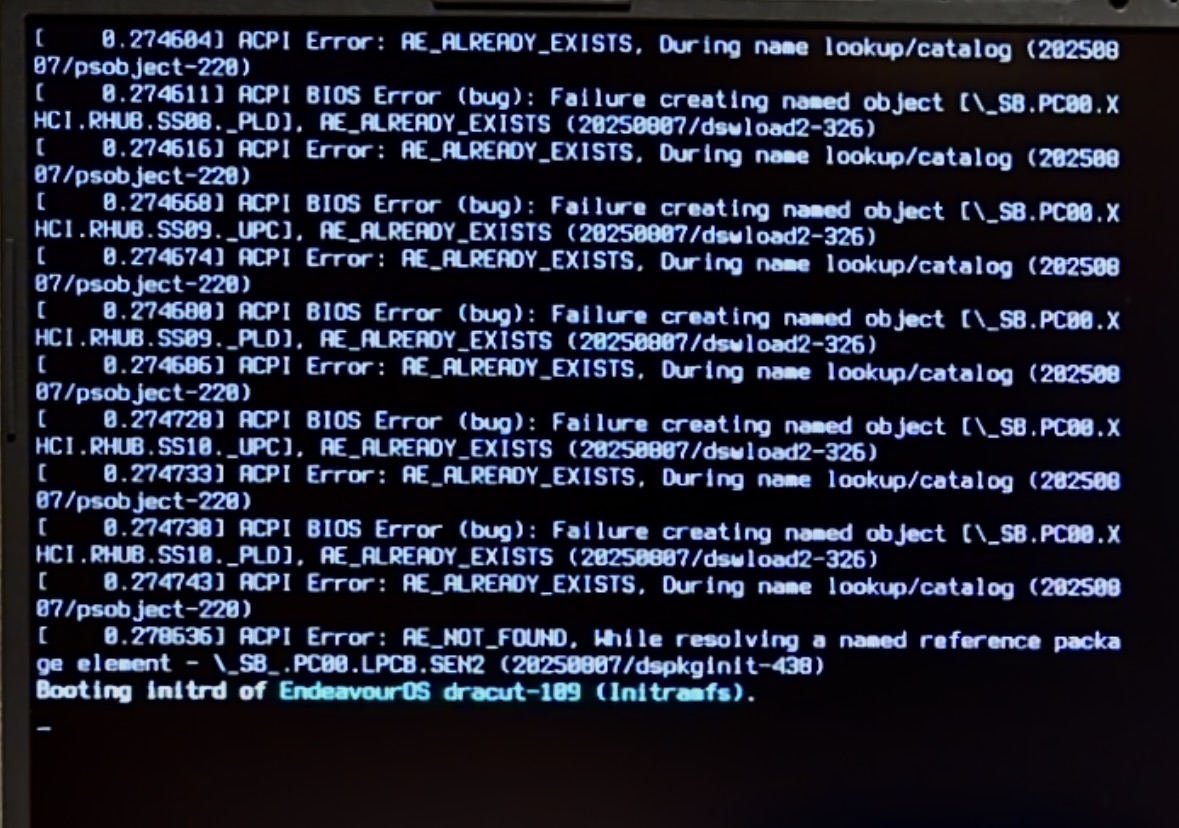
From my research, it would seem they aren’t bad, but I would prefer to fix them if possible, as I do not like seeing them.
My specs are below, I have the latest BIOS the manufacturer provides on their website (v332) and I recently did a CMOS reset for unrelated reasons.
Here is the link for the BIOS I currently have (select G814JIR):
[ https://rog.asus.com/laptops/rog-strix/rog-strix-g18-2024/helpdesk_bios/ ]
Q2
On the same related topic, what is this process? Because, again, I don’t remember seeing that before:

It takes around 4s in the total boot time, and I wanted to know if there is something I can do about it.
Thank you in advance.
Computer config:
Computer:
Manufacturer: ASUSTeK COMPUTER INC.
Model: G814JIR
Form Factor: Laptop
Processor Information:
CPU Vendor: GenuineIntel
CPU Brand: Intel(R) Core™ i9-14900HX
CPU Family: 0x6
CPU Model: 0xb7
Speed: 5600 MHz
32 logical processors
24 physical processors
Video Card:
Driver: NVIDIA Corporation NVIDIA GeForce RTX 4070 Laptop GPU/PCIe/SSE2
Memory:
RAM: 31698 MB
