
Thanks for the reply!
It’s interesting that they released an stable ISO in January and already with Plasma 6 rc2.
i ran the update yesterday and it broke the desktop both on my desktop and on my parents pc (with legacy nvidia drivers) that one would just run both 2 terminal windows with the mouse being a X ? my choice was to wipe plasma from there and keep xfce, my mistaken is that sddm was set by default and i didnt notice unistalling it, so at boot it would ask me to login everytime til later i realized i had to install sddm again
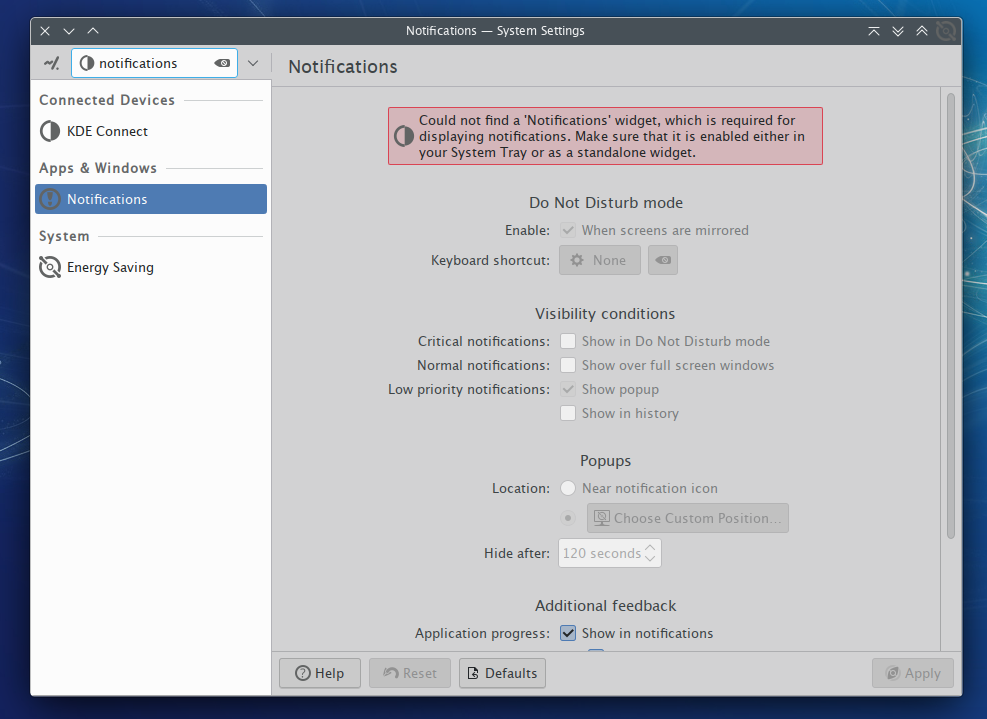
for some reason i cannot get the system tray to work on plasma6 ? it keeps saying it doesnt work with plasma6 yet, btw i spent sometime customizing the stock plasma now, installed the panel transparency and it looks great
The plasma system tray? Sounds like you are using some third party widget that hasn’t been updated for plasma 6.
latte dock is umaintained to my knowledge as well. Very minimal contributions have been made to it since the main developer stepped down from what I have seen here https://invent.kde.org/plasma/latte-dock.
thanks, the stock panel works great now, do you know which package i need to install for stock plasma system tray ?
I don’t think you need to install anything for it. Just check to see if it is there in the widgets menu.
i suspect the one i have for latte might be conflicting, i’ll try to unistall it and see if that helps
Alright, I hunted down the package just in case though. It is apart of plasma-workspace, which I assume everyone who is using plasma has already.
I just upgraded to KDE Plasma 6. Here are a few issues I encountered:
- Event Calendar widget doesn’t work. Needs to be ported to Qt 6. Using Digital Clock for now.
- No more Unsplash Picture of the Day. I heard this was a licensing issue and not KDE’s fault.
- I can’t add seconds to the SDDM and Lock Screen clock anymore. They moved and changed the Clock.qml file. I tried editing it, but it didn’t work. Does anyone know how to fix it?
Other than that, everything seems 
i uninstalled the system tray i had for latte and reinstalled the plasma-workspace package which seems to have helped, now i could drag and drop the system tray on my panel, but i am having invisible icons problem, tried launching skype and the icon does not show up, seems to be a problem like this one
i found this fork yesterday but it doesnt seem to work, i coundt drag and drop it on my panel for some reason
I don’t use skype, so don’t know about that. All of the default icons are there as well as the one for sunshine and vorta which are the two third party programs I have active. The link you provided mentions that it occurs with autostarted apps. Sunshine and yakuake are the autostarted programs that show system tray icons that I use and they both show up. Yakuake is a kde program though, so I wouldn’t count that one.
With all that said, is it just skype that is invisible?
When you say you couldn’t drag and drop it on your panel, does it disappear?
when adding system tray to panel it would show duplicated plasmoid for me, one i coundt drag and drog, and the other would but seemed to do nothing, now i can drag and drop, when checking the panel settings i see the system tray in there but it doesnt show any icons at all, it’s not just skype, it’s showing 0 icons for me
Something seems messed up then. I would suggest creating a new user and seeing if it works there. I wonder if there is a system tray widget stuck somewhere, but you can’t see it. I have filed a bug about a widget that disappears when I drag it to my bottom panel. If this is the case then maybe they are showing up on that invisible widget. Which is why I think testing with a new user would help.
Just updated yesterday before I relaized that the package is out now, so far, it seems to work really well. I was a bit sceptical as I am running an Nvidia Optimus setup and all that I played around with wayland before (Sway, Hyprland) didnt work that well for me. Now I dont really notice a difference (in a good way), just tried Steam with Prime Offload and that also still seems to work.
So far, the best Wayland Experience I had 
I’m also using vorta and the system tray icon is there but when I actually launch the program the icon is just a wayland W. Is this happening to you as well?