Hi, I’m using EndeavourOS with i3wm. Today I updated it and there were only two aur packages that got updated, codium and vim and every other package was already up to date. But when I rebooted my system, I noticed that some of my icons had become very small, but not all of them. And that’s same for some of the workspace icons. My config is all the same. Here are some screenshots.
I tried that but nothing changed. Also the line in the snippet that I posted where I set the font and its size, I actually tried changing to Font Pango: FontAwesome Regular 12 but then the size go fixed but the width of the i3bar messed up and also, some of the workspace icons reverted to previous versions. So I really don’t know what to do anymore. Do you want me to post my entire config?
what package of awesome iconic font is installed? as the default EndeavourOS setup using still awesome-terminal-fonts package … if you change that it could cause need change son the i3 bar used iconicfonts in the config/s
But no need to have this replacing the used font for i3 or bar … it will use what is there…
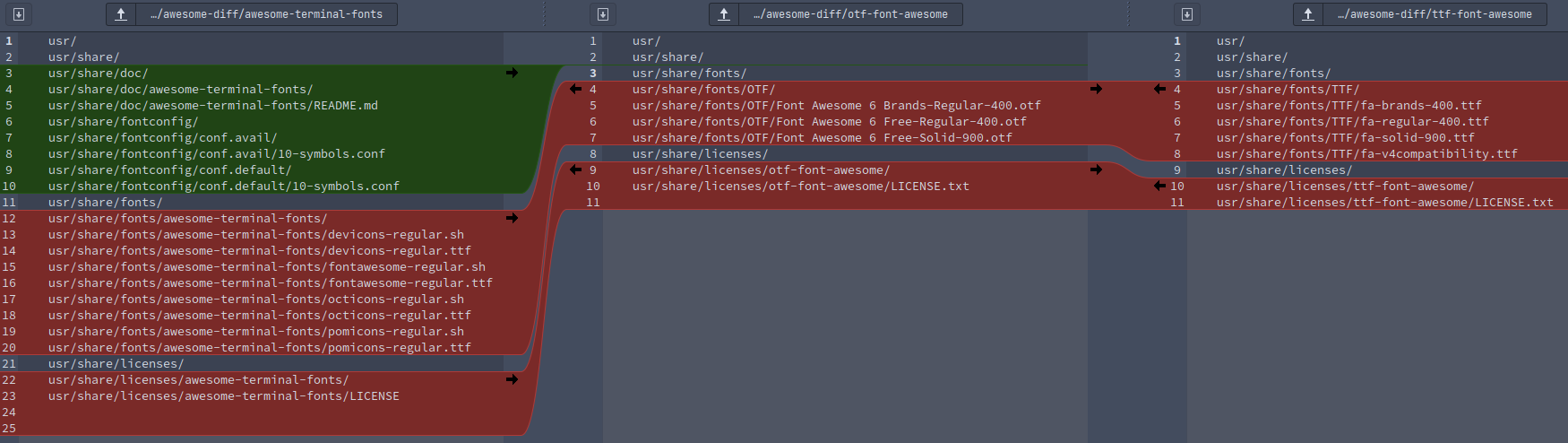
I ran the pacman -Qs awesome command and it showed these packages:
local/awesome-terminal-fonts 1.1.0-4
    fonts/icons for powerlines
local/otf-font-awesome 6.1.2-1
    Iconic font designed for Bootstrap
local/python-qtawesome 1.1.1-1
    Iconic fonts in PyQt and PySide applications
local/ttf-font-awesome 6.1.2-1
    Iconic font designed for Bootstrap
they are not working nicely together … you need to choose one or the other at least i know about ttf/otf/and terminal ones could be python-qtawesome is not interfering but what for are all of them installed anyway?
font-awesome packages otf and ttf do provide the same stuff in different naming and form what causes some inconvenience i would suggest to remove them both… awesome-terminal fonts include everything needed and if you want something different remove this one and us another one instead… but you will need to recheck used symbols
Ok, so I tried removing the ttf-font-awesome and otf-font-awesome and after doing that every icon became tiny. Before, only some of the icons were small but after removing these packages, all icons (including the workspace ones) became tiny .
Have you changed back your main i3 config file font under bar to original? Text will then use Noto Sans and symbols used will be the font symbols from your iblocks config file (awesome or nerd font).
bar {
	font pango: Noto Sans Regular 12

Your code...

}
Try using 12 in your main config file, in the bar section?
I also suggest posting the iblocks config here, so we can check if something might be off. Unless you did not make any modifications and are using the eos default one.
I tried changing size, the text becomes large but the icons are still very small. And I tried replacing my i3blocks config with the default one that ships with endeavour os but still it’s not working.
Strange, then there is still a font conflict from perhaps one of the AUR installs and dependencies. Another option maybe to try installing the nerd fonts and copy icons over to your i3 blocks config. Here is the link:
Edit: I think it should be this package but check first yay -S nerd-fonts-complete
Ok, so instead of installing the whole package, I just installed nerd-fonts-noto-sans-mono package from the aur and under the bar I configured my font as font pango: NotoSansMono Nerd Font 10 and now I everything is looking fine but the thing is, Nerd Font icons are a little too old styled? I wanted to have some new icons that were introduced in FontAwesome 6. Do you think it’s possible?
Yeah, seriously as soon as I typed yay -S nerd-fonts-complete and hit enter, it said the remaining time is 4 minutes 50 seconds, so I went to the kitchen to brew some coffee and after having a cup of coffee, when I returned to my room it was still saying 4 minutes 50 seconds remaining so I yelled at my sisters from the third floor and I was like Ishita! Nandini!!, are you downloading a stupid game on your PS5 again?! Using my router? And my mom was like it’s Monday stupid, the girls are at the school! (my college timing is a little late than theirs) But I know for a fact that my sisters, they can be cheeky sometimes (always up to some mischief), and last time instead of using the living room router (that is like a lot slower than mine) they used mine to download God of war (that we’ve already played) which was like 40 or 45GB? I don’t remember and because of that I spent my entire day trying to talk to the my customer care executive. So I rushed to their rooms to check if that’s the case again but everything was switched off so I returned to my room to see what’s wrong, and guess what, I had a look at my screen (and this time after wearing my glasses) I saw that it’s not 4 minutes 50 seconds, it was like 4 hours 50 minutes. I was like WTF!?!
Hey guys! I think I kind of figured what was causing that weird behaviour with my i3bar. Initially, I was using Noto Sans with a font size of 10 as my font. But after installing the awesome-terminal-fonts package, I set my font pango to Noto Sans 10, FontAwesome 6 10. But I never refreshed i3 or rebooted my PC, and you see, I usually update my server on every Sunday so that is the only day when I reboot my PC. Other than that, it always keeps running. Recently I went out of town and asked my sister to update it for me, on every Sunday. She did update it but she never rebooted it (Women ). So when I rebooted it after updating on this Sunday, I thought my fonts got messed up because of the update. But what actually happened is it was showing the fallback font (i.e icomoon for some reason which ships with awesome-terminal-fonts package) because it was unable to find any font with the name of FontAwesome 6 because it’s actually called FontAwesome.


 .
.
 ). So when I rebooted it after updating on this Sunday, I thought my fonts got messed up because of the update. But what actually happened is it was showing the fallback font (i.e