eZepp
February 14, 2026, 5:06pm
21
Rendering of /home/ezeno/Video/untitled.mp4 crashed

[hevc_nvenc @ 0x7fc2b8201a00] OpenEncodeSessionEx failed: unsupported device (2): (no details)
[hevc_nvenc @ 0x7fc2b8201a00] No capable devices found
Started render process: /usr/bin/melt-7 -loglevel error -progress2 %2Ftmp%2Fkdenlive-jlCPAG-1.mlt[hevc_nvenc @ 0x7f3a20201a00] OpenEncodeSessionEx failed: unsupported device (2): (no details)[hevc_nvenc @ 0x7f3a20201a00] No capable devices foundRendering of /home/ezeno/Video/343ed.mp4 aborted, resulting video will probably be corrupted.
i think the issue is pyton
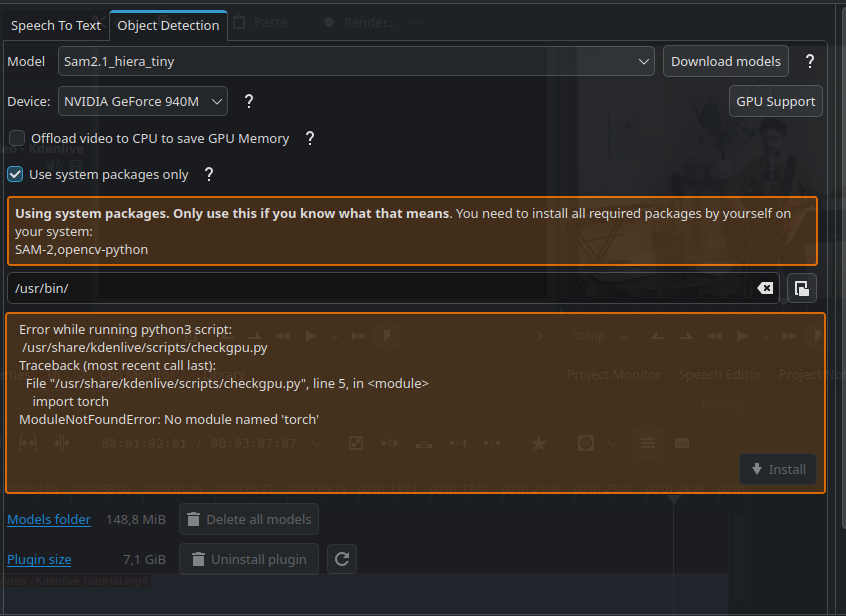
Error while running python3 script:

/usr/share/kdenlive/scripts/checkgpu.py

Traceback (most recent call last):

File "/usr/share/kdenlive/scripts/checkgpu.py", line 5, in <module>

import torch

ModuleNotFoundError: No module named 'torch'
ddnn
February 14, 2026, 5:24pm
22
According to your original post, you are trying to render videos using your GPU, right?
eZepp
February 14, 2026, 5:48pm
23
Let me recap.
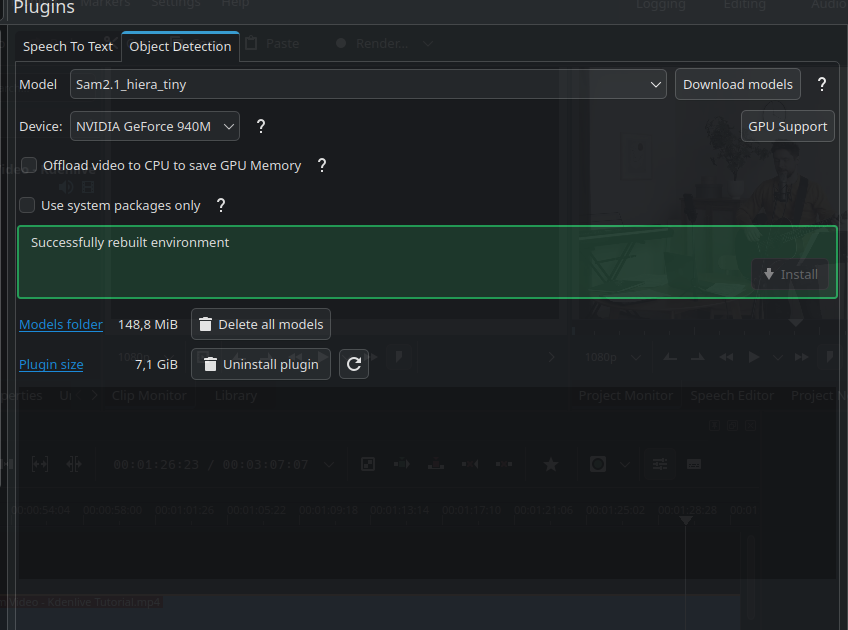
This is what i have now
pacman -Q | grep -A 0 -E "nvidia|cuda|vulk|kden" cuda13.1.1-1-- kdenetwork-filesharing 25.12.2-1 kdenlive 25.12.2-1 -- lib32-nvidia-580xx-utils 580.126.09-1 lib32-opencl-nvidia-580xx 580.126.09-1 -- linux-firmware-nvidia20260110-1-- nvidia-580xx-dkms 580.126.09-2 nvidia-580xx-settings 580.126.09-1 nvidia-580xx-utils 580.126.09-2 nvidia-inst 26.1.1-1 -- opencl-nvidia-580xx 580.126.09-2 -- vulkan-icd-loader 1.4.341.0-1 vulkan-mesa-implicit-layers 1:25.3.5-1 vulkan-nouveau 1:25.3.5-1
and i don’t click ”use system package” i saw this
and when i try to render with NVENC h264 ABR
Rendering of /home/—-/Video/324ed.mp4 crashed

[h264_nvenc @ 0x7f50e8201a00] OpenEncodeSessionEx failed: unsupported device (2): (no details)
[h264_nvenc @ 0x7f50e8201a00] No capable devices found

show log
Started render process: /usr/bin/melt-7 -loglevel error -progress2 %2Ftmp%2Fkdenlive-QURQQW-1.mlt
[h264_nvenc @ 0x7f50e8201a00] OpenEncodeSessionEx failed: unsupported device (2): (no details)
[h264_nvenc @ 0x7f50e8201a00] No capable devices found
Rendering of /home/ezeno/Video/324ed.mp4 aborted, resulting video will probably be corrupted.
if i do click ”use system package”
i get this
and any accelerated render crash the same
ddnn
February 14, 2026, 8:03pm
24
Try this and post the output please:
ffmpeg -f lavfi -i testsrc=duration=3:size=1280x720:rate=30 -c:v h265_nvenc -y test.mp4
This command tests GPU rendering more directly.
This will create a file in your home directory called “test.mp4”
eZepp
February 14, 2026, 8:29pm
25
[vost#0:0 @ 0x562e57462100] Unknown encoder ‘h265_nvenc’
check a second this link, maybe i should downgrade something??
eZepp
February 14, 2026, 8:37pm
26
ffmpeg -version ffmpeg version n8.0.1 Copyright (c) 2000-2025 the FFmpeg developers built with gcc 15.2.1 (GCC) 20260209
libavutil 60. 8.100 / 60. 8.100 libavcodec 62. 11.100 / 62. 11.100 libavformat 62. 3.100 / 62. 3.100 libavdevice 62. 1.100 / 62. 1.100 libavfilter 11. 4.100 / 11. 4.100 libswscale 9. 1.100 / 9. 1.100 libswresample 6. 1.100 / 6. 1.100
ddnn
February 14, 2026, 9:40pm
27
Try this instead:
ffmpeg -f lavfi -i testsrc=duration=3:size=1280x720:rate=30 -c:v h264_nvenc -y test.mp4
It’s very similar, but it’s h264 instead of h265.
Also, please do this for all your future outputs:
Paste the output into the post editor, then select the output you’ve just pasted, and click the button indicated below:
This will format the text properly.
ddnn
February 14, 2026, 9:53pm
28
It’s good that you decided to post this, because now I actually see a difference:
ffmpeg -version
ffmpeg version n8.0.1 Copyright (c) 2000-2025 the FFmpeg developers
built with gcc 15.2.1 (GCC) 20260103
configuration: --prefix=/usr --disable-debug --disable-static --disable-stripping --enable-amf --enable-avisynth --enable-cuda-llvm --enable-lto --enable-fontconfig --enable-frei0r --enable-gmp --enable-gnutls --enable-gpl --enable-ladspa --enable-libaom --enable-libass --enable-libbluray --enable-libbs2b --enable-libdav1d --enable-libdrm --enable-libdvdnav --enable-libdvdread --enable-libfreetype --enable-libfribidi --enable-libglslang --enable-libgsm --enable-libharfbuzz --enable-libiec61883 --enable-libjack --enable-libjxl --enable-libmodplug --enable-libmp3lame --enable-libopencore_amrnb --enable-libopencore_amrwb --enable-libopenjpeg --enable-libopenmpt --enable-libopus --enable-libplacebo --enable-libpulse --enable-librav1e --enable-librsvg --enable-librubberband --enable-libsnappy --enable-libsoxr --enable-libspeex --enable-libsrt --enable-libssh --enable-libsvtav1 --enable-libtheora --enable-libv4l2 --enable-libvidstab --enable-libvmaf --enable-libvorbis --enable-libvpl --enable-libvpx --enable-libwebp --enable-libx264 --enable-libx265 --enable-libxcb --enable-libxml2 --enable-libxvid --enable-libzimg --enable-libzmq --enable-nvdec --enable-nvenc --enable-opencl --enable-opengl --enable-shared --enable-vapoursynth --enable-version3 --enable-vulkan
libavutil      60.  8.100 / 60.  8.100
libavcodec     62. 11.100 / 62. 11.100
libavformat    62.  3.100 / 62.  3.100
libavdevice    62.  1.100 / 62.  1.100
libavfilter    11.  4.100 / 11.  4.100
libswscale      9.  1.100 /  9.  1.100
libswresample   6.  1.100 /  6.  1.100
You are missing: --enable-nvenc in your output.
What is the output of:
pacman -Qo $(which ffmpeg)
Basically, if you insalled ffmpeg from something other than directly from the Arch repos, this may be why you are missing --enable-nvenc.
eZepp
February 14, 2026, 9:55pm
29
ffmpeg version n8.0.1 Copyright (c) 2000-2025 the FFmpeg developers
  built with gcc 15.2.1 (GCC) 20260209
  configuration: --prefix=/usr --disable-debug --disable-static --disable-stripping --enable-amf --enable-avisynth --enable-cuda-llvm --enable-lto --enable-fontconfig --enable-frei0r --enable-gmp --enable-gnutls --enable-gpl --enable-ladspa --enable-libaom --enable-libass --enable-libbluray --enable-libbs2b --enable-libdav1d --enable-libdrm --enable-libdvdnav --enable-libdvdread --enable-libfreetype --enable-libfribidi --enable-libglslang --enable-libgsm --enable-libharfbuzz --enable-libiec61883 --enable-libjack --enable-libjxl --enable-libmodplug --enable-libmp3lame --enable-libopencore_amrnb --enable-libopencore_amrwb --enable-libopenjpeg --enable-libopenmpt --enable-libopus --enable-libplacebo --enable-libpulse --enable-librav1e --enable-librsvg --enable-librubberband --enable-libsnappy --enable-libsoxr --enable-libspeex --enable-libsrt --enable-libssh --enable-libsvtav1 --enable-libtheora --enable-libv4l2 --enable-libvidstab --enable-libvmaf --enable-libvorbis --enable-libvpl --enable-libvpx --enable-libwebp --enable-libx264 --enable-libx265 --enable-libxcb --enable-libxml2 --enable-libxvid --enable-libzimg --enable-libzmq --enable-nvdec --enable-nvenc --enable-opencl --enable-opengl --enable-shared --enable-vapoursynth --enable-version3 --enable-vulkan
  libavutil      60.  8.100 / 60.  8.100
  libavcodec     62. 11.100 / 62. 11.100
  libavformat    62.  3.100 / 62.  3.100
  libavdevice    62.  1.100 / 62.  1.100
  libavfilter    11.  4.100 / 11.  4.100
  libswscale      9.  1.100 /  9.  1.100
  libswresample   6.  1.100 /  6.  1.100
Input #0, lavfi, from 'testsrc=duration=3:size=1280x720:rate=30':
  Duration: N/A, start: 0.000000, bitrate: N/A
  Stream #0:0: Video: wrapped_avframe, rgb24, 1280x720 [SAR 1:1 DAR 16:9], 30 fps, 30 tbr, 30 tbn
Stream mapping:
  Stream #0:0 -> #0:0 (wrapped_avframe (native) -> h264 (h264_nvenc))
Press [q] to stop, [?] for help
[h264_nvenc @ 0x5621f5bc0740] OpenEncodeSessionEx failed: unsupported device (2): (no details)
[h264_nvenc @ 0x5621f5bc0740] No capable devices found
[vost#0:0/h264_nvenc @ 0x5621f5bc0100] [enc:h264_nvenc @ 0x5621f5bc06c0] Error while opening encoder - maybe incorrect parameters such as bit_rate, rate, width or height.
[vf#0:0 @ 0x5621f5bdb680] Error sending frames to consumers: Generic error in an external library
[vf#0:0 @ 0x5621f5bdb680] Task finished with error code: -542398533 (Generic error in an external library)
[vf#0:0 @ 0x5621f5bdb680] Terminating thread with return code -542398533 (Generic error in an external library)
[vost#0:0/h264_nvenc @ 0x5621f5bc0100] [enc:h264_nvenc @ 0x5621f5bc06c0] Could not open encoder before EOF
[vost#0:0/h264_nvenc @ 0x5621f5bc0100] Task finished with error code: -22 (Invalid argument)
[vost#0:0/h264_nvenc @ 0x5621f5bc0100] Terminating thread with return code -22 (Invalid argument)
[out#0/mp4 @ 0x5621f5bbfc00] Nothing was written into output file, because at least one of its streams received no packets.
frame=    0 fps=0.0 q=0.0 Lsize=       0KiB time=N/A bitrate=N/A speed=N/A elapsed=0:00:00.72
Conversion failed!
pacman -Qo $(which ffmpeg)
/usr/bin/ffmpeg è contenuto in ffmpeg 2:8.0.1-6
ddnn
February 14, 2026, 11:11pm
30
It looks like your drivers versions are not matching up correctly. Please show the output of:
nvidia-smi
Was there issues when switching your Nvidia drivers to nvidia-580xx from the AUR?
eZepp
February 14, 2026, 11:12pm
31
nvidia-smi
Sun Feb 15 00:12:00 2026
+-----------------------------------------------------------------------------------------+
| NVIDIA-SMI 580.126.09             Driver Version: 580.126.09     CUDA Version: 13.0     |
+-----------------------------------------+------------------------+----------------------+
| GPU  Name                 Persistence-M | Bus-Id          Disp.A | Volatile Uncorr. ECC |
| Fan  Temp   Perf          Pwr:Usage/Cap |           Memory-Usage | GPU-Util  Compute M. |
|                                         |                        |               MIG M. |
|=========================================+========================+======================|
|   0  NVIDIA GeForce 940M            Off |   00000000:0A:00.0 Off |                  N/A |
| N/A   47C    P5            N/A  /  200W |     570MiB /   2048MiB |      4%      Default |
|                                         |                        |                  N/A |
+-----------------------------------------+------------------------+----------------------+

+-----------------------------------------------------------------------------------------+
| Processes:                                                                              |
|  GPU   GI   CI              PID   Type   Process name                        GPU Memory |
|        ID   ID                                                               Usage      |
|=========================================================================================|
|    0   N/A  N/A             876      G   /usr/lib/Xorg                           138MiB |
|    0   N/A  N/A             996      G   /usr/bin/ksecretd                         1MiB |
|    0   N/A  N/A            1077      G   /usr/bin/ksmserver                        1MiB |
|    0   N/A  N/A            1079      G   /usr/bin/kded6                            1MiB |
|    0   N/A  N/A            1080      G   /usr/bin/kwin_x11                        62MiB |
|    0   N/A  N/A            1098      G   /usr/bin/plasmashell                     33MiB |
|    0   N/A  N/A            1122      G   /usr/bin/kaccess                          1MiB |
|    0   N/A  N/A            1123      G   ...it-kde-authentication-agent-1          1MiB |
|    0   N/A  N/A            1225      G   /usr/bin/kdeconnectd                      1MiB |
|    0   N/A  N/A            1335      G   /usr/lib/xdg-desktop-portal-kde           1MiB |
|    0   N/A  N/A            4711      G   /usr/lib/baloorunner                      1MiB |
|    0   N/A  N/A           38803      G   /usr/lib/librewolf/librewolf            292MiB |
|    0   N/A  N/A           39079      G   /usr/bin/transmission-qt                  1MiB |
|    0   N/A  N/A           46868      G   /usr/bin/dolphin                          1MiB |
|    0   N/A  N/A           56335      G   corekeyboard                              1MiB |
|    0   N/A  N/A           64058      G   /usr/bin/konsole                          1MiB |
+-----------------------------------------------------------------------------------------+
ddnn
February 14, 2026, 11:16pm
32
Again:
Also, please post the output of:
inxi -Fxxc0z
eZepp
February 14, 2026, 11:17pm
33
not sure, Mint suggested drivers was the nvidia-driver-535 so maybe i should downgrade to 530xx or similar?
eZepp
February 14, 2026, 11:20pm
34
 inxi -Fxxc0z
System:
  Kernel: 6.18.9-arch1-2 arch: x86_64 bits: 64 compiler: gcc v: 15.2.1
  Desktop: KDE Plasma v: 6.5.5 tk: Qt v: N/A wm: kwin_x11 dm: SDDM
    Distro: EndeavourOS base: Arch Linux
Machine:
  Type: Laptop System: Hewlett-Packard product: HP Pavilion Notebook
    v: Type1ProductConfigId serial: <superuser required> Chassis: type: 10
    serial: <superuser required>
  Mobo: Hewlett-Packard model: 8096 v: 89.11 serial: <superuser required>
    part-nu: M4U29EA#ABZ Firmware: UEFI vendor: Insyde v: F.03
    date: 03/31/2015
Battery:
  ID-1: BAT0 charge: 28.4 Wh (100%) condition: 28.4/28.4 Wh (100%)
    volts: 16.66 min: 14.8 model: Hewlett-Packard Primary serial: N/A
    charging: status: full cycles: N/A
CPU:
  Info: dual core model: Intel Core i7-5500U bits: 64 type: MT MCP
    arch: Broadwell rev: 4 cache: L1: 128 KiB L2: 512 KiB L3: 4 MiB
  Speed (MHz): avg: 2396 min/max: 500/3000 cores: 1: 2396 2: 2396 3: 2396
    4: 2396 bogomips: 19153
  Flags-basic: avx avx2 ht lm nx pae sse sse2 sse3 sse4_1 sse4_2 ssse3
Graphics:
  Device-1: Intel Broadwell-U GT2 [HD Graphics 5500] vendor: Hewlett-Packard
    driver: i915 v: kernel arch: Gen-8 ports: active: eDP-1 empty: HDMI-A-1
    bus-ID: 00:02.0 chip-ID: 8086:1616
  Device-2: NVIDIA GM108M [GeForce 940M] vendor: Hewlett-Packard
    driver: nvidia v: 580.126.09 arch: Maxwell pcie: speed: 5 GT/s lanes: 4
    bus-ID: 0a:00.0 chip-ID: 10de:1347
  Device-3: Cheng Uei Precision Industry (Foxlink) HP Truevision HD
    driver: uvcvideo type: USB rev: 2.0 speed: 480 Mb/s lanes: 1 bus-ID: 1-3:3
    chip-ID: 05c8:0379
  Display: x11 server: X.Org v: 21.1.21 with: Xwayland v: 24.1.9
    compositor: kwin_x11 driver: X: loaded: modesetting,nvidia gpu: i915
    display-ID: :0 screens: 1
  Screen-1: 0 s-res: 1366x768 s-dpi: 96
  Monitor-1: eDP-1 mapped: eDP-1-1 model: ChiMei InnoLux 0x15ca
    res: 1366x768 hz: 60 dpi: 101 diag: 394mm (15.5")
  API: EGL v: 1.5 platforms: device: 0 drv: nvidia device: 2 drv: iris
    device: 3 drv: swrast gbm: drv: nvidia surfaceless: drv: nvidia x11:
    drv: nvidia inactive: wayland,device-1
  API: OpenGL v: 4.6.0 compat-v: 4.5 vendor: nvidia mesa v: 580.126.09
    glx-v: 1.4 direct-render: yes renderer: NVIDIA GeForce 940M/PCIe/SSE2
  API: Vulkan v: 1.4.341 surfaces: N/A device: 0 type: discrete-gpu
    driver: nvidia device-ID: 10de:1347
  Info: Tools: api: clinfo, eglinfo, glxinfo, vulkaninfo
    de: kscreen-console,kscreen-doctor gpu: nvidia-settings,nvidia-smi
    wl: wayland-info,wlr-randr x11: xdpyinfo, xprop, xrandr
Audio:
  Device-1: Intel Broadwell-U Audio vendor: Hewlett-Packard
    driver: snd_hda_intel v: kernel bus-ID: 00:03.0 chip-ID: 8086:160c
  Device-2: Intel Wildcat Point-LP High Definition Audio
    vendor: Hewlett-Packard driver: snd_hda_intel v: kernel bus-ID: 00:1b.0
    chip-ID: 8086:9ca0
  API: ALSA v: k6.18.9-arch1-2 status: kernel-api
  Server-1: sndiod v: N/A status: off
  Server-2: PipeWire v: 1.4.10 status: active with: 1: pipewire-pulse
    status: active 2: wireplumber status: active 3: pipewire-alsa type: plugin
    4: pw-jack type: plugin
Network:
  Device-1: Intel Wireless 3160 driver: iwlwifi v: kernel pcie:
    speed: 2.5 GT/s lanes: 1 bus-ID: 08:00.0 chip-ID: 8086:08b3
  IF: wlan0 state: up mac: <filter>
  Device-2: Realtek RTL810xE PCI Express Fast Ethernet
    vendor: Hewlett-Packard driver: r8169 v: kernel pcie: speed: 2.5 GT/s
    lanes: 1 port: 4000 bus-ID: 09:00.0 chip-ID: 10ec:8136
  IF: eno1 state: down mac: <filter>
Bluetooth:
  Device-1: Intel Bluetooth wireless interface driver: btusb v: 0.8
    type: USB rev: 2.0 speed: 12 Mb/s lanes: 1 bus-ID: 1-7:5
    chip-ID: 8087:07dc
  Report: btmgmt ID: hci0 rfk-id: 0 state: down
    bt-service: enabled,running rfk-block: hardware: no software: yes
    address: N/A
Drives:
  Local Storage: total: 2.73 TiB used: 1.19 TiB (43.5%)
  ID-1: /dev/sda vendor: HGST (Hitachi) model: HTS541010A9E680
    size: 931.51 GiB speed: 6.0 Gb/s serial: <filter>
  ID-2: /dev/sdb vendor: Toshiba model: MQ04UBD200 size: 1.82 TiB
    type: USB rev: 2.1 spd: 480 Mb/s lanes: 1 serial: <filter>
Partition:
  ID-1: / size: 362.59 GiB used: 61.68 GiB (17.0%) fs: ext4 dev: /dev/sda8
Swap:
  Alert: No swap data was found.
Sensors:
  System Temperatures: cpu: 51.0 C mobo: N/A gpu: nvidia temp: 47 C
  Fan Speeds (rpm): N/A
Info:
  Memory: total: 8 GiB available: 7.67 GiB used: 5.3 GiB (69.0%)
  Processes: 293 Power: uptime: 4h 12m wakeups: 0 Init: systemd v: 259
    default: graphical
  Packages: 1336 pm: pacman pkgs: 1313 pm: flatpak pkgs: 23 Compilers:
    clang: 21.1.8 gcc: 15.2.1 Shell: Bash v: 5.3.9 running-in: konsole
    inxi: 3.3.40
The NVIDIA GeForce 940M is a 2015-era mid-range laptop GPU based on the Maxwell architecture. According to Arch, this requires nvidia-580xx-dkms.
ddnn
February 14, 2026, 11:30pm
36
My first two laptops were HP Pavilion. Didn’t know they shipped with GPUs.
Anyway, your motherboard/BIOS’s last installed update is from 2015. Why is that?
Mobo: Hewlett-Packard model: 8096 v: 89.11 serial: <superuser required>
    part-nu: M4U29EA#ABZ Firmware: UEFI vendor: Insyde v: F.03
    date: 03/31/2015
Also, what Mint or any non-leading/bleeding edge distro says is irrelevant when it comes to drivers because they will always recommend “stable” drivers.
Anyway, this is why inxi is so important, and my fault for not asking for it earlier.
As such, GPU-accelerated rendering wouldn’t be possible.
eZepp
February 14, 2026, 11:34pm
37
Thank you for the help all the same.
Yeah, seems with an 11-year-old BIOS and an 11-year-old GPU, you’re rather limited.
ddnn
February 14, 2026, 11:42pm
39
Could’ve been done with this 2 minutes in had I just asked for the inxi.
But also, I posted this on my Mastodon account yesterday after testing the advanced features in Kdenlive. Your situation is an example that somewhat reflects this.
eZepp
February 14, 2026, 11:45pm
40
I don’t mind too much. I’m just trying to squeeze all the performance possible from this old buddy, and i have to say, i have already get quite a bit out of the box. Maybe is should check if i can update the bios?