Nope
Try alt F7
Nope.
What is on the black screen? A flashing cursor? Nothing?
Nothing
Do i just need to get a new mother board or something crazy
I guess the option would be to boot on a live usb of Endeavour and then you can arch-chroot and run an update. That’s what I would do first. It will also allow you to provide further info if needed for the partition layout in order to arch-chroot if you need help. There are many here that can help with that.
How do you boot to a USB without bios?
If the proper Fkey sn’t doing it then the only other option is powering down an unplug the computer and removing the CMOS battery for a couple minutes. Then put it back in and restart the computer.
Edit: Make sure it’s unplugged and you are grounded when touching anything inside the tower. If you are not capable of this then I would suggest taking it to a computer store or where purchased it.
I would even pull HDs so the only bootable option is either firmware or liveiso
If there’s no bootable drive anywhere, it has to default to firmware.
What do you mean by grounded
A ground strap from your wrist to the computer case. The metal part. Also it might be easy to do as @anon63071375 says.
Hmm well i dont think i have one of those, Ill look around for a computer store as i bought it online
I dont think i can go to one as in my area there is none sadly. Can i still do everything without a bios ?
The CMOS approach is a bit drastic if you don’t have the gear for it. You could try what @anon63071375 suggested earlier as that isn’t too intrusive.
Do you know where they would be found? Or should i google that for my board
This is the SSD that you have. You would unplug that one and leave the usb plugged in. Once you’ve booted into the live usb you can plug the ssd back in and try what rick was suggesting earlier to do an update.
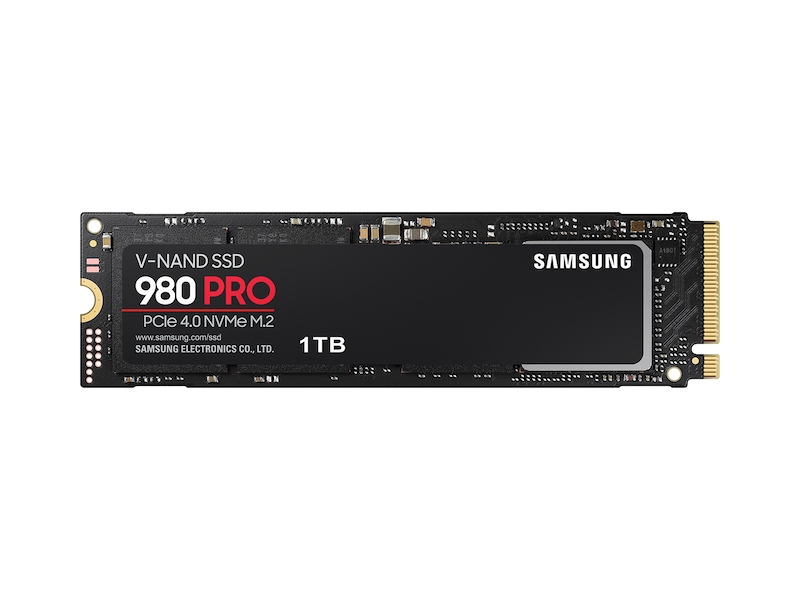
i would need to turn off the pc for this right
meaning like cut power