@ricklinux At this point I think that will be the best in the long run as next week the other OS’s might not work either and the newer card will avert that for some time…
That is the issue’s you run into using old junk and not being able to afford newer hardware because of a fixed income…
I truly do thank you so much… I think your in Canada and that is a bit to far fore me to go and shake your hand, an if you were closer I would buy ya dinner… :)
So the question is, it this (Solved) of (Unsolved)… ???
LLAP
Thanks Again!
@ricklinux If by some chance the Rabbit does a pear in the Hat, I will give it a try… Lol
LLAP
I feel your pain on that one! I’m 69 and have been retired for over 5 years. So far, I have only felt the pinch on my hobbies. I have a couple of expensive hobbies that have kind of stalled. When working I had the money for hobbies but not the time. Now I have the time for hobbies, but not much money.
Pudge
@bescott9944 If you want to try booting on the live ISO but add “radeon.audio=1” to the kernel parameters at the end of the line and see if the HDMI audio works. lol Another kick at the cat! Not sure if you know how to do that?
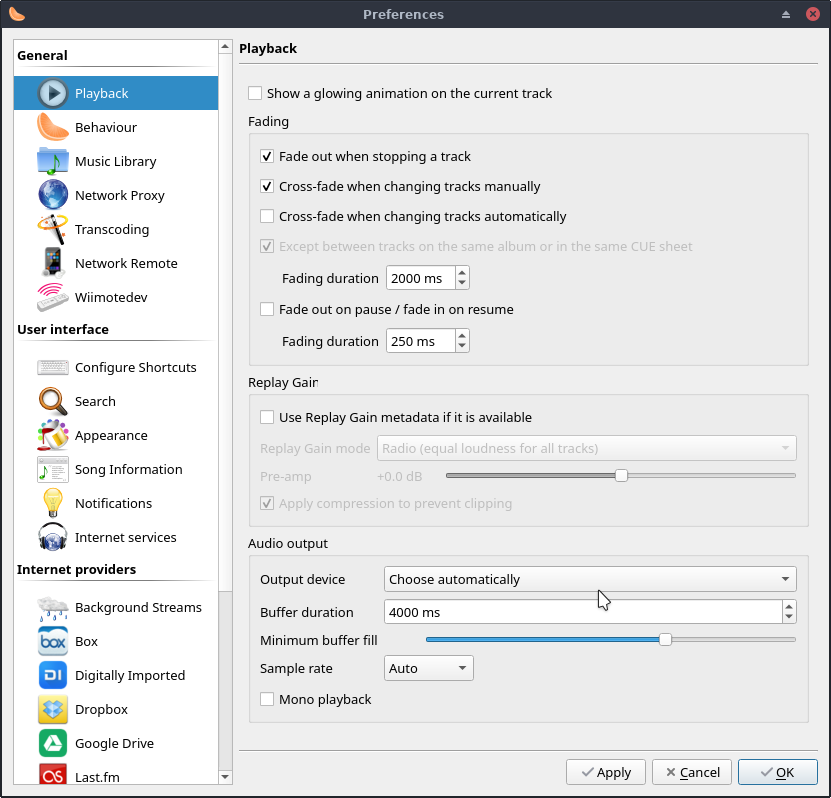
@bescott9944 Did you ever try selecting the output device in clementine under tools, preferences?
@Pudge Well I fully understand the hobby issue. I had just retired at 62 then had my stroke, was fully blind for 2 months, after getting half of my sight back on the right side of my eyes, it was a year and still some times I look at stuff and I don;t understand or know what I am looking at… It’s like having to walk all over again. my brain had to learn what my eyes were seeing and vices versa… The last 3 years has been a blast… NOT! LOL There are other issues from the stroke but that was the big one… 
Hobbies are the first thing that took a big hit too. I do divide what little among the 3 of them. Modeling, computers, electronics. >I have just this year started to work on circuit boards… Lol
I have the kids talked into getting me a microscope like Louse Rossmann uses on his YT channel… Talk about digressing… Sorry Moderator!
Thanks again for you thoughts!
LLAP
@ricklinux
Ouch! don’t kick so hard… LOL
Be leave you had me do that 2 days ago… Lol
It is still there I never did remove it. I checked the Grub boot file when its boots to make sure it is still there…
No I have not as I would have to do that to all programs, but I will give that a try… 
LLAP
Could you also try one last thing. I noticed there were more panels now in the alsa mixer since turning off the onboard sound and turning it back on. So could you now try removing the pulse audio config and reboot with this command.
rm -R ~/.config/pulse
Then reboot and see if anything changes.
@ricklinux
I was wrong that was on the other installation… I did add “radeon.audio=1” to the bootup and no affect. The same with Clementine. I had to go to the Settings and select the HDMI sound…
I will do that and be back… Lol
@ricklinux
Removed the Pulse folder and it came back and there is not a change…
There are several text files in the folder and there are two and this is one…
74160caa811c450185d070ad02a9ebf8-default-source
74160caa811c450185d070ad02a9ebf8-default-sink
and they both have this in it…
alsa_output.pci-0000_00_14.2.analog-stereo.monitor
alsa_output.pci-0000_00_14.2.analog-stereo
I deleted it 3 times and it always comes back the same…
LLAP
and informations behind all of the provided information extra 
@joekamprad That’s for sure… lol
It’s supposed to come back and I’m sure the files there are correct. I will check mine but it was just to see if it would somehow set the HDMI audio on but it just doesn’t want to.
there was a part in arch wiki when you see suspend error in journalctl -b you have to remove the pulse folder, but its not the case currently… sometimes can do , and pulse made the seting again with fresh settings 
Endeavour sees it but it’s not configured to load and use it somewhere because it reports it being off. I just don’t know why.
had some theory found but cannot prove. the idea of a EDID , but ehhhhh got no proof was looking into it…
stil sounds fishy if i tell that it is, was finding proof general stil not found that say it should be that…
i using hdmi sound sometimes got a cheak hdmi > vga connectot with seporate sound plugin, but it works atleast here…, also the monitor but, it flickers sometimes, but that converter is kinda cheap hard to blame… sound works but this case is 5.1 sound … was like https://unix.stackexchange.com/questions/372098/5-1-output-not-working-on-lubuntu but thats no proof…dont know the concept is true of this actually…probably is a other topic
Question? Should one or both of these point to the HDMI output…
I even uninstalled all the Pulseaudio stuff, 6 or 7 files and reinstalled it with the same issues…
On a brighter note the Video cards Shipped while ago be here Monday… Lol
@bescott9944 Okay so i have two ideas. Please post this command.
pacmd list-sinks | grep -e ‘name:’ -e ‘index:’
Mine looks like this.
[rick@endeavour-os ~]$ pacmd list-sinks | grep -e 'name:' -e 'index:'
    index: 0
	name: <alsa_output.pci-0000_01_00.1.hdmi-stereo>
  * index: 1
	name: <alsa_output.pci-0000_00_1b.0.analog-stereo>
[rick@endeavour-os ~]$
@bescott9944 Manually configuring PulseAudio to detect the Nvidia HDMI
If you know how to edit a file with a text editor then you can add this to default.pa file in
/etc/pulse/default.pa
Add this to the last line of the file under load audio drivers statically.
load-module module-alsa-sink device=hw:1,3
The easiest way is to use nano.
sudo nano /etc/pulse/default.pa
Then add the load module line and hit ctrl x to save.
Then restart pulse audio with these.
pulseaudio -k
pulseaudio --start
If this doesn’t work you can just remove it from the file. Then i have one more to try once you post the other command above.