hello again, so i was updating my system as usual with eos-update and pacman hit me with a dependancy issue (as seen in the title). so it says installing libpcap (1.10.7-1) will break libpcap 1.10.6 which is required by lib32-libpcap. what should i do?
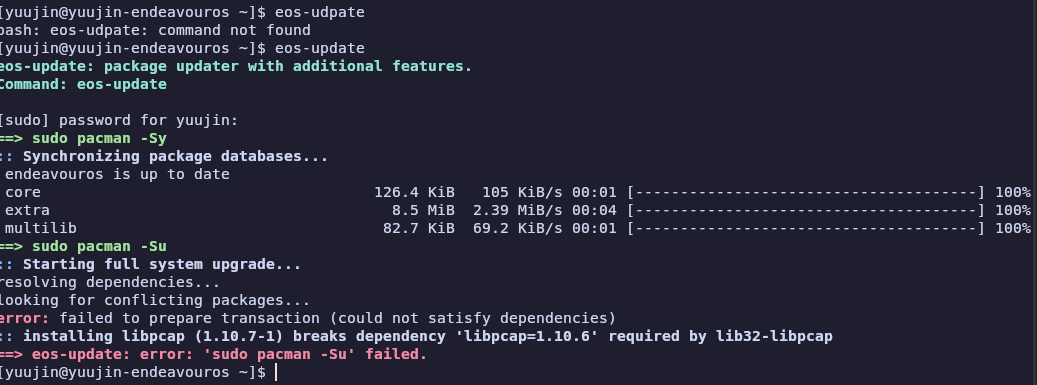
ok, i have decided to just --ignore libpcap for now but if there’s anything better i should do (should’ve done) or a follow up please feel free to tell me!
I would not do that, it’s a bad habit to get into. What does pacman -Qii libpcap return?
@Yuujin, just a friendly reminder: Plain text or screenshots of terminal output can be difficult to read. it’s a lot easier to read terminal output if you use the forum’s Preformatted Text option in posts and replies.
oh i see, i’ll take note of that in the future (i hope it wasnt completely wrong to --ignore it)
yuujin@yuujin-endeavouros ~]$ pacman -Qii libpcap
Name            : libpcap
Version         : 1.10.6-1
Description     : A system-independent interface for user-level packet capture
Architecture    : x86_64
URL             : https://www.tcpdump.org/
Licenses        : BSD-3-Clause
Groups          : None
Provides        : libpcap.so=1-64
Depends On      : glibc  libnl  sh  libdbus-1.so=3-64
Optional Deps   : None
Required By     : iptables  lib32-libpcap  ppp  wine  wireshark-cli  wireshark-qt
Optional For    : None
Conflicts With  : None
Replaces        : None
Installed Size  : 666.95 KiB
Packager        : David Runge dvzrv@archlinux.org
Build Date      : Monday, 05 January, 2026 08:47:55 PM
Install Date    : Sunday, 11 January, 2026 10:43:34 AM
Install Reason  : Installed as a dependency for another package
Install Script  : No
Validated By    : Signature
Backup Files    : None
Extended Data   : pkgtype=pkg

[yuujin@yuujin-endeavouros ~]$
gotcha, mb i jus thought it would be nice to add an img but yeah i’ll use preformatted text when submitting terminal outputs
Well, this is a very old libcap version, on my system I have libcap 2.78-1.
I guess it is linked to your lib32-libcap : why do you have 32-bit packet capture library installed ?
Please run pacman -Qii lib32-libcap to see who is requiring it.
Well it seems not to be about libcap but about libpcap which is installed from the AUR and has been flagged out of date at 08/09. This probably means the maintainer has not updated the package yet. That is the disavantage of installing packages from the AUR, they might not get updated in time, or at all if the maintainer is not maintaining the package anymore (resulting in orphaned AUR packages). If a alternative can be found, for the package that requires this dependancy, that is present in e.g. extra repository it is recommended to install that package because of what I mentioned above. In this case you might want to wait for the maintainer to update the package, or search for a alternative that is not from the AUR.
See also https://aur.archlinux.org/packages/lib32-libpcap
here you go
[yuujin@yuujin-endeavouros ~]$ pacman -Qii lib32-libcap
Name : lib32-libcap
Version : 2.78-1
Description : POSIX 1003.1e capabilities (32-bit)
Architecture : x86_64
URL : ``https://sites.google.com/site/fullycapable/
Licenses : BSD-3-Clause OR GPL-2.0-only
Groups : None
Provides : libcap.so=2-32 libpsx.so=2-32
Depends On : lib32-glibc lib32-pam libcap=2.78
Optional Deps : None
Required By : None
Optional For : None
Conflicts With : None
Replaces : None
Installed Size : 94.52 KiB
Packager : Felix Yan <felixonmars@archlinux.org>
Build Date : Tuesday, 07 April, 2026 01:09:27 AM
Install Date : Saturday, 11 April, 2026 02:02:09 PM
Install Reason : Installed as a dependency for another package
Install Script : No
Validated By : Signature
Backup Files : None
Extended Data : pkgtype=pkg
though im pretty sure it’s libpcap not libcap
Looking closer at the link I gave above I now see there is no maintainer at the moment, not very promising I would say.
You are right, my bad. It is libpcap, so pacman -Qii lib32-libpcap command.
[yuujin@yuujin-endeavouros ~]$ pacman -Qii lib32-libpcap
Name            : lib32-libpcap
Version         : 1.10.6-1
Description     : A system-independent interface for user-level packet capture (32-bit)
Architecture    : x86_64
URL             : http://www.tcpdump.org/
Licenses        : BSD-3-Clause
Groups          : None
Provides        : libpcap.so=1-32
Depends On      : lib32-glibc  lib32-libnl  libpcap=1.10.6  lib32-dbus  libdbus-1.so=3-32
Optional Deps   : None
Required By     : None
Optional For    : None
Conflicts With  : None
Replaces        : None
Installed Size  : 379.29 KiB
Packager        : David Runge <dvzrv@archlinux.org>
Build Date      : Monday, 05 January, 2026 08:51:46 PM
Install Date    : Sunday, 11 January, 2026 10:43:34 AM
Install Reason  : Installed as a dependency for another package
Install Script  : No
Validated By    : Signature
Backup Files    : None
Extended Data   : pkgtype=pkg
Hum, I tried to help but made mistakes, sorry for that, issue is may be beyond my knowledge.
@keescase advises are from a better level. Always prefer official packages when possible rather than from AUR repository.
NOTE if you look at https://aur.archlinux.org/packages/lib32-libpcap link provided, there is a comment from yesterday asking for a patch about version requirement, which is probably what you are facing.
Nevertheless, it seems to be linked to wine or wireshark packages. They may come from AUR repository ?
Running yay -Qm command will list you your AUR packages installed. See if one of the above is present, and if yes may be uninstall it if possible to get rid of the dependency ?
This is what I can say to help, but again this is a bit above my knowledge.
It was installed as a dependency but it’s no longer needed. Remove it, plus its dependencies:
sudo pacman -Rns lib32-libpcap
And that should take care of the conflict in your initial post.
Also, you should check for and remove orphans (packages that were installed as dependencies but are no longer required). You might have a few more.
i think this is the one
[yuujin@yuujin-endeavouros ~]$ pacman -Qtdq
adobe-source-code-pro-fonts
argagg
boost
cmake
doxygen
eos-reboot-recommended
ffmpeg4.4
gtksourceview3
kguiaddons5
lib32-gettext
lib32-libcap
lib32-libpcap
lib32-libunwind
lib32-libxcursor
lib32-libxi
lib32-libxkbcommon
lib32-libxrandr
libinstpatch
libsoup
litehtml0.9
lua53
python-backports-zstd
python-pkg_resources
qpdf
qt6-tools
qt6-wayland
svt-hevc
vulkan-headers
wayland-protocols
xbitmaps
[yuujin@yuujin-endeavouros ~]$ yay -Qm
argagg 0.4.7-3
brave-bin 1:1.94.121-1
lib32-audit 4.2.1-1
lib32-gettext 1.0-1
lib32-libcap 2.78-1
lib32-libnl 3.12.0-1
lib32-libnsl 2.0.1-2
lib32-libpcap 1.10.6-1
lib32-libtirpc 1.3.7-1
lib32-pam 1.7.2-1
libsoup 2.74.3-4
litehtml0.9 0.9-4
pacseek-bin 1.8.7-1
python-backports-zstd 1.2.0-3
python-pkg_resources 81.0.0-1
qdirstat 2.0-1
reiserfsprogs 3.6.27-7
snapper-support 1.1.2-3
splix 2.0.2-3
xfce4-datetime-plugin 0.8.3-2
xfwm4-themes 4.10.0-6
zoom 7.1.5.4332-1
this is what it gave
not gonna lie, kinda unsure if i should remove all of them here, especially the eos-boot-recommended and mostly because im not sure what they’re here for or does being orphaned mean it’s safe to remove
I don’t use EndeavourOS, but as far as I know eos-reboot-recommended is still used by the distro to remind users to reboot after certain packages are updated (like kernels):
eos-reboot-recommended
So you’ll want to mark that as explicitly installed, to keep it from being removed if you clean out orphans:
sudo pacman -D --asexplicit eos-reboot-recommended
I’m a little surprised to see qt6-tools listed as an orphan, as it’s required by kwin and plasma-workspace - did you have Plasma installed, then removed it to use a different desktop environ?
uh no i use xfce since install (and reinstall when vbox dkms ruined my kernels a few years ago). maybe proton-up QT requires it? not sure
Sorry, I missed this post earlier.
Orphans are packages that were installed as a dependency of another package, but are no longer a dependency. This can be because the package that required it has incorporated the deppendency’s function, or because it now uses a different dependency, or because you removed the package that required it with pacman -R package_name (which leaves dependencies) instead of pacman -Rs package_name (which will also remove a package’s dependencies, provided that they are not required by any other package).
Orphans are safe to remove in that removing them won’t break your system, but it is possible that an orphan might still be useful to you even if the package that originally required it no longer needs it. For example, eos-reboot-recommended.
For the eos-reboot-recommended package, it looks like it used to be a dependency of the eos-bash-shared package, but that dependency was removed. That would make it show up as an orphan. The solution is to mark it as explicitly installed with the command I listed previously.