sys log network floppy scanner power rfkill users video storage optical lp audio wheel adm autologin javier
Output of journalctl -xe:
oct 15 10:40:44 archlinux dbus-daemon[496]: [system] Activation via systemd failed for unit 'dbus-org.freedesktop.home1.service': Unit dbus-org.freedesktop.home1.service not found.
do you know which protocol might use ? in wiki stated sof some socket protocol , has a different port
I saw before (I don’t remember how) that my printer didn’t appear in the printer list, even though it is a common printer and it does appear under kubuntu and linux mint. It is MFC-L2750W.
I don’t understand. I am not a computer scientist. Excuse me.
ah sorry , i am also not computer scientist, a hobbyiest 
you can check this as example : https://wiki.archlinux.org/index.php/CUPS/Printer_sharing#DNS-SD_advertisement
look in /etc/cups/cupsd.conf
if browsing is on:
…
Browsing On
…
thats protocol for internal networking , like bonjour , like chatting p2p internal between 2 machines
this case printing.
i dont know printing much also if its over network is kinda foggy i should try here also…
was thinking to add to cups group but i dont know if that is needed, as internal trough avah to another machine i gues that browsing must be on?
The /etc/cups/cupsd.conf file is an HTML file and does not contain any lines with “Browsing on”.
On the other hand, I searched the Brother website for the driver for my printer: the only way to download it is with a deb package for amd64, so I can’t install it.
pardon, the architecture of deb file is i386.
you need a driver …?
there seems a driver in the aur :https://aur.archlinux.org/packages.php?ID=525588
commits tells has some bugs …hmm also last commit in 2018… its installable from yay
edit : yay brother-mfc-l2750dw
Another error!!!
yay gives me: no package matches the search
should be in the aur…
just builded the package ,
then sudo pacman -U brother-mfc-l2750dw-4.0.0-1-x86_64.pkg.tar.zst
the problem is that when i run “sudo systemctl restart org.cups.cupsd.service” i get an error
Job for org.cups.cupsd.service failed because the service did not take the steps required by its unit configuration.
See “systemctl status org.cups.cupsd.service” and “journalctl -xe” for details.
anything goes wrong: i have found this topic:
https://www.reddit.com/r/archlinux/comments/86qmmk/brother_mfcl2750dw_compatible_with_arch/
mayby someone other have some solutions 
pfff. im a noob on this… but patience helps.
I do have this brother-HLL2350DW printer setup here and i do see that in two scenarios printing fails:
- Printer is setup local via usb on a local machine via cups and set to be shared
- printer is set up over wifi only but configured shared on cups on one local system.
If i do setup over wifi only and do not share it from cups printing works without issue.
you can try this driver also:
https://aur.archlinux.org/packages/brother-brgenml1/
I’ve made some progress. I deleted the /etc/cups/cupsd.conf file and copied /etc/cups/cupsd.conf.default to /etc/cups/cupsd.conf
Then I went to the configuration and localhost and, voilà! everything worked. I tried to add new printer in the xfce print configuration. On network printers it says "Brother MFC-L2750DW (BRW105BAD1DC5E8.local). I choose “IPP network printer via DNS-SD” connection… search for drivers… and I am presented with a “Describe printer” window with the name and description filled in automatically and correctly. I click on OK and then I get an error message: “CUPS server error - CUPS error occurred during operation: server-error-internal-error”. End of progress.
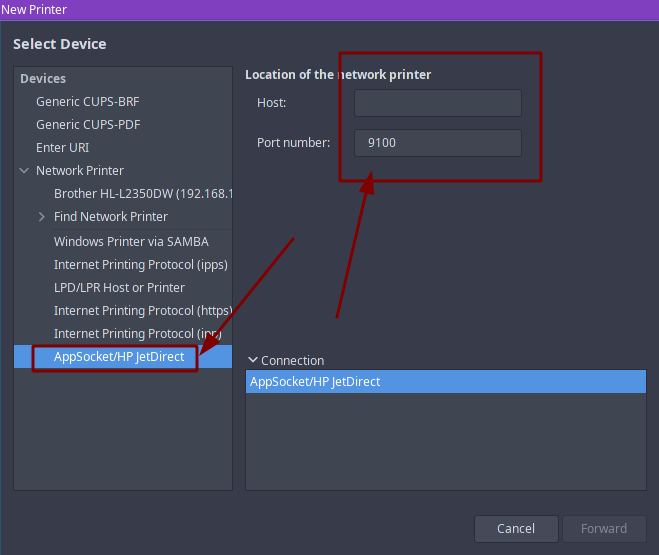
Error. client-error-not-possible.
- can you choose a driver ? or does it fail before that?
- is printer now only connected to LAN? or still on USB?
Yes, I can choose driver for MFC-L2750DW. The printer is connected to another computer (local network) by usb. There is set to share it.
But printer properties, in printer status, says that the printer could not be located.