Extreme graphical artifacts after exiting sleep with an Nvidia 3060ti

The general flavor of the artifacts is stuff like this.

They usually appear black with colored dots, though most interactions with my desktop environment (not inside a window) change them. They seem to appear over any render target that was open before sleeping, but not after. Especially my desktop backgrounds and taskbar.

The issue has changed over the past few days. Initially, it was on all three of my monitors on the login screen when first starting up, but as soon as I booted into my computer it was only on my primary monitor. The sleep after that, it was on all 3. Lately, it’s not been appearing on the login screen.

My assumption is it’s the VRAM state not being restored correctly, but following this page (https://wiki.archlinux.org/title/NVIDIA/Tips_and_tricks#Preserve_video_memory_after_suspend) I already have the setting it suggests be turned on in /proc/driver/nvidia/params
(At least i think so? The naming is slightly different)

ResmanDebugLevel: 4294967295
RmLogonRC: 1
ModifyDeviceFiles: 1
DeviceFileUID: 0
DeviceFileGID: 0
DeviceFileMode: 438
InitializeSystemMemoryAllocations: 1
UsePageAttributeTable: 4294967295
EnableMSI: 1
EnablePCIeGen3: 0
MemoryPoolSize: 0
KMallocHeapMaxSize: 0
VMallocHeapMaxSize: 0
IgnoreMMIOCheck: 0
EnableStreamMemOPs: 0
EnableUserNUMAManagement: 1
NvLinkDisable: 0
RmProfilingAdminOnly: 1
PreserveVideoMemoryAllocations: 1
EnableS0ixPowerManagement: 0
S0ixPowerManagementVideoMemoryThreshold: 256
DynamicPowerManagement: 3
DynamicPowerManagementVideoMemoryThreshold: 200
TegraGpuPgMask: 0
RegisterPCIDriver: 1
EnablePCIERelaxedOrderingMode: 0
EnableResizableBar: 0
EnableGpuFirmware: 18
EnableGpuFirmwareLogs: 2
RmNvlinkBandwidthLinkCount: 0
EnableDbgBreakpoint: 0
OpenRmEnableUnsupportedGpus: 1
DmaRemapPeerMmio: 1
ImexChannelCount: 2048
CreateImexChannel0: 0
GrdmaPciTopoCheckOverride: 0
EnableSystemMemoryPools: 529
CoherentGPUMemoryMode: “”
RegistryDwords: “”
RegistryDwordsPerDevice: “”
RmMsg: “”
GpuBlacklist: “”
TemporaryFilePath: “/var/tmp”
ExcludedGpus: “”

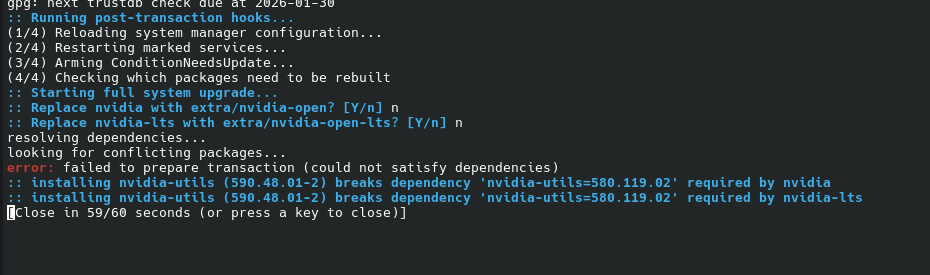
This problem showed up around a week after I updated my system and installed new drivers.
(Screenshot I have from that upgrade, I originally was worried they’d break things and didn’t download them immediately)


I updated my system to install RenderDoc, if that’s at all relevant?

I made this install in October 2025, and haven’t had any graphical issues so far. I haven’t done anything to actively install drivers for nvidia and it’s just worked until now. I don’t think I would’ve broken anything directly.

My GPU has 8 gigs of VRAM, in case that’s relevant.

Welcome to the community @EtheraelEspeon :partying_face: :enos_flag:

Could you please share the output of:

sudo inxi -SMGsmxx --za
yay -Q | grep nvidia

Have you tried booting with the LTS kernel instead, and confirmed whether it also happens there?

inxi:

System:
Kernel:6.12.70-1-ltsarch:x86_64bits:64compiler:gccv:15.2.1
Desktop:KDE Plasmav:6.5.5tk:Qtv:N/Awm:kwin_waylanddm:SDDM
Distro:EndeavourOSbase:Arch Linux
Machine:
Type:DesktopSystem:Alienwareproduct:Alienware Aurora R12v:1.1.4
serial:<filter>Chassis: type:3serial:<filter>
Mobo:Alienwaremodel:07W25Tv:A00serial:<filter>part-nu:0A63
Firmware:UEFIvendor:Alienwarev:1.1.4date:07/08/2021
Memory:
System RAM: total:64 GiBavailable:62.48 GiBused:5.82 GiB (9.3%)
Array-1: capacity:128 GiBnote:est.slots:4modules:2EC:None
max-module-size:32 GiBnote:est.
Device-1:DIMM3type:no module installed
Device-2:DIMM1type:DDR4size:32 GiBspeed:2933 MT/svolts:1.35
manufacturer:0198000080ADpart-no:KF3600C18D4/32GX
Device-3:DIMM4type:no module installed
Device-4:DIMM2type:DDR4size:32 GiBspeed:2933 MT/svolts:1.35
manufacturer:0198000080ADpart-no:KF3600C18D4/32GX
Graphics:
Device-1:NVIDIA GA104 [GeForce RTX 3060 Ti]vendor:Delldriver:nvidia
v:590.48.01arch:Amperepcie: speed:16 GT/slanes:8ports:
active:DP-1,DP-2,HDMI-A-1empty:DP-3bus-ID:02:00.0chip-ID:10de:2486
Display:unspecifiedserver:``X.Org``v:24.1.9with:Xwaylandv:24.1.9
compositor:kwin_waylanddriver: X: loaded:nvidiaunloaded:modesetting
alternate:fbdev,nouveau,nv,vesagpu:nv_platform,nvidia,nvidia-nvswitch
display-ID::1screens:1
Screen-1:0s-res:5760x1080s-dpi:96
Monitor-1:DP-1pos:centermodel:Asus VE248res:1920x1080hz:60
dpi:92diag:609mm (24")
Monitor-2:DP-2pos:leftmodel:VA24Dres:1920x1080hz:75dpi:93
diag:604mm (23.8")
Monitor-3:HDMI-A-1pos:primary,rightmodel:Samsung SyncMaster
res:1920x1080hz:60dpi:305diag:184mm (7.2")
API:EGLv:1.5platforms: device:0drv:nvidiadevice:2drv:swrast
gbm: drv:nvidiasurfaceless: drv:nvidiax11: drv:nvidia
inactive:wayland,device-1
API:OpenGLv:4.6.0compat-v:4.5vendor:nvidia mesav:25.3.5-arch1.1
glx-v:1.4direct-render:yesrenderer:NVIDIA GeForce RTX 3060 Ti/PCIe/SSE2
API:Vulkanv:1.4.341surfaces:N/Adevice:0type:discrete-gpu
driver:nvidiadevice-ID:10de:2486
Info: Tools: api:clinfo, eglinfo, glxinfo, vulkaninfo
de:kscreen-console,kscreen-doctorgpu:nvidia-smiwl:wayland-info
x11:xdpyinfo, xprop, xrandr
Sensors:
System Temperatures: cpu:64.0 Cpch:50.0 Cmobo:N/A
Fan Speeds (rpm): cpu:1143mobo: 585

yay nvidia packages:

lib32-nvidia-utils 590.48.01-1
linux-firmware-nvidia20260110-1
nvidia-hook 1.5.3-1
nvidia-inst 26.1.1-1
nvidia-open 590.48.01-12
nvidia-open-lts 1:590.48.01-12
nvidia-utils 590.48.01-4

LTS kernel isn’t reproducing the issue

After booting back into the normal kernel after the LTS one, the issue persists

That’s interesting.

I can see the non-dkms driver has been flagged out-of-date. That’s not proof of anything in itself, sometimes things are incorrectly flagged.
image

But, with that in mind, one thing you could try is switching to the -dkms driver. That’ll integrate itself into any installed kernel (provided the header files for any installed kernel are also installed), instead of being built for a specific kernel like the non-dkms driver.

So for example, if you have only the main, and LTS kernels installed, this would install the necessary headers for those kernels, and the dkms version of the Nvidia driver:

yay -Syu linux-headers linux-lts-headers nvidia-open-dkms

Simply put, the non-dkms driver is built only for a specific kernel. nvidia-open can only be used with the linux kernel, and nvidia-open-lts can only be used with the linux-lts kernel.

The nvidia-open-dkms driver on the other hand, can be used with any kernel (one driver to rule them all), provided you have the headers for those kernels also installed. The integration will automatically occur on your system, which takes a little bit of extra time during updates.

That fixed it!

I uninstalled the previous nvidia-open drivers when downloading the dkms version. I assume that’s correct(?)

Well done! :smiley:

Yes, that is correct :+1:

The issue still isn’t gone completely. I can no longer consistently replicate it, but my computer just came out of sleep with the exact same artifacts all over any previously open surfaces. I can’t get it to reappear again, so it seems at least mitigated by the dkms drivers.

It seems to only show up after long sleeps now.

If it’s not something that’s happening (reliably) in the LTS kernel, perhaps it’s something that’ll hopefully be identified and addressed in the main kernel.

Something to check though, is that video memory is preserved after suspend.

Run:

sort /proc/driver/nvidia/params | grep -E 'PreserveVideoMemoryAllocations|TemporaryFilePath'

That should output something like:

$ cat /proc/driver/nvidia/params | grep -E 'PreserveVideoMemoryAllocations|TemporaryFilePath'
PreserveVideoMemoryAllocations: 1
TemporaryFilePath: "/var/tmp"

That command outputs this:

PreserveVideoMemoryAllocations: 1
TemporaryFilePath: "/var/tmp"

which makes sense, those were set in that file when I made the post originally

Also, I should be clear, I’m using the normal kernel, not the LTS one. I havent managed to reproduce the bug on either kernel in the past few days.

:downcast_face_with_sweat:

My apologies, I should have spotted that. When I posted this the other day, I was a bit rushed.

For now, perhaps lets hope it was an issue addressed in an update. Continue to keep things up to date, and hopefully you won’t see it again?

I’m using the ZEN kernel, I get exactly the same thing coming out of sleep from time to time. After logging in, screen is normal.

╰─❯ sudo inxi -SMGsmxx --za                                                                                      ─╯
[sudo] password for wombat: 
System:
  Kernel: 6.18.9-zen1-2-zen arch: x86_64 bits: 64 compiler: gcc v: 15.2.1
  Desktop: KDE Plasma v: 6.5.5 tk: Qt v: N/A wm: kwin_wayland dm: SDDM
    Distro: EndeavourOS base: Arch Linux
Machine:
  Type: Desktop System: Micro-Star product: MS-7B58 v: 1.0 serial: N/A
  Mobo: Micro-Star model: Z370 GAMING M5 (MS-7B58) v: 1.0 serial: <filter>
    Firmware: UEFI vendor: American Megatrends v: 1.B0 date: 07/10/2024
Memory:
  System RAM: total: 32 GiB available: 31.28 GiB used: 4.19 GiB (13.4%)
  Array-1: capacity: 64 GiB slots: 4 modules: 2 EC: None
    max-module-size: 16 GiB note: est.
  Device-1: ChannelA-DIMM0 type: no module installed
  Device-2: ChannelA-DIMM1 type: DDR4 size: 16 GiB speed: 3000 MT/s
    volts: 1.35 manufacturer: Corsair part-no: CMK32GX4M2B3000C15
  Device-3: ChannelB-DIMM0 type: no module installed
  Device-4: ChannelB-DIMM1 type: DDR4 size: 16 GiB speed: 3000 MT/s
    volts: 1.35 manufacturer: Corsair part-no: CMK32GX4M2B3000C15
Graphics:
  Device-1: NVIDIA GA104 [GeForce RTX 3060 Ti Lite Hash Rate] vendor: ZOTAC
    driver: nvidia v: 590.48.01 arch: Ampere pcie: speed: 8 GT/s lanes: 16
    ports: active: DP-1 empty: DP-2,DP-3,HDMI-A-1 bus-ID: 01:00.0
    chip-ID: 10de:2489
  Display: unspecified server: X.Org v: 24.1.9 with: Xwayland v: 24.1.9
    compositor: kwin_wayland driver: X: loaded: nvidia unloaded: modesetting
    alternate: fbdev,nouveau,nv,vesa gpu: nv_platform,nvidia,nvidia-nvswitch
    display-ID: :1 screens: 1
  Screen-1: 0 s-res: 2560x1440 s-dpi: 96
  Monitor-1: DP-1 model: Lenovo R27q-30 res: 2560x1440 hz: 165 dpi: 109
    diag: 685mm (27")
  API: EGL v: 1.5 platforms: device: 0 drv: nvidia device: 2 drv: swrast
    gbm: drv: nvidia surfaceless: drv: nvidia x11: drv: nvidia
    inactive: wayland,device-1
  API: OpenGL v: 4.6.0 compat-v: 4.5 vendor: nvidia mesa v: 25.3.5-arch1.1
    glx-v: 1.4 direct-render: yes renderer: NVIDIA GeForce RTX 3060 Ti/PCIe/SSE2
  API: Vulkan v: 1.4.341 surfaces: N/A device: 0 type: discrete-gpu
    driver: nvidia device-ID: 10de:2489
  Info: Tools: api: clinfo, eglinfo, glxinfo, vulkaninfo
    de: kscreen-console,kscreen-doctor gpu: lact, nvidia-settings, nvidia-smi
    wl: wayland-info x11: xdpyinfo, xprop, xrandr
Sensors:
  System Temperatures: cpu: 34.0 C mobo: N/A
  Fan Speeds (rpm): N/A
╰─❯
╰─❯ yay -Q | grep nvidia                                                                                         ─╯
lib32-nvidia-utils 590.48.01-1
linux-firmware-nvidia 20260110-1
nvidia-hook 1.5.3-1
nvidia-inst 26.1.1-1
nvidia-open-dkms 590.48.01-4
nvidia-settings 590.48.01-1
nvidia-utils 590.48.01-4
╰─❯    

I’ve tested the past week or so, and all three kernels I have installed are affected by this artifact issue upon waking from sleep…

╰─❯ pacman -Q $(pacman -Qsq linux kernel | grep ^linux | grep -v headers)                                        ─╯
linux 6.18.9.arch1-2
linux-lts 6.12.71-1
linux-zen 6.18.9.zen1-2
╰─❯  

Reliably affected @UncleSpellbinder ? Just gauging the reproducability.

I’m not sure I understand your question, reliably affected?

All I can say is that all three installed kernels have the same issue as the OP when waking from sleep. The login screen is full of the exact same artifacts as the image the OP posted. It does not happen every time the PC wakes from sleep, just periodically.

Sorry @UncleSpellbinder, I was rather unclear there.

You had said “all three kernels I have installed are affected by this artifact issue”, so I was asking if all three were reliably affected by this issue.

Essentially, does it happen every time, or only sometimes, which you answered anyway :wink:

The only common denominator I’m seeing here is KDE Plasma. I’ve been running artifact-free since first switching to Sway (from Xfce), then now on Hyprland w/DMS. I actually just switched to the Zen kernel after having issues building Nvidia modules with the v6.19 Cachy kernels.

$ inxi -Gaz
Graphics:
  Device-1: NVIDIA AD107 [GeForce RTX 4060] vendor: ZOTAC driver: nvidia
    v: 590.48.01 alternate: nouveau,nvidia_drm non-free: 550-580.xx+
    status: current (as of 2025-11) arch: Lovelace code: AD1xx
    process: TSMC n4 (5nm) built: 2022+ pcie: gen: 2 speed: 5 GT/s lanes: 8
    link-max: gen: 4 speed: 16 GT/s ports: active: DP-1,DP-3
    empty: DP-2,HDMI-A-1 bus-ID: 01:00.0 chip-ID: 10de:2882 class-ID: 0300
  Device-2: NVIDIA TU116 [GeForce GTX 1660 SUPER] vendor: Dell
    driver: vfio-pci v: N/A alternate: nouveau,nvidia_drm,nvidia
    non-free: 550-580.xx+ status: current (as of 2025-11; EOL~2026-12-xx)
    arch: Turing code: TUxxx process: TSMC 12nm FF built: 2018-2022 pcie:
    gen: 1 speed: 2.5 GT/s lanes: 4 link-max: gen: 3 speed: 8 GT/s lanes: 16
    bus-ID: 07:00.0 chip-ID: 10de:21c4 class-ID: 0300
  Display: wayland server: X.org v: 1.21.1.21 with: Xwayland v: 24.1.9
    compositor: Hyprland v: 0.53.3 driver:
    gpu: nv_platform,nvidia,nvidia-nvswitch display-ID: 1
  Monitor-1: DP-1 model: Acer XF270H B serial: <filter> built: 2019
    res: 1920x1080 dpi: 82 gamma: 1.2 size: 598x336mm (23.54x13.23")
    diag: 686mm (27") ratio: 16:9 modes: max: 1920x1080 min: 640x480
  Monitor-2: DP-3 model: Acer XF270H B serial: <filter> built: 2019
    res: 1920x1080 dpi: 82 gamma: 1.2 size: 598x336mm (23.54x13.23")
    diag: 686mm (27") ratio: 16:9 modes: max: 1920x1080 min: 640x480
  API: EGL v: 1.5 hw: drv: nvidia platforms: device: 0 drv: nvidia device: 2
    drv: swrast gbm: drv: nvidia surfaceless: drv: nvidia wayland: drv: nvidia
    x11: drv: nvidia inactive: device-1
  API: OpenGL v: 4.6.0 compat-v: 4.5 vendor: nvidia mesa v: 25.3.5-arch1.1
    glx-v: 1.4 direct-render: yes renderer: NVIDIA GeForce RTX 4060/PCIe/SSE2
    memory: 7.81 GiB
  Info: Tools: api: eglinfo,glxinfo gpu: nvidia-smi wl: nwg-displays
    x11: xdpyinfo, xprop, xrandr

@UncleSpellbinder and @EtheraelEspeon, I wonder if you try following the system log out of suspend, you might catch a useful error?

You could have this running, then let it go into suspend and if the display glitches, see what it outputs when you come out:

journalctl -f

I’m not sure if suspend would interrupt that. If it does, you could instead just output the last 50 lines or so of the current session log:

journalctl -b -0 | tail -n 50
╰─❯ journalctl -b -0 | tail -n 50                                                                                ─╯
Feb 15 21:41:07 endeavourmsi dolphin[208829]: Could not load default global viewproperties
Feb 15 21:41:10 endeavourmsi dolphin[208829]: Could not load default global viewproperties
Feb 15 21:41:12 endeavourmsi dolphin[208829]: Could not load default global viewproperties
Feb 15 21:41:13 endeavourmsi systemd[185331]: Started Mousepad - Text Editor.
Feb 15 21:41:13 endeavourmsi mousepad[225356]: broker.vala:156: Error loading plugin: libhspell.so.0: cannot open shared object file: No such file or directory
Feb 15 21:41:13 endeavourmsi mousepad[225356]: broker.vala:156: Error loading plugin: libnuspell.so.5: cannot open shared object file: No such file or directory
Feb 15 21:41:13 endeavourmsi mousepad[225356]: broker.vala:156: Error loading plugin: libvoikko.so.1: cannot open shared object file: No such file or directory
Feb 15 21:41:13 endeavourmsi mousepad[225356]: gspell_language_get_code: assertion 'language != NULL' failed
Feb 15 21:41:13 endeavourmsi mousepad[225356]: Failed to load plugin "mousepad-plugin-shortcuts": libxfce4kbd-private-3.so.0: cannot open shared object file: No such file or directory
Feb 15 21:41:13 endeavourmsi mousepad[225356]: broker.vala:156: Error loading plugin: libhspell.so.0: cannot open shared object file: No such file or directory
Feb 15 21:41:13 endeavourmsi mousepad[225356]: broker.vala:156: Error loading plugin: libnuspell.so.5: cannot open shared object file: No such file or directory
Feb 15 21:41:13 endeavourmsi mousepad[225356]: broker.vala:156: Error loading plugin: libvoikko.so.1: cannot open shared object file: No such file or directory
Feb 15 21:41:33 endeavourmsi kdeconnectd[185725]: Cannot find Bluez 5 adapter for device search false
Feb 15 21:41:40 endeavourmsi systemd[185331]: kitty-224882-0.scope: Consumed 1.675s CPU time over 2min 47.987s wall clock time, 74.8M memory peak.
Feb 15 21:41:41 endeavourmsi systemd[185331]: Started kitty - Terminal emulator.
Feb 15 21:41:41 endeavourmsi kitty[225874]: [0.047] Could not find included config file: /home/wombat/.config/kitty/current-theme.conf, ignoring
Feb 15 21:41:41 endeavourmsi systemd[185331]: Started kitty child process: 225880 launched by: 225874.
Feb 15 21:41:41 endeavourmsi fastfetch[225892]: Starting libddcutil. library built Not set at Not set. stdout_stderr_redirected=false
Feb 15 21:41:41 endeavourmsi libddcutil[225892]: Initializing libddcutil.  ddcutil version: 2.2.5, shared library: /usr/lib/libddcutil.so.5.4.1
Feb 15 21:41:41 endeavourmsi libddcutil[225892]:                           library built Not set at Not set. stdout_stderr_redirected=false
Feb 15 21:41:42 endeavourmsi libddcutil[225892]: Library initialization complete.
Feb 15 21:41:42 endeavourmsi libddcutil[225892]: libddcutil terminating.
Feb 15 21:41:42 endeavourmsi kitty[225874]: [1.337] [PARSE ERROR] Unknown terminfo property: query-os-name
Feb 15 21:42:00 endeavourmsi systemd[185331]: Started kitty - Terminal emulator.
Feb 15 21:42:00 endeavourmsi kitty[225933]: [0.046] Could not find included config file: /home/wombat/.config/kitty/current-theme.conf, ignoring
Feb 15 21:42:00 endeavourmsi plasmashell[185540]: error creating screencast "Could not find window id {a2df5a87-68af-40e7-862f-ad72301d6b7c}"
Feb 15 21:42:01 endeavourmsi systemd[185331]: Started kitty child process: 225940 launched by: 225933.
Feb 15 21:42:01 endeavourmsi fastfetch[225952]: Starting libddcutil. library built Not set at Not set. stdout_stderr_redirected=false
Feb 15 21:42:01 endeavourmsi libddcutil[225952]: Initializing libddcutil.  ddcutil version: 2.2.5, shared library: /usr/lib/libddcutil.so.5.4.1
Feb 15 21:42:01 endeavourmsi libddcutil[225952]:                           library built Not set at Not set. stdout_stderr_redirected=false
Feb 15 21:42:01 endeavourmsi libddcutil[225952]: Library initialization complete.
Feb 15 21:42:02 endeavourmsi libddcutil[225952]: libddcutil terminating.
Feb 15 21:42:02 endeavourmsi kitty[225933]: [1.341] [PARSE ERROR] Unknown terminfo property: query-os-name
Feb 15 21:42:03 endeavourmsi kdeconnectd[185725]: Cannot find Bluez 5 adapter for device search false
Feb 15 21:42:20 endeavourmsi systemd[185331]: app-org.xfce.mousepad@033c4d02e1e749638013fc9cfa37c2ca.service: Consumed 11.564s CPU time over 1min 6.509s wall clock time, 79.4M memory peak.
Feb 15 21:42:23 endeavourmsi systemd[185331]: Started kitty - Terminal emulator.
Feb 15 21:42:23 endeavourmsi kitty[226023]: [0.045] Could not find included config file: /home/wombat/.config/kitty/current-theme.conf, ignoring
Feb 15 21:42:23 endeavourmsi systemd[185331]: Started kitty child process: 226032 launched by: 226023.
Feb 15 21:42:23 endeavourmsi fastfetch[226041]: Starting libddcutil. library built Not set at Not set. stdout_stderr_redirected=false
Feb 15 21:42:23 endeavourmsi libddcutil[226041]: Initializing libddcutil.  ddcutil version: 2.2.5, shared library: /usr/lib/libddcutil.so.5.4.1
Feb 15 21:42:23 endeavourmsi libddcutil[226041]:                           library built Not set at Not set. stdout_stderr_redirected=false
Feb 15 21:42:24 endeavourmsi libddcutil[226041]: Library initialization complete.
Feb 15 21:42:24 endeavourmsi libddcutil[226041]: libddcutil terminating.
Feb 15 21:42:24 endeavourmsi kitty[226023]: [1.426] [PARSE ERROR] Unknown terminfo property: query-os-name
Feb 15 21:42:32 endeavourmsi systemd[185331]: app-dolphin@1fb6bbbf121e426a91ae8605d4b31aea.service: Consumed 7.881s CPU time over 15min 7.123s wall clock time, 218M memory peak.
Feb 15 21:42:33 endeavourmsi kdeconnectd[185725]: Cannot find Bluez 5 adapter for device search false
Feb 15 21:43:03 endeavourmsi kdeconnectd[185725]: Cannot find Bluez 5 adapter for device search false
╰─❯

Just checking @UncleSpellbinder, this log was taken immediately after coming out of suspend and the issue was present?
